New Sessions At Social Connections

Here I am at Heathrow heading out to Boston for Social Connections this week.  Held at IBMs Research Centre in Boston Social Connections is focussed around IBM Connections (what else!) software with most sessions lasting only 30 minutes.  That’s a tough trick to pull off in a technical session but I’m taking it as a challenge to get my information across in so short a time.  I’ll be there on Thursday all day and presenting with Terri Warren from IBM on “Who Does Connections Think I Am?” At 4.55pm where we’ll dig into how your identity and directories work.  On Friday I have two sessions – one of 30 minutes on being a Connections Administrator at 12pm and a high speed 15 minute session at 1.30 on Design and how to choose what servers, features and add-ons you’ll need. 

So three entirely new sessions I hope you’ll enjoy – see you there!

Upgrading Filenet – Something To Watch Out For

Last night I was working on a Connections CR2 upgrade that included upgrading Filenet.    I was using this very nice piece of documentation from IBM on a lab walkthrough of upgrading to CR2 here .  To date my biggest problem with FileNet has been finding all the files needed and that’s especially true of the CR2 update files but I got there.  What tripped me up was upgrading the CE Client and FNCS (section 3.4.5 on the document).  The sample command is

update-fncs-ceclient.bat -was.dm.path “C:\IBM\WebSphere\AppServer\profiles\Dmgr01” – was.admin.user wasadmin -was.admin.password Passw0rd -fncs.fp.installer.location “c:\Downloads\FNCR2\IBM_CONTENT_NAVIGATOR-2.0.3.2-FP002- WIN.exe” -doInstallFNCS y -ceclient.fp.installer.location “C:Downloads\FNCR2\Filenet cr2\5.2.1-P8CPE-CLIENT-WIN.EXE” – doInstallCEClient y

The problem is that this script ran for about 6 minutes then bombed out.  I checked the fn-fncs-ceclient-update.log file in c:\ibm\connections\ccm\ccm\ccm\scripts (where the script is run from) and it showed a failure to make a SOAP connection (after it had already successfully made one earlier in the script).  I then checked wsadmin.traceout in the Dmgr profile under logs and saw references to “WASX7198W websphere The configuration service is not running” and other failures logging in like “empty credentials”.

OK so the problem was my login credentials used in the script for admin account and password right? Wrong.  Because that works fine earlier in the script. In fact the first thing it does is make a SOAP connection to the Dmgr server.  OK.  So the problem is that my password for the admin account contained a ! – we all know that WAS doesn’t like encoding and decoding special characters right?  Wrong. I tried another account, and another,  I tried wasadmin but that failed (and I wondered if that was because it was a FileNet update and FileNet wants an LDAP account).  At this point i’m bouncing between accounts trying to get this working.  I get the customer to remove the ! and give me a password with no special characters.  Still no luck.

Then I think a bit more.  What if the script isn’t using the values I gave it to run but instead is assuming they are already there in soap.client.props and is attempting to read them from that file. I go to check soap.client.props under Dmgr\properties and there is no value stored there at all.  I add my admin credentials in there and the script runs perfectly.

Today’s lesson is don’t assume a script you are running is using the credentials you give it!


Searching For The Elusive 5.2.0-P8CE-WIN.EXE

In this month’s adventures of Connections installs I offer you my search for a required Filenet installer.  If you’re installing CCM there are 4 files you need to have in a directory for the Connections install to complete – from the install instructions here and shown below .  I’ve done this lots of times and you basically put the executables together in one directory you can point to during the Connections install.

Filenet Install Files

However with CR2 came a requirement to update the installers see here and below

CR2 Requirements

Notice the difference?  CR2 doesn’t list the 5.2.0-P8CE-WIN (LINUX, AIX , ZLINUX) file at all as a required update.  That means that all the other files are in Fixcentral but not that one.  So I want the latest file and I don’t know if there’s a newer one.  I go to Fix Central and search for 5.2.0-P8CE and get offered the 5.2.0.3-P8CP8 files.  I try to search for a download list for IBM Connections Content Manager but it doesn’t exist (I like the download lists because they often have the latest part numbers).  There is one for IBM Connections but that doesn’t include any of the FileNet components.

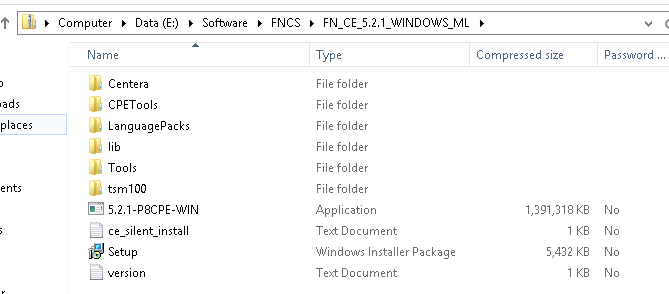
Off I go to Partnerworld where I type in IBM Connections Content Manager and I get an eAssembly to go through including the file FN_CE_5.2.1_WINDOWS_ML which sounded hopeful but I already had that and it contains the following. Note 5.2.1-P8CPE-WIN not P8CE.  The 5.2.0 files were no longer showing on Partnerworld under Connections Content Manager

FN_CE_5.2.1_WINDOWS_ML


Luckily I’m a paranoid control freak and have backups of all the installers myself and there I found the original FN_CE_5.2_WINDOWS_ML file which, when download and extracted had the correct 5.2.0-P8CE-WIN file in it.  The one the Connections installer wanted and refused to progress without.

FN_CE_5.2.1_WINDOWS_ML


The sizes of the zip files should have made me suspicious.  It does look like the 5.2.1 zip file in partnerworld has the wrong content (possibly because there isn’t a 5.2.1 for P8CE only for P8CPE) and i’m not the only one who goes cross eyed staring at P8CE vs P8CPE.   Or maybe I’ve been staring at this too long. Either way thanks to my backup I’m sorted now.

Zip File Sizes

Adding DB2 Datasources Using db2cli

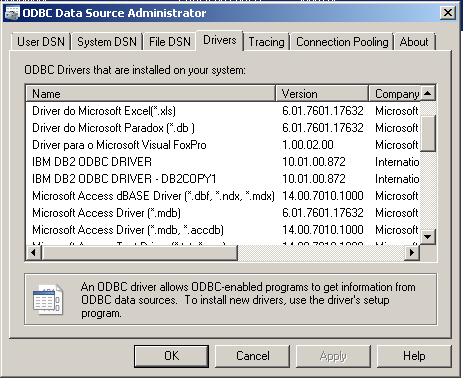
I recently blogged about Advanced Query Tool which I have started using on my VMs instead of one of the heavyweight IBM DB2 client tools.  AQT is a lightweight client that allows me to examine the databases easily but it works by reading in the datasources defined in Windows in the ODBC Manager.  To create datasources you must have some kind of DB2 client or driver installed.  I installed the minimal drivers which gives me this

Screen Shot 2015-03-23 at 11.18.05

Selecting ‘Configure DB2 .Net Data Provider” calls up a GUI interface that walks you through setting up a datasource.  To find the ODBC Manager under Windows 7 or 8 go to Control Panel and click on System and Security then click on Administrative Tools.

Screen Shot 2015-03-23 at 11.20.14

Each driver is configured to connect to a specific server and port.  The configuration is stored in db2cli.ini and db2dsdriver.cfg.  But what if you want to change the server or port address for a datasource.  Or in my case, add multiple datasources pointing to different servers?  Well you could try running the GUI tool again but that decision was made for me when Windows 7 decided to stop running the file and I decided I preferred to have more visibility / control of the configuration.  So instead I chose to use the command line to change and create new datasources.

Open an administrative command prompt and go to the DB2 client install directory (in my case c:\IBM\SQLLIB) and run

db2cli writecfg add -dsn PEOPLEDB_SA -database PEOPLEDB -host db2.turtlehost.net -port 50000

That writes a new datasource called PEOPLEDB_SA (you can call it what you want so long as it’s unique) that is connecting to a database called PEOPLEDB on server db2.turtlehost.net port 50000.  You don’t need to be able to connect to the database when you run the db2cli – it doesn’t validate or test at this point.

Now we need to add this newly created DSN to the Windows registry by running

db2cli registerdsn -add -alldsn

When you’re all done you need to restart Windows for the new registry to be read by AQT and you can go ahead and test the connection and use AQT to connect to the database by choosing the PEOPLE_SA datasource.

AQT Menu


Installation Manager Install Fails on Redhat 6.6

Starting a new Connections customer build this weekend I ran into a problem at step 1 – installing Installation Manager. I could install the console version using ./installc but the graphical version would bring up the product selection screen then crash before the license screen with a “JVM Terminated =1”.

After trying various things, new versions of java, using root instead of sudo (a known problem with earlier versions of IIM) I found the technote I needed.  This is a problem caused by a very specific combination of packages

RH6.5 or 6.6

GTK > 2.24

Cairo <1.9.4

Amazing I didn’t catch that right?  To tell what versions you have installed run

rpm -q gtk

rpm -q cairo

If your cairo version is out of date (which mine was) go to ftp://fr2.rpmfind.net/linux/sourceforge/f/fu/fuduntu-el/el6/current/TESTING/RPMS and download the latest version of cairo (in my case cairo-1.10.2-3.el6.x86_64.rpm)

then run rpm -U cairo-1.10.2.-3.el6.x86_64 .  Now IIM will run and install fine using ./install

Full details of the technote are here

My Caffeinated Sessions At Social Connections

I’m delighted to say that I will be speaking at Social Connections in Boston this April.  It’s a great conference entirely about all aspects of Social Software and IBM Connections.  I like to try something different so I asked for 30 minute slots for my technical sessions this year

Staying On Top Of Connections Administration

From SSL certificates to setting up application security and rebuilding searches, we’ll cover how to identify the most common problems and resolve them quickly.

To do this we’ll also discuss how to set up logging and review both IHS and WAS logs and the key information you’ll need to supply IBM when opening any PMR (and where to find it).

I then have a session on Connections identities and LDAP with Terri Warren called

Who Does Connections Think I Am?

and one on designing a Connections environment – this one is only 15 minutes long.  You can give up 15 minutes to hear how to plan your Connections environment can’t you?

Connections Design From The Bottom Up

To see the full agenda for Social Connections or better yet, to register, click here

See you there!

Installing CR2 for IBM Connections 5

IBM have just released IBM Connections 5 CR2.  And by “just” I of course mean I haven’t had time to install it myself yet but let’s look at what’s going to be needed. Amongst the fixes there are a few new features that improve the use of CCM Libraries with Connections 5 utilising IBM Docs 1.0.7 (also released today).  For example you will now be able to edit Library files in IBM Docs without leaving Connections.  More details of those features here

The landing page for installing CR2 is here and includes a link to the update strategy document and a PDF with example instructions for updating a single server Windows environment.

You don’t have to upgrade to CR1 before going to CR2 but there are required database updates in CR1 you will still need to deploy on your way to CR2.  I’ve linked to them here so you don’t forget them.

I’ll be installing this week in my test environment but I won’t be looking to install for any customer in production for a few weeks.

CR1 Database Updates

CR2 Database Updates

CR2 Cognos Wizard

Filenet Updates (CR2 uses different Filenet versions from CR1 so don’t deploy the CR1 versions if you are moving directly from 5.0 to CR2)


IBM Docs 1.0.7 For Connections – Linux Not Required

The good news for many of my customers wanting to deploy IBM Docs is that version 1.0.7 has just been released and not only does it now support Windows 2012  (no Windows 2012 R2 but v1.0.6 only supported Windows 2008 R2) but previously the key IBM Docs Application and  IBM Docs Proxy required Linux as an operating system meaning we had to not only add at least one additional server but that server had to be Linux.  This was especially frustrating since the Conversion Server required Windows and wasn’t itself supported on Linux so to fully deploy IBM Docs 1.0.6 you needed at least one Linux AND one Windows server

As of 1.0.7 Windows 2008 R2 and Windows 2012 support all IBM Docs components.  Unfortunately the Linux operating system does still not support the Conversion Server but at least we have one OS to use if we want.  Full specifications here

Well done IBM.

IBM Docs on Windows


IBM Connected Pt 2 of 3 – The Message

WARNING: This blog post uses the terms “Connect” “ConnectED” and “Lotusphere” interchangeably.  I suggest you do your own internal translation as you read.

So Connected is over and the sessions are done.  I would say I found it one of the best in years.  Certainly the content of the OGS and many of the other IBM sessions started to form a sensible strategy that I think customers can benefit from and for the first time in many many years I came away genuinely excited about the potential for the technology and the degree of innovation taking place.  Vague enough for you?  I’m sorry, I’ll get into detail in a little bit.

There was a lot of negative emotion understandably about this being the last Orlando conference (not officially but c’mon) but that aside it’s nice to hear IBM dial back on the CLOUD CLOUD and instead talk more about hybrid and mixed on-premises designs because I honestly believe that is the direction the majority of companies are heading.

So leaving aside the incremental improvements (TLS 1.2, critical view indexing, whiteboarding in mobile, video on smartphone, file transfer via mobile) and trying to put my thoughts into some kind of order let’s start with…

Verse

IBM’s new mail client seeks to innovate and re-imagine how we work with mail. I’m an engineer so when I use those words I don’t use them as marketing speak but in their real sense. The good news is that IBM are really on the right track here, focusing on design and using working “type” personas such as “the searcher”, “the on the go worker”, and “the assistant” to create ways to customise and interact.

The even better news is that there will continue to be a NSF database and therefore a Domino server underneath the hood.  Right now Verse is going to be cloud-only but we are promised an on-premises solution in the 2nd half of 2015.  Obviously one of the most powerful aspects of Verse utilises analytics and links to Watson allowing the client to make decisions for you and present the best and most important information to you all the time based on your previous behaviour and content.  I’m fairly sure we aren’t getting Watson on premises so it will be interesting how the integration will work but I can wait to see that.

In the meantime that NSF architecture extends your client choices from Notes, iNotes and Traveler to Verse, Notes, iNotes and Traveler and reassures existing customers they are on the right path.

There is a great website on Verse with demos of how it works and an explanation of the personas I highly recommend you read and sign up for the beta.

From my perspective this is by some way the most exciting direction in enterprise mail from any provider in as long as I can remember.  IBM are talking heavily about a freemium license and driving everyone to the cloud but I file that under ‘marketing wishful thinking’ and wait and see.  Right now my concern is the technology and that looks right.

Connections Next

Connections continues to be central to IBM’s social strategy, with v5 CR2  due out any day now and Connections Next due this year.  IBM continues to add new features and invest in the desktop and mobile clients.  It’s important to remember that things branded as “Connections” are often an interface to another product via Connections. For example Connections Content Manager adds Filenet integration, Connections Mail adds Domino or Exchange integration, Connections Chat adds Sametime integration, etc.  In 2015 we are told to expect more user customisation of Connections, such as the ability to create and synchronise folders and create, name and secure chat threads.

It’s interesting to see the investment in design carrying through to the new Connections next interface which has removed the emphasis on moving between applications like “Wikis” , “Blogs” and “Activities” and replaced this with a more cohesive experience around a single homepage showing what is most important to you (what you are working on, and what those you follow / network with are doing).  I wish I had photos of this and apologies that I don’t, I took some but was too far away from the stage for them to be any good.  We have said for some time that the “apps” menus make Connections seem too fragmented and it appears IBM are listening.

Once more, on-premises will be at least 6 months behind cloud as new features arrive but I’ve decided they can work out the bugs in the cloud before we install on premises 🙂

Mobile

I always enjoy hearing from the IBM Mobile team who in the past few years have been very open to feedback and suggestions from customers and business partners. One of the things that has come up time and again is the need for a single mobile client to handle mail, connections, chat, etc, instead of the individual clients we currently have and it looks like they have listened and produced that in the upcoming Verse client (initially iOS but then Android).  I’m sure it’s going to be cloud only initially but hope to see it support on premises when that becomes available towards the end of 2015.

So where does that leave customers?  If you are running Domino, Notes, Connections, Sametime (renamed as Connections Chat — euch) and are on-premises then you’re in a good place.  I think the path for most companies will end up being entirely on-premises or a cloud / on-premise hybrid with some commodity services in the cloud and business applications on premises.  At least as far as I can see.

What do I do next ? Well that’s for the next blog…

IBM Connected Pt 1 of 3 – My Presentation Content

As I head home from Orlando I have a lot of things I want to share so it seemed best to split these into different blogs about different things.  This one is just the content from my three presentations.  I hope you found them useful if you came along and I hope you find these useful if you couldn’t make it but just download them.

Thanks to Terri Warren from IBM for working with me on the Connections and Directory Integeration presentation. It was our first time presenting together (and first time meeting!) and I think it went well – we had a lot of very technical content as you’ll see but the room stayed with us right to the end.

I was asked a lot about Connections101 and when it will be updated.  I am working on the Linux v5 version now including IBM Docs and that hopefully will start appearing online in the next few weeks.  Then I’m considering an iSeries install version if the hardware works out…

BTE201 – Working with External Users in Connections

BP201 – Creating your own Connections Design

BP206 – Connections Directory Integration (with Terri Warren)