Sametime Pt 3: Installing Communicate

As I said when Sametime 9 shipped, I wanted to spend a few weeks working with it and trying to install it and migrate my existing sites before I blogged.  I’m coming near the end of that now and so wanted to share a few things.  This first blog is about Sametime Communicate which includes Domino , Sametime Community Server, DB2, LDAP, Sametime System Console and Sametime Proxy.  It also includes installing the Sametime Advanced server for Persistent Chat and Broadcast Tools but I want to talk about that separately.

Whether you have installed Sametime 8.5x with WebSphere components or not, Sametime 9 and its install is a very different proposition.  I’m going to start by saying that I would never attempt to upgrade an existing install of WebSphere elements.  IBM in fact say that you should do a side by side upgrade and then move the existing databases for the System Console, Meetings, Advanced and ST Proxy (possibly) over.  That basically involves building an entirely new environment and then switching DNS when you’re ready so your users point there.

It’s my nature to be risk averse and in my testing migrating the existing System Console database is a nightmare. The version of DB2 you should use for Sametime 9 is 10.1, so that means that you’d have to upgrade the database as you migrate. In addition, the schema for the Sametime 9 system console database is not the same as for Sametime 8.5x and, though you can theoretically fix that using the scripts IBM supply, I would rather start completely clean.  The only databases I would make an effort to migrate over are the Meetings and Sametime Advanced because they contain data you can’t lose.  Even so there are no good instructions in the documentation for migrating a Sametime 8.5x Meetings database on DB2 9.7  to a Sametime 9 Meetings database on DB2 10.1 – I would contact IBM support in advance and ask for a tech note with instructions because the documentation has some large gaps there.

Of course, if you don’t have Meetings or ST Advanced right now then you can go ahead and create shiny new databases for your new install.

Download: The first step is to download all the software and get it in place.  Sametime 9 uses WebSphere 8.5 which installs differently than with previous versions of Sametime.  It’s actually a much nicer and easier to manage install, but you will need to install WebSphere by itself before you can install any of the Sametime components.  Make sure you download the version of WebSphere and Installation Manager that is part of the Sametime eAssembly or verify very carefully with the system requirements that you are installing the right version.  Sametime 9 uses WebSphere 8.5 (no fix packs) with additional Sametime specific iFixes, all of which can be downloaded together.

DB2: The version of DB2 supported for Sametime 9 is now 10.1 which is very different in UI from DB2 9.7. For starters, there is no longer a Command Center with a graphical interface allowing you to see and manage databases.  You have to install a separate DB2 client if you want to access the DB2 server and look at the databases. You can install that client on any machine that can access the DB2 server.

WebSphere:  One of the main reasons an in-place upgrade can’t be done is that the underlying version of WebSphere has changed and can’t be upgraded for Sametime.   We have to install WebSphere cleanly.  When installing WebSphere 8.5 you’ll notice the download comes in three parts.  You’ll need to extract all three parts to the same directory which will then contain folders disk 1, disk2 and disk 3 and a file called repository.config in the root folder.  When you install Installation Manager you can then use it to install WebSphere and every other product (other than Domino and the Community Server). You launch Installation Manager and point to the folder where you put your extracted files, it will do the rest.  It sounds complicated but it’s actually very simple and has a huge advantage in that it’s able to search the IBM site for fixes and updates rather than download them each time.

Launch Installation Manager – Choose File – Preferences from the menu and set up your repositories as I have done below (these point to the fixes which were zip files, these didn’t need to be extracted but I wanted them listed separately so I could check them)
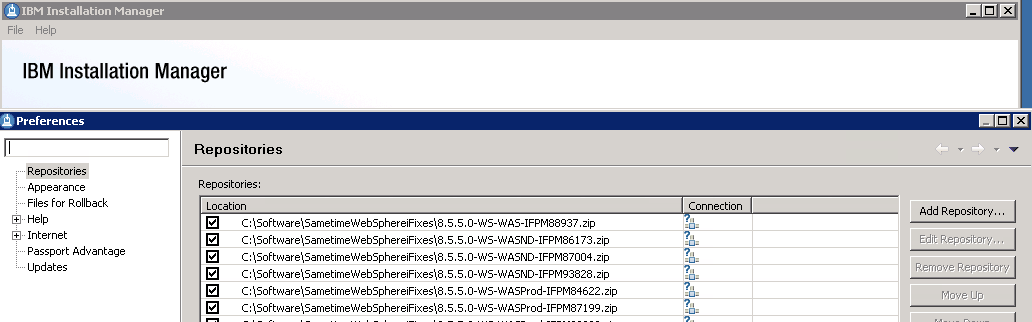
Installation Manager - Adding Repositories

Community Server: When installing the Community Server, IBM have added some much needed additional steps to the documentation providing details on performance tuning Windows 2008 and 2012 networking and securing the server to protect against vulnerabilities discovered in the past few years.  None of this is new, it was all public information in technotes but it’s good to see it brought together in the documentation as part of the deployment instructions.  Don’t be tempted to skip over these steps and come back later, they will double the amount of time it takes to install a Community server (from about a day to about a day and a half) but they are important.

If you are moving from an earlier version of Sametime you will need to be using LDAP if you aren’t already and you can’t use your Sametime Community Server as its own LDAP server, that’s not supported and will  present problems.  In fact you should disable LDAP on the Domino server running Sametime completely.

Sametime Proxy Server: The Sametime Proxy server is used for mobile clients, for awareness in web based meetings, for a browser based IM client and more.  You need to install this as a WebSphere component.  It is IBM’s recommendation that each component have its own VM but I have had success in the past co-locating multiple server elements depending on number of users.  There are a few more  settings some of which were available in Sametime 8.5x but again in technotes, etc and so weren’t well known.  Once a Sametime Proxy Server is installed there are several steps to finish the install, as with the Community server, that will improve performance and security. One interesting item that everyone now will probably come across is that the Sametime Advanced server must use the same SSL certificate as the Sametime Proxy server for awareness to work, making wildcard certificates more suitable to our installs.  Previously I had avoided wildcard certs since WebSphere had issues with them in earlier releases but that appears to be resolved now.

Additional steps on completing the install of Sametime Proxy include making sure you connect to the notification servers for both Apple and Google to ensure mobile devices running iOS and Android can receive updates.  There are also settings to tell the Sametime Proxy server to not connect to the user’s home Community server allowing you to explicitly direct traffic to a dedicated Community member instead.  Instructions for that here.

Finally we usually have a WebSphere Proxy server in front of our Sametime Proxy to handle traffic over port 443.  In the Sametime 9 documentation IBM now seem happy to recommend a reverse proxy for accessing  the Sametime Proxy (I have customer doing that and using products like Netscaler) and only using a WebSphere Proxy in front of a cluster of servers.  The WebSphere Proxy is an intelligent authenticating server that will validate the user prior to directing traffic to a Sametime Proxy server.  If you have multiple Sametime Proxy servers in a cluster, the WebSphere Proxy may redirect the traffic to any of them.  Performance tuning for the WebSphere proxy has been nicely consolidated here.

This was meant to be a short blog entry, obviously I haven’t covered everything but hopefully I have given you some pointers.  More to follow…

My Webcast With Chris Miller on Sametime 9

Just finished a great couple of days with the Salvation Army team here in Orlando talking about all things ICS and CCM (I do loves me some acronyms.. that’s IBM’s Collaboration products like Connections, Sametime, Notes etc plus Connections Content Manager and the Filenet engine).  I don’t often get the opportunity to talk to an international group all working together on a single strategic direction so both the content and the audience (if not the location 🙂 were new and fun.

Next up tomorrow I am on a live webcast with Chris Miller talking about Sametime 9, what we think, what you need, those licensing changes and how to move forward.  If you haven’t registered you can do so here so I hope you can join us.  You just need to pre-register in advance of 10am CST Thursday 26th.


Sametime Launch – Backing Out Of The Race

Today is the launch day for Sametime 9 which means the gold code should be available to download and install.  Usually on gold release day I see a rush on blogs and twitter to download the software get it installed and start talking about it which always makes me feel under pressure.  Added to that is that i’m currently at the airport heading to Florida to do some presentations on Connections Content Management, Quickr migration and Filenet so the chances of me getting a) time and b) decent enough internet to download 15+GB of files is slim.

Once I do get everything downloaded this is the plan

1. Build a new VM with DB2 10 and the System Console on Windows 2008 (because I find DB2 management on Windows easier but that’s just me and it’s changed since we no longer have a control center

2. Build a second VM to install Meetings, ST Advanced code, ST Proxy on RedHat

3.  Build a third VM to install the Media components including the new Video Managers

That should take 2 days from starting download to completing install if all goes well, then I will go back a step, clone my 8.5.2 environment and start testing migration.

I probably won’t blog about my upgrade and migration experiences until the week after next.  Meanwhile I’m focussing in on my Content Management presentations, I’ve learnt a huge amount about Filenet itself as a part of learning CCM in the past few months and I’m excited to be presenting something new (and I hope interesting).  Bring on the 97 degree heat / 90% humidity!

SAMETIME 9 – PT 2: DON’T PANIC!

THIS IS THE BLOG I MEANT TO WRITE – CALL IT A DO-OVER

Still staying within NDA here until Sametime 9 ships, so please bear in mind there are things I can’t talk about in detail until then. I’m not leaving gaps purposefully but did want to post what is public to help people prepare. So let’s get started on what you need to know if you’re an existing Sametime customer.

As I said yesterday the Community Server, which is still based on Domino, runs on Domino 9 and isn’t supported on earlier versions. This may be the time, if you haven’t already, to move your Sametime servers into their own Domino Domain so their server version and updates can be managed outside of the rest of your infrastructure. For those of you who were happily (!) using the old legacy (yes I hate that word too) classic meetings on the Domino server, that’s been removed in Sametime 9. If you want meetings you want the Collaborate license and the WebSphere Meeting server. In the past few years I’ve made sure to tell customers the the classic meetings were purely there for backwards compatibility and transitioning to the new servers but I’m often amazed how many people complain about Sametime Meetings because they don’t realize they are still using the old, applet based, creaky, non-updated codecs – Domino version. I’m glad it’s gone GLAD I TELLS YA! Hopefully that will cut down on confusion.

For those of you not ready to commit to the WAS Meeting server experience, IBM have deployed it into SmartCloud so you can try it out there first if you want

Sametime will not support SAML but will continue to support SPNEGO. SAML would have been nice to streamline the single sign-on technologies we are using with other products but hopefully that’s coming later, support for SAML is still very new within ICS.

The really good news, If you are already experienced in installing Sametime 8.5x then nearly all the components remain the same. You still have a Sametime System Console, a Sametime Proxy Server, a Sametime Meeting Server, a Sametime Advanced Server, etc. All have relatively the same roles as in 8.5x. The big changes are with the Media components where the Packet Switcher has been replaced by two Video components (more when the infrastructure details are completely public but I’ve had this referenced on public calls so we’re good). One important note is that the video components will only be supported on a Linux platform and there is no Windows solution coming. I do understand that the processing and complexity involved in multiperson video requires a lot of development and support so it makes sense thatIBM have opted to focus that on one OS for that one component. Time to brush up your Linux skills people! Again Linux has been my OS of choice for servers for some time now but for some companies wanting video it will require some internal retraining.

The key takeaway is that what you have already learnt and already manage will set you in good stead for Sametime 9.

As far as A/V is concerned, the announcements have been a bit murky so to make it clear – Audio and Video in Sametime Communicate (the IM license) is for 1-to-1 traffic only. Multiperson / Multipoint Video is only available with the Sametime Conference and Complete licenses and the server components that come with those. The server components you install for Communicate will not allow multiperson video (so no installing and accidentally trying it out….).

Lastly I have had 3 people email me today asking about migration strategies and that’s not something I can talk about yet, not least because I haven’t tried myself with gold and I don’t believe in offering advice until I have failed a few times myself :-). Having said that I’m not planning in place upgrades unless I can help it with the exception of the Community server it’s simply easier for me to build in parallel, migrate the Meetings and Advanced data and change the DNS usually. The exception to that would probably be gateway which I never fancy rebuilding from scratch.

So that’s part 2. In Part 3 we’re going to discuss some of the more exciting new features to get you all ready for the big day that’s coming soon.

Sametime 9 – Pt 1: The Basics

Kind of IBM to announce Sametime 9 on the very week when I”m moving to a new blog, so let’ start there.  Several people have asked me in the past 48hrs “what’s new” and there’s a lot more than I want to cover in one blog but let’s start with the simple stuff

Products

The Sametime product licensing has changed and that’s great news for those that wanted some of those extra Sametime Advanced features for instance or those that want full featured Instant Messaging but not Meeting functionality.  Let me try and sum up as simply as possible (if you hear an explosion it’s someone on the IBM ST Product team’s head exploding but I think this is right)

Firstly Sametime Entry is being withdrawn, that was the simple restricted IM only server license for a single Community.  It is not the limited use entitlement you get with a Notes license, that’s still unchanged.   For those of you that wanted Sametime Entry what you’ll now be buying is Sametime Communicate which gives you everything Entry entitled you to and more.  You want more.  If you’re using Instant Messaging your users want more features and the ability to use multiple clients.

Sametime Communicate is what I’m thinking of as the IM license.  If you aren’t doing meetings at all , in any way, but you want to use instant messaging on mobile devices, embedded clients, standalone and web with the addition of persistent chat, screen sharing, file transfer and full voice and video – then the Communicate license gives you all the IM related features that used to come with a combination of ST Standard and Advanced but without the use of meetings. The license allows you to use all the features that were previously available in the Advanced licensing including skill tap and the redesigned rich client as well.

Sametime Conference is the license for using meetings including completely re-engineered continuous  video and a new redesigned meeting client.  There’s a lot more to say on the work done on voice and video on Sametime 9 and what’s coming in the future but I’m leaving that for a later blog however if your only experience of ST Voice and Video is in 8.5x then you are in for a very pleasant surprise with the  work that has been done.  The Sametime Conference license allows you to attend meetings via a browser , not via the rich meeting client and you don’t have the IM features that come with Sametime Communicate.  Think of it like Webex (but obviously much better and with more features).

Sametime Complete is the combination Communicate/Conference license allowing you to do everything that comes with both of those licenses, full featured IM and Meetings both with Audio and Video plus the use of the new Rich Client for both IM and Meetings.  I would expect most of my existing Sametime customers to be  on Sametime Complete however those new to Sametime and with limited requirements for Meetings may prefer to opt for Sametime Communicate.

For me the most exciting things in Sametime 9 are

  1. Improved UIs for meeting and client
  2. Overhauled voice and video to enable multipoint conversations with persistent video (no more looking at a video of me when i’m speaking or switching to the person talking)
  3. Faster web based meetings supported on more browsers
  4. All the cool stuff that came with Advanced including skill tap and broadcast tools, persistent chat rooms, offline messaging and screen sharing – as part of the Communicate and Complete licensing.  Those are some of the best features that Sametime offers and historically customers were reluctant to take up because of additional licensing.
  5. As always the integration with other ICS products such as Connections,  Notes and iNotes takes a big step forward (more on that later too)

Oh and yes, the Community Server component is still on Domino and it’s Domino 9.

I will be doing a Podcast with Chris Miller and others on September 26th talking about Sametime 9 and how to deploy it.  See here

IBM are doing a webcast on what’s new in Sametime 9 you can register for here on September 19th

Making myself stop at this point.  My next post is on the servers, system requirements and suggestions for new installs and upgrades.

.. and today’s view from my holiday here in Lake Como

IMG_0238