The story of Async in JavaScript

By Tim Davis – Director of Development

In my last post I talked about some Javascript concepts that will be useful when starting out with Node.js. This time I would like to talk about a potentially awkward part of JavaScript, i.e. asynchronous (async) operations. It is a bit of a long story, but it does have a happy ending.

So what is an asynchronous operation? Basically, it means a function or command that goes off and does its own thing while the rest of the code continues. It can be really useful or really annoying depending on the circumstances.

You may have used async code if you ever did AJAX calls to Domino web agents for lookups on web pages. The rest of the page loads while the lookup to the web agent comes back, and the user is happy because part of the page updates in the background. This is brilliant and is the classic use case for an async function.

This asynchronous behaviour is built into JavaScript through and through and you need to bear it in mind when you do any programming in Node.

So how does this async behaviour manifest itself? Lets look at an example. Suppose we have an asynchronous function that goes and does a lookup somewhere.

function doAsyncLookup() {
    ... do the lookup ...
    console.log("got data");
}

Then suppose we call this function from our main code, something like this:

console.log("start");
doAsyncLookup();
console.log("finish");

The output will be this:

start
finish
got data

By the time the lookup has completed it is too late, the code has moved on.

So how do you handle something like this? How can you possibly control your processes if things finish on their own?

The original way JavaScript async functions allowed you to handle this was with ‘callbacks’.

A callback is a function that the async function calls when it is finished. So instead of your code continuing after the async function is called, it continues inside the async function.

In our example a callback could look something like this:

function myCallback() {
    console.log("finish");
}

console.log("start");
doAsyncLookup( myCallback );

Now, the output would be this:

start
got data
finish

This is much better. Usually, the callback function receives the results of the async function as a parameter, so it can act on those results. So in examples of callbacks around the web, you might see something like:

function myCallback( myResults ) { 
    displayResults( myResults );
    console.log("finish"); 
} 

console.log("start"); 
doAsyncLookup( myCallback );

Often the callback function doesn’t need to be defined separately and is defined inside the async function itself as a sort of shorthand, so you will probably see a lot of examples looking like this:

console.log("start"); 
doAsyncLookup( function ( myResults ) { 
    displayResults( myResults ); 
    console.log("finish"); 
} );

This is all great, but the problem with callbacks is that you can easily get a confusing chain of callbacks within callbacks within callbacks if you want to do other asynchronous stuff with the results.

For example, suppose you do a lookup to get a list, then want to look up something else for each item in the list, and then maybe update a record based on that lookup, and finally write updates to the screen in a UI framework. In a JavaScript environment it is highly likely that each of these operations is asynchronous. You end up with a confusing chain of functions calling functions calling functions stretching off to the right, with all the attendant risk of coding errors that you would expect:

console.log("start"); 
doAsyncLookup( function ( myResults ) { 
    lookupItemDetails( myResults, function ( myDetails ) {
        saveDetails( myDetails, function ( saveStatus ) {
            updateUIDisplay( saveStatus, function ( updatedOK ) {
                console.log("finish");
            } );
        } );
    } );    
} );

It gets even worse if you add in error handling. We may have solved the async problem, but at the penalty of terrible code patterns.

Well, after putting up with this for a while the JavaScript world came up with a better version of callbacks, called Promises.

Promises are much more readable than callbacks and have some useful additional features. You pass the results of each function to the next with a ‘then’, and you can just add more ‘thens’ on the end if you have more async things to do.

Our nightmare-indented example above becomes something like this (here I am using the popular arrow notation for functions, see my previous article for more on them):

console.log("start"); 
doAsyncLookup()
.then( (myResults) => { return lookupItemDetails(myResults) } )
.then( (myDetails) => { return saveDetails(myDetails) } )
.then( (saveStatus) => { return updateUIDisplay(saveStatus) } )
.then( (updatedOK) => { console.log("finish") } );

This is much nicer. We don’t have all that ugly nesting.

Error handling is easier, too, because you can add a ‘catch’ to the end (or in the middle if you need) and it is all still much more clear and understandable:

console.log("start"); 
doAsyncLookup() 
.then( (myResults) => { return lookupItemDetails(myResults) } ) 
.then( (myDetails) => { return saveDetails(myDetails) } ) 
.then( (saveStatus) => { return updateUIDisplay(saveStatus) } ) 
.then( (updatedOK) => { console.log("finish") } )
.catch( (err) => { ... handle err ... } );

What is really neat is that you can create your own promises from existing callbacks, so you can tidy up any older messy async functions.

Promises also have some great added features which help with other async problems. For example, with ‘Promises.all’ you can force a list of async calls to be made in order.

So promises solved the callback nesting problem, but The Gods of JavaScript were still not satisfied.

Even with all these improvements, this code is still too ‘asynchronous’. It is still a chain of function after function and you have to pay attention to what is passed from one to the next, and remember that these are all asynchronous and be careful with your error handling.

Once upon a time, Willy Wonka gave us ‘square sweets that look round’, and so now TGOJ have given us ‘asynchronous functions that look synchronous’.

The latest and greatest advance in async handling is Async/Await.

All you need to do is make your main function ‘async’, and you can ‘await’ all your promises:

async function myAsyncStuff() {
    console.log("start"); 
    let myResults = await doAsyncLookup();
    let myDetails = await lookupItemDetails(myResults);
    let saveStatus = await saveDetails(myDetails);
    let updatedOK = await updateUIDisplay(saveStatus); 
    console.log("finish");
 }

How cool is this? Each asynchronous function runs in order, with no messy callbacks or chains of ‘thens’. They all sit in their own line of code just like regular functions. You can do things in between them, and you can wrap them in the usual try/catch error handling blocks. All the async handling stuff is gone, and this is done with just two little keywords.

Plus, the functions are all still promises, so you can do promise-y things with them if you want to, and you can create and ‘await’ your own promises to refactor and revive old callback code.

Async/Await is fully supported by Node.js, by popular UI frameworks like Angular and React, and by all modern browsers.

One of the biggest headaches in JavaScript development now has an elegant and usable solution and they all lived happily ever after.

I hope you enjoyed this little story. I told you it had a happy ending.
A Solution For Time Tracking

I’ve always struggled with tracking time.  It’s partly because of my work where I’ll often leap between three or four things at once “oh compact is running, whilst that continues I’ll just do this..” and partly because I disappear down a rabbit hole and forget to “stop” whatever timer I start.  I  have had various time tracking tools integrated to my Mac where a key press starts a timer and another stops it.  It’s the stopping that’s the problem. Tim is much more diligent and carefully logs all his time in a tiny moleskine (analog ftw!) and our friend Mark Myers has long advocated for the pomodoro method where time is broken out into 25 minute chunks.  In fact Mark’s approach to work most closely aligns to mine in that he is often juggling multiple phone calls and pieces of development at the same time and so when he showed me his new Zei tool from Timeular I was convinced enough that we bought one for Tim.  Within a week of him getting it I decided to get one for myself.

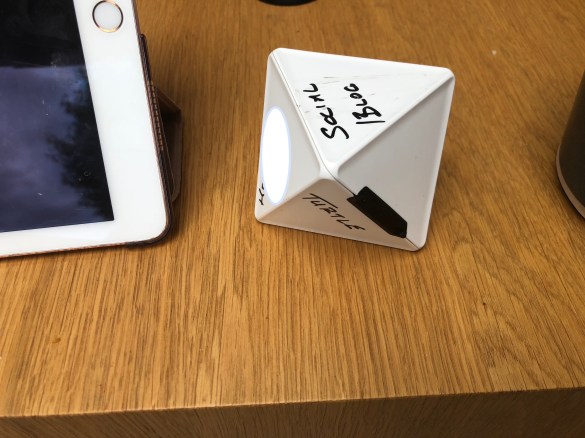
Long story short.. it’s the first time tracking tool that I find easy to use and fits into how I work.  The Zei is actually an octohedran (or a D8 for those of you that way inclined) that fits nicely into your hand, you simply label each side,  tell the app what each side is labelled for and then turn that side “face up” when you start work on that project.  The bluetooth connection to my Mac or phone detects when I turn another side face up and stops the timer on the previous project, starting it on the new one.  There are apps for just about every platform and the reporting is really nice.  The cost is 49 Euro and then 9 Euro a month for unimited projects but we both spent 99 Euro as a one off cost that limits you to 8 projects on the device which suits us fine.  You can (and we do) erase and rewrite the sides of the device regularly (well every few weeks) as work changes.

You can see on my timeular below that I’m currently writing a blog – the terrible scrawl is mine and I have erased / written over badly a few times.  I have left one side entirely blank so if I’m doing “nothing” such as shopping for books online I just turn that face up and I’m not logging time.  You can add more activities in the actual app but I like having the 7 most important ones to track.  When you turn a side face up the app detects that and stops the previous timer, startimg a new one for the new face up side but if you turn it again in less than a minute it doesn’t log anything at all.  The battery on the Zei is meant to last 10,000 hours

IMG_0623

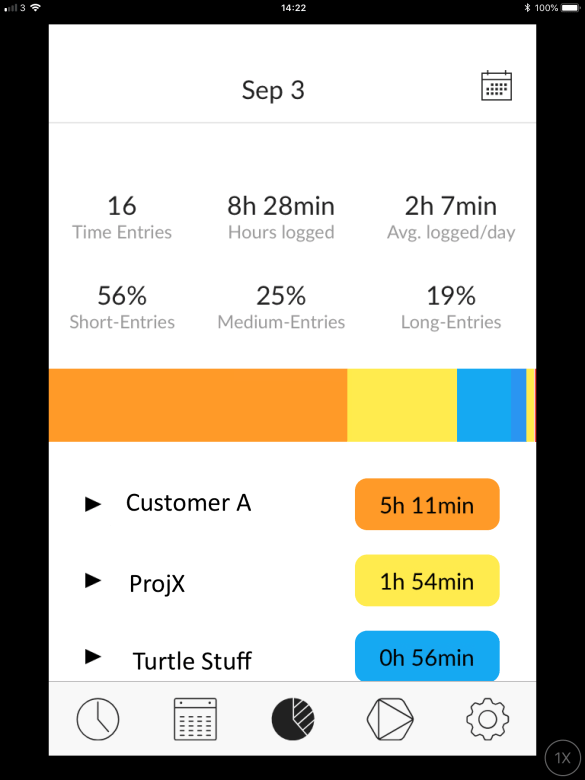
This a sample report from the app on my phone showing activities logged.  I’ve obviously  badly replaced the actual ones with sample ones so I can share it here.  You can see how well it tracks even small amounts of time.  If I’m answering emails I wouldn’t usually start a timer but I can easily turn the timeular face up and it will log all the small increments of time that usually disappear.  For my own reference even on fixed price projects I find it incredibly useful.

IMG_2347

As an additional bonus I know Mark has spoken to them several times about features he’d like and they are very keen to work with customers. So..

a beautifully built product

from a small company that cares about their solution

at a good price point

that actually works

I can’t say better than that http://timeular.com

Things to know with JavaScript – JSON, let, const, and arrows

By Tim Davis – Director of Development

While we eagerly await the arrival of the npm domino-db module with Domino 10, I thought I would spend this instalment of my blog series on Node.js talking a little about some concepts in JavaScript that are used a lot in Node development. If you haven’t looked at JavaScript much since Domino web forms or XPages SSJS then you may not have come across them. You will see them in examples and articles on Node around the web and will want to use them in your own projects as they will make your life easier when starting out.

JSON

The first is JavaScript Object Notation, or JSON, which I talked about briefly in my blog on NoSQL.

Basically, all the data in Node is JSON. This makes it great for storing in backend NoSQL data stores and for handling in front-end JavaScript frameworks.

JSON is a very readable way of describing data, and it looks like this:

{
    "orderNo" : "00101",
    "orderLines": [
        { "quantity" : 7 },
        { "quantity" : 11 },
        { "quantity" : 3 }
    ],
    "status": "Invoiced"
}

An object is denoted by the curly brackets { }. An array is denoted by square brackets [ ]. The items inside the object are name-value pairs. Items are separated by commas in both objects and arrays.

You can type this sort of thing directly into your code if you like, but you would normally just get it from somewhere else, like a database.

You reference the object by name and can access or update its properties using dot notation:

currentOrder.status = "Invoiced";

if ( orderLine.quantity > 100 ) {
    ... your code here ...
}

JSON is hierarchical and you can nest objects inside objects, and arrays inside objects inside arrays, etc, etc. It is a bit like XML in that way, but much easier to read.

You can access nested objects inside arrays inside objects (etc) using dot notation like this:

orders[i].orderLines[j].quantity = 10

JSON arrays are just regular arrays, so you can loop through them:

for ( i = 0; i < currentOrder.orderLines.length; i++ ) {
    ...
}

One great side effect of JSON being so readable is that it is easily converted to and from strings. Converting to strings is a great way to pass data around between different systems. You can use the built-in JSON object to do this:

JSON.stringify( currentOrder )

JSON.parse( '{ "status":"Invoiced", "orderNo":"00101" }' )

You should use these methods because they handle all the formatting and escaping of special characters for you.

Let and Const

These are two new ways of defining variables in Javascript and you will see them a lot. You will already be familiar with using ‘var’, like this:

var count = 0;

You use ‘let’ and ‘const’ in the same way as ‘var’:

let count = 0;

const domain = "mydomain.com";

‘Let’ and ‘const’ are similar to ‘var’, but they behave in a way that helps you avoid problems in your code.

As you can probably guess, ‘const’ is for constant values that will never change. If you try to set another value you will get an error. This will help prevent you overwriting something important in another part of your code.

What ‘let’ does that is different from ‘var’ is more subtle and is all about the variable’s scope, i.e. where in your code it exists.

If you define a variable using ‘var’, then it exists everywhere inside the enclosing function, i.e. everywhere inside the function you are currently in. This is a very wide area, and it is easy to forget and lose track of variable names and values and get confused. This is especially common when you have lots of loops inside loops inside one function.

With ‘let’, a variable only exists inside the current set of curly brackets, i.e code block. So for example a variable would only exist inside a particular loop and not exist outside in the parent function. This helps avoid all sorts of conflicts and overwriting errors.

Here is an example of how let and var work differently inside and outside curly brackets. Notice how ‘var’ overwrites the value while ‘let’ does not:

let cat = "meow";
var dog = "bark";

console.log("cat "+cat); // will be meow
console.log("dog "+dog); // will be bark

if (true) {
    let cat = "scratch";
    var dog = "wag";
    console.log("cat "+cat); // will be scratch
    console.log("dog "+dog); // will be wag
}

console.log("cat "+cat); // will be meow
console.log("dog "+dog); // will be wag

The cat inside the curly brackets is a different cat from the one outside them, but the dog is the same everywhere. This is why the dog gets confused.

Arrow functions

If you read articles on Node or look at code examples, you may have seen functions defined something like this, with the ‘=>’ arrow notation:

( arg1, arg2 ) => { ... }

This is more or less equivalent to

function( arg1, arg2 ) { ... }

The main difference is in how the keyword ‘this’ works.

In a regular function(), when you use ‘this’ it refers to what calls the function. With an arrow function, ‘this’ is from outside what calls the function. This is a pretty arcane distinction, and worth reading up about, but it is very useful in avoiding coding errors.

As an example, when developing in Node you often have functions defined inside methods as callbacks. A callback is a function that is called when a process has finished, usually to go ahead and do something with the results of that process. These usually look something like this:

myOrderDb.getOrders( function( myOrders ) {
    ... do something with myOrders ...
} );

Here you can see that the parameter in the getOrders method is a function. This is a callback function which is called when getOrders finishes and takes the result, ‘myOrders’, and does something with it.

Consider the following example code. I want my app (i.e. ‘this’) to get records from a database and, when that is done, to update its display:

this.showLoadingMessage();
let myOrdersDb = this.getDb();
myOrdersDb.getOrders( function(myOrders) {
    // the following line does not work
    this.displayOrders(myOrders);
} );

So what is wrong? I am expecting ‘this’ to refer to my app so I can go ahead and update the app display with the orders, but the ‘this’ inside the function actually points to myOrderDb because it is myOrderDb that is calling the function. The object that ‘this’ refers to gets overwritten inside regular functions. Keeping track of ‘this’ can be a nightmare when you have a complicated series of callbacks and this can be an easy mistake to make.

However, if you use an arrow function then ‘this’ is not overwritten. It is the same inside the function as it was outside it. So an arrow function version of our code would be:

this.showLoadingMessage();
let myOrdersDb = this.getDb();
myOrdersDb.getOrders( (myOrders) => {
    this.displayOrders(myOrders);
} );

This is only a small change, but now the ‘this’ inside the function is the app, same as outside it, and my call to the app’s displayOrders method will work. With arrow functions everything behaves much more how you would expect it to.

Next Up

In this post I have touched on callbacks, and next time I plan to expand on this topic and talk in detail about a classic bugbear in JavaScript development, asynchronous functions.

Ideas, Demos & Your Last Day To Sign Up for Beta 2

So much interesting activity going on around the IBM/HCL products so in case you missed them I thought I could summarise for you.  All are worthy of your time if you care about the future of Domino, Traveler, Verse or Sametime

BETA

Firstly – no time to lose – the registration for Beta 2 of Domino , Notes and Traveler closes TODAY at 12pm EST/5pm GMT.  If you want access to that Beta due this month hopefully then go and sign up here now https://www.ibm.com/blogs/collaboration-solutions/2018/06/11/announcing-ibm-domino-v10-portfolio-beta-program-sign-today/.  Don’t leave it then be disappointed when you don’t get access.

IDEAS

If you have ideas for what you want in Domino, Notes, Traveler, Sametime or anything else – there is a new site (requiring no login) where you can add your ideas and vote on other people’s.  It’s been running for a few weeks and there are some great ideas there already to vote for so it’s a good place to browse during your next coffee break.  Remember the rule – if you don’t ask you don’t get https://domino.ideas.aha.io/ideas

DEMOS

HCL are publishing a series of videos showing how features that are in v10 will behave.  Here are three interesting features announced so far.

My Collabsphere 2018 video goes live: “What is Node.js?”

By Tim Davis – Director of Development

Last month, I presented a session at Collabsphere 2018 called ‘What is Node.js?’

In it I gave an introduction to Node and covered how to set it up and create a simple web server. I also talked about how Domino 10 will integrate with it, and about some cool new features of JavaScript you may not be aware of.

Luckily my session was recorded and the video is now available on the YouTube Collabsphere channel.

The slides from this session are also available on slideshare.

If you are interested in learning about Node.js (especially with the npm integration coming up in Domino 10) then its worth a look.

Many thanks to Richard Moy and the Collabsphere team for putting on such a great show!

Folder Sync v10 #DOMINO10 #DOMINO2025

Next up in “cool admin things coming your way in v10” – folder syncing.  By selecting a folder on a cluster instance you can tell the server to keep that folder in sync across the entire cluster.   The folder can contain database files (NSFs and NTFs) but also NLOs.

Well that’s just dumb Gab.. NLOs are encrypted by the server ID so they can’t be synced across clustermates but a-ha! HCL are way ahead of you.  The NLO sync involves the source server decrypting the NLO before syncing it to the destination where it re-encrypts it before saving.

So no more making sure databases are replicated to every instance in a cluster.  No more creating mass replicas when adding a new server to the cluster or building a new server and no more worrying about missing NLOs if you copy over a DAOS enabled database and not its associated NLO files.

Genius.

File Repair v10 #Domino10 #Domino2025

If you follow this blog you know that v10 of Domino, Sametime, Verse on Premises, Traveler etc are all due out this year and I want to do some – very short – blog pieces talking about new features and what my use case would be for them.

So let’s start with FILE REPAIR (or whatever it’s going to be called)

The File Repair feature for Domino v10 is designed to auto repair any corrupted databases in a cluster. Should Domino detect a corruption on any of its databases that are clustered, it automatically removes the corrupted instance and pulls a new instance from a good cluster mate. Best of all this happens super fast, doesn’t use regular replication to repopulate, doesn’t require downtime and the cluster manager is fully aware of the database availability throughout.

I can think of plenty of instances where I have had a corrupted database that I can’t replace or fix without server downtime.  No more, and another good reason to cluster your servers.


Definitely different – a few days looking into the future with HCL (and IBM)

If this blog is tl:dr then here’s your takeaway

I can’t thank everyone at HCL enough for throwing open the doors and leaving them open. Together we will continue to innovate great things for customers

Last week Tim and I were invited to the 1st CWP Factory tour held by HCL at their offices in Chelmsford.  “CWP” stands for “Collaboration Workflow Platform” and includes not only the products HCL took over from IBM late last year such as Domino, Traveler, Verse on Premises and Sametime but also new products that HCL are developing as extensions of those.  These (that I can talk a little bit about) such as HCL Nomad (Notes for iPad) and HCL Places (a new client runnvetaing against Domino 10 and providing integrated collaborative services such as chat, AV , web and Notes applications) will be leapfrogging Domino far over its competitors.

I want to start by thanking HCL for inviting us inside to see their process. We met and made our voices heard with more than 30 developers and executives, all of who wanted to know “do you like this?”  “what are we missing?”.  I came away from the two days with a to-do list of my own at the request of various people to send in more details of problems or requirements I had mentioned when there.  John Paganetti, who is also a customer advocate at HCL, hosted the “ask the developers” impromptu session (we had so many questions so they threw one into the agenda on day 2).  We were told to get to know and reach out directly to the teams with our feedback and questions.  If you don’t have a route to provide feedback and want one then please reach out.

Back in February I attended a Domino Jam hosted by Andrew Manby (@andrewmanby) from IBM in London.  These were held all over the world and attendees were pushed to brainstorm around features that were missing or needed.  That feedback was used to create priorities for v10 and many of the features requested at my session and others have appeared in the current beta and are committed to a v10 release.  At the end of the 2nd day of the factory tour we again had a Domino Jam hosted by Andrew Manby but this time for Domino 11 features – wheeeeeeee!   With the Jams and the Destination Domino blog as well as the #domino2025 hashtag activity, IBM are really stepping up to the products in a way they haven’t in several years.  I want to recognise the hard work being done by Andrew, by Uffe Sorensen, and by Mat Newman amongst others, to make this IBM/HCL relationship work.

So what was the factory tour? It was a 2 day conference held at HCL’s (still being built) offices. I am pleased to say it was put together very informally, we were split into groups of about 10 (hi Daniel, Francie, Julian, Richard, Paul, Nathan, Devin, Fabrice!) and one by one the development teams came and took our feedback on the work they are doing.  We worked with the Verse (on premises) team, the TCO team (looking at the Domino and Sametime servers), the Notes client team, the Nomad team and the Application Development team.  It was an intense day in a good way with so much information being shared with us and questions being asked of us.  It was also good to be told that the majority of what we saw and discussed could be shared publicly.

A few highlights (out of many) from the two days that were new to me:

  • The new database repair and folder sync features in Domino 10 (shame on me for not remembering what they are called). The database repair feature will detect when a database is corrupted and replace it whilst the server is running with a new instance from a working cluster mate (another good reason to cluster).  The folder sync feature will keep any  Domino database files or NLOs in any listed folders in sync.  This stuff is so cool and exactly what Domino clustering needed so we asked for them to extend the sync feature to include any files in the HTML directory such as HTML CSS and CGI scripts and they are considering that (v10 is a tight delivery timeline right now so no guarantees of anything).
  • Some very candid discussions (I think repeated multiple times by everyone there) about getting rid of WebSphere for Sametime in the future and how to better provide Sametime services purely under Domino.
  • HCL Places looking much evolved even in the few weeks since it was first shown at Engage – this is going to be a game changer client when it comes out.
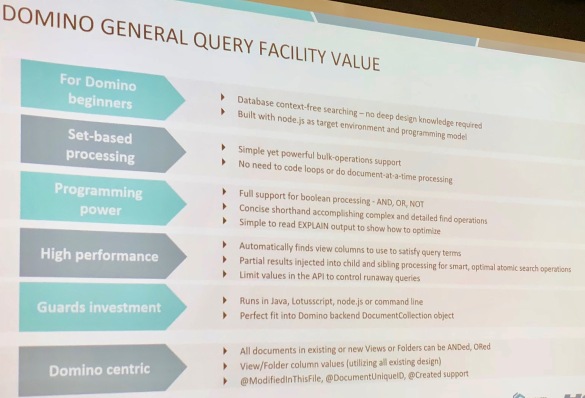
  • The Domino General Query Facility (DGQF) available in Domino 10 is the biggest investment in Notes/Domino code in 10 years. A query language accessible outside Domino that doesn’t require any  knowledge of Domino design by a developer.  Using DGQF you can rapidly query collections of documents represented by any criteria not necessarily views or forms.  Using DGQF a regular web developer would be able to build a Node application, for instance, using back-end Domino data without ever having to learn the structure of the Domino database or touch Domino Designer.  Here’s a sneaky picture I took of the positioning for DGQF.John Curtis who is the lead designer behind DGQF has been very responsive on twitter to questions about how it will work (@john_d_curtis)IMG_0313
  • A lot of stuff Nomad and Node related which is still NDA but you’ll hear more about them at Collabsphere in Ann Arbor – HCL will be out in force as will IBM speaking, showing and listening so if you can you need to get yourself there.   Turn out and turn up – there’s still time to get your voice heard.