Domino – Exchange On Premises Migration Pt2: Wrestling the Outlook Client

In part 1 of my blog about Exchange on premises migration from Domino I talked about the challenges of working with Exchange for someone who is used to working with Domino.  If only that were all of it but now I want to talk about the issues around Outlook and other Exchange client options that require those of us used to working with Domino to change our thinking.

In Domino we are used to a mail file being on the server and regardless of whether we used Notes or a browser to see that client, the data is the same.  Unless we are using a local replica, but the use of that is very clear when we are in the database as it visibly shows “on Local” vs the server name.

We can also easily swap between the local and server replicas and even have both open at the same time.

In Outlook you only have the option to open a mailbox in either online or cached mode.

So let’s talk about cached mode because that’s the root of our migration pains. You must have a mail profile defined in Windows in order to run Outlook. The default setting for an Outlook profile is “cached mode” and that’s not very visible to the users. The screenshot below is what the status bar shows when you are accessing Outlook in cached mode.

connectedtoexchange

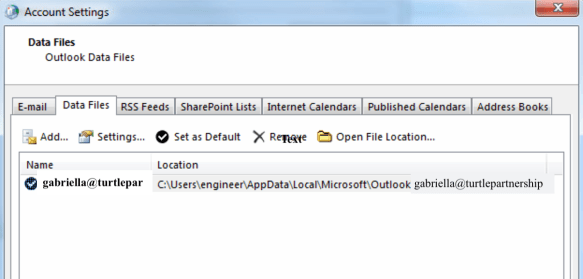
In cached mode there is a local OST file that syncs with your online Exchange mailbox.  It’s not something you can access or open outside of Outlook.
datafiles

Outlook will always use cached mode unless you modify the settings of the data file or the account to disable it.
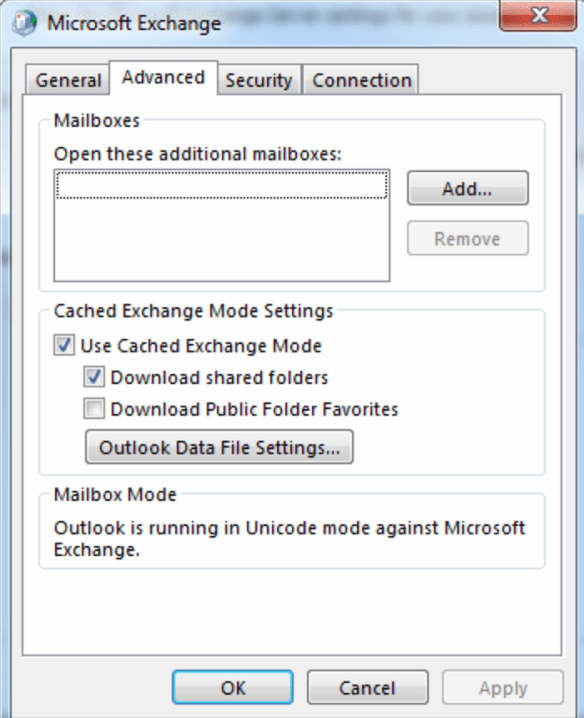
cachedsettings

As you can see from the configuration settings below, a cached OST file is not the same as a local replica and it’s not designed to be.   The purpose of the cached mail is to make Outlook more efficient by not having everything accessed on the server.
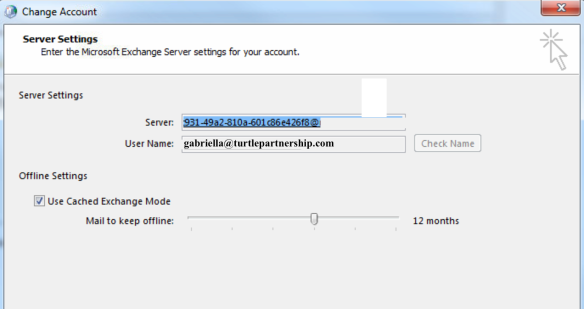
cachedoffline

Why does this matter during a migration?  Most migration tools can claim to be able to migrate directly to the server mailboxes but in practice the speed of that migration is often unworkably slow.  If that can be achieved it’s by far the most efficient but Exchange has its own default configuration settings that work against you doing that including throttling of activity and filtering / scanning of messages.   Many / most migration tools do not expect to migrate “all data and attachments” which is what we are often asked to do.  If what we are aiming for is 100% data parity between a Domino mail file and an Exchange mailbox then migrating that 5GB, 10GB, 30GB volume directly to the server isn’t an option.  In addition if a migration partially runs to the server and then fails it’s almost impossible to backfill the missing data with incremental updates.  I have worked with several migration tools testing this and just didn’t have confidence in the data population directly on the server.

In sites where I have done migrations to on premises servers I’ve often found the speed of migration to the server mailbox on the same network makes migration impossible so instead I’ve migrated to a local OST file.  The difference between migrating a 10GB file to a local OST (about an hour) vs directly to Exchange (about 2.5 days) is painfully obvious. Putting more resources onto the migration machine didn’t significantly reduce the time and in fact each tool either crashed (running as a Domino task) or crashed (running as a Windows desktop task) when trying to write directly to Exchange.

An hour or two to migrate a Domino mail file to a local workstation OST isn’t bad though right?  That’s not bad at all, and if you open Outlook you will see all the messages, folders, calendar entries, etc, all displaying.  However that’s because you’re looking at cached mode. You’re literally looking at the data you just migrated.  Create a profile for the same user on another machine and the mail file will be empty because at this point there is no data in Exchange, only in the local OST.  Another thing to be aware of is that there is no equivalent of an All Documents view in Outlook so make sure your migration tool knows how to migrate unfoldered messages and your users know where to find them in their new mailbox.

Now to my next struggle.  Outlook will sync that data to Exchange.  It will take between 1 and 3 days to do so.  I have tried several tools to speed up the syncing and I would advise you not to bother.  The methods they use to populate the Exchange mailbox from a local OST file sidestep much of the standard Outlook sync behaviours meaning information is often missing or, in one case, it sent out calendar invites for every calendar entry it pushed to Exchange.  I tried five of those tools and none worked 100%. The risk of missing data or sending out duplicate calendar entries/emails was too high.  I opted in the end to stick with Outlook syncing.  Unlike Notes replication I can only sync one OST / Outlook mailbox at a time so it’s slow going unless I have multiple client machines. What is nice is that I can do incremental updates quickly once the initial multi-GB mailbox has synced to Exchange.

So my wrestling with the Outlook client boils down to

  • Create mail profiles that use cached mode
  • Migrate to a local OST
  • Use Outlook to sync that to Exchange
  • Pay attention to Outlook limits, like a maximum of 500 folders*
  • Be Patient

*On Domino mailboxes we migrated that pushed up against the folder or item limits we found Outlook would run out of system memory repeatedly when trying to sync.

One good way to test whether the Exchange data matches the Domino data is to use Outlook Web Access as that is accessing data directly on the Exchange server.  Except that’s not as identical to the server data as we are used to seeing with Verse or iNotes.  In fact OWA too decides to show you through a browser what it thinks you most need to see versus everything that’s there.  Often folders will claim to be empty and that there is no data when in fact that data is there but hasn’t been refreshed by Exchange (think Updall).  There are few things more scary in OWA than an empty folder and a link suggesting you refresh from the server.  It just doesn’t instill confidence in the user experience.

Finally we have Outlook mobile or even using the native iOS mail application.  That wasn’t a separate configuration and unless you configure Exchange otherwise the default is that mobile access will be granted to everyone.   In one instance a couple of weeks ago, mobile access suddenly stopped working for all users who hadn’t already set up their devices.  When they tried to log in they got invalid name or password.  I eventually tracked that down to a Windows update that had changed permissions in Active Directory that Exchange needed set.  You can see reference to the issue here, and slightly differently here, although note it seems to have been an issue since Exchange 2010 and still with Exchange 2016.  I was surprised it was broken by a Windows update but it was.

I know (and have used) many workarounds for the issues I run into but that’s not for here.  Coming from a Domino and Notes background I believe we’ve been conditioned to think in a certain way about mailfile structure, server performance, local data, and the user experience, and expecting to duplicate that exactly is always going to be troublesome.

#DominoForever


Updates from HCL & IBM In London

Today Tim and I attended the Domino 11 Jam in London with Andrew Manby as the ringmaster, it’s been a year since the original Domino 10 London Jam and it was great to see things continuing with Domino 11.  What was made clear in today’s discussion was that whereas Domino 10 was primarily about the back end and TCO features, Domino 11 is all about the client experience.  There were two new HCL UX designers present today to listen to what was said and provide their input.

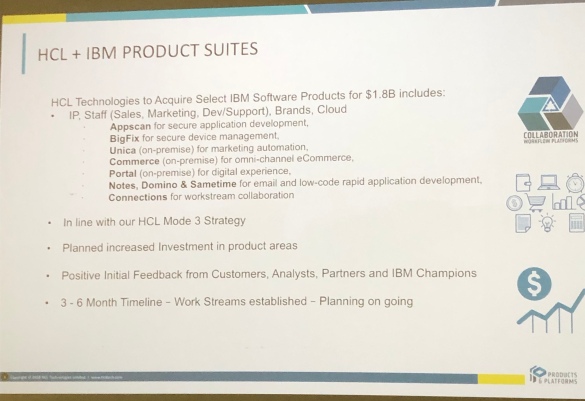
First up Richard Jefts (VP & General Manager @ HCL) laid out for us what the HCL deal with IBM entails.   There are new products that are now owned by HCL including Portal, Connections and BigFix (love BigFix and want to dig into that more). The $1.8bn purchase included not just the products but taking on board all the related staff  (basically everyone except services)

fullsizeoutput_3596

As HCL say on their Collaboration site

“A customer centric approach is the foundational element of the HCL Products business philosophy and a key component of the HCL Products and Platforms strategy to drive overall success of the product portfolios.”

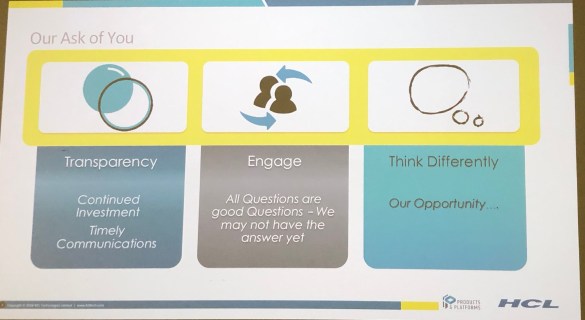
That means working with customers and partners.  As Richard Jefts said today “This is an opportunity for us to revisit what we want the products and solutions to be” – Think Differently.  This isn’t just marketing speak – in the past few months we’ve seen a lot of effort by HCL to reach out , from presentations to the factory tours where many of us got to meet the development teams directly (and those continue this year) and direct sponsorship and involvement at user group events.  They are walking the walk.

fullsizeoutput_3597

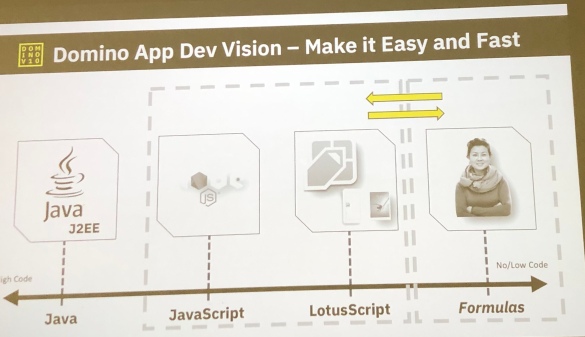
Finally I wanted to share what they are calling the future of Low Code to No Code – these platforms are developer driven and regardless of your level of expertise as a developer, there will be a way in for you with Domino 11 and its successors.

fullsizeoutput_3594

Unfortunately I had to jump out of the jam far too early because I had a support emergency so I missed a lot of the big thinking fun but I wanted to share these screenshots with you as I think they explain a lot about where HCL stand and how they see the future.

Also on my way out the door I met and briefly chatted to another Business Partner – if you were the guy who talked to me about this blog, please connect on LinkedIn, I didn’t get your card 🙂


How to use the new Domino Query Language

By Tim Davis – Director of Development.

Before I talk about building a Domino-based API gateway on Node.js, I thought it would be a good idea to expand a little on how to use the new Domino Query Language (DQL) to run queries on Domino documents.

DQL is the new query language that comes with Domino 10. It is separate from the other query syntaxes in Domino, such as the Full Text Search syntax, or @formula selection criteria. You can use it in other places than Node.js, such as LotusScript and Java, and you can even test your queries from the command line.

What is cool about DQL is that it runs using the new Design Catalog system database, GQFdsgn.nsf. This does a lot of heavy lifting in the background with pre-built design data which makes running the queries more efficient. I am told this will not always be part of the DQL engine, but for now you do need it.

The DQL processing engine also does clever prioritizing of the components of the query to make the process as efficient as possible. You can see how this is done using the ‘explain’ tool (see below).

The syntax is pretty straight-forward. Here are some simple examples to give you an idea:

customer = 'Bob Smith'

age > 21

form = 'Person' and type = 'Client'

You have all the usual operators such as =, >, <, <=, >=, and, or, not. You can wrap elements in parentheses ( ) to control the precedence.

String values are enclosed in single quotes. You can duplicate quotes in your strings to escape them, e.g.:

name = 'James O''Brien'

You can also use lists with the ‘in’ operator, like this:

form = 'Person' and type in ( 'Client', 'Supplier', 'Agency' )

DQL comes with some useful built-in functions that you can use in your queries:

@Created
@ModifiedInThisFile
@DocumentUniqueID

You can search using dates, which are included using the built-in @dt function and are in RFC3339 format. This looks a bit clunky but is pretty clear once you get used to it:

@Created > @dt('2018-01-01T00:00:00+0500')

A cool feature is being able to search in view columns. You use the view name or alias and the programmatic column name, like this:

'PendingOrders'.orderNo = '000101'

These view and column searches are fast because the design analysis of the db has already been done and stored in the design catalog. However if the database isn’t in the catalog then this kind of search will fail.  Adding databases to the catalog is an optional step you would do if you want to perform this kind of query, but being in the catalog helps with the performance of regular searches as well and so is always recommended.

One thing to bear in mind is that currently you can only search on regular summary fields in the documents, which means you can’t search in rich text items yet. I am told this is coming later.

Also, if your query generates an error during the processing then you will get no results returned. You don’t get partial results (unlike some SQL behavior). This is likely not a problem provided you know to expect it.

With all of this you should have everything you need to run pretty much any query you want, with plenty of flexibility and control.

Talking of control, DQL comes with a command line DomQuery tool to test your queries. It has an -e (explain) option that will deconstruct how your query will be processed and details how it will perform. It splits out each element of the search and lists the order they are processed, how long each takes, and how the results get filtered down step by step. You can use this to test out your searches and tune them to make sure they run efficiently and perform well for the users.

However, just in case you do end up running a query that gets out of hand there are limits to protect the server. The limits are:

  • MaxDocsScanned – maximum allowable NSF documents scanned ( 200000 default)
  • MaxEntriesScanned – maximum allowable index entries scanned (200000 default)
  • MaxMsecs – maximum time consumed in milliseconds ( 120000 ) (2 minutes)

You can override these limits system-wide using notes.ini settings if you need to, but you really ought to instead review your query’s behaviour before you consider doing this.

The DQL engine is continuously being enhanced and the new Domino 10.0.1 version adds support for query arguments (also known as substitution variables). You use query arguments when building your queries to help avoid code injection. This works by defining specifically which elements of a query are user input rather than just constructing the query as one string. Without this, a user could maliciously input some DQL syntax into the query and access unexpected documents or data.

I hope all this helps give you an idea of how easy and fast it will be to run DQL queries from a Node.js app. In my next post I plan to bring this together with the domino-db module and build an API gateway.

Domino 11 Jam Coming To London

The Domino jams continue, now onto Domino 11 and with a date of January 15th in London. No location yet but I’d be very surprised if it’s not IBM South Bank.

I attended a couple of jams last year and I can confirm many of the comments made and items requested ended up in the v10 products and several have already been prioritised into v11.  If you are interested in the future of the collaboration products and especially Domino then you will want to contribute ideas to the jam so email Brendan McGuire (MCGUIREB@uk.ibm.com) and ask to attend.

We all hope to be there investing in the future or products we believe in.  Hope to see you there as well.

If you are interested in locations other than London check out this URL  where there are already locations and some dates announced.

#dominoforever

HCL Launch New Collaboration Site & Client Advocacy Program

Today HCL went live with their own site for their collaboration products at https://www.cwpcollaboration.com. It’s Domino-based and we even have new forums you can sign up for (and the sign up process is easy).

The big news for me is the launch of their Client Advocacy Program which you can read about and sign up to on the site. The Client Advocacy program connects customers directly with a technical point of contact in development, it’s free and open for registration now.  You can read more in their FAQ here, but for those of you who are tl:dr here’s a taster.

Why is HCL Client Advocacy participation beneficial?

A Client Advocate provides the participant:

  • opportunity to discuss successes, challenges, and pain points of the customer’s deployment and product usage
  • a collaborative channel to the Offering Management, Support and Development Teams
  • proactive communications on product news, updates, and related events/workshops
  • more frequent touch points on roadmaps and opportunity to provide input on priorities
  • facilitation of lab services engagements or support team as appropriate

You can request to sign up here

I think we can all agree that even in these early days HCL are showing customer focused intent and following up quickly with real actions to reach out and encourage us to talk to them directly.  I know this is just the beginning, the foot is down hard on the acceleration pedal and I’d recommend you follow HCL_CollabDev on twitter as well as the new Collaboration site.  And feed back.  They want to hear what you think and what you want.  If you feel something is missing or you have an idea, feed back.

Above all don’t paint HCL with the IBM brush, this is a new company with new ideas and their own way of doing things.  Exciting times.

Whooomf – All Change. HCL Buys The Shop…

According to this Press Release as of mid June 2019, HCL take ownership of a bunch of IBM products including Notes, Domino and Connections on premises. Right now and since late 2017 there has been a partnership with IBM on some of the products such as Notes, Domino, Traveler and Sametime* so this will take IBM out of the picture entirely. Here are my first “oh hey it’s 4am” thoughts on why that’s not entirely surprising or unwelcome news ..

HCL are all about leading with on premises, not cloud. The purchase of Connections is for on premises and there are thousands of customers who want to stay on premises. Every other provider is either entirely Cloud already or pushing their on premises customers towards it by starving their products of development and support (waves at Microsoft). *cough*revenue stream*cough*

HCL have shown in 2018 that they can innovate (Domino’s TCO offerings, Notes on the iPad, Node integration etc) , develop quickly and deliver on their promises. That’s been a refreshing change.

They must be pleased with the current partnership products to buy them and more outright.

When HCL started the partnership with IBM they brought on some of the best of the original IBM Collaboration development team and have continued to recruit at high speed. It was a smart move and one I hope they repeat across not just development but support and marketing too.

HCL already showed with “Places” that they have ideas for how collaboration tools could work (see this concept video https://youtu.be/CJNLmBkyvMo) and that’s good news for Connections customers who gain a large team and become part of a bigger collaboration story in a company that “gets it”.

Throughout 2018 HCL have made efforts to reach out repeatedly to customers and Business Partners, asking for our feedback and finding out what we want. From sponsoring user group events (and turning up in droves) around the world to hosting the factory tour in June at their offices in Chelmsford where we had two days of time with the developers and their upcoming technologies. I believe they have proven they understand what this community is about and how much value comes from listening and – yes – collaborating.

Tonight I am more optimistic for the future of these products and especially Connections than I have been in a while. HCL, to my experience, behave more like a software start up than anything else, moving fast, changing direction if necessary and always trying to lead by innovating. I hope many of the incredibly smart people at IBM (yes YOU) who have stood alongside these products for years do land at HCL if that’s what they want, it would be a huge loss if they don’t.

*HCL have confirmed that Sametime is included

Domino – Exchange On Premises Migration Pt1: Migration Tools

It’s been an interesting few months intermittently working on a project to move Notes and Domino users onto Exchange on premises 2013 and Outlook 2013.  I’m going to do a follow up blog talking about Outlook and Exchange behaviour compared to Notes and Domino but let’s start at the beginning, with planning a migration.

The first thing to know is that if your company uses Domino for mail, Exchange on premises is a step down.  I’m sorry but it is and I say this as someone with a lot of experience of both environments (albeit a LOT more in Domino). At the very least you need to allow for the administrative overhead to be larger and to encompass more of your environment. Domino is just Domino on a variety of platforms, Exchange is Active Directory and DNS and networking and a lot more besides.  In fact Microsoft seem to be focusing on making the on premises solution ever more restrictive and difficult to manage (better hope you enjoy Powershell) to encourage you to move to O365.

To give you an example, during the migration we had an issue where mail would suddenly stop sending outbound.  The logs gave no clue, I spent 2 days on it finding nothing and eventually decided to pay Microsoft to troubleshoot with me to find out what I’d done wrong.  5 hrs of joint working later we found it.  It wasn’t Exchange or any box I worked on.  It was one of the Domain Controllers that didn’t have a service running on it (kerberos key distribution center) that was causing the issue.  Started that service on that box and all was fine.  Three days wasted but at least it wasn’t what I did 🙂

MIGRATION TOOLS

First of all we need a migration tool unless you’re one of the increasingly large number of companies who just decide to start clean.  This is especially true when moving to O365 because there often isn’t either the option or the capability to upload terabytes or even gigabytes of existing mail to the cloud.  Having tested 5 different tools for this current project here were my biggest problems:

  1. A tool that was overly complex to install, outdated (requiring a Windows 7 OS) and the supplier wanted several thousand dollars to train me on how to install it
  2. Tools that didn’t migrate the data quiitteee right. It looked good at first glance but on digging deeper there were misfiled messages and calendar entries missing
  3. Tools that took an unfeasibly long time (>12hrs per mail file or even days).  The answer to that problem was offered as “you are migrating too much, we never do that” or “you need a battalian of workstations to do the migration”
  4. Tools that required me to migrate everything via their cloud service i.e send every message through their servers¨. I mean it works and requires little configuration but no.  Just no.

Whatever tool you decide to use I would recommend testing fully against one of your largest mail files and calculating the time taken against what that does to your project plan.  For my current smaller project I am using a more interactive tool that installed on a workstation and didn’t require any changes on either the Domino or Exchange end.

You’ll notice I’m not naming the tools here.  Although there are a couple where the supplier was so arrogant and unhelpful I’d like to name them, there are also several who were incredibly helpful and just not the right fit for this project.  Maybe for the next.  The right migration tool for you is the one that does the work you need in the time you need and has the right support team behind it to answer finicky questions like ‘what happened to my meeting on 3rd June 2015 which hasn’t migrated”.  Test. Test. Test.

Many of the migration tools are very cheap but be careful that some of the cheapest aren’t making their money off consultancy fees if paying them is the only way to make the product work.

QUESTIONS

So our first question is

“What do you want to migrate?”

Now the answer to this will initially often be “everything” but that means time and cost and getting Exchange to handle much larger mailboxes than it is happy to do.  That 30GB Domino mailfile won’t be appreciated by Exchange so the second question is

“Would you consider having archives for older data and new mailboxes for new”

You also need to ask about rooms and resources and shared mailboxes as well as consider how you are going to migrate contacts and if there needs to be a shared address book.  The migration of mail may be the easiest component of what you are planning.

Now we need to talk about coexistence.  Unless you plan to cutover during a single period of downtime during which no mail is available you will need a migration tool that can handle coexistence with people gradually moving to Exchange and still able to work with those not yet migrated from Domino without any barrier in between.  Coexistence is a lot more complex than migration and the migration tools that offer it require considerably more configuration and management for coexistence than they do for the migration.  Consider as well that your coexistence period could be months or even years.

One option, if the company is small enough, is to migrate the data and then plan a cutover period where you do an incremental update.  Updating the data every week incrementally allows you to cutover fairly quickly and also gives a nice clean rollback position.

EXCHANGE CONFIGURATION

The biggest issue in migrating from Domino to Exchange is how long it takes getting the data from point A to point B.  I tried a variety of migration tools and a 7GB mail file took anywhere from 3hrs to 17hrs to complete.  Now multiply that up.   Ensuring your Domino servers, migration workstations and Exchange servers are located on the same fast network is key.

Make sure your Exchange server is configured not to throttle traffic (because it will see that flood of migration data as needing throttling) so configure a disabled/unlimited throttling policy you can apply during the migration.

Exchange’s malware filter, which is installed by default and only has options for deleting messages or deleting their attachments, is not your friend during a migration.  Not only will it delete your Domino mail that it decides could be malware as it migrates but it also slows the actual migration down to a crawl whilst it does that.  You can’t delete the filter but you can temporarily disable it via Powershell.

Next up.. the challenges of the Outlook / Exchange model to a Notes / Domino person.


Using Node.js to access Domino

You will be pleased to hear that the Domino 10 module for Node.js is now in beta (you can request early access here) and in this article I would like to show you how easy it will be to use.

Before we get started using the Domino module in Node, we do need to do some admin stuff on our Domino server. It has to be running Domino 10 and we have to install the Proton add-in, and we also have to create the Design Catalog including at least one database. (The Proton add-in listens on its own port, by default 3002, and is separate from HTTP.)

More detail on these admin tasks will be covered in a companion blog, but here I would like to focus on the app-dev side.

Lets build a simple Node.js system that will read some Domino documents and get field values, and also create some new documents. In my next post we can integrate this into the basic Node stack we developed in my previous post to create an actual API.

Assuming our Domino server is all set up, the first thing we do is install the new dominodb module. When this goes live later in the year, we will do this with the usual  ‘npm install dominodb’, but while we are still in beta we install it from the downloaded beta package:

npm install ../packages/domino-domino-db-1.0.0.tgz --save

Once we have the dominodb connector installed, we can use it in our Node server.js code. The sequence is almost exactly the same as in LotusScript. First, we connect to Domino and open the Server (sort of equivalent to a NotesSession), then from this we open our Database, and then using the Database we can access and update Documents.

We start the same way as with all other Node.js modules, with a ‘require’:

const { useServer } = require('@domino/domino-db');
This ‘useServer’ is a function and is going to create our server connection. We give it the Domino server’s hostname and the Proton port, and it connects to our server like this:
serverConfig = {
    hostName: 'server.mydomain.com',
    connection: { port:'3002'}
};
useServer( serverConfig )
The useServer function returns a ‘server’ object. This is inside a javascript promise (I talked about promises in an earlier post), so we can use the server object inside the promise to open our database like this:
useServer( serverConfig ).then( async server => {
    const database = await server.useDatabase( databaseConfig );
The databaseConfig contains the filepath of our database on the server:
const databaseConfig = {
    filePath: 'orders.nsf'
};

Notice how we are using ‘async await’ to simplify the asynchronous nature of getting the database. This code looks very similar to the LotusScript equivalent.

So we have created a server connection and opened a database. Now we want to get some documents.

The domino-db module uses the new Domino Query Language (DQL) which comes with Domino 10. This can perform very efficient high-performance queries on Domino databases.

It is very much like getting a document collection with a db.search( ) in LotusScript, and the query syntax is similar to selection formulas, for example:

const coll = await database.bulkReadDocuments({
    query: "Form = 'Order' and Customer = 'ACME'"
});
This returns a collection of documents in a JSON array. These documents do not automatically contain all the items from the Notes documents. By default they only have some basic metadata, i.e. unid, created date, and modified date:
{
  "documents":[
    {
      "@unid":"A2504056F3AF6EFE8025833100549873",
      "@created": {"type":"datetime","data":"2018-10-25T15:24:00.51Z"},
      "@modified": {"type":"datetime","data":"2018-10-25T15:24:00.52Z"}
    }
  ],
  "errors":0,
  "documentRange":{"total":1,"start":0,"count":1}
}
To get field data from the documents, you need to specify which fields you want returned, and this is done with an array of itemNames:
const coll = await database.bulkReadDocuments({
  query: "Form = 'Order' and Customer = 'ACME'",
  itemNames: ['OrderNo', 'Qty', 'Price']
});
Then you get the field data included in your query results:
{
"documents":[
  {
    "@unid":"A2504056F3AF6EFE8025833100549873",
    "@created":{"type":"datetime","data":"2018-10-25T15:24:00.51Z"},
    "@modified":{"type":"datetime","data":"2018-10-25T15:24:00.52Z"},
    "OrderNo":"001234",
    "Qty":2,
    "Price":25.49
  }
],
"errors":0,
"documentRange":{"total":1,"start":0,"count":1}
}
We can output the document field data with JSON dot notation in a console.log (with the JSON.stringify method to format it properly):
console.log( "Order No: " + JSON.stringify( coll.documents[0].OrderNo ) );

So this is how to read a collection of documents. Now lets look at creating a new document, which is even easier.

First we build our document data in an ‘options’ object, including the Form name and all our other item values:

const newDocOptions = {
  document: {
    Form: 'Order',
    Customer: 'ACME',
    OrderNo: '000343',
    Qty: 10,
    Price: 49.99
  }
};
Then we simply call the ‘createDocument’ method, like this:
const unid = await database.createDocument( newDocOptions );

We don’t need to call a ‘save’ on the document, it is all handled in one operation. The return value is the unid of the newly-created document, so we can act on it again to update it if we want to.

To update a document, we get it by its unid with the ‘useDocument’ method, and then we can call ‘replaceItems’ on it.

This takes the new values in a ‘replaceItems’ parameter, but it only needs to contain the fields to update:

const document = await database.useDocument({
  unid: coll.documents[0]['@unid']
});
await document.replaceItems({
  replaceItems: { Qty: 11 }
});

Here we are using the ‘@unid’ value from the collection we got earlier. This is a bit fiddly because ‘@’ is a reserved symbol in JSON, but we can use the JSON square bracket notation to get around this.

We have got documents and created and updated documents. In addition to all these, the domino-db module provides a variety of methods for reading, creating and updating documents, allowing you to do anything you would need.

Also, the DQL syntax has sophisticated search facilities that can return large numbers of documents and can even search in views and columns.

There are couple of things to be aware of:

The first is that by default the connection to Domino is unsecured, but you can easily make it use TLS/SSL. You may need help from your Domino admin to provide you with the certificate and key files, but this is all explained in the documentation.

The second thing is that currently this access is either Anonymous or can be set to a single Domino user account in TLS/SSL by the client certificate (which maps to a Domino person document). So in the beta there is no user authentication per se, but this will be coming later with OAuth support.

I hope you found this both useful and exciting. In my next article I plan to show how to build these domino-db methods into a Node HTTP server and create an API gateway.


Deploying The AppDev Pack – An Admins Guide

Over here on the blog is Tim’s next entry talking about Node development and Domino, this time he explains how to use the early release of the app dev package to access (read and write) Domino data via Node.  However I don’t let developers do Domino admin so this is the bit where I explain how to configure Domino.  It’s all very easy and also all still early release so things may well change for GA.

First you will need to request the early release package which you can do here. What you’ll then get is a series of .tgz files including one entitled ‘domino-appdev-docs-site.tgz’ which, once extracted, gives you the index.html with instructions for installing.

You need to bear in mind that at least initially this only runs on Linux and Domino 10 and that Domino 10 on Linux 64bit officially means RHEL 7.4 or higher, or SLES 12. I went with RHEL 7.5.

Next we need to install  “Proton” so it can be run as a Domino server task which just means extracting the file ‘proton-addin.tgz’ into the /opt/ibm/domino/notes/latest/linux directory.   There is also some checking to make sure files are present and setting permissions but I don’t want to repeat the install instructions here as I would rather you refer to the latest official version of those.  Suffice it to say this is a 5 minute job at most.

Once the files are in place you can start and stop Proton as you would any other Domino task by doing “load Proton”, “tell Proton quit”, etc.

Then there are a few notes.ini settings you can choose to set including:

PROTON_SSL
= if you want the traffic between the Proton task and Node server to be encrypted (0/1).

PROTON_LISTEN_PORT= what port you want Proton to listen and be accessed by Node on (default 3002 ).

PROTON_LISTEN_ADDRESS= if you want Proton to listen on a specific address on your Domino server such as 127.0.0.1 which would require Node to be installed locally or 0.0.0.0 which will listen on any available address.

PROTON_AUTHENTICATION= how Proton handles authentication.  There are currently two options, client_cert or anonymous.  With authentication set to anonymous all requests that come from the Node application are done as an “anonymous” Domino user and your Domino application must allow Anonymous rights in the ACL.

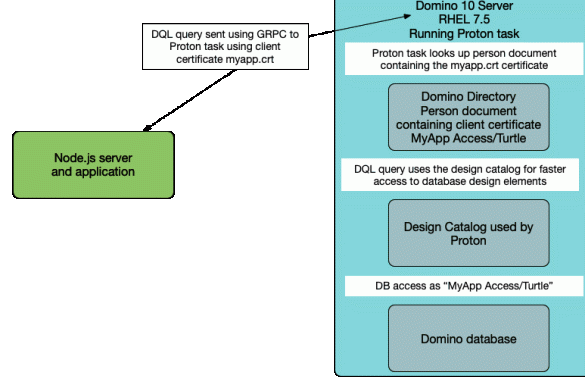
The “client_cert” option requires the Node application to present a client certificate to the Proton task and for the Domino administrator to have already mapped that certificate to a specific person document by importing it.  Note that “client_cert” still means that all activity from that Node application will be done as a single identified user that must be in the ACL but does mean you need not allow anonymous access.  You can also use different identities in different Node applications.

Of course, what we all want is OAuth or an authentication model that allows individual user identities and this is hopefully why the product is still considered “early release”.   Both the “anonymous” and “client_cert” models are of limited use in production.

PROTON_KEYFILE
= the keyfile to use if you want PROTON to be communicating using SSL.  This isn’t releated to the Domino keyfile (although it could be) and since this is only for communication between your Node server and your Domino Proton task and never for client-facing traffic you could use entirely internally-generated keys since they only need to be shared with the Node server itself.

HCL have kindly provided scripts to generate all the certificates you need for your testing.

Finally we need to create a design catalog for Proton to use.  You can add individual databases to the design catalog and the first one you add actually creates the catalog.  There must be a catalog with at least one database in it for Proton to work at all.

The catalog contains an index of all the design elements in a Domino database so to add a new database to the catalog you would type:
load updall <database> -e

This isn’t dynamically maintained though, so if you change the design of a database you must update its entry in the catalog if you want to have new design elements added or updated, like this:
load updall <database path> -d

The purpose of the catalog is to speed up DQL’s access to the Domino data.  It’s not required that every database be catalogued but obviously doing so speeds up access and opens up things like view scanning using the <‘View or folder name’>.<Columnname> syntax.

Proton

So that’s my very quick admin guide to what I did that enabled Tim to do what he does. It’s very possible (even probable) that this entire blog will be obsolete when the GA release ships but hopefully this and Tim’s blog help you get started with the early release.

Perfect10 – Building A Test Lab

In the 10th edition of my Perfect 10 webcast I explain how and why to build a test lab so you can get to deploying those products you downloaded today. You did download them right?

I was asked recently to share the slides for all these Perfect10 presentations and to be honest I hadn’t thought of it but it’s a good idea so I’ll be sharing them all this week.

Next up: Let’s Talk Domino v10 & Admin

11 mins