Rethinking the iPad Air

Yesterday I switched my iPad for an iPad Air. I had an iPad and I have an iPad mini which I thought would replace my regular iPad but it’s now barely used. The iPad has two SIM cards, one for O2 in the UK (which also works in Europe at no charge which I suspect O2 don’t know) and one for AT&T in the US. Despite its size and weight (and how difficult it is to fit in a handbag) I find it more enjoyable to read books on and it’s really reliable for data connections. The iPad mini is now used only on planes really where it’s small enough to fit on the seat tray so I can watch videos

So why bother upgrading at all ? Well I had skipped 2 versions already (I also don’t update my iPhone) and my books were taking a noticeable time to load (10 seconds or so which is FAR too long) plus “lighter” sounded good and I could pass down my old one to my mother replacing her even older one. I can’t say I was excited about it though….

Well a day later and using it today I love it. It’s smaller, thinner and lighter to fit in my bag, I can hold it easily with one hand and the reduction in bezel size means my thumbs reach the middle when typing which makes it more accurate to use. On and the books load much faster. I debated upgrading to the Air but knowing what I do now I’d definitely recommend it. The mini may find a new home though.

A word of warning about Sametime 9 Community Server

Someone on our Sametime exam team questioned this this morning and I realised it definitely needs to be publicly called out. The Sametime 9 Community Server no longer has any stpolicy.nsf database or a policies view under the old school web based admin. If you upgrade to Sametime 9 you must install the system console (and db2) to be able to manage and maintain policies going forward.

Something for your planning…

Sametime Pt 3: Installing Communicate

As I said when Sametime 9 shipped, I wanted to spend a few weeks working with it and trying to install it and migrate my existing sites before I blogged.  I’m coming near the end of that now and so wanted to share a few things.  This first blog is about Sametime Communicate which includes Domino , Sametime Community Server, DB2, LDAP, Sametime System Console and Sametime Proxy.  It also includes installing the Sametime Advanced server for Persistent Chat and Broadcast Tools but I want to talk about that separately.

Whether you have installed Sametime 8.5x with WebSphere components or not, Sametime 9 and its install is a very different proposition.  I’m going to start by saying that I would never attempt to upgrade an existing install of WebSphere elements.  IBM in fact say that you should do a side by side upgrade and then move the existing databases for the System Console, Meetings, Advanced and ST Proxy (possibly) over.  That basically involves building an entirely new environment and then switching DNS when you’re ready so your users point there.

It’s my nature to be risk averse and in my testing migrating the existing System Console database is a nightmare. The version of DB2 you should use for Sametime 9 is 10.1, so that means that you’d have to upgrade the database as you migrate. In addition, the schema for the Sametime 9 system console database is not the same as for Sametime 8.5x and, though you can theoretically fix that using the scripts IBM supply, I would rather start completely clean.  The only databases I would make an effort to migrate over are the Meetings and Sametime Advanced because they contain data you can’t lose.  Even so there are no good instructions in the documentation for migrating a Sametime 8.5x Meetings database on DB2 9.7  to a Sametime 9 Meetings database on DB2 10.1 – I would contact IBM support in advance and ask for a tech note with instructions because the documentation has some large gaps there.

Of course, if you don’t have Meetings or ST Advanced right now then you can go ahead and create shiny new databases for your new install.

Download: The first step is to download all the software and get it in place.  Sametime 9 uses WebSphere 8.5 which installs differently than with previous versions of Sametime.  It’s actually a much nicer and easier to manage install, but you will need to install WebSphere by itself before you can install any of the Sametime components.  Make sure you download the version of WebSphere and Installation Manager that is part of the Sametime eAssembly or verify very carefully with the system requirements that you are installing the right version.  Sametime 9 uses WebSphere 8.5 (no fix packs) with additional Sametime specific iFixes, all of which can be downloaded together.

DB2: The version of DB2 supported for Sametime 9 is now 10.1 which is very different in UI from DB2 9.7. For starters, there is no longer a Command Center with a graphical interface allowing you to see and manage databases.  You have to install a separate DB2 client if you want to access the DB2 server and look at the databases. You can install that client on any machine that can access the DB2 server.

WebSphere:  One of the main reasons an in-place upgrade can’t be done is that the underlying version of WebSphere has changed and can’t be upgraded for Sametime.   We have to install WebSphere cleanly.  When installing WebSphere 8.5 you’ll notice the download comes in three parts.  You’ll need to extract all three parts to the same directory which will then contain folders disk 1, disk2 and disk 3 and a file called repository.config in the root folder.  When you install Installation Manager you can then use it to install WebSphere and every other product (other than Domino and the Community Server). You launch Installation Manager and point to the folder where you put your extracted files, it will do the rest.  It sounds complicated but it’s actually very simple and has a huge advantage in that it’s able to search the IBM site for fixes and updates rather than download them each time.

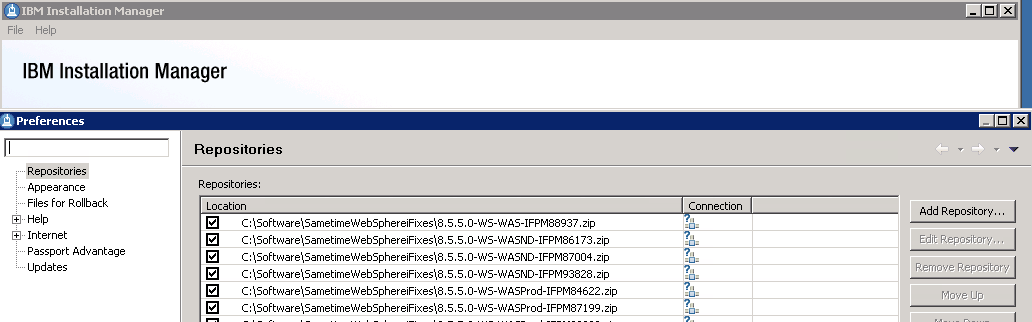
Launch Installation Manager – Choose File – Preferences from the menu and set up your repositories as I have done below (these point to the fixes which were zip files, these didn’t need to be extracted but I wanted them listed separately so I could check them)

Installation Manager - Adding Repositories

Community Server: When installing the Community Server, IBM have added some much needed additional steps to the documentation providing details on performance tuning Windows 2008 and 2012 networking and securing the server to protect against vulnerabilities discovered in the past few years.  None of this is new, it was all public information in technotes but it’s good to see it brought together in the documentation as part of the deployment instructions.  Don’t be tempted to skip over these steps and come back later, they will double the amount of time it takes to install a Community server (from about a day to about a day and a half) but they are important.

If you are moving from an earlier version of Sametime you will need to be using LDAP if you aren’t already and you can’t use your Sametime Community Server as its own LDAP server, that’s not supported and will  present problems.  In fact you should disable LDAP on the Domino server running Sametime completely.

Sametime Proxy Server: The Sametime Proxy server is used for mobile clients, for awareness in web based meetings, for a browser based IM client and more.  You need to install this as a WebSphere component.  It is IBM’s recommendation that each component have its own VM but I have had success in the past co-locating multiple server elements depending on number of users.  There are a few more  settings some of which were available in Sametime 8.5x but again in technotes, etc and so weren’t well known.  Once a Sametime Proxy Server is installed there are several steps to finish the install, as with the Community server, that will improve performance and security. One interesting item that everyone now will probably come across is that the Sametime Advanced server must use the same SSL certificate as the Sametime Proxy server for awareness to work, making wildcard certificates more suitable to our installs.  Previously I had avoided wildcard certs since WebSphere had issues with them in earlier releases but that appears to be resolved now.

Additional steps on completing the install of Sametime Proxy include making sure you connect to the notification servers for both Apple and Google to ensure mobile devices running iOS and Android can receive updates.  There are also settings to tell the Sametime Proxy server to not connect to the user’s home Community server allowing you to explicitly direct traffic to a dedicated Community member instead.  Instructions for that here.

Finally we usually have a WebSphere Proxy server in front of our Sametime Proxy to handle traffic over port 443.  In the Sametime 9 documentation IBM now seem happy to recommend a reverse proxy for accessing  the Sametime Proxy (I have customer doing that and using products like Netscaler) and only using a WebSphere Proxy in front of a cluster of servers.  The WebSphere Proxy is an intelligent authenticating server that will validate the user prior to directing traffic to a Sametime Proxy server.  If you have multiple Sametime Proxy servers in a cluster, the WebSphere Proxy may redirect the traffic to any of them.  Performance tuning for the WebSphere proxy has been nicely consolidated here.

This was meant to be a short blog entry, obviously I haven’t covered everything but hopefully I have given you some pointers.  More to follow…
Keeping It Clean

Two recommendations for accessories for my Macbook Air extremely useful for both what they are meant to do and also as something completely different.  The first was a simple privacy screen to keep things private when I’m sat in meetings making notes I don’t want seen travelling.  The second is a keyboard cover to protect the keys from my aggressive typing (I wore the M and N keys away in 6 months on my last laptop).

The unexpected bonus of the privacy screen is that  I bought one that had guide rails stuck to the side bezels so it can be slotted in and out as needed. This also stops me getting fingerprints all over my monitor.  I just take it out and clean it with soapy water, plus it only cost about 15 dollars so i’m happy to replace it if I need to.

My keyboard cover (as recommended by Kathy) actually does an second  job of catching crumbs and long bits of hair (the classy fallout of not stopping work to eat and being on the keyboard 18+hrs a day).  I love the Moshi keyboard protector which is so light and thin I don’t notice it’s there and doesn’t effect my typing – in fact i’d buy it purely to protect the keyboard from debris.  I was surprised by how nice the Moshi was compared to other covers I have seen which created too much of a buffer between my typing and the keys to make them workable.

If you want to try it out, here’s the keyboard cover. Again it “sits” on the keys , it’s not glued on so can be removed and cleaned (spot a pattern here ?}

Moshi Keyboard Cover

MOBUG 2014 – The Mobile User Group

Some of you may have already heard of MOBUG from some activity this year but for those that haven’t, MOBUG is a new idea for a user group and community around all things Mobile.   Designed to be entirely independent of software, hardware and service provider  it hopes to bring together anyone involved in mobile strategy at strategic or technical levels to share knowledge and discuss ideas.

For this format there needs to be a different approach so alongside regular expert presentations there will be round table discussions and feedback groups to allow you to hear from others and make your voice heard.

Best of all it’s not only free for attendees but is being held at the beautiful Soho Hotel in London

Go here to find out more and register your interest in attending or sponsoring.  MOBUG takes place on 24th March 2014 and spaces are limited.

Great Geek Challenge – Connect 2014

If you’ve been to IBM Connect (formerly known as  LotusSphere) in the past 3 years you may have heard of the Great Geek Challenge organised by the Nerd Girls.  On Tuesday night of the conference we take over the Fountain restaurant at the Dolphin hotel (the one that sells Ice Cream) and have a fun, loud, stupid, competitive, quiz evening.  Carl Tyler and Paul Mooney have been hosting the past few years and although we are limited by the capacity of the restaurant and the number of events on a Tuesday night, we’ve packed the place out every year.

If you’ve been you know how much fun it is (hopefully) if not – well trust me , it is.  We provide prizes and free food and drink, courtesy of our sponsors. The GGC has never made a penny in profit in its 3 years.  It’s done purely to give our friends an opportunity to have some fun.

This year I’m  starting off by trying to find out if people would be interested in us doing the GGC again and if sponsors want to contribute*.  I hate asking for money and if there’s no interest in sponsoring or attending I won’t put any of us through that 🙂 I did consider asking for contributions on the door but it just doesn’t feel right.  A quick poll seems like a good idea here..

Hope to see you in Orlando in January

The LDC team – having a good time . No really, they were.

My Webcast With Chris Miller on Sametime 9

Just finished a great couple of days with the Salvation Army team here in Orlando talking about all things ICS and CCM (I do loves me some acronyms.. that’s IBM’s Collaboration products like Connections, Sametime, Notes etc plus Connections Content Manager and the Filenet engine).  I don’t often get the opportunity to talk to an international group all working together on a single strategic direction so both the content and the audience (if not the location 🙂 were new and fun.

Next up tomorrow I am on a live webcast with Chris Miller talking about Sametime 9, what we think, what you need, those licensing changes and how to move forward.  If you haven’t registered you can do so here so I hope you can join us.  You just need to pre-register in advance of 10am CST Thursday 26th.


Some Punny Title With The Word “Abstract” In It..

IBM Call for Abstracts is open as I’m sure you’ve heard from 100 other sources but I wanted to talk a bit about some of the tracks and especially the Show and Tell track that Paul and I have been working on with the track manager Christian Holsing at IBM since its inception.  You’ll notice if you go look (oh go on, here’s a URL if you can’t wait) that the Lotusphere Technical Program at IBM Connect remains a big  component of the overall Kenexa World / IBM Connect event.

As part of the Lotusphere component the content breaks down into tracks some of which are designed for IBM, some for customers and some for BPs.  Getting your abstract accepted is about two things

1. Writing a decent abstract.  I can’t emphasise this enough.  Don’t submit something half thought through or constructed because you think it’s so important you”ll “get to that later”.  First pass, if the abstract isn’t good , you’re out.  Plenty of people in the Community including myself are happy to talk to you about your abstract pre submission, I know I run mine by friends before submitting.  Don’t make the mistake of a bad abstract on a good subject

2. Submit to the right track. Not all of them. The right one.  Last year I was very sorry to see sessions I would have loved to have had in Show and Tell miss us because they were submitted to the wrong track. That’s true of all tracks.  The content team try to share / move abstracts to better tracks but it’s a manual process and 90% will simply get lost in the shuffle.

Do not pass up the opportunity to present at Connect.  I can’t emphasise this enough.  Every year the content team wants new ideas and new speakers and there is no better exposure for yourself or your company than sharing your knowledge with the variety of attendees at Connect.  Plus if you’re weird like me you just like standing on stage to shout “look how cool this is!”.

The Show and Tell has, over the years, gained the reputation for being hard-a** , we take only the most technical sessions. However we recognise that although we want in depth technical detail on a niche aspect of an ICS product, the products and technology themselves have become more complex and the depth of step by step instruction we wanted can become a death march for both presenter and attendee. So this year we’re changing things around, we still want highly technical , we still want demos, but here is the abstract for this year which I hope gives you an idea of the changes in style.

The Show ‘n Tell track brings you the best in live technical education. SNT sessions explain in comprehensive detail a specific technology with detailed instructions, picture screenshots and live demonstrations that show how it can be used and applied for your environment. With 90 minutes per session you can share your expertise with an audience who has come to learn something new.

This year we are interested in technical content on any of the IBM Collaboration Solutions products demonstrating how people can get the best out of them, as well as how combining IBM technology can deliver an integrated Social Experience. Whether you’re an administrator or a developer consider only that our attendees are working with complex technologies and demanding new ideas, at IBM Connect we want to give them content they can’t get anywhere else.

As far as the other tracks are concerned.  If you are a Business Partner or a technical consultant or an individual your best tracks to submit to are Best Practices, Jump Start and Show and Tell.  Not Infrastructure or Application Development which historically are 99% IBM presenters.  In addition if you’re a Customer or Business Partner you have new, what i’d call technical marketing,    tracks to submit to talking about cool things you’ve done. For Customers (“Track Seven: Customer Case Studies (from an IT perspective”) and for Business Partners (“Track Eight: NEW! Spotlight on IBM Business Partners “).

If you have an idea for a session don’t twist yourself in knots trying to decide whether to submit, just write the abstract and submit, you won’t regret it.  I’ll be sending in some submissions myself and keeping my fingers crossed but whatever happens I hope to see you in Orlando in 2014.

IBM Wiki Outage…

IBM Wiki Outages Coming up
“Planned outage Friday October 4 to Monday October 7, 2013

This wiki, along with all other wikis, forums and other applications hosted on www-10.lotus.com, www-12.lotus.com, and infolib.lotus.com are expected to be unavailable from 5:00 PM EDT (9:00 PM GMT) Friday, October 4th 2013 to 9:00 AM EDT (1:00 PM GMT) Monday, October 7th, 2013 due to maintenance work at our facility”

Sametime Launch – Backing Out Of The Race

Today is the launch day for Sametime 9 which means the gold code should be available to download and install.  Usually on gold release day I see a rush on blogs and twitter to download the software get it installed and start talking about it which always makes me feel under pressure.  Added to that is that i’m currently at the airport heading to Florida to do some presentations on Connections Content Management, Quickr migration and Filenet so the chances of me getting a) time and b) decent enough internet to download 15+GB of files is slim.

Once I do get everything downloaded this is the plan

1. Build a new VM with DB2 10 and the System Console on Windows 2008 (because I find DB2 management on Windows easier but that’s just me and it’s changed since we no longer have a control center

2. Build a second VM to install Meetings, ST Advanced code, ST Proxy on RedHat

3.  Build a third VM to install the Media components including the new Video Managers

That should take 2 days from starting download to completing install if all goes well, then I will go back a step, clone my 8.5.2 environment and start testing migration.

I probably won’t blog about my upgrade and migration experiences until the week after next.  Meanwhile I’m focussing in on my Content Management presentations, I’ve learnt a huge amount about Filenet itself as a part of learning CCM in the past few months and I’m excited to be presenting something new (and I hope interesting).  Bring on the 97 degree heat / 90% humidity!