One Of Those Faces….

Walking on Brighton seafront this weekend we came across the “Tight Modern” a tiny replica of the Tate Modern containing artworks by 60 disabled artists.  Well worth a look but that’s not important right now…What is important is that as I came out , one of the guides stopped me and said:

“I know you don’t I?”

Well no, no she didn’t but I come across this all the time.  It’s weird that people think they know me.. Not just “I might know you” but “I DO know you”.  So I responded whilst smiling:

“No I just have one of those faces, people think they know me all the time”

From here we move to the next step which is the person who claimed to know me insists that my memory is faulty:

“We met at one of Simon’s get togethers” – said quite forcefully whilst gesturing at whoever Simon is.

These are my favourite responses , the best of which was from a guy at immigration in Chicago who insistently said:

“We were on the same kibbutz a few years back”

When I continue to deny knowing them the whole atmosphere gets very frosty and the person who is convinced they know me is now convinced I’m lying for some reason.  I then get a dismissive goodbye.

So there you have it, in a few short seconds my new friend goes from delighted to see me again to annoyed I’ve turned into such a lying b***h.  I clearly need a better strategy to deal with these confrontations because they do keep happening and I must  just have one of those faces

Or I’m part of a science fiction plot / movie and there are hundreds of me’s out there that I’m unaware of.  Maybe one of the other me’s also has a blog?

Solving My Macbook Battery Problem

In the past few months I’ve been frustrated by my Macbook Air, which is less than a year old, constantly draining the battery when I leave it unplugged and on sleep.  I often have work to do in the middle of the night or early morning so I’ll bring the fully charged laptop to bed, put it on sleep and set the alarm for 4am – then when I wake up and go to do work I discover the battery is almost completely drained.

I found a thread on the apple support forums from late last year where people were complaining of something similar but that seemed to be entirely related to the Avast software which I don’t have.  I also saw a few comments about using a keyboard cover preventing the screen closing properly which worried me as I didn’t want to give up on my mophie cover but on testing (putting it to sleep manually rather than just closing the cover) I discovered the drain still happened.

My solution was finding the command

pmset -g assertions

running that in a terminal window gave me this

Assertion status system-wide:
BackgroundTask 0
PreventDiskIdle 0
ApplePushServiceTask 0
UserIsActive 1
PreventUserIdleDisplaySleep 0
InteractivePushServiceTask 0
PreventSystemSleep 1
ExternalMedia 0
PreventUserIdleSystemSleep 0
NetworkClientActive 0
Listed by owning process:
pid 69(hidd): [0x0000000a00002102] 02:04:08 UserIsActive named: “com.apple.iohideventsystem.queue.tickle”
Timeout will fire in 596 secs Action=TimeoutActionRelease
pid 67(InternetSharing): [0x000000080000215f] 02:02:51 DenySystemSleep named: “com.apple.InternetSharing”
No kernel assertions.

See that last one?  I have internet sharing on because once when at a conference where only I could connect, Tim and I shared my wifi connection. That option was stopping my laptop from ever properly going into sleep.  I disabled it in system preferences , shut my laptop lid and found it still 100% charged 5 hrs later.

Oh and the first time I ran the pmset command it didn’t show me that, instead it showed me this

PreventUserIdleSystemSleep named: “com.apple.iTunes.syncing”

Yes iTunes was preventing idle sleep, but more importantly until I shut down iTunes it didn’t show me the bigger problem of Internet Sharing preventing it.

Problem solved.

Connections DB Schemas

A fantastic visual representation of the key relationships in Connection database schemas by Mark Myers.  None of this is documented by IBM publicly so this is entirely Mark’s effort to take apart and document.  Some of us have tried it in pieces but this is by far the most comprehensive and useful attempt to document the underlying architecture I’ve seen.

Another one for the bookmarks…

http://www.stickfight.co.uk/blog/Connections-Db-Schema-Tip2-Finding-the-UserID

Adventures With CCM and Libraries

Recently I’ve run into all sorts of problems deploying CCM for a customer who is running multiple servers.  In this case two of the biggest problems were down to the Filenet application server being different from the Connections application server so I’ll write them up here in case anyone else runs into the same thing.

Problem No.1 CreateObjectStore batch file fails with

“CC0050E CONTENT_FCA_ROOT_DOES_NOT_EXIST the root folder does not exist d:\ibm\connections\data\shared\ccm”

After much checking that the folder was there and did exist and the account running the CreateObjectStore did have rights I realised that it wasn’t looking on the Deployment Manager server (where the Filenet files are installed and where the batch files are run from) but on the WebSphere Application Server designed to run the CCM Application.  That server, which was a completely separate machine,  didn’t even have a D drive. It had an E drive.  Once I was able to create d:\ibm\connections\data\shared\ccm on that second server, the setup completed.

Problem No.2 Principal Name not found when running CreateGCD

This failed multiple times no matter what account we used although we had a specific account set up for CCM called ccm_administrator that had a valid email address and was in LDAP, this kept failing.  I could see the account in LDAP (Domino) , through an LDAP browser and could validate the password but CCM didn’t like it.  In the end we discovered that the site had a filter for LDAP users in Connections that required a certain attribute to be complete, that account didn’t have that attribute set so even though it was a valid LDAP account it wasn’t authorised as a Connections account.  Once that attribute was set the CreateGCD ran perfectly.

Problem No.3.  Mobile app doesn’t display library contents

This is actually a bug which is due to be fixed in a new version of the Connections mobile application (est. end April).  If the CCM application is on a server with a different hostname than the Mobile application, you can see Libraries in the Mobile application and even go into them but you can’t see library contents.  Using a browser on a mobile device works fine.

So that’s it.  A few CCM things that have stalled me or tripped me up in the past few months that I hope you can avoid 🙂

Keeping On Top Of Sametime Fixes

Thanks to Jeffrey Miller @ IBM for posting a blog page with links to all the latest fixes for the Sametime components.  He has offered to keep this up to date and I strongly suggest you bookmark the page (I did) to save trying to navigate through the hundreds of individual items on fix list and work out what supersedes what.

http://www.mymiller.name/wordpress/sametime/sametime-9-0-latest-published-versions/

Problems Deploying Sametime Policies – The Missing Link

I’ve recently run into a problem deploying Sametime Community Server 9.0.1 at two new sites and on an existing 8.5.2 IFR1 site which I’m not 100% convinced is the same issue but as part of my troubleshooting I discovered a missing piece of  policy behaviour that I”m finding extremely useful.

Prior to Sametime 9, policies were deployed on the Community Server and used the database stpolicy.nsf.  That database no longer exists in v9 and later.  In Sametime 8.5.2, if you didn’t deploy the System Console and just had a standalone Community Server you were still using stpolicy.nsf.  As of v9 of Sametime you can no longer do that as stpolicy.nsf no longer exists.   The Community Server must be deployed with the System Console in order to manage policies from within the Console itself. Carry on reading, that’s not the missing link:-)

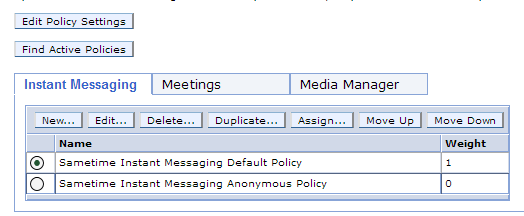
Here’s a screenshot of the Sametime System Console showing where you set up policies, this is stored in the STSC DB2 database.

SSC Policies

From here the policies are pushed down to Community server (Domino) at intervals (approximately hourly) or when the server or policy service restarts so they can be applied to users on login.  This means that clients logging in are receiving policies from the Community server, they aren’t directly looking up policies from the System Console.  If there’s a breakdown in communication between the SSC and the Community server, you can’t push policy updates down to the users.

When installing the Sametime Community Server, the default policy is to allow minimal features through the embedded client, things like screen capture, file transfer and rich text editing are disabled, however I have discovered on two different sites with new 9.0.1 installs, the changes to the default policy were not feeding down to the clients.  The problem was where to track this down.  The policy was right in the System Console but if I turned on POLICY_DEBUG_LEVEL=5 (in the [Debug] section of sametime.ini) I could see that the policy settings being applied did not match those from the System Console.  I even created and deleted additional policies and saw them continue to be ignored through reboots.

So where was the missing piece – somewhere the Community Server was picking up old values but with no stpolicy.nsf there was seemingly nowhere for me to find them.  A separate earlier PMR to IBM pointed me to two new (to me) Xml files on the Community Server file system (domino program directory)

policies.server.xml

policies.user.xml

These are where the System Console policies are written and updated and where the Community server policy service accesses the settings to deploy to users.  The date / time stamp on those files was suspiciously that of the original install, so they hadn’t been updated since then.  The next thing to check is why these weren’t updating.

The first thing to do is test that the Community Server can access and read policies using your wasadmin (or whatever your administrative account it) account.  To do that launch a browser on the Community Server and go to http://sscserver.turtlehost.net:9080/stpolicy/policy/all – you should be prompted for a login, give it your wasadmin name and credentials and the policies should display as a string of values in your browser.  If that works but the policies.server.xml and policies.user.xml files still aren’t updating then the problem may be with how you are telling the Community Server to connect to the SSC.

In the Domino program directory there is a “console” subdirectory and in there is a console.properties file that tells the Community Server how to connect to the System Console.  The contents of that property file are

SSCEncodedAuthorization= [the encoded password for the wasadmin account or whatever your admin account is}
SSCSSLEnabled]=false
SSCHTTPPort=9080
SSCHostName=sscserver.turtlehost.net
SelectedDeploymentId={deployment id of the community server plan in the SSC}
SSCHTTPSPort=9443
LogLevel=FINEST

What’s missing from there is the SSCUserName which identifies the name of the user who is going to login (usually wasadmin) and SSCPassword which contains the unencrypted password for wasadmin (removed and replaced with SSCEncodedAuthorization on first use).  Both of those were required in 8.5.2 versions but don’t seem to be there in 9.0.1  It may be that they shouldn’t be needed but twice now I have seen policies not update after initial install and adding those values to the console.properties , removing the SSCEncodedAuthorization and restarting fixed the problem permanently.  If you add the SSCPassword and remove the SSCEncodedAuthorization you can tell if the connection to the SSC was successful because the properties file will then remove the SSCPassword and replace the SSCEncodedAuthorization.

So there you have it – three missing pieces to help debug policy deployment in Sametime

1. The Domino server based XML files policies.server.xml and policies.user.xml

2. The URL http://sscserver.turtlehost.net:9080/stpolicy/policy/all

3. The console.properties file in the console subdirectory under the Domino program directory
 

Get a load of these speakers…

I’m really excited by the breadth of world class speakers and moderators joining us at CSCEvent.   Take a look below and visit our agenda.  It’s only 2 weeks away and not only do you have us, LDC and these speakers but it’s being held at one of the most fun locations in London, The Soho Hotel (look at those seats!).  There are still a few places left so please join us and register here

The Collaboration Stack Community event, taking place in London on March 21st is nearly at capacity (although we have been warned people register and don’t come 😦 )  Hope to see you there!

Video From Spark Ideas @ Connect 2014?

If you missed Spark Ideas and our great speakers or just want to see them again, the videos of each talk are now uploaded to our Vimeo channel. Thanks to Chris Miller and Spiked Studios for recording producing and uploading!

Spark Ideas Videos

  • Get your motor running – Head out on the highway – Looking for adventure – And whatever comes our way (Debora Cole)
  • Fighting For Rural Internet (Bill Buchan)
  • Living without walls: How some goats, an orphan and a very long cup of tea changed my life (Colleen Burns)
  • Meet my 3 Friends Pain, Suffering and Sacrifice (Gaby Spaszewski)
  • Introverts in the wild (Tim Davis)
  • Operation Pencil Box (Norman Cox)
  • One Stupid Thing, Every Day (Julian Robichaux)
  • Bicycles & Community (Jamie Magee)
  • Is love enough? The passion to help children find a home for good (Stuart McIntyre)

Something Different This Way Comes..

If you’re in the UK (or visiting) and have any kind of interest or background in Collaborative technologies, we, together with our friends at LDC, are putting together a new networking event in London on March 21st.  The agenda can be found on our website http://cscevent.com/agenda and you’ll see we are trying something different (and no-one, least of all us, will be selling to you.)

This is a technologically agnostic networking event for those who work in or are interested in collaborative software. Our goal is to create space for ideas, to learn from others and get a view of how various sectors like cloud, mobility and security are unfolding.

It’s a chance to step back, consider and develop your strategy in the context of others’ experiences. We hope you come along with a willingness not just to listen but also to share.

We have two types of sessions during the day, followed by an evening drink / beers in nearby Soho.

Talking Technical

In this room each event will present two or three speakers who want to offer their views
on a technology and why they like it. We will then open up the floor for further
discussion with the audience who are welcome to ask questions and offer their own
content or viewpoints

Work and Life

This room brings informal discussions and roundtables around a variety of subjects
that effect us all. How do we run our work days, our lives, our downtime and our
interests. How do we get trained, plan work, track work and connect with each other.
Each event will be an open discussion with a moderator working through a series of
prepared questions for the room to open up discussion. The moderators here are not
necessarily subject-matter experts and the audience is expected to participate.

We will have to limit numbers to CSCEvent so if you definitely want to come you can register via  Eventbrite

Hope to see you there!