Hidden Pre-Reqs for Sametime VMCU – Surprise!

Building out another Sametime environment this week and I hit a roadblock. Fortunately because I’m a control freak I always read along with the documentation when I do an install, no matter how many times I’ve done it before.  I do this because it’s always possible IBM have updated their documentation since I last saw it…..and so I found,  buried in the documentation here, on the install page of the VMCU.. under

Deploying –

Deploying Common Component –

Deploying Audio and Video –

Sametime Media Manager on Linux or Windows –

Installing the Sametime Media Manager’s VMCU component –

Installing the Sametime the Sametime Video MCU – Step 9)

I find this

Download and install the following prerequisite RPMs if they are not already installed.

For the list of RPMs to install, see the IBM Technote, List of RPMs to install on the Sametime Video MCU

Yes a shiny list of pre-reqs required only by the VMCU and not on the system requirements.  Unfortunately they are all fairly old RPMs and at the current site although the packages are there, they are all newer versions of the ones needed.  The tech note is very specific about that

Important: Each RPM’s file name includes a version number in the format X.X.X.Y, where X is a mandatory level that cannot be changed, and Y is a minimum level. If your RPM has a higher level for the value in the Y position, you can use it.”

So you may have zlib installed but if you have zlib-1.2.7-0.*.x86_64.rpm but the tech note calls for zlib-1.2.3-106.*.x86_64.rpm then you’re out of luck unless you can revert back to zlib-1.2.3. something

I assume the tech note (which is only a couple of weeks’ old) is a result of support having to deal with VMCU problems and determining those exact packages are needed for the VMCU to work.  It’s not a problem so long as you know about it and make sure those packages are in place before you start.

How To Resist Punching Windows 2012 In Its Smug Face

Windows 2012 surely comes from the deranged mind of a resentful Microsoft employee who then got the usability team drunk before releasing it to market. Much of the horror of 2012 was fixed in R2 so why don’t I just use that? Well sadly Sametime 9 does not officially support R2 as a platform only 2012. I’ve done plenty of ST installs since Sametime 9 shipped last Sept but funnily enough all of them on Linux or Windows 2008 R2. So what’s the problem? Let’s go through each of my steps to build….

1. Having checked with IBM support if they’d support Windows 2012 R2 and got a reply that it hadn’t been QA’d but “should work” my customer wanted to try that. Fair enough. I sign on, find IE and start my downloads. Step 1 install DB2
….installer crash
…..repeat many times with different accounts security and options. Installer crash
….remove McAfee (how did that get in there) and try again. Installer crash

Note at this point it isn’t even attempting to install, the installer basically errors immediately. I find similar errors reported for Db2 9.7 back in Windows 2008 R2 early days so we open a PMR and IBM confirm unsupported platform (!)

Pause whilst 4 servers are rebuilt and software is downloaded again

2. Install DB2. Success! But hang on, every time I login there’s no system tray icon and a db2systray error. On digging it appears this is a conflict with Windows 2012 extended security – disable systray or add every user who logs in to either DB2ADMINS or DB2USERS group.

3. But where are the groups? For that I need server settings but that’s nowhere to be found. I tell a lie there’s a 1×1 pixel in the bottom right of the desktop (make sure the entire desktop can fit in your RDP window) hover EXACTLY there for a few seconds (it won’t be instant) and up comes that weird charms right hand side thing including Server Settings – go there and about 5 clicks later I find my way to users and groups..

4. Now test port 50000 is listening. Where’s my command prompt? Where’s my start bar? For that matter where’s my DB2 programs I just installed including my command window? Turns out Windows 2012 did away with all that pesky Start menu “things that aren’t Microsoft” options because why would you need those? (They brought it back in R2). O-Kay

..to call up Start menu press the Windows key. If I do that in my VM through which I have a VPN connection and RDP to the 2012 box – it does bring up the start menu, the start menu to my VM not the RDP box. This is apparently a known problem fixable by pressing Windows key+Alt+Backspace or on my Mac keyboard Cmd+CTRL+Function+back arrow and I have the Metro home screen. Similar to Windows 8 but much less useful since it has no apps listed or even the Command Prompt. Apparently to get that I have to type “run” (into nowhere – just type it) and now I get a line I can enter a search into to find an app

5. Oh and that charms menu we found earlier is the only chance you stand of finding a restart option. Except it’s called “Power” which is WAY more scary but if you go there you can choose restart

6. And don’t get me started on IE and it’s restrictions on concurrent downloads…

Now I have the hang of it it’s fine but how it ever shipped out the door without actually – you know – being tested by real admins beggars belief.

DB2 and SSC built – moving on…

When bad wasadmins go missing

Working yesterday on deploying a new application in a test Connections environment I was logged into the ISC using wasadmin for hours. Eventually I finish my work and restart everything to test.  I go to login to the deployment manager and no account will work, not wasadmin nor any of the LDAP administrative accounts set up.  So what do I do?  Well first I need to work out what’s going wrong and I check SystemOut.log when trying to login and see this error as a root cause

CWWIM2009E The principal ‘AnonymousUser’ does not have the role ‘administrator’ required for the operation ‘GET CONFIGURATION’

Well OK, let’s back up ,since it happened after a reboot the change could have been made any time since the previous restart and wasn’t necessarily related to the work I was doing at all.  First I need to get into the ISC and to do that I need to disable ISC security so I can get in.  I edit security.xml in the /profiles/dmgr/config/cells/<cellname> directory and find the first enabled=”true” in the security tag and change that to enabled=”false” (make sure you save a copy of this file first).  Then stop the dmgr and start it again. I have trouble stopping it as the authentication isn’t working so , since the dmgr is the only WAS server running , I just terminate java.exe from task manager.  Having done that the URL for the dmgr  <hostname>:9043/ibm/console no longer asks for a password and lets me login using just a user name.  and I’m IN – albeit with no security so no way to start servers.

I go look at the Administrative users configured in the system and sure enough the LDAP admin accounts are there but wasadmin is gone.  I can’t add wasadmin because security is disabled and it can’t find the account.  I can work around it but a better solution is to tell the ISC to use the LDAP realm instead of the defaultWimFileBasedRealm (which contains wasadmin).  I go to Global Security, re-enable security from that screen (it was disabled by my earlier security.xml change) and then go into the federated repository and change the realm name from o=defaultWIMFileBasedRealm to whatever my LDAP realm is (in this case “root”) and then change the Primary administrative user name to one of my LDAP admin accounts (in this case gabdavis).

Global Security

Now I can restart dmgr and login to the ISC with the name gabdavis (my ldap account) and its ldap password.  Once in there I can go to Administrative Users and re-add wasadmin with all the roles I need then (if I wanted to) go back to Global Security and revert the realm and primary administrative account back to what was set originally (above).

And that’s it.  I hope this is useful for anyone else who has a wasadmin go astray…Backup your deployment manager profile regularly people !

Wrestling for Space

I like to build VMs for any customer projects I’m working on so the OS and environment will match theirs.  That means I have between 8 – 10 VMs on my machine at any one time and with 500GB of disk I have to be careful of space.  My usual size for a Windows 7 or Windows 8 VM is 30 – 40GB since they usually contain only the OS and some administrative tools like Putty, Winscp, Domino Administrator, Jexplorer, Softerra’s LDAP browser etc.  Windows itself eats up more and more space and I found on one 30GB drive today that the winsxs directory was 12GB.  After doing some research (surely I could clear up some space there?) I ended up running the following command from an administrator run command window

dism /online /cleanup-image /spsuperseded /hidesp

which removed the SP1 one files and cleared up nearly 4GB of space. Add to that clearing out the Temp directory and the Downloads directory and I free up nearly 9GB in total.


Bye Bye Wikis – Hello Knowledge Center and Welcome Back PDFs

Just in time for the release of Connections 5 (on June 26th people – mark your diaries),  the IBM documentation team are slow launching the new Knowledge Center  that is replacing many of the existing Wikis and all of them going forwards with IBM generated content. (clap)(clap)(dance)(clap)(finger click)(more dance)

The Knowledge Center currently links back to the Wikis for some products (such as Connections 4.5) and has generated content for others (such as Sametime yay!).  Eventually all the newer Wiki documentation (for example Connections 5) will disappear and reappear in the Knowledge Center.  I’m definitely in favour of the documentation being sourced authoritatively from IBM once more and not open to general editing for a start but there’s also the option to create your own collections of useful content and then print entire topics to PDF.

That needs repeating WE CAN NOW PRINT DOCUMENTATION TO PDF (and therefore printers) once more by selecting only a parent topic.  I think you need to login first, create a collection and save to PDF but it works beautifully for me.

The Knowledge Center contains documentation for ALL IBM products in one place with Sametime, Connections, Domino etc under ‘Collaboration Solutions”. You can bookmark the products you go to the most to make it more useful or create your own collections.  This is a big step forward from googling and finding Connections 2.5 content higher in the search results than 4.5 or finding stuff by remembering that the databases for the wikis are stwiki and lcwiki!

A huge thank you to the documentation team for recognising the wikis just weren’t working for us and for giving me back my offline pdf documentation.  As the products get ever more complex, so does the documentation and nothing beats printing and reading content for me.

Here’s a link to the Sametime 9 section but you can easily navigate up to other products from there


The Curse Of The Maltese Falcon

All Tim wants for his birthday is a copy of the Maltese Falcon on ebook. Without DRM.  For a book published in 1929 and famous worldwide you’d think that was possible.  Every summer he re-reads all the Raymond Chandler books and most of Dashiell Hammett (who wrote Falcon) and since we’re travelling most of this summer he wanted an ebook copy.

This isn’t the first book this has happened with – getting non DRM copies of ebooks or even copies of books in digital form isn’t as easy as you might think.  The surfeit of books offered for sale on Amazon or iBookstore is tiny compared to the history of book writing , we just get lulled into thinking EVERYTHING is available when that’s absolutely untrue.  Despite having a small house and not much space I’ve hung onto a copy of every book I’d regret not being able to read again, as well as buying as many as I can on ebook.

So what’s the problem?  Amazon, where I usually buy ebooks (only because the DRM is so easy to remove) doesn’t sell it. Barnes and Noble does and you can remove DRM from those too but I have to create a fake american identity to do that and I’m not convinced the quality of the book they are selling is better than many of the free or cheap ones out there.  Those free or cheap books are scanned and OCR’d and the quality goes from “OK, if I ignore the typos” to “unreadable”.  So far every public version of The Maltese Falcon we’ve tried has been unreadable with the additional bonus of missing chapters.  The iBookstore sells a Dashiell Hammett collection that includes The Maltese Falcon that I own but I read that on my iPad, the DRM in place.  Nothing removes the iBooks FairPlay DRM – a few years ago a hacker called Brahms brought out a tool called Requiem that did remove all DRM from iBooks and it was disabled by the next update of iTunes and Brahms then “retired” his code (I assume this means Apple had her / him killed but what do I know).  There are tools today that remove DRM from Apple media content but not books.

Why is this bothering me so much? Well the idea that today the world of “books” for the generations behind me has shrunk down to those available as ebook. I still love to browse a bookshop whenever I can find one but I’m also usually the youngest person there. Our choice, range and ownership has gone out of the window.  Amazon have no interest in building a large publicly available all encompassing library of books that might have a small audience.  They have an interest in selling high volume / high profit.  The most recent fight between Amazon and Hachette where Hachette books (including those by Michael Connolly and “Robert Galbraith” were removed from sale with no explanation) gives all of us reason to worry.

So is there another way? A way to have DRM free ebooks.  I realise greedy and backward thinking publishers hold much of the blame but my access to books is in danger and it’s time for publishers to realise they are strangling their own market, for resellers to realise that DRM isn’t protecting sales and for the rest of us to start doing I don’t know what…..  I had hoped that Apple would negotiate with publishers to go DRM free but clearly writers are more powerful than musicians and the argument that worked for music isn’t going to work here.  It also is more than apparent by the closing of bookshops that they haven’t learnt the lessons of the music industry.  The bookshops are your storefronts to the online purchase – I connect to your wireless in the store, download a book and the store gets a % of sales. Seems easy to me.

If there’s some good news out there for the future of books, bookstores and ebooks I’d love to hear it…


Norway & ISBG

Last week I was in Norway at the ISBG conference in Larvik.  You would know this if I hadn’t messed up publishing my blog entry talking about how much I was looking forward to going and what I was presenting on but I tried to set it to publish “in the future” and got the year wrong – so yeah.. I”m back!

At the bottom of this blog you’ll find links to my three presentations. Two of them are updates from ones I gave at Connect and the third is entirely new on how to configure Single Sign On / SAML / SPNEGO for your company.  I had 45 minutes for that presentation and even abbreviated I ended up with 55 slides but I think it went well – except for the bit where I kept stepping forward to hear questions better and nearly fell off the front of the stage.  You know the moment where one foot hangs in mid air and you desperately throw yourself backwards to stop falling forwards.  That.

Any-who , this was only my 2nd trip to Norway and since last year it poured with rain the entire time I didn’t see much. This year we spent some of the weekend in Oslo by the harbour and walked, walked walked.  A beautiful city and if you get a chance I highly recommend the Viking Ship Museum (get there early before the crowds as we did) and the Norwegian Folk Museum (thank you to Wencke Lorentzen for her guiding and the lefse ). The Folk Museum is huge and impossible to completely cover even if we had a whole day which we didn’t because we spent too long with the viking ships.  A very interesting takeaway for me is that without any form of written communication there is very little understanding of how the vikings managed to survive, sail huge distances, find their way home and live each day – all we can is make a best guess.   We also spent a long day walking, walking around Oslo which has some of the best public art I’ve seen (it was a gorgeous day so that helped the 9+ miles journey).

Oh and we ate some of the best food ever – if, like me, you love fish and especially raw fish and also cheese, and are happy for the waiter to bring out “whatever” until you say stop.. well Norway rocks 🙂

Thank you to the ISBG team for inviting me once more and everyone who attended.


My Shameful Secret (well one of them)

It’s sad but true, I have reached well into my 5th decade (no! surely not.. you’re right, I don’t look it) and have never owned a bike or even learnt to ride one.  For the past 4 years I’ve owned a recumbent exercise bike and cycle on that 6 – 10 miles a day but I’ve always wanted to ride a bike.  Partly because we live less than 1/4 mile from one of the most beautiful parks in London – Bushy Park and partly because when I met Tim he was an avid cycler who raced and cycled 40 miles a day.  He stopped because I didn’t know how and despite trying occasionally over the years we discovered I didn’t have much sense of balance but more importantly i’m short.  Not petite, just short.  That means my legs are short, my torso is short, my arms are an OK length which is surprisingly of little use in life.  Basically finding a bike I could get on and then stop without falling off has proven difficult.

Our last attempt about 10 years ago where I used his old bike went spectacularly wrong and it’s taken me this long to get up the nerve to try again, or I’m finally at the age where I simply don’t care about looking stupid.  So some friends on Facebook very kindly gave me advice, the crux of which boiled down to “get to a bike shop”.  Well there’s a great bike shop 100m from our house called Burts Cycles, it’s been there for over 100 years (60 years in the same family) and Tim remembered it from when he was very little.  Sadly not fondly.  He can’t remember why but for some reason he never wanted to go there again. So I found another bike shop about a mile away and off we went this morning.

I won’t mention them by name here.  They were awful.  I had wondered about getting a folding bike because from what I’d seen the stepover was nice and low and initially at least we only wanted it for cycling a few miles in the park.  The guy dismissed that as worthless (folding bikes are no good apparently) and then proceeded to try and push me to buy a “Giant” bike that was clearly no good for me (but great for him at 600 quid).  I struggled getting on and off and as I tried to explain to him my problem he kept saying “well you won’t get anything smaller you’ll just have to practice”.  Suitably chastised, embarrassed and deciding that bike riding really wasn’t for me we left.

On the way home we passed Burts Cycles and I asked Tim to stop.  This is a wonderful bike shop.  I explained my shortness problem (you know, in case he couldn’t spot that) and he showed me specialist frame builders who build for a smaller frame, then gave me a 75 quid 2nd hand fold up bike to try getting on and off and suggested I walk it round the corner to the car park and try it out.  That was great – I could get on and off it easily and even managed to cycle a bit and stop without crashing.  We came back to the shop all excited and he then directed me at another bike that was on special offer with a similar low step over but new and even had a basket (what! don’t look at me like that, I want a basket).  Again I tried it out and loved it so we bought this beauty.. my very first bike.

Gab's Bike


Of course we then realised Tim would need one too and once more Burts Bikes were fantastic – when Tim pointed at a bike he liked the guy said “yes that’s nice but you don’t need to spend anywhere near that much if you’re just cycling casually, this one is half the price”.  Again a quick test run and we both ended up walking home with shiny new bikes.

Tim's Bike


Of course we now have to go back and collect the car….

How I Wrangled Control Back From My Browser

I’ll admit it, I’m a privacy freak.  I limit what information I share publicly, I never give my actual date of birth, mother’s name, or correct answer to any question.  I have dummy mail accounts set up for when sites want me to register and I VPN if I’m anywhere but at home.  I think it’s important to be aware of what’s happening when you’re working in a browser, what happens when you leave tabs open and the degree to which you can and are tracked.  For me the convenience of letting a company know more about me in return for them customising my experience is an insanely unequal exchange.   I also know a lot more now about how Google etc track and use information (thanks to my brother in law Rob for his expertise).

But then again I also refuse to have loyalty cards.  Taking some degree of control back from your browser activity is not only responsible it’s empowering and healthy 🙂

Like notes.ini settings, more is not always better so I’ve gradually built up a handful of extensions that give me more control over my browsing and recently added a couple more that have the added benefit of being fascinating to watch and mostly free.

Toolsbar with Extensions

Extensions

1Password stores my passwords for multiple sites so I never have to reenter them.  I used to use this a lot but much less so since I switched to using password patterns which I change every 4 months.  I have 3 patterns at a time one for “I don’t care if someone gets at this” , one for “this has information on it i’d like to keep secure but nothing financial” (like my IBM registration), one for sites which hold payment information.  Each site has a unique password constructed from a pattern eg “first two letters of site in caps plus the number 1111 plus the letter X in caps” but not that 🙂

Evernote web clipper isn’t about security or privacy but it allows me to snap any browser page into Evernote.  I store all my reference documents personal and business (some encrypted) in Evernote and sync it to my iPad.  It also recognises when I snip a recipe and stores that both in itself and in its companion free iPad app called recipes.

AdBlock blocks ads.  There are sites that simply are unreadable and do not render in Safari unless all the ads are blocked and then they look normal.

AVG Do Not Track prevents sites I visit tracking me and sending information back to social networks and advertisers.  I have the option of allowing tracking but I find leaving this on allows me to clearly see what’s being attempted by sites I visit.

ClicktoPlugin for Safari prevents plugins from loading automatically on any site unless I then click to run them.  Even better it replaces media including flash with HTML5.  Whenever Safari was sucking CPU it was always down to some flash running somewhere, installing this has completely fixed that problem.

My two newest plugins are DuckDuckGo and Disconnect.Me.  DuckDuckGo is a search replacement that honours privacy.  It conducts a simultaneous search of Google and Bing if you want but your searches aren’t filtered (“customised”) by your assumed preferences from your search history.  Read more about it here http://dontbubble.us and here http://donttrack.us . Nothing is saved or tracked.

Disconnect.me is theoretically similar to Do Not Track but much more granular and is showing me more information about what a site is doing.  I’m easy to disappear down the rabbit hole here but take a look at this report from visiting the Facebook homepage

Disconntect.me on Facebook

So we have (confusingly green means blocked) – 4 advertising requests, 3 analytics requests and 215 content requests.  What Disconnect.me does is restrict content that doesn’t come directly from the site and page you visited.  They recommend you do not block content unless you’re 100% sure as it may affect site rendering.  At the bottom you can see they claim to save significant time and bandwidth in page loading too.  I don’t have any issues with Bandwidth myself and it’s not something I’m that worried about so I honestly haven’t tested if that’s true.  For each section you can expand and see what has been blocked and choose to whitelist sites.

My favourite feature is the visualize page button which gives me this rendering of sites requesting access and which ones are blocked.  I can mouse over any icon, see the site and whitelist / blacklist it.

So that’s it.  I can’t think of anything I’m missing (that frustrates me and i’d like to take control of) but I’m open to suggestions..
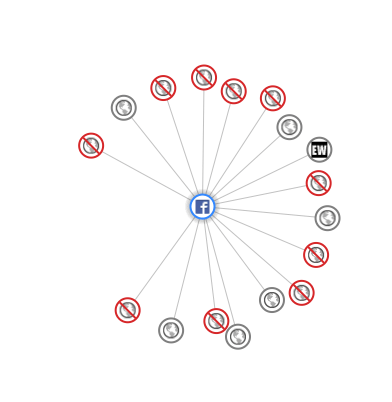
Visualisation of Site Requests


Connections .. um Next?

Next week on May 21st sees the launch of IBM Connections Next, coming 14 months after Connections 4.5.  Initially it will be in IBM’s cloud only but by the end of June we will have software to install on site.  That timeline matches IBM’s promise of end of Q2.  This is a major release so everyone is under NDA until May 21st.

If you’re a Connections customer and you don’t have a test environment in place then you are going to want one to validate your customisations, scripts and applications.  As far as your production environment is concerned ,  I don’t know if IBM will support an in-place upgrade, they certainly have before but my preference is always side by side to minimise downtime and risk.  If Connections Next is based upon WebSphere 8.5 (as Sametime is) rather than WebSphere 8.0 then side by side will likely be the only option.  We’ll see if that’s the case when the documentation appears..

The best public information right now is this presentation from Luis Benitez @ Connect 2014

there is also a Q&A with Luis and Suzanne Livingston on May 22nd  you can register for here

In the meantime – enjoy this great trailer for Connections Next 

Exciting things are coming!