IBM Connected Pt 1 of 3 – My Presentation Content

As I head home from Orlando I have a lot of things I want to share so it seemed best to split these into different blogs about different things.  This one is just the content from my three presentations.  I hope you found them useful if you came along and I hope you find these useful if you couldn’t make it but just download them.

Thanks to Terri Warren from IBM for working with me on the Connections and Directory Integeration presentation. It was our first time presenting together (and first time meeting!) and I think it went well – we had a lot of very technical content as you’ll see but the room stayed with us right to the end.

I was asked a lot about Connections101 and when it will be updated.  I am working on the Linux v5 version now including IBM Docs and that hopefully will start appearing online in the next few weeks.  Then I’m considering an iSeries install version if the hardware works out…

BTE201 – Working with External Users in Connections

BP201 – Creating your own Connections Design

BP206 – Connections Directory Integration (with Terri Warren)

A Conference Kind Of Year (Ch-ch-ch-changes)

As I come up for air having completed my presentations for ConnectED 2015, starting this weekend in Orlando, I am in a reflective mood.  I have 3 presentations this year (plus two halves) and I’m really excited about the content.  In fact I’m really excited about what I’ve been working on recently and I already have travel plans to be at (and hope to present at) Engage in Gent, Social Connections in Boston and MWLUG in Atlanta in March, April and August respectively.  This is the year of the conference..

I’m also delighted that many of my friends who can’t make ConnectED are still coming into town to hang out and visit. It’s going to be a very new and different kind of conference. I expect to go back 20 years to the days of quietly wandering the corridors unnoticed and going home to my rented house in the evenings and that’s OK – just so long as those of you who are going enjoy my presentations and say hi

BP201 Creating Your Own Connections Confection – Getting The Flavour Right
Swan, Mockingbird 1-2 Tuesday 5pm.
This is the session where I attempt to explain how to build your Connections environment and take into consideration all the additional products you can bolt on such as Forms Experience Builder, IBM Docs. What features do they give you and how do they affect your design.

BP206 Connections Directory Integration:  A Tour Through Best Practices for Directory and Security Integration With IBM Connections (with Terri Warren from IBM)
Swan Mockingbird 1-2 Monday at 3.45pm
This is a highly technical session looking at the structure and behaviour of directory services for IBM Connections.  How does LDAP behave, how do the Connections applications use the directory and what are the biggest traps people fall into.

BTE201 How to LDAP – Working With External Users in IBM Connections
Dolphin S Hemisphere 2 Monday at 1pm
Adding external users into your Connections environment was a new feature with Connections 5. In this session I’ll take you through the options for configuring external user access and what is the external user experience.  Includes live demos ! (oh yes.. i’m not scared)

Then there are the sessions I’m organising or “guesting” in.

Nerd101 Spark Ideas – What Are Your Inspirations?
Swan 3-4 Tuesday 2.30pm
If you have never been before then Sparks are 7 or 8 people talking for 6 mins on a topic of their choice, this year our theme is what or who has inspired you and we have great new speakers bravely talking about fear, challenging themselves, and what inspires them every day.

MAS101 #UserBlast2015
Swan 7 -10 Sunday 5pm
Let’s face it, this is Mat Newman’s show:-)

My first visit to Orlando was in 1989 – the year Tim and I got engaged and we went using timeshare certificates given by our parents.  In 1990 we went back for our first ever stay at a proper grown up hotel for our honeymoon (they Hyatt Regency Grand Cypress).  In 1991 we went for the last time, we were getting ready to be grown ups, get on that career path and start a family.  We bought a Magic Kingdom “brick” as a memory of our last trip (we expected) for 20 years (until our kids grew up).  Well life doesn’t do what you expect and in 1996 I was working with Lotus Notes for another company, Tim had a job he hated and we hadn’t started a family – we came back to Orlando to Lotusphere.  I remember sitting in our room at the Port Orleans trying to work out how to cram in sessions to as short of time as possible so we’d have a chance to go to a park.  I remember walking around and knowing nobody and nobody knowing me, just Tim and I isolated and looking in from the outside.  I remember sitting three exams in a row in an attempt to get my certification and finish early so I could – again – go to the park. My first exam scored 98%, 2nd 86% and third 77% – just passing.

Later than summer we both quit our jobs having no idea what we were going to do and started The Turtle Partnership with our friend and colleague Mike Smith.  We’ve been to Orlando every January since.  It’s time to say goodbye properly.

Connections File Sync For Mac (and Windows)

Last week IBM shipped the new Mac Desktop client for IBM Connections which is downloadable from Greenhouse.  It fully supports the syncing of files for on premises Connections servers as well as Cloud servers.   I have tested the File Sync features against one of my own servers as I’m very impressed. You must first configure your server to support File Sync and the instructions for that are here but essentially you need to edit files-config.xml by doing

wsadmin -lang jython -username iscusername -password iscpassword

execfile(“filesAdmin.py”)

FilesConfigService.checkOutConfig(“location”,AdminControl.getCell())

then go find the files-config.xml file and edit it using a text editor.  Look for and edit this section (my example below)

<fileSync enabled="true"> true" url="http://public.dhe.ibm.com/software/dw/ibm/connections/IBMConnectionsMSDesktop.zip"/> true"/> </fileSync>

Then check the file back in using

FilesConfigService.checkInConfig(“”)

Once this is checked in, sync the nodes and restart the Files App. Now the Mac Desktop client can be downloaded and installed.  The users shouldn’t try add the server in their client until Files Sync is enabled or it will have to be re-added.  So what happens once it’s installed

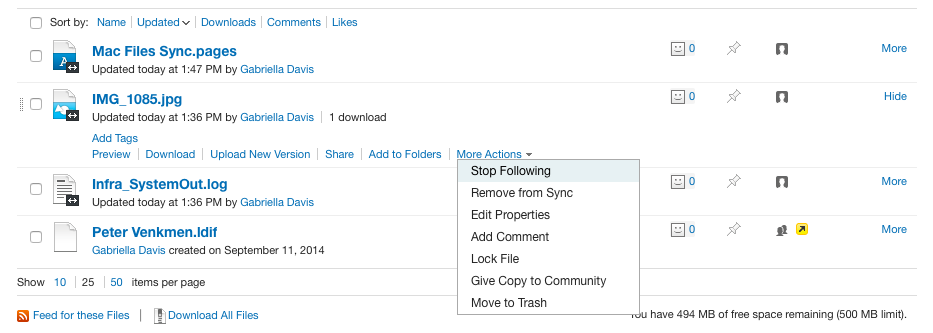
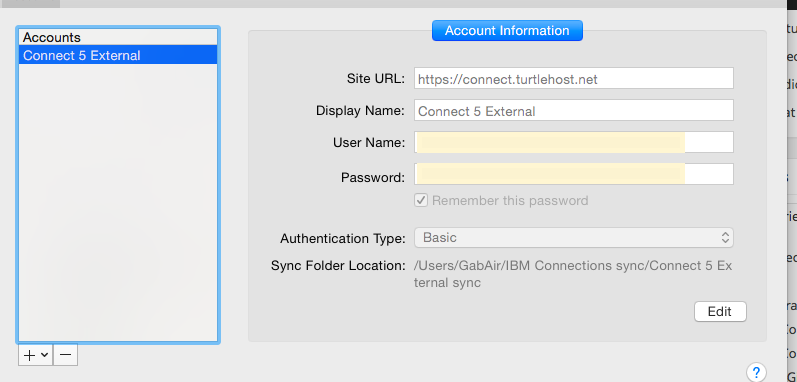
Setup accounts for your Connections servers , either on premises on Cloud. You must choose Basic authentication for on premises servers.

Setup accounts for your Connections servers , either on premises on Cloud. You must choose Basic authentication for on premises servers.


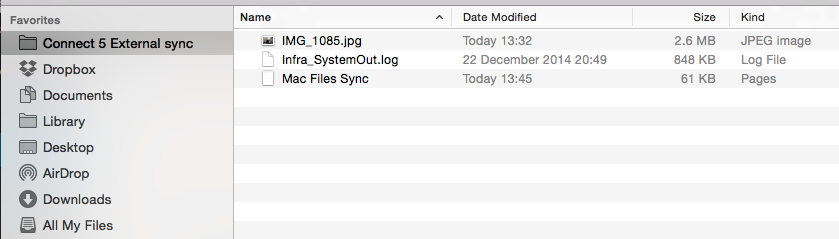
My Finder in Mac now has a folder for my Connections server.  I named the folder when I configured the server and I can have multiple folders for multiple servers

My Finder in Mac now has a folder for my Connections server. I named the folder when I configured the server and I can have multiple folders for multiple servers

Now I can drag and drop files into my sync folder or save files from any application to my sync folder and the desktop application will upload the file in the background, creating new or adding a new version

Once a file is set up for sync, it will continue to sync until you choose to disable sync for it.

Synced Files

Of course this is also available for Windows desktop clients here ..

Finding A Workable DB2 Client

Let me be clear.  DB2 10.x is the bane of my life.  Unfortunately it’s also the default version for products like IBM Connections and Sametime.  Prior to 10.x there was a GUI admin interface installed as part of the DB2 server which meant I could remote to a customer’s server and easily review data ,tables, schemas etc.  More importantly my customers jump on their own servers and , without much DB2 expertise, be able to review the system databases.  Unfortunately as of DB2 10.x there is no graphical interface.  So what are my options?  In theory I could (and do) easily install DB2 Data Studio on the server to act as a client but it’s not only a fairly overblown install for the few things I need, it isn’t in my experience very intuitive for customers.

For me, I’d like a simple , small (not 2GB like Data Studio can be) graphical client that I can add to any of my VMs and use to attach to any of my customer systems.  I’ve tried Squirrel SQL but that’s mostly useful for running SQL queries, but for a visual review of large amounts of data i’ve found it to be not as useful.  So I’ve now settled on Advanced Query Tool from http://www.querytool.com.  It’s a small (10s of MB) install.  It is simple to configure and it does everything I need, it’s also simple for customers to understand.  It’s big disadvantage is that , unlike Data Studio and Squirrel, it’s not free and the Advanced Edition costs 360 USD. Right now that’s worth it to me for all the time I save and the knowledge that the data I’m looking at isn’t the result of a poorly written SQL query.

I’m definitely preferring AQT over Squirrel and for my own VMs i’d rather not install Data Studio.

Sparks Ideas – ConnectED 2015. What Inspires You?

I’m delighted to confirm that Spark Ideas is back this year at ConnectED 2015.  This is organised by Nerd Girls and the idea is that people speak for up to 6 minutes on our topic.  This year’s topic is “Inspirations” so what we want to hear is about anything or anyone that has inspired you.

Sparks are always popular as  I think previous speakers and attendees will tell you  – it’s also something out of the standard conference fare.  Since this could be your last chance to spark  I hope we’ll see you there but even more I hope you want to speak and share your inspiration with us.  Please email me , Kathy Brown, Susan Bulloch or any of the Nerd Girls or even info@nerdgirlgroup.com.  Or DM any of us on Twitter if you want to talk through an idea.  Trust me, we want to hear your ideas and we want to hear from people who have never “Sparked” before.

Nerd Girls are about celebrating everyone’s uniqueness , what drives us to create our own path.  We hope to see you there ..

2.30pm on Tuesday in Swan Rooms 3&4


Connections 5 Customisations – Problems With Stylesheets

This weekend we upgraded a site with heavy customisation from Connections 4.5 to Connections 5 CR1.  Part of that migration was using the lc-migrate tool to export and import the artifacts and ensuring the customisations (customizations for any google searches!) were in place.  All seemed to be fine for a couple of weeks but then suddenly our custom stylesheet was replaced by the default Connections 5 theme.

That made no sense, no changes were done and the css and images were still in the right place under /customizations/themes/defaultTheme – where they had always been.  Looking at SystemOut everything seemed fine.  I cleared the temp folders (/profiles/AppSrv01/temp and wstemp as well as /config/temp) and tried updating the version stamp using wsadmin (LCConfigService.updateConfig(“versionStamp”,””) and restarting EVERYTHING but no luck.

Luckily my subsequent PMR ended up with Susan who remembered an internal PMR that referenced changes in how customisations work.  Specifically that relative URLs for images no longer work either when used in stylesheets so

(“images/customersite.gif”

has to become

(“/com.ibm.lconn.core.styles.oneui3/gen4Theme/images/customersite.gif”)

The detail for this isn’t in the documentation that I could find but this IBM’er has a great blog piece on it

Paul Godby Connections Customization

In addition the defaultTheme folder (as specified in the documentation) no longer works for custom stylesheets. You have to use a folder called gen4Theme and move the stylesheets in there.

Luckily I was working with the amazing Mark Myers on this who pulled out the stops and got the CSS changed and working (dynamic sizing and all) overnight.

..aaaannnndd we’re back in business.   Go Team!

p.s. the reason it had looked fine for us for weeks across several people/ machines and browsers was caching of the original design elements.

What’s Up With ConnectED 2015 And What I’m Up To…

So it’s nearly holiday time which means it’s nearly panic finishing sessions time for the great January Florida adventure.  This year the conference is very different, more technical, smaller, modelled on the idea of a user group.  There are plenty of things you know and love like the Best Practices track curated by Susan Bulloch and some new things like the new Beyond track which are technical sessions demonstrating very cool stuff you can do when integrating IBM products with other technologies.

IF YOU HAVEN’T YET REGISTERED GO DO THAT NOW.. I’LL WAIT….

Done? Good…..

This year with things smaller and a bit less frantic it gives us all room (and spaces)  to hang out with friends, exchange ideas, catch up, as well as finalise those plans for world domination.  To me that’s ideal, it’s been years since I’ve had a chance to do the conference at anything less than a flat out pace.

In terms of sessions I’m doing a few things….

In the Best Practices track I have a session on Connections design called

Creating Your Own Connections Confection – Getting The Flavour Right
IBM Connections 5 comes in a variety of exciting flavours – fancy a vanilla install, or maybe you want to add some extra sauce like External users or IBM Docs? A sprinkling of File Viewer and a few Surveys or maybe a dollop of Sametime. In this session we’ll take a look at how to build the right flavour combination of Connections for your business from deciding what features you want through to architecting a solution. We will have plenty of “How Tos” such as how to add external users to your Connections communities securely and what does their experience look like? How much Sametime is just enough? What’s the difference between IBM Docs, File Viewer and EditLive in features and deployment? If you’re new to Connections, planning a move to Connections 5 or even considering what Connections features you might want to add, this is your session, low fat and calorie free!

In the Beyond track I have a session on LDAP and integrating external users into Connections.

Then I am working with Terri Warren @ IBM on a Best Practices session about integrating directory information into Connections applications and single sign on.

Finally I’m on stage with Mat Newman and Susan Bulloch (but let’s be honest, we all know who the stars are here) doing a User / Support / Admin blast type thing (still in formation).

… and then possibly more important than any of that.. SPARK IDEAS is back.  This year we want to hear about who or what inspired you to push past what you thought you could achieve or reach for.  Sparks is always a great session that people seem to really enjoy and yes i’ll be reaching out to some of you looking for volunteers to talk for no more than 6 mins.  If you want to see previous sparks visit our Vimeo channel.  Otherwise please email info@nerdgirlgroup.com or any of the Nerd Girls directly or send me a DM on ping me on Skype.  This could be your very last chance to attend and participate in a Sparks session in Orlando so don’t miss it.

Lots of Good News This Morning

I woke up this morning to two pieces of great news.. firstly according to this blog , my session in the Best Practices track at ConnectED has been accepted.  This session is focussed around all the work I’ve been doing with IBM Connections, helping customers choose from all the features and optional extras that are available and how to deploy them.  So I’m hoping you like the idea and that I will see you in Orlando in January…

Oh and my 2nd piece of good news , my IBM Certification as a Connections 5 Administrator came through, making me proudly one of the first to be qualified on this new exam.

Creating Your Own Connections Confection – Getting The Flavour Right
IBM Connections 5 comes in a variety of exciting flavours – fancy a vanilla install, or maybe you want to add some extra sauce like External users or IBM Docs? A sprinkling of File Viewer and a few Surveys or maybe a dollop of Sametime. In this session we’ll take a look at how to build the right flavour combination of Connections for your business from deciding what features you want through to architecting a solution. We will have plenty of “How Tos” such as how to add external users to your Connections communities securely and what does their experience look like? How much Sametime is just enough? What’s the difference between IBM Docs, File Viewer and EditLive in features and deployment? If you’re new to Connections, planning a move to Connections 5 or even considering what Connections features you might want to add, this is your session, low fat and calorie free!


My Connections Migration Checklist

I’ve been doing a lot of Connections upgrades and migrations in the past few months and since I prefer to do a side-by-side upgrade there are lots of steps along the way to make sure the data is moved and upgraded from the existing servers to the new servers.  The documentation on how to do this in the Knowledge Center is good but there’s a lot of jumping around all over the place between tasks and I have found it helpful for me to have a checklist to make sure I don’t miss anything.

Here’s the checklist I’m using right now with some explanation and links to the documents in the Knowledge Center for each.  My steps aren’t  in the same order as in the documentation but they are the order I use

In theory the migration shouldn’t make changes to your production servers, but I’m risk averse and it’s worth the extra few minutes to make sure you can back out of the migration should you need to.

Before starting anything you should have created new empty databases on your new system using the scripts / wizard from the version you are moving from.  Even if you are moving to Connections 5 from Connections 4, you will need to use the Database wizard for Connections 4 to create the databases we are going to move data into.   That makes sense when you consider we are going to transfer the data over from the existing production environment so the format / structure and schema must be identical from source to target.

Begin by stopping everything, all WAS servers and DB2 (or SQL, Oracle) in your production environment as well as any TDI assemblylines you may have running.  The data migration requires the production site to be down and stay down until the new site comes up, that could be anywhere from a day to 3 days depending on how big your environment is and how much data you have as well as the connectivity between old and new environments when transferring the data.

Now let’s back everything up – just get the existing production configuration data somewhere you can access it and make sure you don’t lose any data during migration so backup all the DB2 databases as well as the Connections shared data /Connections/data.. /shared (I personally like to backup /Connections/data which gets local as well but that’s just me.

  • Backup Connections Dmgr Profile by running backupconfig.bat /.sh from the /Dmgr01/bin directory.  This will stop the Dmgr server if it’s not already stopped or if you don’t use the -NoStop parameter. (no need to backup Installation Manager when doing a side by side migration)
  • Backup the Connections shared data
  • Backup customisations somewhere you can access them for reading and manual copying over to the new environment
  • Run the migration.bat / sh to export the Connections configuration data ready for import in your new environment.  This includes the LotusConnections-Config.xml and application specific data.  This is exported to a directory you then copy to your new environment where you can import it
  • Migrate each of the databases, one at a time.  Each one has a pre-script to run to prepare the database, then at least 2 migration scripts, one to move the data and one to clear the scheduler entries on each database.   All the instructions are here however there are a couple of things to bear in mind.

When running the scripts I like to add >filename to the end of each command to pipe the output to a log file.  I usually create a “Logs” directory and call the file by the name of the script _app name e.g predb_blogs.txt.  This way I can check if the scripts ran OK by reading the logs and I have something to send to IBM if it comes down to opening a PMR

See my earlier blog for potential syntax issues running the scripts

To run dbt.jar which migrates the data you create an XML file and a matching Batch file for each application.  I like to create all of these at once and add them to a directory from which I can run for each application (again with the >logfile at the end).  Below are examples of XML and batch files I modify to use (I’ve avoided putting in carriage returns as that messes things up should you copy out of here)

XML (e.g. files.xml below)
<dbTransfer xmlns:xsi=”http://www.w3.org/2001/XMLSchema-instance“><database role=”source” driver=”com.ibm.db2.jcc.DB2Driver” url=“jdbc:db2://sourcedbserverhost:50000/FILES” userId=“db2admin” schema=“FILES” dbType=“DB2”/> <database role=”target” driver=”com.ibm.db2.jcc.DB2Driver” url=”jdbc:db2://targetdbserverhost:50000/FILES” userId=“db2admin” schema=“FILES dbType=“DB2”/> </dbTransfer>

BATCH (calls files.xml)
“e:\install\connections\wizards\jvm\win\jre\bin\java” -cp e:\dbt_home\dbt.jar;e:\ibm\sqllib\java\db2jcc.jar;e:\ibm\sqllib\java\db2jcc_license_cu.jar com.ibm.wps.config.db.transfer.CmdLineTransfer -logDir e:\dbt_home\logs -xmlfile e:\dbt_home\files.xml -sourcepassword typedb2passwordhere -targetpassword typedb2passwordhere

  • Upgrade database schemas.  Once all the migrations scripts have been run (don’t forget the clearScheduler and run/updateStats where needed) you can proceed to upgrade the databases.  I like to back them up one more time before running the upgrade though, but that’s just me.  If it took a day or more to migrate the data I don’t want to do that all again.There are two ways to update the databases on your new target server.  Either using the provided (Connections 5) database wizard and choosing “Upgrade” or by running manual scripts.  I prefer to run the scripts manually so I can see what’s going on and IBM recommend that for the Homepage at least you run the script manually rather than use the Wizard.

    Instructions for doing both Wizard and Manual methods are here .  The biggest issue with running the scripts manually is that there are slightly different syntaxes depending on which version you are coming from and it’s fiddly getting the right one, I still prefer it although  I have used the Wizard for several of the applications and it has worked fine.

  • Once you’ve upgraded all the databases, the Homepage requires another step and that’s to do a java migration of its data. This ensures the format and content of each individual’s homepage matches that required for Connections 5.  The Homepage database is by far the largest of all those used and this could take significant time.  Below is an example of the command I run (again I have taken out carriage returns and invalid quotes etc

e:\install\connections\wizards\jvm\win\jre\bin\java -Dfile.encoding=UTF-8 -Xmx1024m -classpath e:\ibm\sqllib\java\db2jcc.jar;e:\ibm\sqllib\java\db2jcc_license_cu.jar;e:\install\connections\wizards\lib\lic.dbmigration.default.jar;e:\install\connections\wizards\lib\commons-logging-1.0.4.jar;e:\install\connections\wizards\lib\news.common.jar;e:\install\connections\wizards\lib\news.migrate.jar com.ibm.lconn.news.migration.next50.NewsMigrationFrom45to50 -dbur1 jdbc://db2://targetdb2hostname:50000/HOMEPAGE -dbuser db2admin -dbpassword targetdb2password >java.out.log 2>&1

  • Importing artifacts.  Using the directory and contents created earlier one when we exported the Connections artifacts, we can now import them into our new Connections environment.  We’re basically doing the reverse of what we did to export but this time running migration.bat /sh lc-import.
  • CommunitiesMemberService.syncMemberExtIdByLogin(“wasadmin”)
  • Migrate or Rebuild the search index.  Migrating can be done if the source version is 4.5 because the search index structure is the same however I prefer to rebuild cleanly if I have the time
  • FilesDataIntegrityService.syncAllCommunityShares()
  • Custom profiles. If you have custom profile settings (strings, languages, profile types) in your existing environment and that is 4.0 these will need to be migrated / converted to the Connections 5 format.  There are also settings that should have come over when restoring your artifacts that it is worth validating

The items below tend to be optional depending on what is installed in your current environment but if these elements exist currently they will need to be migrated too

Cognos

Connections Content Manager

Media Gallery

That’s my list anyway.  Obviously the Knowledge Center is the definitive source for all you installation / documentation needs 🙂
 

Speaking at ConnectED 2015, the mysterious “track 6”

This year the new ConnectED conference introduces a brand new track under breakout sessions – Track 6 entitled “Beyond The Everyday”.  The track is being put together by Christian Holsing and myself and it’s something very different we think has been missing from previous IBM conferences.  Although it has replaced the Show and Tell track the two aren’t connected in any way and the “Beyond” sessions are regular (60 mins) session length.  Best of all , these sessions are ideal for Business Partner and Customer speakers.

Let me explain why I’m excited by “Beyond” because I can think of at least 30 sessions without even trying that would be great. Beyond the Everyday looks to fill a gap as it encourages you as speaker to talk, not just about IBM products, but about how extending those products and adding other technologies bring your software to a whole new level.  In previous years I’ve heard from people who didn’t submit that they didn’t think IBM would care to hear what they want to talk about because it’s not on brand enough – well it may not have been true then (I honestly don’t know) but it’s not true now, at least for this track.

Business solutions today aren’t all from one provider, they aren’t all from one OS, many of them aren’t all on premises or Cloud but combining the most innovative tools in each area from different sources makes Connections, Sametime, Domino, Portal etc a very big part of a larger technological story.  It’s about what we can achieve when we reach further.   So I know you all have innovative ways of making things work, of bending technology to your will, of achieving your goals by forcing those technical barriers out of the way and and that’s what we want to hear about 🙂

In short, if you’re doing something freaky, weird, bent and exciting (in a software sense) share it with an audience who want to know how to work without limits.   As before I am very happy to help or advise on abstracts if you are considering submitting, but you only have a week or so to do so.  I’m hoping we were right and this is what people want to hear and hoping even more this is what you all want to talk about!

Send in your abstracts HERE

Beyond the Everyday