Getting Ready For El Capitan (OSX 10.11) and iOS9

Apple are getting ready to ship both iOS9 (sometime next week is rumoured) and the latest version of OSX called El Capitan. Already people have downloaded and are using beta versions of the software and finding things don’t work – small things like Notes won’t install or run and iOS devices won’t connect to Traveler!  So here’s what you need to do (and with thanks to the king of all things Apple OS Rene Winkelmeyer)

Your Traveler server must be upgraded to the latest version which was released last week – 9.0.1.7.  That version adds support for iOS9 and without it your devices won’t be able to connect.  All those BYOD users with iPhones are sure to be updating the second the OS is released so you really need to stay ahead of the game and get your server upgraded.  And whilst you’re at it , make sure you get your SSL certificates updated to SHA2 if you haven’t already.

Amendment: Rene would like me to make it clearer that not having a SHA2 certificate from a public CA will absolutely positively stop Traveler from working as of iOS9 right now.  He’s right – I wasn’t clear enough on that. Your Traveler server must have a SHA2 SSL certificate and really must be Domino 9.0.1 FP4

IBM have announced there will be a new 64bit (yay!) version of Notes 9.0.1 for the Mac to be released prior to the shipping of El Capitan.  There are no declared dates but I’m hoping that means “September”.  More details of that here but basically until the new 64bit client is available, don’t upgrade to OSX 10.11

So. Traveler first. In fact Traveler NOW and then wait… 🙂

External User Registration Application – Some Screenshots And Details

Thank you everyone for the great feedback and interest in our external users registration app.  I had hoped that people would find it useful and I think we have a way of distributing it at no cost to anyone interested.

The app is a single Domino database which has two versions depending on whether you want users to be able to register themselves or be invited to register by your internal users.  I’ve tried to show both below

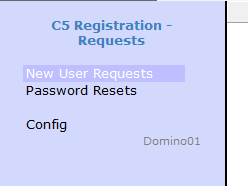
The Notes menu is very simple because it’s not intended to be used by anyone other than the occasional administrator.  Everything else is done via a web interface

The Notes client menu

The Notes client menu

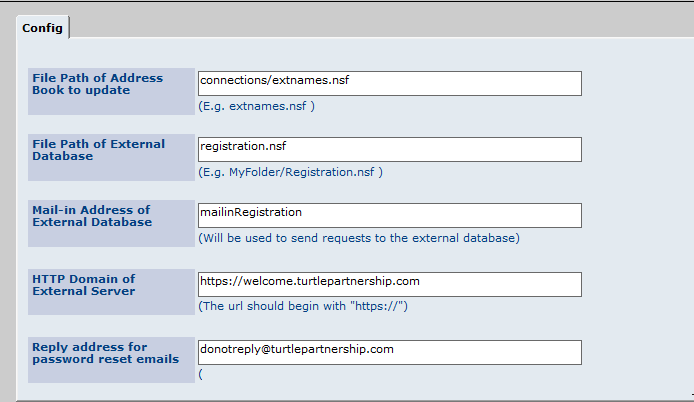
First you need to set up the configuration telling the app where the Directory that will contain external user names is.  This the directory that TDI will reference when creating policies but user accounts aren’t copied into it until the registration process is entirely complete.

This setup is for the internal registration app

Setup

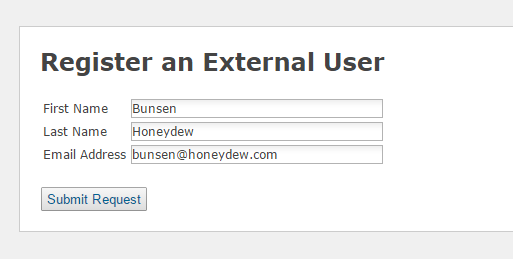
This is the registration page for the public registration where anyone can sign up for access. Obviously you could modify this to have further checks in place but bear in mind Connections only allows access for external users to Communities they are invited into so if I did register myself and login, I wouldn’t be able to see or do anything without a further invite.

We ask for an email address and confirm the registration back to that address asking the external user to click a link to activate – that way we ensure the email addresses are valid and monitored.  The code also checks that no one else has registered with the address already

RegistrationPublic

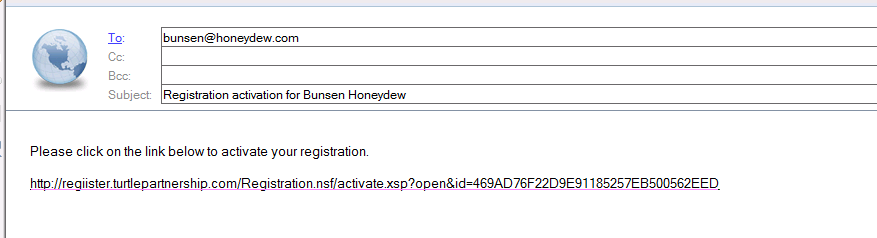
An external user would then receive an email with an activation link to click on

ConfirmationEmail

The registration page used for the internal invite model is slightly different but still checks the email address being registered is not already being used.

RegisterInternal

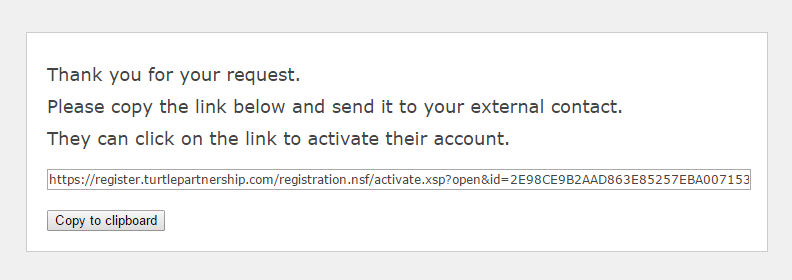
Then generates a unique registration code that can be emailed out to the external user manually (or automated if you want to add that code)

RegisterInternalConfirm

In each case the activation screen resulting from clicking on the link is the same. The password requirements can be modified by changing the code.

Activation And finally when the external user creates a valid password they get the following screen

Confirmation

So how do you get hold of a version of the app?  Obviously this is only part of the external user registration process which also includes LDAP and TDI configuration.  I would be very happy to quote on helping you with those pieces too but it’s not a requirement you use my consultancy to get access to the app, we are happy to make it available. I believe the setup can be completed in 2 – 3 hrs at most and again I’m happy to bill you to do that if you need me to or you can ask another Business Partner. You are welcome to take the app and support it yourself but in all cases our copyright remains in place (and is everywhere 🙂

THE SOFTWARE IS PROVIDED “AS IS”, WITHOUT WARRANTY OF ANY KIND, EXPRESS OR IMPLIED, INCLUDING BUT NOT LIMITED TO THE WARRANTIES OF MERCHANTABILITY, FITNESS FOR A PARTICULAR PURPOSE AND NONINFRINGEMENT. IN NO EVENT SHALL THE AUTHORS OR COPYRIGHT HOLDERS BE LIABLE FOR ANY CLAIM, DAMAGES OR OTHER LIABILITY, WHETHER IN AN ACTION OF CONTRACT, TORT OR OTHERWISE, ARISING FROM, OUT OF OR IN CONNECTION WITH THE SOFTWARE OR THE USE OR OTHER DEALINGS IN THE SOFTWARE.

Please email Mike Smith (mikes @ turtlepartnership.com) or myself if you need more information or a copy of either the public registration or internal registration app. Bear with us and we’ll get it out to you as soon as we can.

Domino 9.0.1 FP4 Crashes With HTTP On Linux and AIX

I discovered this on a customer site this weekend.  Their servers are running SLES Linux 64bit and already had Domino 9.0.1 FP2 on them.  I upgraded to  FP4 but only one of the clustered mail servers runs iNotes – that server kept crashing as soon as someone tried to access their mail.  The other server was stable and if I disabled HTTP the crashing server stayed up.

Turns out the IBM installer for FP4 on Linux and AIX is setting the ownership of the dojo folder incorrectly which causes the crash.  The dojo folder is under <notesdatadirectory>/domino/js and the ownership was set to invalid names.  From the js directory (which just has the dojo folder in it) I ran

chown notes:notes * -R

which told Linux to change the ownership of the dojo folder and everything beneath to the account / group used to run Domino.

There is a technote dated 28th August that i’ll post here but the fix on the technote is incorrect.  On their fix they say the permissions are wrong and need changing to 755 using chmod but that’s not true, they are already 755 in my installs but the actual ownership is wrong.  Maybe they’ll fix the technote but the background is here http://www-01.ibm.com/support/docview.wss?uid=swg21964549

Adding External Users To Connections – A Nice Simple Tool

Ever since Connections 5 gave us the ability to add external users to Communities it has been the number one requested feature from customers. The problem is that external users must exist in a LDAP source and also must have a profile in Connections that is created via TDI.

There are lots of ways to do this but few that are end user friendly and simple.  For that reason, some time ago we started to use our own XPages application that we make available to customers that automates the onboarding of external users into Connections.  The application is very simple and has two possible modes you can run in

  1. User self registration.  An external user can go to your website and create their own name / pw and email address. The system then sends an email to confirm the address is valid and asks them to click to activate.  On activation they create their own password that is checked against password requirements in the app (such as length, upper case, special character etc).  Once created the user can also self service a password reset via an email request sent to their account.
  2. User invite.  In this mode external users cannot create their own accounts but are instead invited by someone inside the company who again – goes to a webpage, creates a request and emails an activation link to their contact.  The rest of the process, activation, password checking, password reset remains the same.

It’s a single Domino database and can be set up in only a couple of hours.  Of course you still have to create the TDI sync but that’s a requirement no matter what you do.  For some time we’ve been considering how to make this tool available to the community at large since every customer we work with struggles with the same issue and we now have several good iterations of it we could share. We aren’t a product company and don’t want to sell it but we also can’t afford to commit to free support for a free download.

I’m not entirely sure of the answer. So far it’s been a non-issue since I’ve given it to customers we already do consultancy for or who ask us for consultancy. We’ve only charged for custom changes if required.  If you’d be interested in a copy of the database, seeing or testing it let me know and we’ll work something out.  It’s not open source, the code is our copyright but If you have any suggestions as to how we can make it more available without committing a lot of resource to productise it (which I would have to do for OpenNTF) I’d be very happy to hear them.

Turning The Optimism Up To 11

After last week’s great MWLUG conference (thank you Richard Moy, Lisa Duke & all the sponsors ) I realised how much I miss my community now there are fewer chances to meet in real life. I’m reminded it’s far too easy to think what’s the focus in my little personal bubble matches what everyone else is doing. My friends are not just my friends, they are the people who nudge me off track and kick my brain into thinking about new things it wants to learn and do.

The biggest gathering of all is always January in Orlando and although I had resigned myself earlier this year into saying goodbye for the last time (and literally did that) I realised I’m not ready to walk away whilst there’s still a strong community of people just as vocal and excited by technology (albeit very different technology) as when I first went in 1995. I saw it in Belgium in March, in Norway in May, in Atlanta last week and will see it again in London in a few weeks. So. Orlando.

I have no idea what the conference will be

I have no idea if my friends will be there

I have no idea if I’ll be speaking

But today I booked my flight, put a deposit on accommodation and sent in 4 abstracts which I’m excited about. I briefly went through the panic of “but how do I word this so IBM will pick it” before giving myself a slap to remember it’s not about what I’m meant to talk about, it’s about what I know, want to share and what I think people want to hear.

I may not be on stage – I don’t know if my subjects or even me are what are wanted this year – but I’ll be there, ready to hug my friends, share ideas, talk and laugh. I hope you will be too.

IBM Connections Mobile – Issues On Android

This is one of those posts that scare me – I’m fairly sure someone else must have seen and blogged this but since I can’t find anything I am writing this up.

I recently did a Connections 5 install for a customer, it was a clean install on clean hardware.  We did migrate the data but not the artifacts (the lc-export function) because we wanted to have clean XML and configuration files. Once installed the mobile application worked perfectly on iOS but on Android there were no applications listed when you logged into the mobile application.  Since the configuration for mobile isn’t OS specific (or isn’t documented as being so) I assumed the mobile-config.xml was correct as it worked for iOS.  So the customer went ahead an opened a PMR, the response from IBM was

“Your Connections engineer missed a step in migrating the mobile application”

Well that’s strange because this wasn’t a migration and if I look at the migration documentation in the IBM Knowledge Centre there’s no mention of any tasks related to mobile-config.xml.  A follow up IBM email said we had a missing “NavigationGroups” section so I check the mobile-config.xml.  The section is there but with no real entries in the default version

<NavigationGroups>
<NavigationGroup name=”Favorites”>
<Expanded>false</Expanded>
<HideNavGroup>false</HideNavGroup>
</NavigationGroup>
<NavigationGroup name=”Updates”>
<Expanded>true</Expanded>
</NavigationGroup>
<NavigationGroup name=”Applications”>
<Expanded>true</Expanded>
</NavigationGroup>
</NavigationGroups>
<NavigationGroups>

The only document on the knowledge base that has the words “NavigationGroups” in it is the one that talks about extensibility of the Mobile app – here.  So OK, I take the example from there and attempt to modify my mobile-config.xml but on checking it back in using MobileConfigService.checkInConfig it returns an invalid XML error.  Looking at the IBM example it seems their XML structure is wrong.  If you are going to have an ApplicationList node entry then it MUST come after the Expanded and HideNavGroup entries.

The IBM suggested content is below – this fails

The ApplicationList node entry before the Expanded node entry is invalid XML structure

The ApplicationList node entry before the Expanded node entry is invalid XML structure

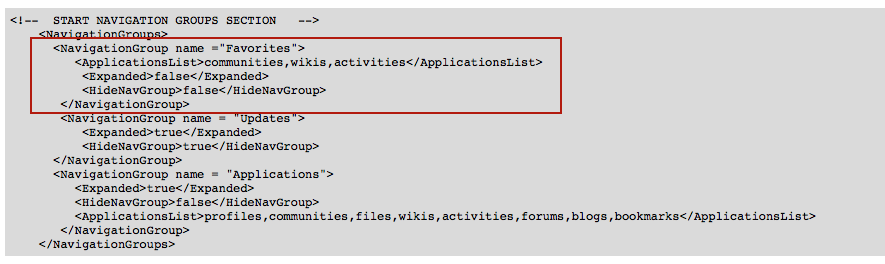
The final correct format I used is

<NavigationGroups>
<NavigationGroup name =”Favorites”>
<Expanded>false</Expanded>
<HideNavGroup>false</HideNavGroup>
<ApplicationsList>communities,wikis,activities</ApplicationsList>
</NavigationGroup>
<NavigationGroup name = “Updates”>
<Expanded>true</Expanded>
<HideNavGroup>true</HideNavGroup>
</NavigationGroup>
<NavigationGroup name = “Applications”>
<Expanded>true</Expanded>
<HideNavGroup>false</HideNavGroup>
<ApplicationsList>profiles,communities,files,wikis,activities,forums,blogs,bookmarks</ApplicationsList>
</NavigationGroup>
</NavigationGroups>

I am still awaiting more testing but it does seem from IBM’s response that the Android OS requires this section to be completed in a way that the iOS OS doesn’t.  It’s not part of the migration documentation though

All Change On IBM Connected Abstract Submission

A couple of weeks ago I blogged about the Connected Abstract submission process and the topics available to choose from

.. that was then.  This is now  All change.  Gone are the topics of

Digital Experience, Email, Meetings and Chat, Social Collaboration, Social Content

To be replaced by more familiar “topics” that look more like the tracks we are used to.  As I discovered when I went to submit the ones I had written in draft .. time for a bit of a rework.  You still have until September 4th to submit yours

Abstract Topics

Submitting Abstracts For Connect 2016 And Some Interesting Discoveries

Yesterday the IBM Connect 2016 site updated with the call for abstracts, so today I’m submitting sessions because I don’t know 100% what form the conference will take but I want to contribute as best I can to deliver the kind of event we all want to be at.  They may not pick my session (alright sessions – I’m submitting a few choices) but I have topics I’m excited about and that I think people want to learn about so I went to submit.

First thing’s first, as with last year you have to create a speaker profile before you start with your background and a small bio but what I really found interesting was the submission form. There are no mentions of any specific tracks so when you submit a session you only get to choose from “Technical Breakout” or “Business Strategy Breakout”.  What’s really exciting is the list of topics to choose from which I assume are alphabetical rather than importance order

Digital Experience
Email
Meetings and Chat
Social Collaboration
Social Content

Look at that! Those topics may be broad but they are exactly the things I want to hear about (Email, Chat, Social Collaboration) and talk about.  In previous years we’ve had a lot of other topics listed that I would say fell outside the core interest of people that attended Lotusphere of old.  I’m not saying that’s bad but it’s certainly good news that this conference is embracing the topics and technologies we’re all working with today and not just those IBM hope we will be working with tomorrow.

The categories that your session can fall into are short and sweet as well – personally I”m excited to see sessions that fall under these headings

Analytics
Cloud
Cognitive
Commerce
Mobile
Security

There are only a few weeks to submit as it closes on September 4th and I’ve heard noises about the short notice but I’m honestly not sure why.  It’s not a surprise to anyone that Connect is running in January, that was announced months ago. It’s not surprise content, we are all working with these technologies.  Submitting an abstract is simply a case of finding a topic that interests you, that you have a unique slant on and sending it in.  My plan as always – be enthusiastic, write a good abstract and hope for the best.

I’m not involved in any way with the content this year but I’ve seen enough abstracts over the years to offer some advice I think – YMMV but here is last year’s posting on how to write an abstract 🙂

Good luck and click here to get started..

Domino LDAP And A Failure To Authenticate

Bear with me and try not to shout at the screen “we all know that” – this blog is about the 10 hrs I lost yesterday troubleshooting a problem I distinctly remembering seeing before and realising, once I solved it, that last time it had also taken me hours and ended up being the same issue.  In my defence the last time I had this problem it was with Quickr so that’s a throwback and even if this blog isn’t news to you, it will hopefully be there for me in another 5 years…

I was using Domino as a LDAP source for Connections.  I don’t manage the Domino side of things for this customer so I had just asked them to add a secondary directory (in this case for External users) to Directory Assistance on their LDAP servers. I wanted the DA document set to be LDAP only rather than LDAP & Notes / Internet Authentication**. They did that and I tried to login from Connections to discover that I could login as a user in names.nsf but not as a user in the secondary directory. Time to look at the configuration.  Here’s what I did

1. Confirmed the DA document looked OK.  It actually wasn’t set to trust for credentials so I enabled that.
No luck.

2. Tried “sh xdir” to verify the directory was listed. It was, as Directory #4 out of 6.  Tried sh xdir reload to refresh Directory Assistance and then tried restarting the server
No luck but at least I knew DA was configured correctly

3. Turned on LDAPDebug=3 so I could see the debug information. At this point I could see the failing accounts (any in the secondary directory) were coming up with “authentication failure using internet password” in Domino and in the SystemOut.log of the WAS server that hosts the homepage application I saw references to PasswordFailedCheckException behind CWWIM4529E and SECJ0369E errors. Password failed? That made no sense at all.   One thing that was an issue was that the server I was working on was being probed every few seconds by a remote machine for availability on LDAP so with debug turned on the screen was filling up with thousands of lines of content making it difficult to see and track my own issues.  In retrospect if I’d asked for that to be disabled it would have saved me hours.

4. I then took a step back and installed Softerra’s LDAP Browser so I could test things outside of Connections.  I could bind using any credential in names.nsf but when trying to bind using a credential in the secondary directory I got “invalid credentials” and LDAP wouldn’t bind.

5. I then cut and paste a person document from the secondary directory to names.nsf to verify if the issue was the directory itself or the format of the person documents. I knew those documents worked fine on another server where they were in the names.nsf.  Turns out that if I moved them to names.nsf they worked fine.  I could bind with Softerra and I could login with Connections.

hmmm

6. I go back and check the ACLs of both names.nsf and the secondary directory.  I may even have bumped up default to something stupidly high *cough*Editor*cough* for 30 seconds to rule that out.
No luck

7. I paste the person document back into names.nsf again and bind with Softerra. This time I try and search for a name I know is in both the names.nsf and secondary directory (not the same name, just the same lastname).  Interestingly I get access denied / unauthorised – it finds the two entries but doesn’t let me see the content of them.  The fact that it found the entries meant that it could search LDAP but it can’t display them?  Surely that’s ACL issues.  So back I go to check the -default- rights on both directories and even test effective access for the specific account i’m using.  Nothing.

Then I see it.  As I try searching and searching and trying to catch errors on the server logs amongst the mass of LDAP debug information.. I see
searching directory names.nsf for sn=davis
searching directory directories\custnames.nsf for sn=davis
search directory directories\morenames.nsf for sn=davis unauthorised, skipping
search directory directories\externalnames.nsf for sn=davis
search directory directories\suppliers.nsf for sn=davis

Right there – in the middle. A directory I don’t care about, that has two dummy documents in it but happens to be part of Directory Assistance.  I go look at yes – -Default- is set to No Access. I change that to “Reader” and ta-da! suddenly I can both bind and login.  Then I remember I had this exact problem before at another customer with many directories that I didn’t set up or configure and it took me forever to find because I simply don’t touch what I’m not meant to be managing. In this case a directory that’s nothing to do with me and isn’t being used by my application on a server I don’t manage.

So what happened? It appears that Domino LDAP will search multiple directories but once it comes across one it can’t access with those bind credentials it doesn’t skip over it.. it stops.  The “skipping” isn’t strictly true.  So when the credentials were in directories one or two they worked. in directories four or five they failed because it stopped at directory three.

My lessons are
1. Remove as much extraneous activity as you can or you won’t be able to debug quickly enough
2. Always check everything (or in my case ask permission to check everything) even if it looks unrelated and especially if you didn’t set it up yourself 🙂

You’re welcome Gab of the future….

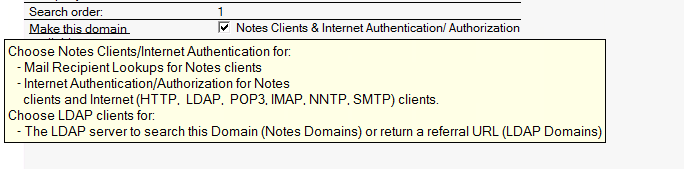
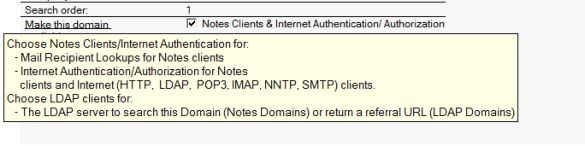
**Added on this morning.  Using LDAP only for authentication doesn’t work because a Directory Assistance document set to LDAP only doesn’t actually work for anything but LDAP searching. Not for authentication at all.  Foolish me for trying to be logical.  Here’s what the pop up help says – and they’re right. I tested it :-)]
DirectoryAssistance

Return Of The Watch

Watches are gone or going the way of the dodo right? I mean actual watches that just tell time not watches that try and be supercomputers.  Everyone tells the time on their devices now so you don’t get a watch to do just that.  Right?

I don’t wear a watch.  I haven’t worn a watch since I was a child, I think my last watch memory was seeing 1979 click over to 1980 on my casio digital watch at new year’s eve (yes even as a child I knew how to party).  I stopped wearing watches as a child because I kept losing them.  As I got older I didn’t want a watch because I felt that paying too much attention to time was unhealthy and stressful.  I think I have a good internal clock and I can always tell when a kitchen alarm i’ve set is about to go off about 5 seconds before it does :-).  On top of that, working with computers taught me to stop wearing anything on my wrists – it slows me down, irritates me and I end up taking bracelets off and – yes – losing them.

So this is a long way of saying, today I bought a watch.  Not an expensive one.  Just a swatch but I finally decided a watch is what’s missing from my life. You see I get very little “down” time.  When I do get downtime I know I have a set window to relax before I have to get some more work done.  That means I have to keep picking up my phone to check the time.  When I pick up my phone to check the time, I see mail notifications or text messages or am reminded of 1000 other things I should be doing in that moment instead of just sitting and reading.

The devices that tell me the time are also now inextricably linked with “work” and therefore “stress”.  A watch is now the easiest and least stressful way to actually tell the time.  It’s an interesting full circle and I wonder if it’s just me.