What Kept Me Busy In 2016 and Where Am I Going Now?

I think this post might be just under the wire for 2016 reviews so let’s talk about what I was working on and learning for the past year.  I always need to be learning, if I’m not I feel like I’m standing still and last year most of my learning moved outside of the core IBM products simply because there was little new to learn.

So what kind of projects did I work on?

  • Security reviews of Domino, Connections, HTTP environments
  • Single Sign On projects including deploying SAML using ADFS and TFIM as well as lots of Kerberos / IWA integration projects
  • Designing hybrid environments for customers moving mail to the cloud
  • Lots of TLS configurations on lots of different products
  • IBM Connections upgrades to 5.5
  • IBM Sametime deployments from sites that had 8.5.2
  • Domino consolidation, maintenance and hardware migrations
  • High Availability for Traveler, Domino HTTP and Sametime

What was I learning?  I’m always looking for interesting and challenging technologies that can make a difference to those smaller customers who need to stretch a tight budget.  It’s how I got involved with Notes originally in the early 90s – It allowed me to make big changes quickly for smaller customers.  This year that has meant staying on top of cloud and hybrid security issues and single sign on products and technologies.  Beyond that I have become really interested in data visualisation and have been working with products like Tableau and some of its cheaper competitors to see what they can offer.

Then in December I signed up for a Lynda.com subscription to ensure I have a good grounding in wider technologies and how they can work together.  Of course signing up and actually making time to learn are two different things so that takes us to 2017.

Goals for 2017

  • More data visualisation tools / learning cool things to do with Tableau
  • Building myself a Lynda training plan
  • Deploying Verse on Premise for existing Domino customers and introducing those without Connections to that integration piece
  • More work with database technologies around performance and security
  • Identify ways to deploy docker solutions with better stability and security
  • Improving my languages (I’ve been working on Italian and want to learn Spanish)
  • Working on interesting projects or ones that make a difference

As you can see my “goals” are fairly loose, I am always open to new ideas for technologies to learn (except development languages – blech).  It may be my review of 2017 will be nothing like my goals list and I won’t consider that a failure.


So THAT’S what it’s about

“A New Way To Work” – all of us in the IBM mail space have heard the phrase and seen presentations but does it actually mean anything to me – a set in her ways mail and calendar user who just wants mail to work and be fast?

In the past few months I have been using Verse On Premise in its beta form as well as the beta versions of Verse for iOS.  I had previously played around with Verse in the cloud but since my 20 year old mail file is on our Domino servers, the majority of my mail and searching activity was done via Notes and Traveler.  iNotes was never a client of choice for me.  I don’t archive mail very often (alright never) and so there’s a lot of history there.

So what have I found? I absolutely love Verse.  It’s fast and the layout is clean but as promised there are features that are so ridiculously useful** they have literally changed how I work for example

  1. Flagging for “needs action”  via a single click which then lets me set an action date for today, tomorrow, a week or other
  2. At the same time I can add a  personal note to the  message that travels with it,  and is visible when reading it in Verse.
  3. I can then remove the  message from my inbox by clicking on it.
  4. Viewing just those messages that need action which are automatically categorised by “today”, “tomorrow” etc.
  5. All of that, the action, the date, even the private notes transfer to Verse for iOS on my phone and iPad.

Add to all of this is the fact that it’s my same mail file on my same Domino servers. I could and can still open using the Notes client, using iNotes, even using Outlook if I want.  There are lots of things to enjoy about Verse and everyone works differently, but this is one group of features that live up to the hype of having tricked me without noticing into a new way of working 🙂

** no screenshots in here as it’s advanced beta still under NDA but the features have been shown publicly and hopefully will be in final product

You Lie! Error Messages and When To Ignore Them

Building Connections this week and troubleshooting some errors reminded me to share the process I have adopted when dealing with IBM error messages – which is to treat them as hints that can set you on the right path but also send you badly down the wrong one.

Problem 1:

Installing Connections itself via Installation Manager.  One of steps during the install requires you to specify the DB2 server, the database names and credentials to connect to them.  I click validate and it fails  with error CLFRP0030E and launch error!.  That points to this technote which says I left a space after the hostname for the DB2 server.

I absolutely didn’t leave a space and didn’t copy/paste.  Just in case (and working on the assumption that it’s always me and not the product) I cleared it all and typed carefully again. I confirmed the hostname was correct and could be reached.  I also relaunched Installation Manager and started from the beginning.  No luck.

It’s  at this point I have to accept the error is referring to something else and that’s all the information I’m going to get from Installation Manager.  So now I move to asking myself “what if I saw no error but it just failed to connect”.  Well the first answer to that is to check if the connection details, hostname, credentials etc actually work at all.   Having confirmed the hostname and ports (there were no firewalls turned on or virus software), I logged into the DB2 server and checked the LCUSER account. Locked out.  I unlocked the account and the install then completed.

Problem 2

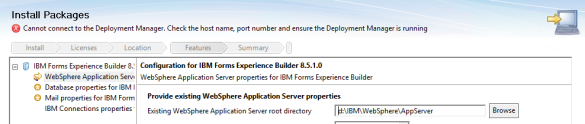
The test server in this environment is one box with everything DB2, TDI and all the applications on it.  My base WebSphere install was WAS 8.5.5 FP10 since Connections System Requirements for WebSphere 8.5.5 says FP8 and higher and I wanted to test that out. Everything installed fine right up to when I went to install Connections Surveys.  That’s when I hit a 2 day brick wall.  Installation Manager couldn’t connect to the Deployment manager despite it being on the same server.

screen-shot-2016-12-09-at-18-26-10

Well that’s odd.  Deployment manager is running.  The hostname resolves. The port is listening. I try to find out what the system requirements are for Connections Surveys but for 2 days last week and through the weekend the IBM system requirements pages for Survey were down.  I’m stubborn so I won’t let it go.  Even the Forms Experience Builder requirements for earlier versions were down.  So eventually I had to leave it and move onto the production build. The work needs completing and I was suspicious that the issue might have been installing everything on one server.

I build production across 4 servers and this time I stick with WebSphere 8.5.5 FP8 just in case.  When I get to the Surveys install it goes without a hitch.  So back to the test server I go.  Roll back Websphere to 8.5.5.0 and then forwards to FP8 (thank you Installation Manager!).  Surprise surprise Surveys installed perfectly.

So. Not an issue connecting to deployment manager or port or the server running but instead “Connections Surveys cannot install onto WebSphere 8.5.5.10 at all.


A Sametime Chat Mystery

Today I was contacted urgently by a site I did an install for back in early September.  The install went well and I left them several months ago with working components, but apparently about a week ago people stopped being able to login to the Community server. In fact not even the SSC could access it.

.. and yet no-one had changed anything at all.  I do love a good mystery so I thought it would be useful to someone (or even just future Gab) to document what I did:

  • verified if port 1533 was listening using netstat -an |find /i “1533”.
  • verified there were no running AV services that could interfere with the ports.
  • checked if the ST services were running, in fact only about 6 were.
  • tried to start some of the services that weren’t running and they failed immediately.
  • since no-one touched Sametime my next guess was a Windows update that caused a problem.
  • checked the Windows networking settings hadn’t been overwritten (they had) . Although those settings shouldn’t cause the services to fail completely it was worth resetting them.
  • I then added vp_trace_all=1 to the [Debug] settings in the sametime.ini which creates detailed log files in the \ibm\domino\trace directory.
  • having added that I could see log files being created for every service, even the ones that wouldn’t stay started. In fact those ones recreated every couple of minutes.  So the services were trying to start and failing.
  • reviewing the log files I could see on things like STPlaces there was a JVM error, but I put that aside for the time being in case it was a dependency issue.
  • in other logs such as STDirectory I could see broken networking errors and just before that I could see a comment about switching to TLS.

    A-ha! Well, that’s new.

  • checking the sametime.ini I found:
    VPS_PORT=1516
    VPS_TLS_PORT=1516

    which I changed to:
    VPS_PORT=1516
    #VPS_TLS_PORT=1516

    My guess being an incomplete TLS configuration from the SSC.  Having done that the server restarted perfectly and all services started.  The SSC could then access the server with no problem.

Of course once I had spent 4hrs doing that I then found a technote on it which I never would have found before I saw the TLS entry.  Here’s the technote .

Sometimes it’s a rollercoaster but so long as I get things working  I’m calling that a good day.  Now back to building more Connections servers.


A Tip For Submitting A Best Practices Session

If you go to submit a session for Connect 2017 (which you can do here )- you’ll notice there is no specific Best Practices track like we’ve had in the past.   In fact all the tracks have changed and been grouped under themes

Emerging Technologies
Strategy & Business
Development, Design & Tools etc

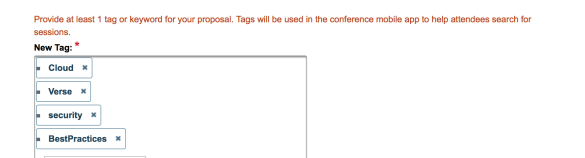
So how do you submit what you consider a Best Practices session and more importantly how do attendees find those sessions on the agenda considering they have always been the most popular by far at any conference.  Well the way to do it is to use a session tag.

On the session submission form you have a field for “New Tag” where you can categorise your own session.

screen-shot-2016-11-01-at-17-38-27

In that field make sure you enter the word “BestPractices” (all one word) and your session will appear as a Best Practices session in the agenda so everyone can find it easily.


Domino in the Back, Party in the Front

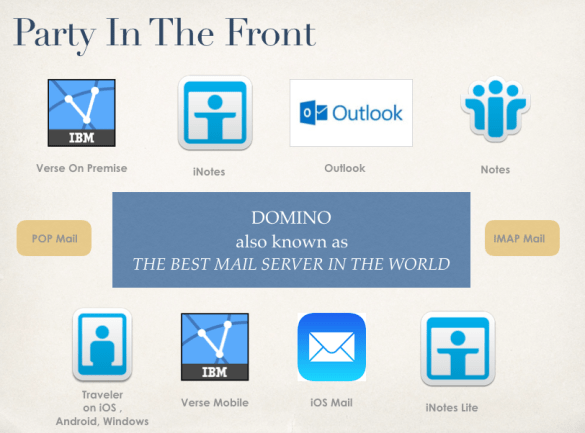
This is my presentation from Icon UK in September which discusses making client decisions whilst keeping Domino, the best mail server in the world, as your underlying architecture

How often do you hear that the business is discussing moving mail platforms because “our users want X” where X is nothing to do with the server and everything to do with the client UI. Domino remains the best mail server available but often user dissatisfaction drives a move and that comes from being asked to use the wrong client or from a bad deployment. If you’re using Domino you have an ever expanding range of clients to choose from browsers, iNotes, Verse, Traveler with iOS integration, Android applications, POP3 and IMAP. 

screen-shot-2016-10-24-at-09-51-18

The full presentation is here

Introducing Penumbra Briefings

On today’s Community Call we were able to share a new initiative being started by The Penumbra Group called Penumbra Briefings.  Penumbra is a worldwide networking group of Business Partners that we have been part of for over 20 years and has as its members many partner companies and people you already know very well.

So what’s a Penumbra briefing?  At our regular meetings one of the things we all enjoy are the open discussions about IBM news and technologies as well as what we are individually working on.  Our idea was to bring that approach to a wider audience in the hopes that others will find it useful and interesting too. These are intended to take two formats:

  1. Monthly webcasts with published topics and with an audience Q&A at the end.
  2. Daily briefings during Connect 2017 in  San Francisco.  Independently from IBM (and not part of any official agenda) we will be holding briefings about the days’ events, sessions and news which will be both live for people attending and broadcast for those not.

If you have 2 minutes to give your feedback on today’s briefing or even the briefing idea,  it would help us identify topics of interest and the best format moving forwards.  We have a very brief survey here http://bit.ly/PenumbraBriefing

Thank you to Tony Holder, Mike Smith, Lance Spellman, Nigel Cheshire, Wannes Rams and Julian Robichaux for being panelists and moderators today.

More information about the briefings in the presentation below and here is a REPLAY of today’s call.  Details of our next briefing in November will be available soon and we hope you can attend.


Connect 2017 Registration – Same Name But Something Very Different

Today registration has opened for the conference known as Connect 2017.  Connect in Orlando wasn’t anything more than a rename of Lotusphere but although this bears the same name it’s very far from being the same event. Connect 2017 is taking place in Moscone West in San Francisco at the end of February but that’s not the biggest change – the content,  structure and even pricing is drastically different too.

Let’s start with the title and tagline.  No more vague marketing phrases about what the conference is about (“pool of knowledge”) instead we have “Redefine work with Watson”. You may not know what Watson can do for you or your business yet but the conference very clearly is planning to focus on that

screen-shot-2016-10-17-at-18-58-08

Then we have the tracks

Emerging Technologies

Explore the promise of technologies like augmented reality, Internet of Things, blockchain, artificial intelligence and Watson, and their potential to change our work and life challenges.

So if you want to understand new technologies, things your customers are only aware of on the peripheries , if you want to understand how to position your skills and what opportunities are out there this is for you.  This is definitely for me.

Strategy and Business

Discover how pioneers are addressing current trends and issues in the evolving domain of strategy and business. Led by industry speakers and leveraging case method, the track explores business challenges, approaches, and outcomes across engagement, expertise, productivity and work.

I have no idea what will appear in this track but i’m encouraged by the terms ‘industry speakers” which suggests we’ll be hearing from outside IBM

Development, Design and Tools

Delve deep into product, design and code. Build a deep understanding of products and solutions that help us redefine everyday work including Verse, Connections, Notes, Domino, Bluemix, WebEx, Toscana, Spark, Box and more.

.. I’m calling that “Best Practices” in my head.

On top of the tracks there will be “lightning talks” which sounds like pop up Ted type short sessions appearing around the conference.  But what do I know.

Now we come to registration pricing and some nice new offerings

Full Conference Pass @ 1695 USD (or 100 USD less if you are an alumni) this gets you access to everything including receptions, breakfast and lunch. A Daily Conference Pass is also available at 895 USD.

Experience registration at 995 USD includes everything except the hands on labs and breakout sessions. For 995 USD you can still attend keynotes the expo and lightning sessions but if you don’t usually go to regular breakout sessions, if the conference is more of a networking than direct learning event for you, maybe the Experience registration is better.

Finally if all you want to do is visit the Expo and network you could opt for Discover Connect at only 89 USD per day.

Take a look at the registration options here. I’m hoping IBM will allow upgrades from one level to the next but I can’t find any confirmation of that right now.

Connect 2017 – All Change & Call for Speakers

The website for IBM Connect 2017 is now up and giving us more detail about the event next year. It’s all change from Orlando to San Francisco but actually the only thing that hasn’t changed is the name – from the looks of the event and tracks this seems to be a very different kind of conference.

Taking place in San Francisco at Moscone West from 20-23 February there seems to be a bigger focus on new technologies than in the past and certainly ones that step further towards the edges of traditional ICS products.  Today many of us work cross-product and with hybrid infrastructures so its welcoming to see IBM recognising that and offering a conference that gives us both present and future topics to learn.

Registration for the conference isn’t open yet, but you can submit a session as a speaker here  only until Nov 4th and the topics listed give an insight – an exciting one I think – into what the conference will contain.  I plan to submit a session myself and hope to be there in San Francisco next February even if I’m not speaking.

Sessions can be submitted in the following categories:

Emerging Technologies: Join experts discussing technologies that are shaping our world. The Emerging Technologies track explores our work/life challenges and investigates the promise that technologies like Augmented Reality, Internet of Things, Blockchain, Artificial Intelligence, and Watson will bring.

Strategy and Business: Discover how pioneers are addressing current trends and issues in our constantly evolving domain of strategy and business. Led by industry speakers and leveraging case method, the track explores business challenges, approaches, and outcomes across engagement, expertise, productivity, and work.

Development, Design and Tools: Delve deep into product, design and code with the experts. Discover a deep understanding of products and solutions that help us redefine everyday work including Verse, Connections, Notes Domino, Bluemix, Cisco WebEx TM, Toscana, Spark, Box and more.


It’s Cham-peen Time

The IBM Champion program is once more open for nominations for 2017 Champions.  For those of you that don’t know, the Champion program has been set up by IBM to reward and thank people who have established a voice in their community.  To become a Champion first IBM need to know what you do and there is a nomination form which can be used by others to nominate you or by you to nominate yourself.  All the nominations are then reviewed by an internal IBM team who choose the Champions each year.  Before going any further you can nominate people here until Nov 4th.

Last year Theo Heselmans and I were selected as the first IBM Lifetime Champions which means we don’t need to be nominated (I will still be nominating others) and last week I participated in a web conference with IBM on the Champion program, what it’s about, what the value is to you and how to become one.  You can watch and download that event here and I recommend you do if you’re interested in becoming or nominating a Champion.

For me being a Champion means that the work I do, writing, speaking, feeding back to product development, has been valuable to someone , that they wanted to say thank you and that IBM recognise my work.  It doesn’t change what I do or make me more beholden to IBM but it does expand my audience and makes me feel good 🙂  So that said, if there is anyone who makes a difference to your work, answering questions via forums, twitter, on their blogs, who speaks or organises a conference or whose contribution you’d miss if they were to stop – NOMINATE THEM here.

I have heard plenty of people say (and said it myself once) “well if no-one nominates me I guess I don’t do enough” and that simply isn’t true.  No-one knows what you do as well as you.  Other people may not nominate you because they don’t know everything you do or simply because they think you have already been nominated.  I’ve been guilty in the past of not nominating someone I thought was a shoe-in only to find out no-one else did either.  Nominating someone else is also a huge compliment to them and a way of saying thank you even if they don’t end up becoming a Champion.

Now go out there and get nominating !