Think Sessions & Some V10 Content

IBM Think is fast approaching so in mid March I’m off to Vegas to an entirely new conference without much of an idea what to expect.   What I do have already is a busy week with three sessions to prepare and deliver.

1.30pm Monday March 19th in “Surf B”

A Guide To Single Sign-On for IBM Collaboration Solutions

This is a new session where I plan to talk not just about the technical aspects of single sign on but how to plan for a single identity environment and how to prepare your users.

4.30pm Tuesday March 20th in “Surf C”

Deep Dive: What’s New in Notes, Sametime and Verse On-Premises for Users and Administrators

This is being presented with Ram Krisnamurthy who has moved from IBM to HCL and is the Chief Architect, Notes/Designer/Xpages there.  As part of our presentation we will have content to share on v10 of all the ICS products.

11.30am Wednesday March 21st in “Surf B”

IBM Champion Panel: Stories of Client Success with the Domino Portfolio

An panel discussion with fellow Champions Paul Withers and John Jardin.  We will be sharing some client success stories and answering questions from the room.

I have a few other things in the works, including a possible Nerd Girl session but more on that later.


Me vs iBooks: The Return. I win (barely)

This blog is for future me and for anyone else wanting to understand some iBooks structure.  It’s not an attack on Apple – I know I’m an extreme case.

Some of you may know my fondness for books.  A habit that led to me buying so many books when the iPad came out I actually broke the iBooks app (too many books to display on the “purchased” screen) which took a year to fix.  Fast forward several years..

It’s been an unexpected few days of technical support. Rumour is that Apple will be changing the iBooks app in an upcoming release and that always makes me nervous.  I buy around 30 books a month and have 3859 on my iPad and iPhone.  Probably about 60/40 iTunes and Amazon.  Losing my books would be equivalent to someone who cares about music losing all their music or a gamer losing all their games.  It would be bad.  Give her space. Don’t try and talk to her. Back away slowly. Bad.

I carefully backup (and have to remove DRM to do it) about once a month.  Why?  Because Apple may decide to drop iBooks at any time and then where would I be with 4000 (or at least 2000) unreadable books?

So I needed to backup and since upgrading to High Sierra that’s been impossible.  The technology I used only worked up to  Sierra.  That’s OK, I use Parallels , can download Sierra at no cost from the App Store and create a VM running Sierra. Of course I had to authorise that VM with my iTunes account so it could read the books which meant deauthorising everything else first since I was at 5 devices. Top tip, if you buy new kit, make sure you deactivate iTunes before flattening the old kit.

Step 1: Getting the books into my VM

In theory because I sync my books to the cloud I should be able to just launch iBooks and auto redownload. Unfortunately that didn’t happen. The books display as in the cloud but have to be manually downloaded.   Understandably selecting nearly 4000 books and telling iBooks to download them all caused it to crash. Repeatedly.  So I needed a better way.

Step 2: Why not just copy the books from my laptop which is the host machine for the VM?

Some digging uncovered that my epubs are stored in

~/Library/Containers/com.apple.BKAgentService/Data/Documents/iBooks/Books

so surely I can just copy them over from one machine to another?  Why yes I can and when I launch iBooks they all display – kind of.  They can’t be read and most of the covers are missing but otherwise.. great! Some more digging later and I realised that although I had copied over the books.plist (which is a preferences file containing and index of all the books iBooks knows about), I didn’t get the SQL database that iBooks uses that is in ~/Library/Containers/com.apple.iBooksX.  

So that isn’t going to work. A few hours of trying to get covers to appear or books to be readable and I realised I needed to take a step back.  

Step 3: Maybe I was overthinking this. iBooks builds the index when you add books to the app by choosing “add to library” or just drag and drop them so why not drag the 4000 epubs into iBooks.  I knew they were already there but I tested and it does prompt you with the option to “Replace” all books that are already there instead of creating duplicates (of course what I could really do with is “Skip” rather than “Replace” but I get i’m in a niche situation).

So – drag 4000 books to iBooks and choose “Replace” and wait.  There’s no progress bar. Nothing.  The only way I can see that anything is happening is by launching activity monitor and noting that bkagentservice was consuming 80+% CPU.  Eventually “lots” of books appear.  This is the point where I realise there’s no way to count how many books are in iBooks.  I knew “lots” wasn’t all because I got this dialog “<epub filename> couldn’t be opened because you don’t have permission to view it”

Screen Shot 2018-02-05 at 07.54.25

I click OK and got another, and another and another. Eventually having to Force Quit iBooks and restart.

Fair enough.  Maybe when copying over the files from host to guest the permissions came with them and my new guest account doesn’t have permissions.  I spend some time making sure all permissions are OK, applying my new account as well as “Everyone” to that folder and all files contained in it.  I finally test by dragging and dropping individual files into iBooks that work with no error so I decide that error is a red herring – it’s more a “gah! iBooks can’t handle you doing that and has tripped over itself – try adding fewer books”

So now I have a new problem.  What books are missing?  If I knew what books were  missing I could manually add them.   Unfortunately not only do I not know what books are missing,  I don’t know if it’s 10 books or 2000.

Step 4: The search for the missing books

Those filenames aren’t terribly helpful but I know what books I have so I search in iBooks for certain book titles and discover some that aren’t there that should be (and are in my iBooks on my host machine).  How do I find the filename that matches the book title if I know I have the epub in the correct directory?  Here we head to terminal.  In the directory

~/Library/Containers/com.apple.BKAgentService/Data/Documents/iBooks/Books

I type grep “some phrase” ./*.epub -r

that “some phrase” could be author, booktitle, any text found in the book.  It’s weirdly powerful so make it as specific as you can.  I find the epub filename for a book I know should be there, I find that the epub  is in the right folder and I drag and drop that epub into iBooks. It works!.  Then I try with some of the files it said I had no permissions for… those work too.  OK so since I know it works and I can’t add all 4000 books at once,  now all I need is a list of what books it thinks I have in my Library to compare with the ones I have on the file system.
Easy right?
Step 5: We’re going to need some XCode
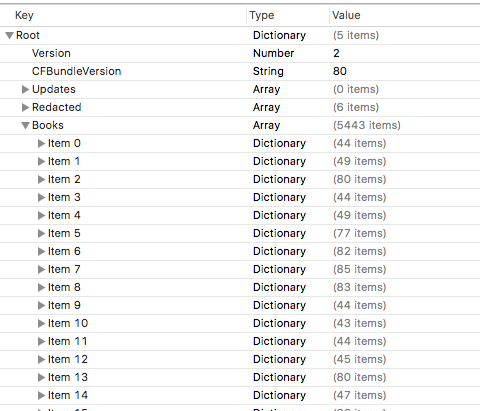
The list of books it thinks I have in the library is in the preferences file books.plist in ~/Library/Containers/com.apple.BKAgentService/Data/Documents/iBooks/Books.  Unfortunately the only thing that can easily read  a preferences file is Xcode so off I go into developer territory and installing XCode.  Once I do that I can open and read that preferences file.  Of course XCode is 10GB and my books are 12GB so I’m fast running out of space on the small VM I started with.  
When I do that I see this.  That’s right, an array of 5443 items each one representing a book.  Yes I know I said I had 4000 and it failed to add them all but clearly something is awry in the index too – one problem at a time.
Screen Shot 2018-02-05 at 11.56.37
Step 6: A New Plan
I can now read plist files and in theory get an export of items in that file.  If I can export all the books and filenames in the guest machine and do the same on the host machine I can import both lists into Excel and compare to see what files are missing – then manually add them.  Simple!
I don’t do code. I know what I want to do and what I want to do needs code but I will avoid it if I can.  Unfortunately here it’s the simplest way to get what I want.
Using “Script Editor” (part of the native OS) I write a script like this

tell application “System Events”

tell property list file “/Users/gabrielladavis/Library/Containers/com.apple.BKAgentService/Data/Documents/iBooks/Books/Books.plist”
set Booklist to value of property list item “Books”
set Output to “”
set Counter to 0
repeat with a from 1 to length of Booklist
set theCurrentListItem to item a of Booklist
try
set author to artistname of theCurrentListItem
set booktitle to itemname of theCurrentListItem
set thefile to sourcepath of theCurrentListItem
set Output to Output & author & “,” & booktitle & “,” & thefile & return
end try
set Counter to Counter + 1
if Counter mod 50 = 0 then
log (Counter)
end if
end repeat
log Counter
return Output
end tell
end tell

The counter was so I could see it was actually doing something as it ran.  The “try” was to check if the item has an author etc since my PDFs often didn’t and the code would fail otherwise.

It may not be pretty but it gave me what I wanted which was thousands of lines like this

Pamela Hartshorne,Time’s Echo,/Users/gabrielladavis/Library/Containers/com.apple.BKAgentService/Data/Documents/iBooks/Books/1F31185F755DD6B65C00B1CF641409B4.epub

Riggs, Ransom,Miss Peregrine’s Home for Peculiar Children,/Users/gabrielladavis/Library/Containers/com.apple.BKAgentService/Data/Documents/iBooks/Books/46D721416EA9EBB037E767DF155A4395.epub


Step 7: An afternoon with Excel

Running the agent twice against the host and guest books.plist gives me the data I need.  The host machine plist gives me 3789 entries and the guest machine 5443 entries. It appears every time I attempted to drag and drop a file in the guest copy of iBooks it created a new plist entry.  I enjoy data manipulation in Excel and after cleaning things up and playing with INDEX/MATCH I discover…. it’s not going to work.

The problem is that the plist filename is only updated when the books are added to the library so there was an unreliable mismatch between the guest and host plists.

Step 8: Take a step back and try playing by Apple’s rules

I take a copy of the iBooks directory into another folder (“movedbooks”)then I launch iBooks itself and (making sure iCloud is completely disabled on the guest machine so there’s absolutely not syncing to any device) I remove every.single.book from within iBooks.  Several scary minutes later iBooks is empty and so is the iBooks folder and the plist file.

Meanwhile I still have a copy of all the books in “movedbooks” – I know iBooks didn’t like me dropping 4000 books in but at this point I’m prepared to meet it half way.  After some trial and error, I copy the books in 250 or so at a time.  I verify they are added correctly by checking the books count that appears in the iBooks folder.  It takes about an hour but when I’m done, the iBooks folder is 170 items smaller than the movedbooks backup.

GAH

Step 9: The search for the missing books

I now need a tool to compare the contents of the movedbooks folder to the ibooks folder and tell me which files re present in the first but missing in the second i.e. are missing from iBooks.  A free app called “Compare Folders” does that for me nicely.  Unfortunately it won’t let me export the list but at list I can see the list of missing files.

Step 10: The final piece

170 is a manageable number so now, one by one, I find the missing files and drop them into iBooks.  That works and I end up 3849 books in iBooks and in the directory.  If you’ve spotted that’s 10 less than I should have then congratulations, that’s not a typo.  10 books completely resisted being added to the guest, no error, nothing, they just won’t add.  Even weird when I check my Excel spreadsheet and decide I don’t care about those 10.  But I make a note in case in care in the future.

So that’s it.  I shouldn’t need to do this again as I can add books in small numbers as I buy them and never again have to add all books I’ve bought.  In theory.

A final note.  If you have a Mac , buy yourself a copy of DiskWarrior, but that’s a story for another day.
This Is Us

About a month ago in a conversation with someone they mentioned to me that, having visited our website, they didn’t really understand what Turtle did.  That wasn’t a complete surprise,  updating our website has been on the todo list for a very long time.  In some ways what held us back was overthinking or trying to work out how to emulate “proper” websites whilst still conveying who we are.

Fast forward one month and Tim** has put together our new site which we’re all delighted with.  We wanted to streamline the content and just clearly show you who we are and what we can do.

I hope you like it, or it is at least useful.  Feedback is always welcome. Good feedback even more so :-).

**thanks to Abigail Roberts for all her creative ideas and input..

Screen Shot 2018-02-03 at 14.52.14

Producing A Champions Expertise Presentation (since you asked)

A few people have asked how I created the Champions Expertise presentation on containerisation that I published last week.  There are lots of Champions out there keen to produce their own next month so hopefully this helps someone.

I wanted a structured presentation with my voice overlayed describing each slide. I deliberately didn’t want video / my face on screen alongside the presentation.  That’s good because it’s a pain in the bum to do but mostly I find that having a talking head is distracting people from reading slides. That’s may not be true to everyone but not having video is my personal preference.

Equipment:

Macbook Pro (2014)

Keynote 7.3.1

BeatsX headphones connected via bluetooth.
I find having a good headset ensures there is no bleed or sound in from the surrounding space and these are the best headphones I’ve ever owned, plus they are really fast to charge so rarely run down.

Rehearsing:

I use Keynote on my Mac but Powerpoint does the same thing.  I wrote the presentation including speaker notes for myself , the speaker notes contained the key points I wanted to make sure I didn’t miss when going through each slide.  I try not to write too many speaker notes because I end up reading those instead of presenting so my notes are usually one word prompts.

Once I finished writing I ran through it in presenter mode which shows me a clock countdown as well as the speaker notes. That way I can get comfortable with what I am saying so it flows better when recorded.  I was aiming to run for 10 minutes talking quickly which, in my opinion, is a good length for wanting people to watch online.  I rehearsed 3 times but then I’m a committed over preparer, I suspect most people would rehearse less or not at all.

Recording:

So now I’m ready to record.  Keynote (and Powerpoint) has a feature called “Record Slideshow” when I choose that I go into presenter mode and have a “record button”. The clever thing is that the audio is recording as part of each slide not as a separate file.  I can stop anytime and pick up the recording again or clear a particular part of the recording and do over.  I chose to do it all in one hit.  My secret weapon was to ask someone to sit near me so I could present to them rather than into thin air. I felt that made me sound more natural (hopefully) and it was certainly easier to get into the flow. It did mean I ended up stumbling when he asked me a question part way in but that’s OK, it highlighted where I wasn’t being clear enough so I fixed the slide and started over

Publishing:

Once I was happy with the slides and audio I just saved the file and uploaded it (80MB) to my blog. I could have shrunk it down more and had lower quality, certainly with only audio it wouldn’t have made a lot of difference and I may go back and do that. My blog was also cross posted to twitter and linkedin

And that’s it.  If you have either Keynote or Powerpoint and a decent headset then it’s very easy.  I hope you enjoyed listening and look forward to more expertise presentations next month.

What’s A Conference Without A Dolphin Rotunda?

Those of you that understand the heading to this post know what I mean but for those that don’t.. through 20+ years of Orlando IBM conferences around ICS products, the general gathering place, the place where you’d sit and catch up with people walking by, the place where you could always go to find someone to talk to – was the Rotunda in the lobby of the Dolphin hotel.

This year at Think in Las Vegas there is no Dolphin hotel and no rotunda but I believe we still need a gathering place.  A single location where people can go, get a drink and meet up or catch someone walking by.  Having been to Vegas a lot (don’t ask) and InterConnect last March, I’m suggesting this place – Mizuya at the Mandalay Bay https://www.mandalaybay.com/en/restaurants/mizuya.html

It’s right outside the conference entrance so probably a <5 minute walk

It is basically a bar that opens at 11am and serves sushi all day

It has a live band in the evenings

It doesn’t have to be that place (I’m open to suggestions) but I think we need to put our stake in the ground and choose “A PLACE” so everyone knows where to go and where to find each other.

Anyone?


Champions Expertise – 2018 Technology

IBM Champion Expertise presentations are a new initiave we are starting this month whereby Champions can provide audio presentations on a particular topic.  This month is “2018 Futures and Technology” and here is my presentation on what I think is going to be big for 2018, containerisation vs virtualisation and where it goes next.  This presentation has audio and I tried to keep it short but feel free to double speed me if 14 mins is too long.

I mention in my presentation that I have a more detailed presentation on docker architecture on slideshare and if you want to see that it’s here.  I’d also be grateful for any feedback on the length, style or other aspects of the presentation and what you think of the Champions Expertise idea.

THINK Adventures

IBM Think is fast approaching in March (19-22) in Las Vegas.   I enjoyed the larger scale and scope of InterConnect and this is going to be even bigger so here we go….

Speaking:

I currently have one confirmed session on the Think site, I will be presenting on single sign-on both the technical aspects and the behavioural ones focusing on working across hybrid systems and with external solutions.

I am also confirmed to do another session on Domino that i’m very excited about but more on that later when I can share..(VERY excited)

Finally I will be at Champions day which is taking place on Sunday 18th and hope to be speaking there too.  This is open to all IBM Champions.

Show Floor:

At InterConnect I spent one entire day walking the showfloor (or whatever it’s called) visiting booths and really learning what is new, what is interesting, and what I had no clue about in sectors I don’t usually work in.  I plan to spend a day doing that again. I was very interested in the security products for instance and I particularly enjoy walking up to a booth and watching them look surprised when my response to their “we are out of giveaways” is “I’m not here for those, I want to know what you’re selling”

Make sure you give yourself enough time,  at InterConnect last year there were lots of labs dotted around the show floor between the booths as well.  I’d say you want at least 4 hrs.

Sessions:

So. Many. Sessions.  Make sure you download the app.  Previously I tried to plan sessions in advance but the day and my interests move too fast and there is simply too much choice so my plan this year is to wing it slot by slot “OK what are my options for this morning? – that’ll do”.   Don’t miss out on some of the talks either, there are many theatres doing short and longer talks which have a broad subject matter. Last year my favourites included a talk on Robotics Engineering from Dr Sabine Hauert of Bristol University, a talk on new media from the editor of Buzzfeed, and Linden Tibbetts CEO of IFTTT discussing how they work with large amounts of data.  None of those theatre talks are recorded or come with shareable presentations so you have one shot to see them.

Networking:

The size of Las Vegas actually provides great opportunities for smaller networking meet ups (you can’t go 5 steps without coming across a bar)|.  I will be there along with my colleagues in The Penumbra Group as well as my fellow Champions across all IBM sectors and I really hope to see some of you too.  If you see me (even if I look stressed and caught up with work which apparently is my resting face) please say hi, I love to talk to people about what they’ve seen, what they think and I love to talk about what I think. Sharing ideas and feedback is a very big reason to do this stuff in person.

Vegas:

I won’t lie, I’m a fan of Vegas which is odd because I’m not a fan of masses of people or noise.   I do like sun though.  And cheap high quality hotels.  And bars where you can ask for a cocktail and they know how to make it.  And music everywhere.  And really good food.  Vegas is notoriously cheap in the week and expensive at the weekend.  The last I looked the Luxor which is right next to the Mandalay where the conference is had rates as low as 60 USD per night during the week.  Even if you’re not coming to the entire conference (and I do have a 100 USD discount code for those that might want it), consider coming to Vegas to meet everyone.

So that’s it.  I’ve got lots to do beforehand to prepare but I have 1000 ideas of what I want to do and I’m already getting excited.  OK that’s partly because I really want to see what the sun looks like . but only partly.

I really hope to see you there, it’s not the same without you.


{blink}So THAT’S the future{blink}

It’s been a few weeks since I’ve posted here.  The end of last year was a juggle of many different pieces of work and learning new technologies but more on that later. I did however take my eye off the ICS (IBM Collaboration Solutions) ball waiting for the HCL deal to firm up and find out more what was going on.

As you may know from my previous post, at the end of October IBM entered a partnership with HCL whereby the latter took development ownership of all Domino products including Verse and Traveler as well as Sametime whilst IBM continued to own the license model, support and most importantly strategy.  As part of that announcement we were told of an upcoming series of workshops around the world called Domino Jam 2025  which were to determine the future path of both Domino and Sametime (so not just Domino and nothing to do with the year 2025!).

Last Friday I (along with about 50 other people) attended a London Domino Jam at IBM South Bank which was hosted by the senior development team at HCL (who transferred in from the same roles at IBM) and the product management team at IBM.  Up until a week or so ago I would say I was more curious and cautiously optimistic than excited.  I had been in coversation with someone in the development team at HCL who I have known from IBM days for 20 years and his introduction to HCL and his enthusiasm for the future sparked my own.  Let’s just say the HCL team seem to be people who have been long immersed in these products, believe in them and are now being let off the leash to develop for the future. During the day we were casually told that there would be new product releases guaranteed in 2018 including

Domino 10

Notes 10

Traveler 10

Verse (10?)

Sametime Instant Messaging 10

That was and is very encouraging news and IBM seemed bemused that several of us in the room kept asking for clarification and confirmation of a thing they thought we already knew.

As part of the Domino jam workshop we were split into groups and asked to brainstorm things like “your biggest pain points” and “what features would you like to see in the future” and then prioritise and present them.  These workshops are going on around the world right now (there’s one in Geneva I believe today) and you can register for them here https://www.ibm.com/collaboration/announcements/domino-jam2025.  In addition if you can’t attend in person IBM are hosting a Domino Jam Forum from Jan 16 – Jan 19 where you can provide your feedback directly online.  See this blog for more information https://www.ibm.com/blogs/collaboration-solutions/2018/01/11/announcing-domino2025-online-forum-january-16-18-2018/

the “#domino2025 Online Forum” will be active for fifty-five hours across the globe to gather your business and technical input and prioritization.” (I prefer “priorities” but I get what they mean :-).

If you are in any way invested in the future of ICS products either mail or instant messaging or conferencing then this is a serious effort to hear what you want and don’t want.  I can tell you there was some very honest and harsh feedback as well as some pretty extreme ideas thrown out by the teams last Friday and we were encouraged to do that.   I know for some of you it’s asking a lot but dig deep, find that kernel of optimism that’s still left, or just throw in your lot because it does no harm to do so and may do a lot of good.

This is an opportunity to help form the long term strategy and direction of products many of us love and believe in.  Take it.

Looking For A Few Champions

IBM Champion nominations are upon us and with only a week to go to get those in I wanted to send out a plea.  I would love to nominate you as a Champion.  Yes YOU. Unfortunately in most cases I don’t know enough about who you are and what you do.  It’s no good saying “well if I did enough she would know me” because that’s not how it works – very few of us do enough publicly to make others aware of what we do.  Being a Champion can be awarded against lots of criteria not just speaking at events or writing blogs.  Libby has kindly shared some here but anything that falls under advocating for ICS products or committing your own resources to the technical community counts.

As a Lifetime Champion I am fortunate that I don’t need to reapply but I thought if I tried to write up my own dummy nomination here for 2017 hopefully it will help you see some of the things you do as worthy of nomination.  This isn’t me boasting and I hope it doesn’t read as me being arrogant, I’m just trying to encourage by example and help people who may need it.

Why should you be an IBM Champion? *

Describe the contribution in the last year are you most proud of or you believe has had the biggest impact on the technical community, IBM or IBM’s customers. Share as much detail as possible, including the activity’s impact and any links.

Consider activities and accomplishments from the past year that rise above and beyond your job and support IBM products and solutions andthe greater technical community, including both internal and external activities.

The follow on question to this is asking me to list my top 5 activities so I would assume the first question wants just what you consider the most important activity listed followed by an opportunity to list 5 other things you would like considered / are proud of.

Here are a few things I could add under the suggested categories,  I know there’s a lot here, this is FAR more than you need to submit but I wanted to give as many examples as I could.

EVANGELISE AND ADVOCATE FOR IBM

  • Presenting to {named customer} on IBM’s strategy and the ICS roadmap to convince them they were on the right path
  • A tweet sharing IBM news or commenting on  IBM news that got X number of retweets (with link) or a blog or linkedin post that got X number of reads
  • Customer references for internal meetings or presentations I attended and contributed to that helped them deploy ICS products

HELP GROW AND NURTURE THE COMMUNITY

  • Examples of people who contacted me for support or assistance or just advice that I helped out (asking them if they would act as references)
  • The Nerd Girl work at Connect and the mentoring done since then.
  • Participation in multiple user groups

EXPAND REACH ACROSS THE IBM PORTFOLIO

  • My work this year learning and sharing on Docker to support the IBM Connections initative and now Domino
  • Work partnering with IBM security business partners
  • My GDPR work with customers that combines discussions of multiple IBM technologies IOT, blockchain, and Domino data

PROVIDE FEEDBACK ON IBM PRODUCTS AND DIRECTION

  • The IBM advisory panels I’ve been involved in along with references to our meetings
    The design feedback sessions I’ve been involved in with references to the IBM teams involved and the topics I fed back on
  • The “Jams” I’ve contributed to along with my contributions
  • PMRs that highlighted a significant problem in a product and enabled development to improve it

SHARE KNOWLEDGE AND EXPERTISE

  • My series of New Way To Learn sessions I did in May for IBM with links to the sessions and listing Alan Hamilton as a reference. Also listing my blog and slideshare where the sessions are shared
  • A list of my blogs I’ve written this year
  • The conferences I’ve spoken at such as Connect, InterConnect, Engage, MWLUG, AdminCamp and Social Connections along with the presentation content and again links to my slideshare

I really want to hear from people who haven’t been nominated or even people who want some support in being nominated. Please contact me if you want me to nominate you or connect with me on Skype (GabriellaDavis) if you just want to talk about it. Don’t feel you have to know me to reach out.

Also if nothing else, please please nominate yourself.  One trick I found worked for me was to ask a colleague to draft my self nomination and then I updated it.  That way I didn’t feel awkward writing things down and got to see what someone who works closely with me sees me do.

A New Era, A New Future, A New Domino

Some of you may have already seen the tweets out of HCL and the announcement from IBM on the new strategic partnership for ICS products that IBM have just entered into with HCL.  To explain things as simply as possible this means that HCL will take over the development of most of the ICS products whilst IBM continues to manage the product strategy, marketing and licensing.  The products involved include

Domino
Notes (on premises and SmartCloud)
Traveler
Verse
Sametime
IBM Client Access
IMSMO (mail support for Microsoft Outlook)

So what does this actually mean for us as Business Partners and, more importantly, for customers?  In my opinion this is very good news.  The products will benefit from significantly more development investment and resources,  with the existing IBM development teams on those products moving under HCL  In addition IBM will continue to manage the product themselves (using the existing offerings management teams) as well as the licensing, and the strategic direction.

There is no longer any End of Life date for Domino, not even “at least until” dates.

As far as customers are concerned, nothing will change other than an acceleration in the investment and development of products including the announcement of Domino 10 for 2018 and the #Domino2025 project.  Even submitting PMRs will continue in the same way.  There will be no customer – HCL direct relationship.

What is Domino2025? Otherwise known as Project Sapphire this is a strategic and ongoing product development initiative IBM will be starting in November where they will be taking feedback on what people want to help drive the future of Domino.   You can tweet your feedback using #Domino2025 and look forward to workshops taking place worldwide as a continual process to design future (post v10) Domino.

I have a lot more thoughts which I’ll share over the coming days but when I first heard about this and considered it I realised that this is a huge opportunity and a step forward for all the products involved.  I hope you agree.

The birth of a new Domino!