In this 6th episode of my #Perfect10 webcast I look at how to identify any performance issues in your Sametime, iNotes, Verse on Premises or Traveler environments prior to upgrade.
Next Up: Preparing for Beta Testing
In this 6th episode of my #Perfect10 webcast I look at how to identify any performance issues in your Sametime, iNotes, Verse on Premises or Traveler environments prior to upgrade.
Next Up: Preparing for Beta Testing
By Tim Davis – Director of Development
In my previous post I talked about what Node.js is and described how to create a very simple Node web server. In this post I would like to build on that and look at how to flesh out our server into something more substantial and how to use add-on modules.
To do this we will use the Express module as an example. This is a middleware module that provides a huge variety of pre-built web server functions, and is used on most Node web servers. It is the ‘E’ in the MEAN/MERN stacks.
Why should we use Express, since we already have our web server working? Really for three main reasons. The first is so you don’t have to write all the web stuff yourself in raw Node.js. There is nothing stopping you doing this if you need something very specific, but Express provides it all out of the box. One particularly useful feature is being able to easily set up ‘routes’. Routes are mappings from readable url paths to the more complicated things happening in the background, rather like the Web Site Rules in your Domino server. Express also provides lots of other useful functions for handling requests and responses and all that.
The second reason is that it is one of the most popular Node modules ever. I don’t mean therefore you should use it because everyone else does, but its popularity means that it is a de facto standard and many other modules are designed to integrate with it. This leads us nicely back around to the Node integration with Domino 10. The Node integration with Domino 10 is based on the Loopback adaptor module. Loopback is built to work with Express and is maintained by StrongLoop who are an IBM company, and now StrongLoop are looking after Express as well. Everything fits together.
The third and final reason is a selfish one for you as a developer. If you can build your Node server with Express, then you are halfway towards the classic full JavaScript stack, and it is a small step from there to creating sites with all the froody new client-side frameworks such as Angular and React. Also, you will be able to use Domino 10 as your back-end full-stack datastore and build DEAN/NERD apps.
So, in this post I will take you through how to turn our simple local web server into a proper Node.js app, capable of running stand-alone (e.g. maybe one day in a docker container), and then modify the code to use the Express module. This can form the basis of almost any web server project in the future.
First of all we should take a minute or two to set up our project more fully. We do this by running a few simple commands with the npm package manager that we installed alongside Node last time.
We first need to create one special file to sit alongside our server.js, namely ‘package.json’. This is a text file which contains various configuration settings for our app, and because we want to use an add-on module we especially need its ‘dependencies’ section.
What is great is we don’t have to create this ourselves. It will be automatically created by npm. In our project folder, we type the following in a terminal or command window:
npm init
This prompts you for the details of your app, such as name, version, description, etc. You can type stuff in or just press enter to accept the defaults for now. When this is done we will have our package.json created for us. It isn’t very interesting to look at yet.
We don’t have to edit this file ourselves, this is done automatically by npm when we install things.
First, lets install a local version of Node.js into our project folder. We installed Node globally last time from the download, but a local version will keep everything contained within our project folder. It makes our project more portable, and we can control versions, etc.
We install Node into our project folder like this:
npm install node
The progress is displayed as npm does its job. We may get some warnings, but we don’t need to worry about these for now.
If we look in our project folder we will see a new folder has been created, ‘node_modules’. This has our Node install in it. Also, if we look inside our package.json file we will see that it has been updated. There is a new “dependencies” section which lists our new “node” install, and a “start” script which is used to start our server with the command “node server.js”. You may remember this command from last time, it is how we started our simple Node server.
We can now start our server using this package.json. We will do this using npm, like this:
npm start
This command runs the “start” script in our package.json, which we saw runs the “node server.js” command which we typed manually last time, and our server starts up just like before, listening away. You can imagine how using a package.json file gives us much more control over how our Node app runs.
Next we want to add the Express module. You can probably already guess what to type.
npm install express
When this is finished and we look inside our package.json, we have a new dependency listed: “express”. We also have many more folders in our node_modules subfolder. Express has a whole load of other modules that it uses and they have all been installed automatically for us by npm.
Now we have everything we need to start using Express functions in our server.js, so lets look at what code we need.
First we ‘require’ Express. We don’t need to require HTTP any more, because Express will handle all this for us. So we can change our require line to this:
const express = require('express')
Next thing to do is to create an Express ‘app’, which will handle all our web stuff. This is done with this line:
const app = express()
Our simple web server currently sends back a Hello World message when someone visits. Lets modify our code to use Express instead of the native Node HTTP module we used last time.
This is how Express sends back a Hello World message:
app.get('/', (req, res) => {
   res.send('Hello World!')
} )
Hopefully you can see what this is doing, it looks very similar to the http.createServer method we used previously.
The ‘app.get’ means it will listen for regular browser GET requests. If we were sending in form data, we would probably want to instead listen for a POST request with ‘app.post’.
The ‘/’ is the route path pattern that it is listening for, in this case just the root of the server. This path pattern matching is where the power of Express comes in. We can have multiple ‘app.get’ commands matching different paths to map to different things, and we can use wildcards and other clever features to both match and get information out of the incoming URLs. These are the ‘routes’ I mentioned earlier, sort of the equivalent of Domino Web Site Rules. They make it easy to keep the various, often complex, functions of a web site separate and understandable. I will talk more about what we can do with routes in a future blog.
So our app will listen for a browser request hitting the root of the server, e.g. http://127.0.0.1:3000, which we used last time. The rest of the command is telling the app what to do with it. It is a function (using the arrow ‘=>’ notation) and it takes the request (‘req’) and the response (‘res’) as arguments. We are simply going to send back our Hello World message in the response.
So we now have our simple route set up. The last thing we need to do, same as last time, is to tell our app to start listening:
app.listen(port, hostname, () => {
   console.log(`Server running at http://${hostname}:${port}/`);
});
You may notice that this is exactly the same code as last time, except we tell the ‘app’ to listen instead of the ‘server’. This helps illustrate how well Express is built on Node and how integrated it all is.
Our new updated server.js should look like this:
const express = require('express');
const hostname = '127.0.0.1';
const port = 3000;
const app = express();
app.get('/', (req,res)=> {
   res.send("Hello World!")
});
app.listen(port, hostname, () => {
   console.log(`Server running at http://${hostname}:${port}/`);
});
This is one less line than before. If we start the server again by typing ‘npm start’ and then browse to http://127.0.0.1:3000, we get our Hello World message!
Now, this is all well and good, but aren’t we just at the same place as when we started? Our Node server is still just saying Hello World, what was the point of all this?
Well, what we have now, that we did not have before, is the basis of a framework for building proper, sophisticated web applications. We can use npm to manage the app and its add-ons and dependencies, the app is self-contained so we can move it around or containerise it, and we have a fully-featured middleware (i.e. Express) framework ready to handle all our web requests.
Using this basic structure, we can build all sorts of things. We would certainly start by adding the upcoming Domino 10 connector to access our Domino data in new ways, and then we could add Angular or React (or your favourite JS client platform) to build a cool modern web UI, or we could make it the server side of a mobile app. If your CIO is talking about microservices, then we can use it to microserve Domino data. If your CIO is talking about REST then we can provide higher-level business logic than the low-level Domino REST API.
In my next blog I plan to talk about more things we can do with Node, such as displaying web pages, about how it handles data (i.e. JSON), and about how writing an app is both similar and different to writing an app in Domino.
By Tim Davis – Director of Development.
I have talked a little in previous posts about how excited I am about Node.js coming to Domino 10 from the perspective of NoSQL datastores, but I thought it would be a good idea to talk about what Node.js actually is, how it works, and how it could be integrated into Domino 10. (I will be giving a session on this topic at MWLUG/CollabSphere 2018 in Ann Arbor, Michigan in July).
So, what is Node.js? Put simply, it is a fully programmable web server. It can serve web pages, it can run APIs, it can be a fully networked application. Sounds a lot like Domino. It is a hugely popular platform and is the ‘N’ in the MEAN/MERN stacks. Also it is free, which doesn’t hurt its popularity.
As you can tell from the ‘.js’ in its name, Node apps are written in JavaScript and so integrate well with other JavaScript-based development layers such as NoSQL datastores and UI frameworks.
Node runs almost anywhere. You can run it in Windows, Linux, macOS, SunOS, AIX, and in docker containers. You can even make a Node app into a desktop app by wrapping it in a framework like Electron.
On its own, Node is capable of doing a lot, but coding something very sophisticated entirely from scratch would be a lot of work. Luckily, there are millions of add-on modules to do virtually anything you can think of and these are all extremely easy to integrate into an app.
Now, suppose you are a Domino developer and have built websites using Forms or XPages. Why should you be interested in all this Node.js stuff? Well, IBM and HCL are positioning the Node integration in Domino 10 as a parallel development path, which is ideal for extending your existing apps into new areas.
For example, a Node front-end to a Domino application is a great way to provide an API for accessing your Domino data and this could allow easy integration with other systems, or mobile apps, or allow you to build microservices, or any number of things which is why many IoT solutions are built with Node as a platform, including those from IBM.
In your current Domino websites, you will likely have written or used some JavaScript to do things on your web forms or XPages, maybe some JQuery, or Server-Side JavaScript. If you are familiar with JavaScript in this context, then you will be ok with JavaScript in Node.
So where do we get Node, how do we install it and how do we run it?
Getting it is easy. Go to https://nodejs.org and download the installer. This will install two separate packages, the Node.js runtime and also the npm package manager.
The npm package manager is used to install and manage add-in modules and optionally launch our Node apps. As an example, a popular add-on module is Express, which makes handling HTTP requests much easier (think of Express as acting like Domino internet site documents). Express is the ‘E’ in the MEAN/MERN stacks. If we wanted to use Express we would simply install it with the simple command: ‘npm install express’, and npm would go and get the module from its server and install it for you. All the best add-on modules are installed using the ‘npm install xxxxxx’ command (more on this later!).
Once Node is installed, we can run it by simply typing ‘node’ into a terminal or command window. This isn’t very interesting, it just opens a shell that does pretty much nothing on its own. (Press control-c twice to exit if you tried this).
To get Node to actually do stuff, we need to write some JavaScript. A good starting example is from the Node.js website, where we build a simple web server, so let’s run through it now.
Node apps run within a project folder, so create a folder called my-project.
In our folder, create a new JavaScript file, lets call it ‘server.js’. Open this in your favourite code editor (mine is Visual Studio Code), and we can start writing some server code.
This is going to be a web server, so we require the app to handle HTTP requests. Notice how I used the word ‘require’ instead of ‘need’. If we ‘require’ our Node app to do anything we just tell it to load that module with some JavaScript:
const http = require('http');
This line essentially just tells our app to load the built-in HTTP module. We can also use the require() function to load any other add-on modules we may want, but we don’t need any in this example.
So we have loaded our HTTP module, lets tell Node to set up a HTTP server, and we do this with the createServer() method. This takes a function as a parameter, and this function tells the server what to do if it receives a request.
In our case, lets just send back a plain text ‘Hello World’ message to the browser. Like this:
const server = http.createServer((req, res) => {
 res.statusCode = 200;
 res.setHeader('Content-Type', 'text/plain');
 res.end('Hello World!\n');
});
There is some funny stuff going on with the arrow ‘=>’ which you may not be familiar with, but hopefully it is clear what we are telling our server to do.
The (req, res) => {…} is our request handling function. The ‘req’ is the request that came in, and the ‘res’ is the response we will send back. This arrow notation is used a lot in Node. It is more or less equivalent to the usual JavaScript syntax: function(req, res) {…}, but behaves slightly differently in ways that are useful to Node apps. We don’t need to know about these differences right now to get our server working.
In our function, you can see that we set the response status to 200 which is ‘Success OK’, then we make sure the browser will understand we are sending plain text, and finally we add our message and tell the server that we are finished and it can send back the response.
Now we have our server all set up and it knows what it is supposed to do with any request that comes in. The last thing we want it to do is to actually start listening for these requests.
const hostname = '127.0.0.1';
const port = 3000;
server.listen(port, hostname, () => {
 console.log(`Server running at http://${hostname}:${port}/`);
});
This code tells the server to listen on port 3000, and to write a message to the Node console confirming that it has started.
That is all we need, just these 11 lines.
Now we want to get this Node app running, and we do this from our terminal or command window. Make sure we are still in our ‘my-project’ folder, and then type:
node server.js
This starts Node and runs our JavaScript. You will see our console message displayed in the terminal window. Our web server is now sitting there and happily listening on port 3000.
To give it something to listen to, open a browser and go to http://127.0.0.1:3000. Hey presto, it says Hello World!
Obviously, this is a very simple example, but hopefully you can see how you could start to extend it. You could check the ‘req’ to see what the details of the request are (it could be an API call), and send back different responses. You could do lookups to find the data to send back in your response.
Wait, what? Lookups? Yes, that is where the Node integration in Domino 10 comes in. I know this will sound silly, but one of the most exciting things I have seen in recent IBM and HCL presentations is that we will be able to do this:
npm install dominodb
We will be able to install a dominodb connector, and use it in our Node apps to get at and update our Domino data.
Obviously, there is a lot more to all this than I have covered in the above example, but I hope this has given you an idea of why what IBM and HCL are planning for Domino 10 is so exciting. In future blogs I plan to expand more on what we can do with Node and Domino 10.
Here’s a good thing.. an interesting (free) 2 day event being held by IBM in Dublin on Workspace development and IBM Design Thinking. If Watson Workspace is something you are working with or interested in they will have designers and developers on hand to help you work through ideas. Unfortunately I will be in the US then or I’d definitely be signed up.
Take a look and register here
In this 5th episode of my #Perfect10 webcast I look at how to identify any performance issues in your Domino environment prior to upgrade. Assuming most people will be doing an in place upgrade, we want to resolve or at minimum document any existing issues before starting
By Tim Davis – Director of Development.
With Domino 10 bringing Node.js, and my experience of Javascript stacks over the past few years, I am very excited about the opportunities this brings for both building new apps and extending existing ones. I plan to talk about Node in future blogs, and I am giving an introduction to Node.js at MWLUG/CollabSphere 2018 in Ann Arbor, Michigan in July. However, I would like to digress from the main topic of Node and Domino itself, and talk a little about an awareness side effect that I am hoping this new feature will have, i.e. moving Domino into the Javascript full stack development space.
There are a plethora of NoSQL database products. In theory, Domino could always have been a NoSQL database layer, but there was no real reason for any Javascript stack developer to even consider it. It would never appear in any suggested lists or articles, and would require some work to provide an appropriate API.
The thing is, working in the Javascript stack world, I was made very aware that pretty much all the available NoSQL database products did not appear very sophisticated compared to Domino (or most other major Enterprise databases – Oracle, DB2, SAP, MS-SQL, etc). The emphasis seemed always on ease of use and very simple code capabilities and not much else.
Now in and of itself this is a worthy goal, but it doesn’t take long before you begin to notice the features that are missing. Especially when you compare them to Domino, which can now properly call itself a Javascript stack NoSQL database.
Popular NoSQL databases are MongoDb, Redis, Cassandra, and CouchDb. As with all of the NoSQL databases, each was built to solve a particular problem.
MongoDb is the one you have probably most likely heard of. It is the ‘M’ in the MEAN/MERN stacks. It is very good at scaling and ‘sharding’ which is sharing workload across many servers. It also has a basic replication model for redundancy.
Redis is an open source database whose power is speed. It holds its data in RAM which is super-fast but not so scalable.
Cassandra came from Facebook, and is a kind of mix of table data and NoSQL and is good for very large volumes of data such as IoT stuff.
CouchDb was originally developed by Damian Katz from Lotus and its key feature is replication including to local devices, making it good for mobile/offline solutions. It also has built-in document versioning which improves reliability but can result in large storage requirements.
Each product has its own flavour and would be suited to different applications but there are many key features which Domino provides, that we are used to being able to utilise, and while some of these products may have similar features, none of them have a proper equivalent for all.
Read and Edit Access: Domino has incredibly sophisticated read and edit control, to individual documents and even down to field level. You can provide access through names, groups and roles, and all of this is built-in. In the other products, anything like this has to be pretty much obfuscated by specifying filters in queries. You are effectively rolling your own security. In Domino, if you are a user not in the reader field then you can’t read the document, no matter how you try to access it.
Replication and Clustering: One of Domino’s main strengths has always been its replication and clustering model. Its power and versatility is still unsurpassed. There are some solutions such as MongoDb and CouchDb which have their own replication features and these do provide valuable resilience and/or offline potential but Domino has the most fine control and distributed data capabilities.
Encryption: Domino really does encryption well. Most other NoSQL products do not have any. Some have upgrades or add-on products that provide encryption services to some degree, but certainly none have document-level or field-level encryption. You would have to write your own code to encrypt and decrypt the individual data elements.
Full Text Indexing: Some of the other products such as MongoDb do have a full text index feature, but these tend to be somewhat limited in their search syntax. You can use add-ons which provide good search solutions, such as Solr or Elasticsearch, but Domino has indexing built-in and those indexing solutions themselves have little security.
Other Built-in Services: Domino is not just a database engine. It has other services that extend its reach. It has a mail server, it has an agent manager, it has LDAP, it has DAOS. With the other products you would need to provide your own solution for each of these.
Historically, a big advantage for the other datastores was scalability, but with Domino 10 now supporting databases up to 256Gb this becomes less of an issue.
In general, all the other NoSQL products do have the same main advantage, the one which gave rise to their popularity in the first place, and this is ease of use and implementation. In most cases a developer can spin up a NoSQL database without needing the help of an admin. Putting aside the issue of whether this is actually a good idea for enterprise solutions, with containerization Domino can now be installed just as easily.
I hope this brief overview of the NoSQL world has been helpful. I believe Domino 10 will have a strong offering in a fast growing and popular development space. My dream is that at some point, Domino becomes known as a full stack datastore, and because of its full and well-rounded feature set, new developers in startups looking for database solutions will choose it, and CIOs in large enterpises with established Domino app suites will approve further investment in the platform.
In this 4th webcast in my #Perfect10 series I discuss system requirements for v10 of Domino, Sametime and Traveler. Yes I know we don’t know those yet and we don’t even have the beta but we do know some things that are coming and more importantly this is something you should do before any major upgrade regardless. If we want an upgrade to be successful we don’t want it dragged down by old or outdated architecture and operating systems.
It runs a little bit longer than I like at 19 minutes I had a lot of information to cram in. I’m sure you can speed me up to 1.5x if you want to save a few minutes 🙂 As always if you have any feedback or would like me to do a webcast on a specific aspect please let me know.
By Tim Davis – Director of Development.
I have been working with the MEAN/MERN stacks for a few years and with Domino 10 looking to introduce Node.js support, Domino itself is following me into the ‘World of Node’. This world is the full-stack web developer world of MEAN, MERN, and all things javascript, and in this world NoSQL is king.
The MEAN/MERN development stacks have been around for a while. They stand for MongoDb, Express, Angular/React, and Node. (The other main web development stack is LAMP which is Linux, Apache, MySQL, PHP/Perl/Python).
The reason the MEAN/MERN stacks have become so popular is because they are all based on the same language, i.e. javascript, and they all use JSON to hold data and pass it between each layer. It’s JSON all the way down.
You may already be using Angular or React as a front end in your Domino web applications. With the introduction of Node into the Domino ecosystem, this becomes even more powerful. Domino can become the NoSQL database layer of a full javascript stack (e.g. DEAN or NERD) and, most importantly in my view, Domino becomes a direct competitor to the existing NoSQL data stores such as Mongo and Couch which are so popular with web developers and CIOs.
So what exactly is NoSQL?
As you can tell by the name, it is not SQL. SQL datastores are traditional relational databases and are made up of tables of data which are indexed and can be queried using the SQL syntax. Examples are DB2, Oracle, and MySQL. The tables are made up of rows with fixed columns and all records in a table hold the same fields.
NoSQL data is not held in tables. It is held in individual documents which can each hold any number of different fields of different sizes. You can query these documents to produce collections of documents which you can then work with.
Does this sound familiar? Yes, this is exactly how Domino works! Domino was NoSQL before NoSQL.
The main advantage of NoSQL over SQL in app development is that it allows for more flexibility in data structures, either as requirements evolve or as your project scales. It also allows for something called denormalization, which is where you hold common data in each document rather than doing SQL joins between different tables, and this can make for very efficient queries. Again, this is how Domino has always worked. Notes views are essentially NoSQL queries.
In addition to all this, when NoSQL is used in a javascript development stack the use of JSON as the data format means that the data does not need to be reformatted as it passes up and down the stack, with less chance of errors occurring.
Now obviously the note items inside Domino documents aren’t held as JSON, and this would be a issue when looking to integrate Domino into a javascript stack, but the Node server solution being introduced in Domino 10 solves this problem.
The Node server in Domino 10 comes with a ‘connector’ to do the work of talking to Domino. It is based on Loopback and gRPC (both IBM/HCL initiatives) and promises to be very fast. Having this connector built-in means that you as the developer do not need to worry about how to get data out of Domino. HCL have done that job for you. All you have to worry about is what to do with it once you have it, e.g. send it out as a response from an API, show it in Angular or React, or whatever.
This is all very exciting as a developer, especially one like me who has worked with javascript stacks for a while, but as I mentioned earlier the power of this solution is that it moves Domino into a position to directly compete with other NoSQL databases in IT strategies.
In my next blog I will talk about the advantages that Domino brings to the NoSQL table and why I believe it is the best NoSQL solution for full-stack javascript development.
On today’s #Perfect10 webcast I show how to audit and analyse your Notes client installs in preparation for the v10 upgrade later this year. Understanding how many clients you have active , what versions they are running, how they are installed and on what platforms is going to be a significant part of your upgrade planning.
This week was the Engage conference held in Rotterdam – the largest and (IMO) best event Theo Heselmans has given us yet. Rotterdam is a lovely city and the water taxi that took us from the restaurant back to the boat last night turned a 5 minute ride into a James Bond chase sequence – at several points he took corners by tilting the boat almost entirely on its side (there goes Tim!) and then onto the other side (bye Mike!) before pulling a handrake turn and reversing up to the dock – worth every cent of four and a half Euro. I don’t usually find time to attend sessions beyond the keynotes because I get caught up presenting and doing other things (I find it hard to think what right now but let’s group it under “meeting people”) but this week I was rushing from presentation to round table to meetup so here’s a summary of my highlights, kept as short as I can so you aren’t tempted to tl:dr
HCL brought the energy, the enthusiasm and a huge team of people showing how far they have taken Domino, Notes, Traveler, Sametime , Verse on Premises etc. IBM had energy too but their focus was Connections/Workspace and although it continues to develop, we in the ICS community have been starved for progress on the other products. HCL together with IBM hosted several roundtables on Domino, Application Development, Notes Client, Verse on Premises etc where we got to ask for or complain about what we wanted or felt was missing and answer questions about design priorities. I won’t go through all of that other than to apologise to everyone else in the Domino/Sametime roundtable who didn’t get a word in once I started.
From that Domino round table we heard about a couple of much needed and unexpected features coming in v10 (both of which I think are so new they haven’t yet been named) around the area of TCO. One is what I’d call a sync feature for Domino where you can tell a server to keep specific folders in sync with other servers in its cluster. Those folders could contain NSFs but also NLOs (DAOS files), HTML files or really anything else. The server will create the missing files and it doesn’t use replication to do that. Even better, if the server detects a NSF file corruption it is capable of removing its own instance of the file and pulling a new one from a cluster mate – all without any admin intervention. Another great tool will be the idea of shared encryption keys for NLO files so that Server B will be able to copy even encrypted NLO files from Server A by decrypting and then re-encrypting them. Management and maintenance of NLOs and the DAOS catalog was high on my list of enhancement requests.
From the Application round table we heard about how the integration with Node and Domino will work, there will be a npm install – DominoDB that will allow Node developers to access Domino data via the Node front end. Queries to Domino from the Node server will be using high performance gRPC (remote procedure calls) – in the same way Notes and Domino use NRPC for proprietary access. The gRPC access used by Node for Domino will eventually be open source. The front end of the Node server will be surfaced using the Loopback API gateway.
Essentially what this means is that any developer who can program using Node will be able to use their existing skills against Domino NSFs. That Domino systems will, in one step, become accessible to a much wider group of developers and systems is the main application development goal.
Domino statistics and reporting can be uploaded into and analysed from within the New Relic platform. If you find this as interesting as I do then you too are clearly an administrator,
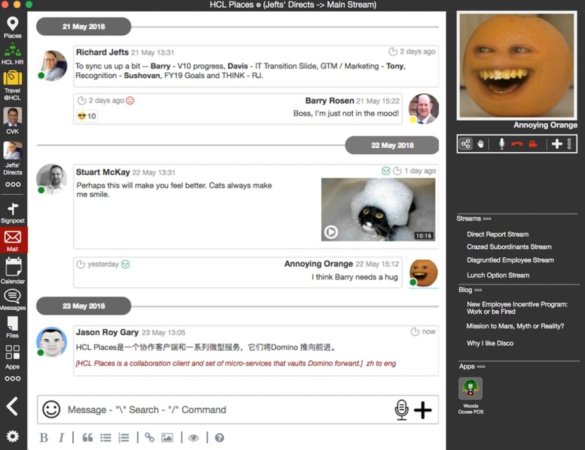
HCL Places. So that was a surprise. HCL demoed a working (but very basic) prototype of a new product they had been developing in secret (well no-one in the room knew of it). A lightweight desktop collaboration client that runs against a Domino NSF. It can include mail,, sametime , video, mentions and Notes applications. All on premises. Here is a terrible image of the prototype which – yes I know is cluttered – but focus on the features not the look and you can see that HCL are trying to take Domino somewhere we’ve all known it could go but never had the chance. The image was shared out by Jason Roy Gary who built and demonstrated the prototype and whose role at HCL is (I think) Vice President Engineering and Innovation, Collaborative Workflow Platforms.
In a week full of good news the two best were that a beta program for v10 will start with phase 1 in June and phase 2 in July. June will be a closed beta and July open. If you want to register for the beta program when it is announced then sign up for the newsletter on the Destination Domino site here
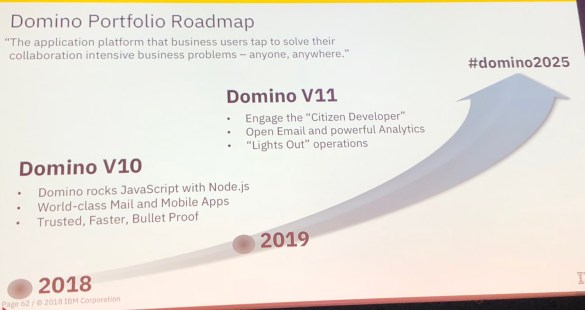
Plus there was this .
I don’t want to minimise the contribution by IBM themselves at Engage, each of the roundtables included IBM’ers alongside HCL’ers and there was certainly plenty of activity around Connections and Workplace but right now, in this blog, I’m revelling in the fact that Domino is finally getting the attention it deserves. Plus look at these great pens – they have little yellow highlighters in the top and when I asked IBM if I could buy some for customers they were happy to give me a “few”.

So – long story (it could have been sooo much longer) short. A great week , I learnt a lot, my session on Docker was standing room only in boiling heat, I had the chance to talk to people I rarely get to talk to and Engage was in another great location. I don’t know how Theo will match this next year but I look forward to finding out. Plus I got chocolate as a speaker gift.
Now don’t go messing with my high.
 The Turtle Partnership Blog