Installation Manager Install Fails on Redhat 6.6

Starting a new Connections customer build this weekend I ran into a problem at step 1 – installing Installation Manager. I could install the console version using ./installc but the graphical version would bring up the product selection screen then crash before the license screen with a “JVM Terminated =1”.

After trying various things, new versions of java, using root instead of sudo (a known problem with earlier versions of IIM) I found the technote I needed.  This is a problem caused by a very specific combination of packages

RH6.5 or 6.6

GTK > 2.24

Cairo <1.9.4

Amazing I didn’t catch that right?  To tell what versions you have installed run

rpm -q gtk

rpm -q cairo

If your cairo version is out of date (which mine was) go to ftp://fr2.rpmfind.net/linux/sourceforge/f/fu/fuduntu-el/el6/current/TESTING/RPMS and download the latest version of cairo (in my case cairo-1.10.2-3.el6.x86_64.rpm)

then run rpm -U cairo-1.10.2.-3.el6.x86_64 .  Now IIM will run and install fine using ./install

Full details of the technote are here

Installing CR2 for IBM Connections 5

IBM have just released IBM Connections 5 CR2.  And by “just” I of course mean I haven’t had time to install it myself yet but let’s look at what’s going to be needed. Amongst the fixes there are a few new features that improve the use of CCM Libraries with Connections 5 utilising IBM Docs 1.0.7 (also released today).  For example you will now be able to edit Library files in IBM Docs without leaving Connections.  More details of those features here

The landing page for installing CR2 is here and includes a link to the update strategy document and a PDF with example instructions for updating a single server Windows environment.

You don’t have to upgrade to CR1 before going to CR2 but there are required database updates in CR1 you will still need to deploy on your way to CR2.  I’ve linked to them here so you don’t forget them.

I’ll be installing this week in my test environment but I won’t be looking to install for any customer in production for a few weeks.

CR1 Database Updates

CR2 Database Updates

CR2 Cognos Wizard

Filenet Updates (CR2 uses different Filenet versions from CR1 so don’t deploy the CR1 versions if you are moving directly from 5.0 to CR2)


IBM Docs 1.0.7 For Connections – Linux Not Required

The good news for many of my customers wanting to deploy IBM Docs is that version 1.0.7 has just been released and not only does it now support Windows 2012  (no Windows 2012 R2 but v1.0.6 only supported Windows 2008 R2) but previously the key IBM Docs Application and  IBM Docs Proxy required Linux as an operating system meaning we had to not only add at least one additional server but that server had to be Linux.  This was especially frustrating since the Conversion Server required Windows and wasn’t itself supported on Linux so to fully deploy IBM Docs 1.0.6 you needed at least one Linux AND one Windows server

As of 1.0.7 Windows 2008 R2 and Windows 2012 support all IBM Docs components.  Unfortunately the Linux operating system does still not support the Conversion Server but at least we have one OS to use if we want.  Full specifications here

Well done IBM.

IBM Docs on Windows


Engage UG In Ghent A Session And Rowdy Lunch

I’m very happy to say that Theo and the Engage.ug team have chosen one of my sessions (I sent in far too many submissions – sorry Theo!) to present this March in Ghent.   If you haven’t registered, it’s a great (FREE) European conference with a packed schedule and I can’t recommend it enough.  Go on and click the link above.  I’ll wait.

At 9am on Tues 31st in Room B I’m presenting “How To LDAP – Working With External Users In Connections ” where I attempt to show you all the options for adding and managing external users in your IBM Connections environment.

This isn’t the same session I did recently at ConnectED because I believe that attendees need some more detail on LDAP itself before they can make good decisions on how to configure and deploy it for external users so I’m modifying the presentation to add more technical grounding in LDAP to give context before moving on to external user configuration.  I hope you enjoy it.

I’m also doing a lunchtime session on Monday with Paul Mooney on “Changing your Technology”.  How do you adapt to changes in technology and how can you identify and harness the skills you take for granted?

“The Domino community is a vibrant, passionate world, but the market reality is now hard to ignore. You may be looking at the marketplace as it stands and thinking about the future. You may have spent a long time becoming well known in a technology set, only know to find it is going away. In this informal session, Paul Mooney and Gab Davis will share their own stories and explain how you’re a lot more valuable than you may think you are.  Expect a love of the Domino platform, a good dollop of positivity and a bit of painful honesty”

….We’re in Room A at 12.45 on Monday, bring lunch and shots of tequila..

IBM Connected Part 3 of 3 – What Do I Do Next?

So ConnectED is over and the world has shifted a little bit more.  Going into this year the work I had been doing since 1996 on Mail systems had dropped from about 70%+ of my tasks to about 20% and had been replaced with projects around security, SSO, Connections, Sametime and other related WebSphere / DB2 systems.   Mostly that was because the use of mail systems has plateau’d and there is very little pushing at the boundaries going on so although everyone is still heavily dependent on mail , the systems pretty much ran themselves day to day.  The most upheaval we had last year was related to security updates.

I like working with complex technologies so my work around Sametime, Connections and SAML continues but I’ve also learnt that there are huge gaps in understanding around the supporting systems like LDAP and database servers that customers are struggling with along with their own ability to maintain and manage the built systems once in place.

Then there’s cloud.  As a system designer / installer / engineer / whatever – a move to the cloud in theory means I’m out of a job but I’ve never seen it like that.  I do this because I love to deliver systems that make people’s lives easier and continue to learn and develop myself.  An IBM’er said to me  “I don’t see why you are happy we are doing this in the cloud , surely you’ll be out of a job?”.  Leaving aside that I have no interest in holding customers back to maintain my own career, I wouldn’t get any sense of fulfilment from treading water.

I have projects spaced out across the year and I’m speaking at conferences hopefully in Belgium, Boston, Orlando (no not that one), Norway, Atlanta, UK etc.  However it’s the beginning of the year and I’ve been told no-one contacts me because they think I’m flat out busy – just to be clear, I’m never too busy to take on work 🙂

So where does that leave me?

Waiting

We’re in a transitional stage with Verse which is yet to appear outside of a limited beta in the cloud and is at least a  year away from on premises.  What that will change is still to be seen and I’ll wait and see and decide where I land once I understand more of what it delivers both in the cloud and on premises and the architecture behind it.  Other IBM products continue to add incremental features but nothing that would cause a seismic shift in my personal development strategy.

Teaching & Managing Supporting Technologies

The underlying technologies that these systems are dependent on are where many companies have gaps.  Nothing is as important as well structured and reliable LDAP.  LDAP directories are used for everything from authentication to data population , access rights and SSO.  One of the things I want to focus on this year is giving customers a better grasp of LDAP and how to build and maintain the best system they can.  Whether you are on premises or cloud, having a good directory is key to everything else you try to deploy.

DB2 and HADR.  Many IBM products require a Database server and all of them pretty much support Db2, where SQL and Oracle are supported and used there is usually an in house database server team.  However, many customers who come from a Domino background have very little DB2 experience because it’s never been needed and often what was the Domino team have to manage it.  DB2 databases need maintenance in the same way Domino databases need them. The server may keep running but your performance is going to take a hit.  I want to work this year on ensuring those customers who need DB2 systems have the right architecture and training to support it.  Basically what I’ve done for years with Domino.  You wouldn’t deploy Mail without understanding how to run a Domino server, and you shouldn’t deploy Connections without understanding how to run a DB2 server.

WebSphere is now pretty much aligned across products on 8.5x and it’s actually a fairly simple product to understand and manage. It’s just nothing like Domino.  There are plenty of WebSphere courses out there but most of them cover 10% of what you need to work with Connections and Sametime (maybe 25% of Portal) and the rest is irrelevant to your day to day work.  Along with doing lots of WebSphere only projects in the past 18 months I’ve also started doing WAS infrastructure design and workshop training for teams wanting to get up to speed with managing a  WAS environment.  I do the training via remote screen / web conference and it seems to work well as it has the advantage of me being able to use the customers own environment to train against.  I’ll be continuing to work with WebSphere architecture specifically related to Connections and Sametime but also standalone.

Connections101

I’ve fallen behind on Connections101 since losing my fellow editor Paul but I have content now written for building Connections 5 on a Linux platform.  Every time I think i’m done I decide to add a new piece like how to upgrade or add IBM Docs,  but I’m going to go ahead and publish what I have in hand and add to it once the site is live.  I’m also considering a Connections101 on deploying on iSeries. I just need to get my hands on an iSeries again (it’s been a few years since I owned one).

Are You Ready For Cloud?

With all the talk of Cloud and hybrid I believe many customers are at the stage of wondering if they should be moving and if they can move.  I have no incentive to recommend or not recommend someone move but I do understand that what salesmen often don’t tell you  or (to be fair) understand are the limitations of your existing business systems.

I am considering offering a provider agnostic cloud assessment to help you understand what your own technical barriers to cloud may be and whether a hybrid solution will ever be an option for you.   If I am able to review systems and highlight what could move, what could possibly move if it’s changed and what can never move – I’m hoping it will help customers clear out the noise and be able to make a good strategic decision.   I’d basically like to help people understand if a cloud deployment is a viable option for them now or in the future.

Domino 

I’m still continuing to work with Domino and now most of my work is around healthchecks, consolidation, clustering, security and performance.  It’s encouraging to see most customers upgrading Domino to newer versions, I see fewer and fewer EOL (v6, v7) versions out there and it’s still my favourite product to work with.  I’m always delighted to get a new Domino project.

Sametime / Connections Chat

I’m doing a lot of work deploying the A/V elements of Sametime and designing global deployments.  Once more it’s important that when the install is complete, the in house team are able to understand and manage the environment. Especially with the media elements in Sametime which are so dependent on each other and on their interconnectivity.

Summary

So if you’re interested in deploying anything WebSphere related, in DB2, in building and managing LDAP, in Single Sign On across multiple different systems, in workshop training or in understanding if and when you might consider a hybrid cloud strategy – that’s what I’m hoping to be working on and talking about this year.  I foresee another shift towards the end of 2015 (or sooner if no-one is interested in those things :-))

What do you think?

 

Connections File Sync For Mac (and Windows)

Last week IBM shipped the new Mac Desktop client for IBM Connections which is downloadable from Greenhouse.  It fully supports the syncing of files for on premises Connections servers as well as Cloud servers.   I have tested the File Sync features against one of my own servers as I’m very impressed. You must first configure your server to support File Sync and the instructions for that are here but essentially you need to edit files-config.xml by doing

wsadmin -lang jython -username iscusername -password iscpassword

execfile(“filesAdmin.py”)

FilesConfigService.checkOutConfig(“location”,AdminControl.getCell())

then go find the files-config.xml file and edit it using a text editor.  Look for and edit this section (my example below)

<fileSync enabled="true"> true" url="http://public.dhe.ibm.com/software/dw/ibm/connections/IBMConnectionsMSDesktop.zip"/> true"/> </fileSync>

Then check the file back in using

FilesConfigService.checkInConfig(“”)

Once this is checked in, sync the nodes and restart the Files App. Now the Mac Desktop client can be downloaded and installed.  The users shouldn’t try add the server in their client until Files Sync is enabled or it will have to be re-added.  So what happens once it’s installed

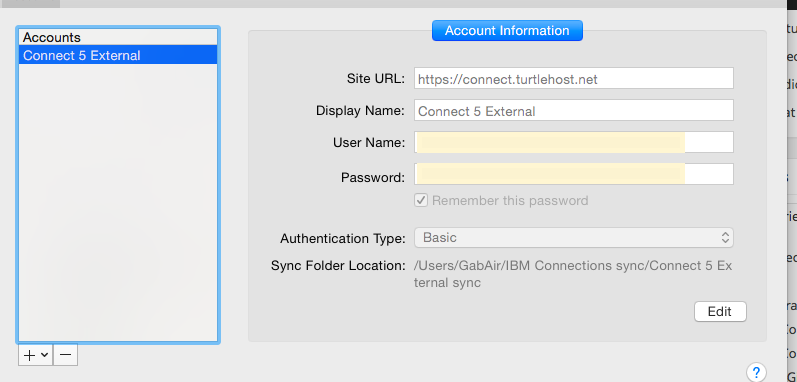
Setup accounts for your Connections servers , either on premises on Cloud. You must choose Basic authentication for on premises servers.

Setup accounts for your Connections servers , either on premises on Cloud. You must choose Basic authentication for on premises servers.


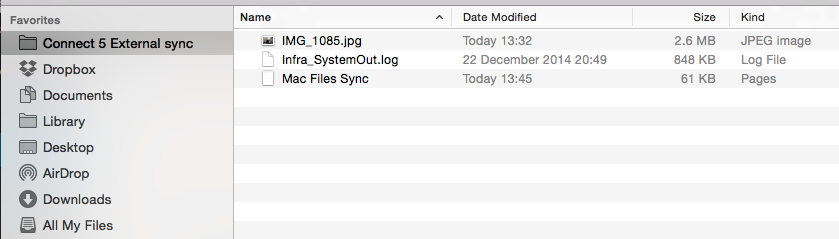
My Finder in Mac now has a folder for my Connections server.  I named the folder when I configured the server and I can have multiple folders for multiple servers

My Finder in Mac now has a folder for my Connections server. I named the folder when I configured the server and I can have multiple folders for multiple servers

Now I can drag and drop files into my sync folder or save files from any application to my sync folder and the desktop application will upload the file in the background, creating new or adding a new version

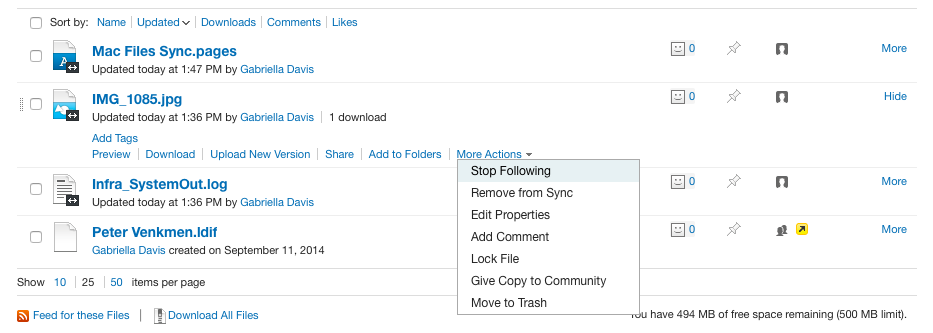
Once a file is set up for sync, it will continue to sync until you choose to disable sync for it.

Synced Files

Of course this is also available for Windows desktop clients here ..

My Connections Migration Checklist

I’ve been doing a lot of Connections upgrades and migrations in the past few months and since I prefer to do a side-by-side upgrade there are lots of steps along the way to make sure the data is moved and upgraded from the existing servers to the new servers.  The documentation on how to do this in the Knowledge Center is good but there’s a lot of jumping around all over the place between tasks and I have found it helpful for me to have a checklist to make sure I don’t miss anything.

Here’s the checklist I’m using right now with some explanation and links to the documents in the Knowledge Center for each.  My steps aren’t  in the same order as in the documentation but they are the order I use

In theory the migration shouldn’t make changes to your production servers, but I’m risk averse and it’s worth the extra few minutes to make sure you can back out of the migration should you need to.

Before starting anything you should have created new empty databases on your new system using the scripts / wizard from the version you are moving from.  Even if you are moving to Connections 5 from Connections 4, you will need to use the Database wizard for Connections 4 to create the databases we are going to move data into.   That makes sense when you consider we are going to transfer the data over from the existing production environment so the format / structure and schema must be identical from source to target.

Begin by stopping everything, all WAS servers and DB2 (or SQL, Oracle) in your production environment as well as any TDI assemblylines you may have running.  The data migration requires the production site to be down and stay down until the new site comes up, that could be anywhere from a day to 3 days depending on how big your environment is and how much data you have as well as the connectivity between old and new environments when transferring the data.

Now let’s back everything up – just get the existing production configuration data somewhere you can access it and make sure you don’t lose any data during migration so backup all the DB2 databases as well as the Connections shared data /Connections/data.. /shared (I personally like to backup /Connections/data which gets local as well but that’s just me.

  • Backup Connections Dmgr Profile by running backupconfig.bat /.sh from the /Dmgr01/bin directory.  This will stop the Dmgr server if it’s not already stopped or if you don’t use the -NoStop parameter. (no need to backup Installation Manager when doing a side by side migration)
  • Backup the Connections shared data
  • Backup customisations somewhere you can access them for reading and manual copying over to the new environment
  • Run the migration.bat / sh to export the Connections configuration data ready for import in your new environment.  This includes the LotusConnections-Config.xml and application specific data.  This is exported to a directory you then copy to your new environment where you can import it
  • Migrate each of the databases, one at a time.  Each one has a pre-script to run to prepare the database, then at least 2 migration scripts, one to move the data and one to clear the scheduler entries on each database.   All the instructions are here however there are a couple of things to bear in mind.

When running the scripts I like to add >filename to the end of each command to pipe the output to a log file.  I usually create a “Logs” directory and call the file by the name of the script _app name e.g predb_blogs.txt.  This way I can check if the scripts ran OK by reading the logs and I have something to send to IBM if it comes down to opening a PMR

See my earlier blog for potential syntax issues running the scripts

To run dbt.jar which migrates the data you create an XML file and a matching Batch file for each application.  I like to create all of these at once and add them to a directory from which I can run for each application (again with the >logfile at the end).  Below are examples of XML and batch files I modify to use (I’ve avoided putting in carriage returns as that messes things up should you copy out of here)

XML (e.g. files.xml below)
<dbTransfer xmlns:xsi=”http://www.w3.org/2001/XMLSchema-instance“><database role=”source” driver=”com.ibm.db2.jcc.DB2Driver” url=“jdbc:db2://sourcedbserverhost:50000/FILES” userId=“db2admin” schema=“FILES” dbType=“DB2”/> <database role=”target” driver=”com.ibm.db2.jcc.DB2Driver” url=”jdbc:db2://targetdbserverhost:50000/FILES” userId=“db2admin” schema=“FILES dbType=“DB2”/> </dbTransfer>

BATCH (calls files.xml)
“e:\install\connections\wizards\jvm\win\jre\bin\java” -cp e:\dbt_home\dbt.jar;e:\ibm\sqllib\java\db2jcc.jar;e:\ibm\sqllib\java\db2jcc_license_cu.jar com.ibm.wps.config.db.transfer.CmdLineTransfer -logDir e:\dbt_home\logs -xmlfile e:\dbt_home\files.xml -sourcepassword typedb2passwordhere -targetpassword typedb2passwordhere

  • Upgrade database schemas.  Once all the migrations scripts have been run (don’t forget the clearScheduler and run/updateStats where needed) you can proceed to upgrade the databases.  I like to back them up one more time before running the upgrade though, but that’s just me.  If it took a day or more to migrate the data I don’t want to do that all again.There are two ways to update the databases on your new target server.  Either using the provided (Connections 5) database wizard and choosing “Upgrade” or by running manual scripts.  I prefer to run the scripts manually so I can see what’s going on and IBM recommend that for the Homepage at least you run the script manually rather than use the Wizard.

    Instructions for doing both Wizard and Manual methods are here .  The biggest issue with running the scripts manually is that there are slightly different syntaxes depending on which version you are coming from and it’s fiddly getting the right one, I still prefer it although  I have used the Wizard for several of the applications and it has worked fine.

  • Once you’ve upgraded all the databases, the Homepage requires another step and that’s to do a java migration of its data. This ensures the format and content of each individual’s homepage matches that required for Connections 5.  The Homepage database is by far the largest of all those used and this could take significant time.  Below is an example of the command I run (again I have taken out carriage returns and invalid quotes etc

e:\install\connections\wizards\jvm\win\jre\bin\java -Dfile.encoding=UTF-8 -Xmx1024m -classpath e:\ibm\sqllib\java\db2jcc.jar;e:\ibm\sqllib\java\db2jcc_license_cu.jar;e:\install\connections\wizards\lib\lic.dbmigration.default.jar;e:\install\connections\wizards\lib\commons-logging-1.0.4.jar;e:\install\connections\wizards\lib\news.common.jar;e:\install\connections\wizards\lib\news.migrate.jar com.ibm.lconn.news.migration.next50.NewsMigrationFrom45to50 -dbur1 jdbc://db2://targetdb2hostname:50000/HOMEPAGE -dbuser db2admin -dbpassword targetdb2password >java.out.log 2>&1

  • Importing artifacts.  Using the directory and contents created earlier one when we exported the Connections artifacts, we can now import them into our new Connections environment.  We’re basically doing the reverse of what we did to export but this time running migration.bat /sh lc-import.
  • CommunitiesMemberService.syncMemberExtIdByLogin(“wasadmin”)
  • Migrate or Rebuild the search index.  Migrating can be done if the source version is 4.5 because the search index structure is the same however I prefer to rebuild cleanly if I have the time
  • FilesDataIntegrityService.syncAllCommunityShares()
  • Custom profiles. If you have custom profile settings (strings, languages, profile types) in your existing environment and that is 4.0 these will need to be migrated / converted to the Connections 5 format.  There are also settings that should have come over when restoring your artifacts that it is worth validating

The items below tend to be optional depending on what is installed in your current environment but if these elements exist currently they will need to be migrated too

Cognos

Connections Content Manager

Media Gallery

That’s my list anyway.  Obviously the Knowledge Center is the definitive source for all you installation / documentation needs 🙂


One Dumb And Two Smart Things – Calling That A Win

Last night / yesterday afternoon I was building a Connections server (for an internal project) when I wiped out hours of work doing something dumb.  I had spent some time downloading all the software and fixes to the server which was Windows 2008 R2 (because I have plenty of licensing for that)  and then I installed DB2 and WAS and created the WAS profile.  Next step was to run dbwizard.bat to create the databases but that’s where weird stuff started happening.  The dumb bit had already occurred I just hadn’t noticed it yet…..

The DBWizard would launch and let me move past the first screen but no amount of clicking on “Next” would let me move off the “Create, Edit, Update” screen.  Clicking ‘Back” actually took me to the next screen (!) but I couldn’t get any further than that.  I refused to believe it could be a DB2 problem because at the point in the Wizard it had no idea I was running DB2 as I hadn’t chosen my database platform because I couldn’t get to that screen.  I started from the assumption that since DBWizard is a java program my version of Java (brand shiny new updated yesterday) was incompatible.  So cue much time spent uninstalling and installing different java versions to try and fix it with no luck.  I could have run DBWizard from another machine but I wanted to fix whatever the underlying problem was.  Then I realised the dumb bit, I had installed 32bit DB2 on a 64bit platform which DB2 is fine with but the DBWizard really isn’t.  I don’t know if that was my problem (I still can’t believe on the early DBWizard screen it even knows to check) but in my attempts to fix uninstall and cleanup DB2 , I corrupted the Windows registry.  At least that’s what I think I did because on restart Windows would only boot to a grey branded screen with no login, even if I chose one of  the Safe modes or tried booting from a CD.

Since this work was about installing Connections and not fixing Windows I decided not to waste more time on it and startover.  Here come the two smart things.

1. I have a pre built Windows 2008 R2 VM disk with a 40GB C drive I use to clone and make new VMs.

2. I had downloaded and installed everything to a separate 100GB virtual disk

I detached the virtual disk from the broken VM

deleted that VM from the host entirely

made a copy of my simple VM disk

created a new virtual machine using that copy as its disk

added the 100GB virtual disk to that new VM

opened it up and changed its ip to match that of the VM I just deleted

and I was back in business.  Total time elapsed about 7 minutes

Of course I now had a D drive with software on it the Windows registry new nothing about but it was simple to just delete those installer folders and reinstall (the right) DB2, WAS etc and get back on track.  Certainly much simpler than trying to fix a broken Windows server!

WebSphere Things That Drive Me Insane – Pt..um.. 3

I actually like WebSphere. Honestly I do.  But it really really does not like Domino and Domino is my first love (well 2nd love.. ccMail you’ll always be first in my heart).  I have always run into problems configuring Domino within WebSphere mostly due to the fact that Domino LDAP isn’t always hierarchical the way every other LDAP is.  Back in the original Sametime 8.5 days we couldn’t have users of ST who didn’t have hierarchical names and we used to have to fake a hierarchy (C=US) to trick WebSphere.

My latest hair tearing out insanity is shown below.  To configure external users for Connections you can choose to set up an alternate LDAP source – in this case I’m using a dedicated Domino server I can make publicly available for people to register themselves.  Here are my repositories set up in WebSphere showing the two Domino LDAP sources..

LDAP1 is our internal directory LDAP SSO the external / public facing

LDAP1 is our internal directory
LDAP SSO the external / public facing

Here’s the fun bit.. this is what the federated repositories actually look like in WebSphere

Federated Repositories

As soon as I added the external Domino LDAP repository it changed the original internal one to the external one so that’s listed twice.  Try and add it again and it adds the same one a third time.  Even more hilarious, only the original (unlisted) one actually works and lists / authenticates users.

And yes, if I try and delete one it actually deletes all three.  Off I go to edit some XML files….I’ll post a fix when I get there

IHS Errors or WHY Won’t Connections SSL Work

It happens.  Usually when I’m building a test server on a single box and i’m building in a hurry.  I get everything configured and installed and take a brief stopover at IHS configuration on my way to completing security setup.   I create my keyfile using ikeyman, I import my trusted root certificates from whichever CA I plan to use and I generate a personal certificate.  I think it’s all working fine then I restart IHS and one of two things happen

1. IHS starts but only for 80 not 443

2. IHS starts on both 80 and 443 but I get an error 500 trying to access any Connections page over SSL

The logging on the 2nd error isn’t terribly useful and it’s tempting to run around checking the module mappings and LotusConnections-Config.xml for the source of the problem.  For some reason, even though I’ve seen each of these lots of times, my brain insists on starting at the beginning with debugging and looking at the logs.  So this blog is for you brain – next time just come here and check this first

1. The solution is often that the keyfile either isn’t where I told httpd.conf it was OR where the plugin-cfg.xml is looking for it.  Take time to go check the plugin configuration under your webserver in the ISC and make sure the name and location are what you think they are.  Then go and actually make sure they are there

2. A handshaking error caused by either the signer certificates used by the application servers not being imported into the keyfile OR (and this one drives me batty) installing everything on one box with the same hostname for the WebSphere servers as the IHS server.  In the 2nd instance you can’t have two totally different certificates both claiming to be the same hostname trying to talk to each other.  I export the certificate from WAS trusted key store and import it into ikeyman (or import into WAS and map each of the servers).

In general when I’m configuring IHS it’s always down to a file not being where I told httpd.conf it was.

Here are my rewrite and plugin lines for 64bit IHS on this particular Linux box

LoadModule was_ap22_module “/opt/IBM/WebSphere/Plugins/bin/64bits/mod_was_ap22_http.so”

WebSpherePluginConfig “/opt/IBM/HTTPServer/Plugins/config/webserver1/plugin-cfg.xml”

RewriteEngine On RewriteRule ^/$ https://<hostname>/homepage [R,L]

Update: I should have linked to this document which I found in the past and is always useful. Troubleshooting IHS