A Few Things From Connections 6 System Requirements

Connections 6 is due to be released on Friday but yesterday we had the announcement and the system requirements.  I took a look at them here and there’s a few things to be aware of if you’re an existing Connections customer

Operating Systems

  • Windows 2012 R2 and 2016 are both supported as server platforms but that’s it
    *Connections Content Manager isn’t supported on Windows 2016
  • Linux OS is SLES 12 or RHEL 7 so if you will almost certainly need to upgrade your OS if you’re already on Linux
  • Only 64bit OS are supported for servers
  • Installation Manager remains at 1.8.5 / 6 which can be upgraded in place if necessary
  • WebSphere Application Server is 8.5.5.10 which again can be upgraded in place if necessary
  • DB2 requires 11.1 minimum
  • SQL Server 2016 only
  • IBM HTTP Server 8.5.5 fixpack 10 required
  • Tivoli Directory Integrator 7.1.1 fixpack 6 is a minimum requirement and can be upgraded in place
  • Sametime integration requires Sametime 9.0.1 for chat and meetings


So those are the highlights that jumped out at me but the installation documentation isn’t out yet so I’ll find out more on Friday hopefully.  Start your engines…….


You Lie! Error Messages and When To Ignore Them

Building Connections this week and troubleshooting some errors reminded me to share the process I have adopted when dealing with IBM error messages – which is to treat them as hints that can set you on the right path but also send you badly down the wrong one.

Problem 1:

Installing Connections itself via Installation Manager.  One of steps during the install requires you to specify the DB2 server, the database names and credentials to connect to them.  I click validate and it fails  with error CLFRP0030E and launch error!.  That points to this technote which says I left a space after the hostname for the DB2 server.

I absolutely didn’t leave a space and didn’t copy/paste.  Just in case (and working on the assumption that it’s always me and not the product) I cleared it all and typed carefully again. I confirmed the hostname was correct and could be reached.  I also relaunched Installation Manager and started from the beginning.  No luck.

It’s  at this point I have to accept the error is referring to something else and that’s all the information I’m going to get from Installation Manager.  So now I move to asking myself “what if I saw no error but it just failed to connect”.  Well the first answer to that is to check if the connection details, hostname, credentials etc actually work at all.   Having confirmed the hostname and ports (there were no firewalls turned on or virus software), I logged into the DB2 server and checked the LCUSER account. Locked out.  I unlocked the account and the install then completed.

Problem 2

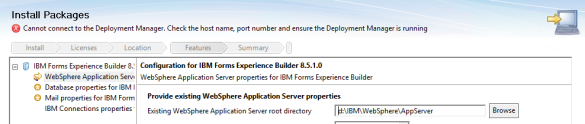
The test server in this environment is one box with everything DB2, TDI and all the applications on it.  My base WebSphere install was WAS 8.5.5 FP10 since Connections System Requirements for WebSphere 8.5.5 says FP8 and higher and I wanted to test that out. Everything installed fine right up to when I went to install Connections Surveys.  That’s when I hit a 2 day brick wall.  Installation Manager couldn’t connect to the Deployment manager despite it being on the same server.

screen-shot-2016-12-09-at-18-26-10

Well that’s odd.  Deployment manager is running.  The hostname resolves. The port is listening. I try to find out what the system requirements are for Connections Surveys but for 2 days last week and through the weekend the IBM system requirements pages for Survey were down.  I’m stubborn so I won’t let it go.  Even the Forms Experience Builder requirements for earlier versions were down.  So eventually I had to leave it and move onto the production build. The work needs completing and I was suspicious that the issue might have been installing everything on one server.

I build production across 4 servers and this time I stick with WebSphere 8.5.5 FP8 just in case.  When I get to the Surveys install it goes without a hitch.  So back to the test server I go.  Roll back Websphere to 8.5.5.0 and then forwards to FP8 (thank you Installation Manager!).  Surprise surprise Surveys installed perfectly.

So. Not an issue connecting to deployment manager or port or the server running but instead “Connections Surveys cannot install onto WebSphere 8.5.5.10 at all.


A Sametime Chat Mystery

Today I was contacted urgently by a site I did an install for back in early September.  The install went well and I left them several months ago with working components, but apparently about a week ago people stopped being able to login to the Community server. In fact not even the SSC could access it.

.. and yet no-one had changed anything at all.  I do love a good mystery so I thought it would be useful to someone (or even just future Gab) to document what I did:

  • verified if port 1533 was listening using netstat -an |find /i “1533”.
  • verified there were no running AV services that could interfere with the ports.
  • checked if the ST services were running, in fact only about 6 were.
  • tried to start some of the services that weren’t running and they failed immediately.
  • since no-one touched Sametime my next guess was a Windows update that caused a problem.
  • checked the Windows networking settings hadn’t been overwritten (they had) . Although those settings shouldn’t cause the services to fail completely it was worth resetting them.
  • I then added vp_trace_all=1 to the [Debug] settings in the sametime.ini which creates detailed log files in the \ibm\domino\trace directory.
  • having added that I could see log files being created for every service, even the ones that wouldn’t stay started. In fact those ones recreated every couple of minutes.  So the services were trying to start and failing.
  • reviewing the log files I could see on things like STPlaces there was a JVM error, but I put that aside for the time being in case it was a dependency issue.
  • in other logs such as STDirectory I could see broken networking errors and just before that I could see a comment about switching to TLS.

    A-ha! Well, that’s new.

  • checking the sametime.ini I found:
    VPS_PORT=1516
    VPS_TLS_PORT=1516

    which I changed to:
    VPS_PORT=1516
    #VPS_TLS_PORT=1516

    My guess being an incomplete TLS configuration from the SSC.  Having done that the server restarted perfectly and all services started.  The SSC could then access the server with no problem.

Of course once I had spent 4hrs doing that I then found a technote on it which I never would have found before I saw the TLS entry.  Here’s the technote .

Sometimes it’s a rollercoaster but so long as I get things working  I’m calling that a good day.  Now back to building more Connections servers.


Domino in the Back, Party in the Front

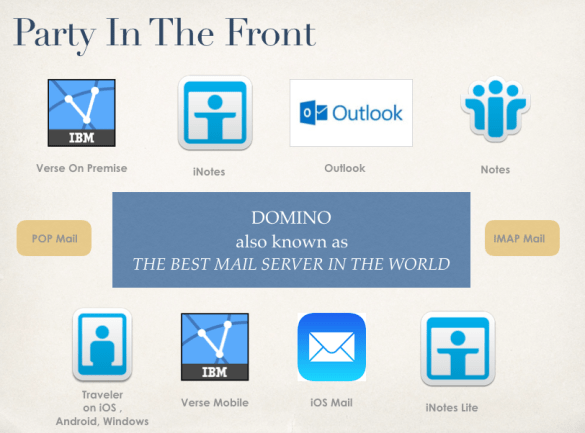
This is my presentation from Icon UK in September which discusses making client decisions whilst keeping Domino, the best mail server in the world, as your underlying architecture

How often do you hear that the business is discussing moving mail platforms because “our users want X” where X is nothing to do with the server and everything to do with the client UI. Domino remains the best mail server available but often user dissatisfaction drives a move and that comes from being asked to use the wrong client or from a bad deployment. If you’re using Domino you have an ever expanding range of clients to choose from browsers, iNotes, Verse, Traveler with iOS integration, Android applications, POP3 and IMAP. 

screen-shot-2016-10-24-at-09-51-18

The full presentation is here

Heads Up For UK Amazon Echo Buyers

After spending far too long (i.e. more than 10 mins) on tech support with my Amazon Echo today I finally rang them.  My problem was that it refused to acknowledge I had Amazon Prime and that TuneIn radio didn’t work so I couldn’t say “Alexa, play BBC Radio 4” for instance.

Calling Amazon UK support and I’m told they entirely messed up the UK Echo devices which ship to auto register with amazon.com.  Apparently tech support have to manually change your Echo registration on their end to force it to connect to the UK site instead of the US and they are “rushed off their feet” doing that as each person calls.  It should be sorted by tomorrow.

  1. The setup was a pain and far too confusing for anyone not technically savvy (say my mother in law)
  2. There is no remote control supplied although one exists they are just too cheap to supply it with the device
  3. They shipped it with the wrong configuration assuming there is no other country other than the US.
  4. You have to call them to get it manually fixed

Amazon is definitely no Apple …

Mac OS Sierra and VPN Problems

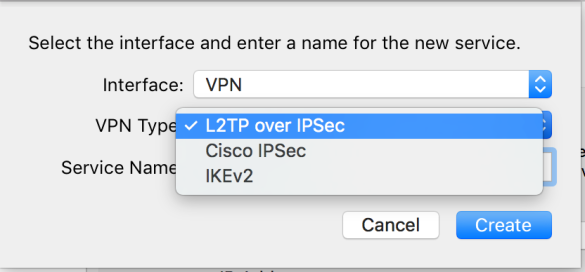
I upgraded my Mac at the weekend to Sierra, which went beautifully.  Fast and no problems at all.  Until this morning.  This morning I went to connect to a customer VPN and it has disappeared from my list of VPNs on my Mac.  On further checking I realised that customer ran their VPN as PPTP and PPTP is no longer supported as a VPN option on Mac OS.

screen-shot-2016-09-26-at-11-51-20

I can use 3rd party VPN software and I guess removing it was Apple’s best option – leaving it in place but disabling it would have just led me into trying to make it work not realising it was no longer supported.  Still a warning pre-install of “if you upgrade the following services and applications will no longer work” would have been nice if a bit much to ask for.

Consider this your warning*

*And yes I know PPTP isn’t secure and the customer shouldn’t be using it but that one isn’t my decision.  

From F to A In A Day

As I went to bed last night I set the alarm early, I have a lot to do this week especially since I’ll be at Icon UK for 2 days of it and I wanted to get started early.  So of course today was the day my work went out of the window and I lost 10 hrs debugging one of my own servers. Let’s back up…

This weekend I was prepping my presentations for Icon UK this Thursday.  One is called “Domino In The Back, Party In The Front” so I’m going to be talking about all the client options available to you using Domino as a back end.

On Sunday I had the idea of installing IMSMO (IBM Mail Services For Microsoft Outlook) on one of my lab machines.  I had a customer wanting to deploy and I wanted to try and mirror their setup, plus it meant I’d have something to demo from.  The lab server was already running 9.0.1 FP6 with a SHA2 SSL certificate delivering TLS1.2.  I hadn’t used any web services on it in a couple of weeks so I went ahead and added IF3 (required by IMSMO) and installed the application addin service.  It actually installs as a variant of Traveler (and I’ll be blogging on that later).  I completed the install and Outlook worked fine.  Unfortunately it was the only HTTPS service that worked.  Everything failed.  By failed I mean the browser – any browser – refused to connect.

So off I went to investigate why the browsers wouldn’t connect.  I started with testing via SSLLabs and that reported AN F as apparently the server was demanding SSLv3 instead of TLS 1.2   Of course just about every browser will refuse to accept a negotiation of SSLV3.  But why was the server suddenly demanding it when it had never done so before?

Well 10 hrs later I’d exhausted everything I could think of:

  • verified notes.ini had no additional unexpected settings
  • forced Disable_SSLV3=1 even though that server had been fine serving TLS 1.2 previously
  • disabled internet site documents and reproduced using web configuration
  • recreated the internet site and web rule documents
  • generated a new keyfile from my wildcard certificates
  • uninstalled IF3
  • uninstalled IMSMO including all the cleanup
  • scanned for anything that could be hijacking HTTPS
  • restarted and restarted and restarted http and clear cache upon cache upon cache
  • bothered Darren Duke for a sanity check – I believe the words “I don’t know what the hell is going on” came up
  • uninstalled Domino (around hour 8) because I couldn’t spend any more time troubleshooting

After uninstalling Domino. Reinstalling up to FP6, copying in the databases and templates and restarting.  I was back with TLS 1.2 again and suddenly SSLLabs was giving me an A+. 

Of course then I did what I should have done in the first place (saving time is never a time saver), I built a new lab server purely for IMSMO.  Installed FP6 and IF3 and the addin and everything worked perfectly including TLS1.2.

I have no idea what part of the IMSMO install , the addin or IF3, conflicted with my existing lab server configuration or what it did to force the server to only serve SSLV3 no matter how I tried to push it otherwise – but an uninstall and clean install ended up being my only fix in the time I had.  Someone somewhere knows the setting that made it do that.  I’d love to know what.

Now it’s 4.15am and I’m back where I thought I was at 11pm Sunday night.  The 4 days work I had to fit in 2 days , I have to fit in 1 day.  This week’s lesson. Never start something new when you barely have time to get the existing things completed.

See you at Icon UK


MWLUG Presentations & Wrap Up

After serveral weeks travelling around the US doing work and visiting friends we ended up in  Austin for MWLUG.  Another great event organised by Richard Moy and the team with lots of great sessions including Scott Souder’s session on IBM Verse, more on Project Toscana and Ben Langhinrichs’ on Data Visualisation which is an area I’m working a lot in right now.

I had three presentations during the conference and ended up doing four to fill in for a session that was cancelled at the last minute.  The Adminblast session I gave was one I hadn’t looked at in over a year until 20 minutes before I started so we all went on a magical journey discovering what I meant to say on each slide as it appeared.

Austin was a great town which I didn’t get to see enough of but luckily we arrived early on the Saturday before the rains started and walked around enjoying the bars and the music. Of all the amazing food on offer I will miss the Vegan Nom taco truck the most. Now to try and reproduce those flavours at home…

IBM Traveler, Management and Security


The SSL Problem and How To Deploy SHA2 (with Mark Myers from LDC Via)


Adminblast Emergency MWLUG Session (original co-authored with Paul Mooney)


Deploying Instant Messaging For Mobile Devices


User Denied Access To Files and Wikis

Another PMR this week on a new 5.5 side by side build. Once built everything looked OK except a couple of users in IT who received access denied errors when going to Files or Wikis, everything else worked.  Those two applications have databases with pretty much the same schema so we often see matching problems in both applications.

Checking the application security I could see that both were set to All Authenticated so there was no reason why those users couldn’t get at files.  The browser error contained

Identifier: LC6C54CE35BA4D41BF8CB2461634B9EAE6 EJPVJ9275E: Unable to add a group with the directory ID [E7F267C7-8811-D8EC-8025-7E57004A5278, 4339D1D3-2F37-ACDB-8025-7E57004A5285, C0085F47-7A84-EFD4-8025-7E57004A51FA, 4DB58BD6-77EA-80AC-8525-6B700078923E, A5456CF5-9FA0-E49B-8025-7E57004A5316, 54578802-623A-2E18-8025-7E57004A5289, 4EEFAFD1-A098-4155-8025-7F1D00522430, 0D1FD4C5-F61E-CB15-8025-7E57004A51F6, 5A3E2519-52BE-F072-8025-7E57004A527B, 04CE2967-BD15-B84D-8025-7E57004A52F1, 0D162A8C-223C-33C3-8025-7EB4002F6ADF, 6DCCEAE9-6A16-2A75-8025-7E57004A5377, 2B5D0EBA-B225-BA42-8025-7E57004A52DF, C6B296E2-5D27-0F89-8025-7E57004A532A].

If I count how many directory IDs are listed there, there are 14 which matched the number of groups that user was a member of when doing an LDAP query.  Still we weren’t using groups for any access and this exact configuration was working for the same users in 5.0.

In the SystemOut.log I could also see

CWWIM4546E  Duplicate entries were found in the external identifier ‘d68bb54dea77ac8085256b700078923e’ in repository ‘d68bb54dea77ac8085256b700078923e’.

That ID (formatted in various ways) would not resolve to any group in Files or Wikis never mind to duplicates.

Eventually David McCarthy @ IBM got me to change the wimconfig.xml file on the deployment manager which fixed the problem.  My configuration didn’t exactly match the documentation which said to change

<config:baseEntries name=”o=ORGX” nameInRepository=”o=ORGX”/>
to
<config:baseEntries name=”” nameInRepository=””/>

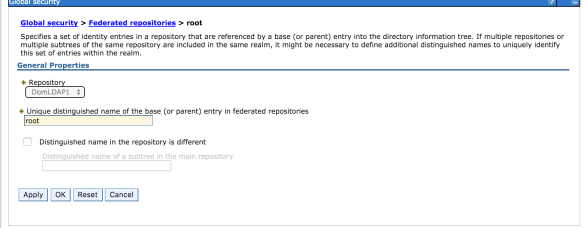
my configuration only had <config:baseEntries name=”” – no ORGX and no nameInRepository at all.  I believe that’s because we use  Domino for LDAP and “root” as the base entry so my federated repository looks like this – a configuration that results in no entry for nameInRepository in wimconfig.xml.
Screen Shot 2016-06-29 at 14.52.26

Once more this isn’t a problem in 5.0 but possibly due to a change in WebSphere behaviour in a newer version, I had to manually edit wimconfig.xml to add the nameInRepository=”” value.

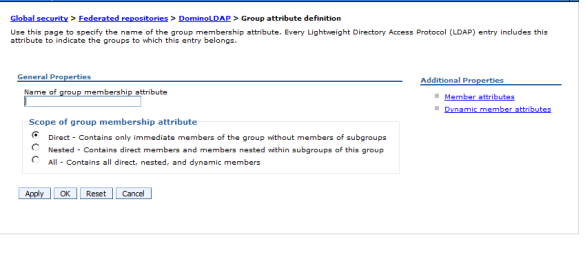
At IBM’s request I also added the Group Membership Attribute which is used for resolving nested group memberships.  This customer uses Domino for LDAP and doesn’t really use nested groups in Connections so in 5.0 it was empty and worked fine however 5.5 may have been struggling with resolving group memberships for some individuals.  In 5.5 having it set to empty could have been contributing to the access problem.

The screenshot below is from 5.0. Screen Shot 2016-06-28 at 19.13.56this is how I changed it in 5.5 (same LDAP source, same users, same everything else)
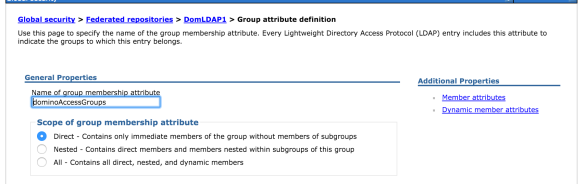
Screen Shot 2016-06-29 at 15.06.31

Resyncing and restarting then fixed the problem and the users concerned could suddenly access Files and Wikis.

Not sure why it didn’t work for those users before the changes but it could have been something to do with one particular group and its nesting or maybe even a replication conflict which I couldn’t find.

Go figure.
 

Ephox Textbox.io – documentation error

When installing Textbox.io, one of the rich text editors for Connections 5.5 from Ephox,  you have the option post install to configure a spellchecker.  It’s actually a very nice feature that spellchecks on the fly in any rich text field within connections.

To enable it you have to install one of the ear files that comes with the Ephox installers and configure a configuration file that allows the spellchecker to run.  It’s a simple thing to do and the instructions are here however a few issues you should be aware of

  1. The documented example refers to you using server ports but if Connections is correctly configured via IHS and you have regenerated the plugin-cfg.xml then you don’t need to add the server ports for access
  2. The example refers to only one  origin URL but often we have more than one.  To add additional origin URLs you add a comma and a space. My example is
     ephox { allowed-origins { origins = [ "http://connections101.turtlehost.net", "https://devtest.turtlehost.net"], url = "https://connections101.turtlehost.net/ephox-allowed-origins/cors" } }
  3. The biggest problem is that the documentation is wrong when it says where to create the application.conf file

    On Windows: BOOT_DRIVE_LETTER:\opt\ephox\application.conf where BOOT_DRIVE_LETTER is the boot drive for your system

    it’s fairly clear it wants me to put the file on the C drive which is the boot drive for Windows but if you do that the spellchecker won’t work and the URL

    https://connections101.turtlehost.net/ephox-allowed-origins/cors will return

    {"value":["http://localhost"]} 

    which is obviously a default value when the file can’t be found.  

    You need to create the application.conf file not on the boot drive but on whatever drive you have installed WebSphere for the deployment manager which could be the D, E or even Z drive. By creating the /opt/ephox directories there and an application.conf file the spellchecker will find it and start working.