Domino 10 vs NoSQL

By Tim Davis – Director of Development.

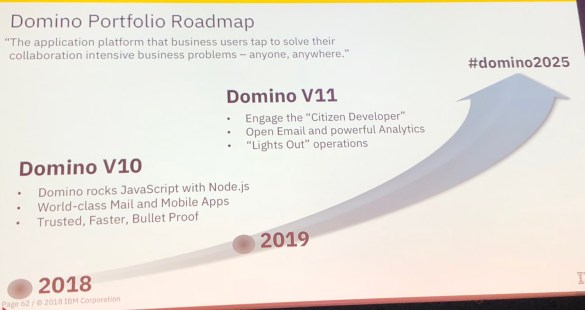
With Domino 10 bringing Node.js, and my experience of  Javascript stacks over the past few years, I am very excited about the opportunities this brings for both building new apps and extending existing ones. I plan to talk about Node in future blogs, and I am giving an introduction to Node.js at MWLUG/CollabSphere 2018 in Ann Arbor, Michigan in July.  However, I would like to digress from the main topic of Node and Domino itself, and talk a little about an awareness side effect that I am hoping this new feature will have, i.e. moving Domino into the Javascript full stack development space.

There are a plethora of NoSQL database products. In theory, Domino could always have been a NoSQL database layer, but there was no real reason for any Javascript stack developer to even consider it. It would never appear in any suggested lists or articles, and would require some work to provide an appropriate API.

The thing is, working in the Javascript stack world, I was made very aware that pretty much all the available NoSQL database products did not appear very sophisticated compared to Domino (or most other major Enterprise databases – Oracle, DB2, SAP, MS-SQL, etc). The emphasis seemed always on ease of use and very simple code capabilities and not much else.

Now in and of itself this is a worthy goal, but it doesn’t take long before you begin to notice the features that are missing. Especially when you compare them to Domino, which can now properly call itself a Javascript stack NoSQL database.

Popular NoSQL databases are MongoDb, Redis, Cassandra, and CouchDb. As with all of the NoSQL databases, each was built to solve a particular problem.

MongoDb is the one you have probably most likely heard of. It is the ‘M’ in the MEAN/MERN stacks. It is very good at scaling and ‘sharding’ which is sharing workload across many servers. It also has a basic replication model for redundancy.

Redis is an open source database whose power is speed. It holds its data in RAM which is super-fast but not so scalable.

Cassandra came from Facebook, and is a kind of mix of table data and NoSQL and is good for very large volumes of data such as IoT stuff.

CouchDb was originally developed by Damian Katz from Lotus and its key feature is replication including to local devices, making it good for mobile/offline solutions. It also has built-in document versioning which improves reliability but can result in large storage requirements.

Each product has its own flavour and would be suited to different applications but there are many key features which Domino provides, that we are used to being able to utilise, and while some of these products may have similar features, none of them have a proper equivalent for all.

Read and Edit Access: Domino has incredibly sophisticated read and edit control, to individual documents and even down to field level. You can provide access through names, groups and roles, and all of this is built-in. In the other products, anything like this has to be pretty much obfuscated by specifying filters in queries. You are effectively rolling your own security. In Domino, if you are a user not in the reader field then you can’t read the document, no matter how you try to access it.

Replication and Clustering: One of Domino’s main strengths has always been its replication and clustering model. Its power and versatility is still unsurpassed. There are some solutions such as MongoDb and CouchDb which have their own replication features and these do provide valuable resilience and/or offline potential but Domino has the most fine control and distributed data capabilities.

Encryption: Domino really does encryption well. Most other NoSQL products do not have any. Some have upgrades or add-on products that provide encryption services to some degree, but certainly none have document-level or field-level encryption. You would have to write your own code to encrypt and decrypt the individual data elements.

Full Text Indexing: Some of the other products such as MongoDb do have a full text index feature, but these tend to be somewhat limited in their search syntax. You can use add-ons which provide good search solutions, such as Solr or Elasticsearch, but Domino has indexing built-in and those indexing solutions themselves have little security.

Other Built-in Services: Domino is not just a database engine. It has other services that extend its reach. It has a mail server, it has an agent manager, it has LDAP, it has DAOS. With the other products you would need to provide your own solution for each of these.

Historically, a big advantage for the other datastores was scalability, but with Domino 10 now supporting databases up to 256Gb this becomes less of an issue.

In general, all the other NoSQL products do have the same main advantage, the one which gave rise to their popularity in the first place, and this is ease of use and implementation. In most cases a developer can spin up a NoSQL database without needing the help of an admin. Putting aside the issue of whether this is actually a good idea for enterprise solutions, with containerization Domino can now be installed just as easily.

I hope this brief overview of the NoSQL world has been helpful. I believe Domino 10 will have a strong offering in a fast growing and popular development space. My dream is that at some point, Domino becomes known as a full stack datastore, and because of its full and well-rounded feature set, new developers in startups looking for database solutions will choose it, and CIOs in large enterpises with established Domino app suites will approve further investment in the platform.
Engage Week & Lots of News

This week was the Engage conference held in Rotterdam – the largest and (IMO) best event Theo Heselmans has given us yet.  Rotterdam is a lovely city and the water taxi that took us from the restaurant back to the boat last night turned a 5 minute ride into a James Bond chase sequence – at several points he took corners by tilting the boat almost entirely on its side (there goes Tim!) and then onto the other side (bye Mike!) before pulling a handrake turn and reversing up to the dock – worth every cent of four and a half Euro.   I don’t usually find time to attend sessions beyond the keynotes because I get caught up presenting and doing other things (I find it hard to think what right now but let’s group it under “meeting people”) but this week I was rushing from presentation to round table to meetup so here’s a summary of my highlights, kept as short as I can so you aren’t tempted to tl:dr

HCL brought the energy, the enthusiasm and a huge team of people showing how far they have taken Domino, Notes, Traveler, Sametime , Verse on Premises etc.  IBM had energy too but their focus was Connections/Workspace and although it continues to develop, we in the ICS community have been starved for progress on the other products.  HCL together with IBM hosted several roundtables on Domino, Application Development, Notes Client, Verse on Premises etc where we got to ask for or complain about what we wanted or felt was missing and answer questions about design priorities.  I won’t go through all of that other than to apologise to everyone else in the Domino/Sametime roundtable who didn’t get a word in once I started.

From that Domino round table we heard about a couple of much needed and unexpected features coming in v10 (both of which I think are so new they haven’t yet been named) around the area of TCO. One is what I’d call a sync feature for Domino where you can tell a server to keep specific folders in sync with other servers in its cluster. Those folders could contain NSFs but also NLOs (DAOS files), HTML files or really anything else.  The server will create the missing files and it doesn’t use replication to do that.  Even better, if the server detects a NSF file corruption it is capable of removing its own instance of the file and pulling a new one from a cluster mate – all without any admin intervention.  Another great tool will be the idea of shared encryption keys for NLO files so that Server B will be able to copy even encrypted NLO files from Server A by decrypting and then re-encrypting them.  Management and maintenance of NLOs and the DAOS catalog was high on my list of enhancement requests.

From the Application round table we heard about how the integration with Node and Domino will work,  there will be a npm install – DominoDB that will allow Node developers to access Domino data via the Node front end. Queries to Domino from the Node server will be using high performance gRPC (remote procedure calls)  – in the same way Notes and Domino use NRPC for proprietary access. The gRPC access used by Node for Domino will eventually be open source.  The front end of the Node server will be surfaced using the Loopback API gateway.

Essentially what this means is that any developer who can program using Node will be able to use their existing skills against Domino NSFs.  That Domino systems will, in one step, become accessible to a much wider group of developers and systems is the main application development goal.

Domino statistics and reporting can be uploaded into and analysed from within the New Relic platform.  If you find this as interesting as I do then you too are clearly an administrator,

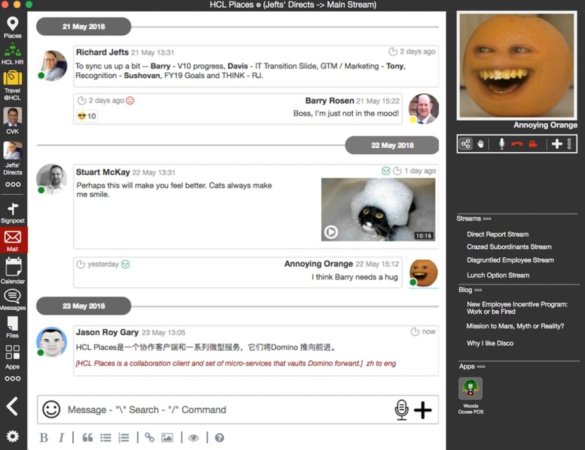
HCL Places.  So that was a surprise.  HCL demoed a working (but very basic) prototype of a new product they had been developing in secret (well no-one in the room knew of it).  A lightweight desktop collaboration client that runs against a Domino NSF. It can include mail,, sametime , video, mentions and Notes applications.  All on premises.  Here is a terrible image of the prototype which – yes I know is cluttered – but focus on the features not the look and you can see that HCL are trying to take Domino somewhere we’ve all known it could go but never had the chance.   The image was shared out by Jason Roy Gary who built and demonstrated the prototype and whose role at HCL is (I think)  Vice President Engineering and Innovation, Collaborative Workflow Platforms.

Dd4EspOUwAAwlFb.jpg-large

In a week full of good news the two best were that a beta program for v10 will start with phase 1 in June and phase 2 in July.  June will be a closed beta and July open.  If you want to register for the beta program when it is announced then sign up for the newsletter on the Destination Domino site here

Plus there was this .

IMG_0018

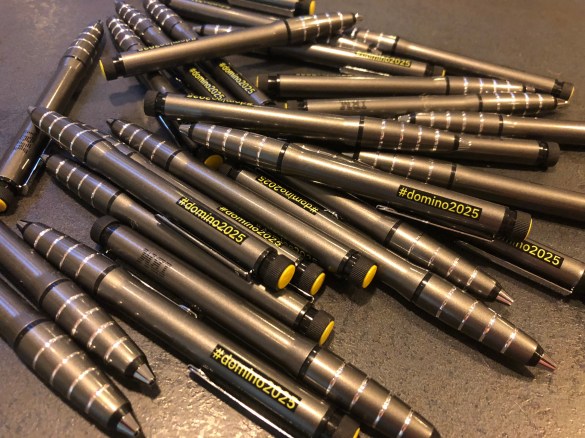
I don’t want to minimise the contribution by IBM themselves at Engage, each of the roundtables included IBM’ers alongside HCL’ers and there was certainly plenty of activity around Connections and Workplace but right now, in this blog, I’m revelling in the fact that Domino is finally getting the attention it deserves.   Plus look at these great pens – they have little yellow highlighters in the top and when I asked IBM if I could buy some for customers they were happy to give me a “few”.

IMG_0126

So – long story (it could have been sooo much longer) short.  A great week , I learnt a lot, my session on Docker was standing room only in boiling heat, I had the chance to talk to people I rarely get to talk to and Engage was in another great location.  I don’t know how Theo will match this next year but I look forward to finding out.  Plus I got chocolate as a speaker gift.

Now don’t go messing with my high.

The Champion & Confidence Dilemma

I wanted to share today something I’ve been dealing with for a few months and inspired by shares from others.  For those of you who don’t know the IBM Champion program, in short it was set up to acknowledge the work done by people who contribute to their Community outside of their regular jobs.

When I started as a business partner in the mid 90s the IBM community I was introduced to was full of people interested in IBM technology, wanting to learn and wanting to share what they knew with others for no reason other than they were excited about it and enjoyed seeing others doing the same.  In the past 20 years a lot of that has changed and I miss those days.  There are still lots of people who share and want to learn but the days of not wanting credit or taking a back seat are often (not always) gone.

I was encouraged and inspired for 20 years by people many of you will have heard of and many of you wouldn’t.  Without Andrew Pollack to tell me I was smart enough to learn this stuff and present, or Chris Miller offering to present wtih me or Rocky Oliver encouraging me to write, or Ben Langhinrichs asking the tough business questions about why I don’t charge more, or Carl Tyler giving me no leeway to make excuses, or Paul Mooney who was as enthusiastic about educating as I was and happy to work with me – without those people and many more in Penumbra and further afield I wouldn’t have chosen the path I did.  The path that led me to be an IBM Champion and 3 years ago one of the first (along with the amazing Theo Heselmans) IBM Lifetime Champions.

That should have been it right? Validation. The pinnacle of achievement.  Confirmation I was doing something right.

I hadn’t allowed for two things.  People’s misjudgement and their need to tear you down. Those two things in the past few months have brought me near to walking away.

I’ve learned to trust my judgement and my judgement says when people isolate me and ignore me it’s because they want to cut me out, and I assumed because they didn’t like me. I don’t consider myself that likeable so that’s a reasonable, although sad, explanation.  However I have realised in the past few weeks that apparently I am in some sort of competition that I was unaware of:  “Don’t let her get involved, she has enough credit”,  “Don’t get involved in ideas she has, she has enough credit”.  Little comments people have said in passing in my hearing serve to destroy my confidence daily. There have been many of these incidents, all small but incemental.

In a group discussion a few weeks ago I was trying to encourage someone I respect to put themselves forward to be a champion.  Another person in the group asked of the group, “Who thinks they deserve to be a champion?” and I, along with the other couple of champions there, put up my hand thinking we were supporting the discussion. This person said, “I don’t. I don’t think any of us do”.

I felt blindsided

I felt awful.

I still feel awful.

Maybe that person was right.  In which case the validation I had been accepting and working to deserve was just ego.  I didn’t think I had much ego but maybe I do. Maybe that’s what puts people off.

So this is to say to all of you out there:

  • Don’t project onto anyone a motive for their actions. Least of all your own.  Someone once said to me “well we all present for the applause don’t we”.  No. No we don’t.  Some of us do it to learn and to help others learn. That’s it.
  • Don’t project confidence where none exists. Don’t assume how you see someone is how they see themselves.
  • If you’re jealous, own that as your problem. I will put my hand up and admit to in the past being jealous of successful friends (Paul, Rob, Stuart) but that was my problem about where I felt I fell short and I truly hope they never felt the effects of it.
  • Don’t try and tear people down to make yourself feel better.

Your comments hurt. your actions or in-actions hurt. You cause hurt.

I wish it was still the mid 90s and we could still be that community that recognised the success of one is the success of all, but that was pre a lot of things and this is where we are now.

I’ll keep doing what I do because that’s the only way I know how to work and because presenting, blogging , sharing, learning, teaching make me happy.


Air Chat – Instant Messaging On A Plane

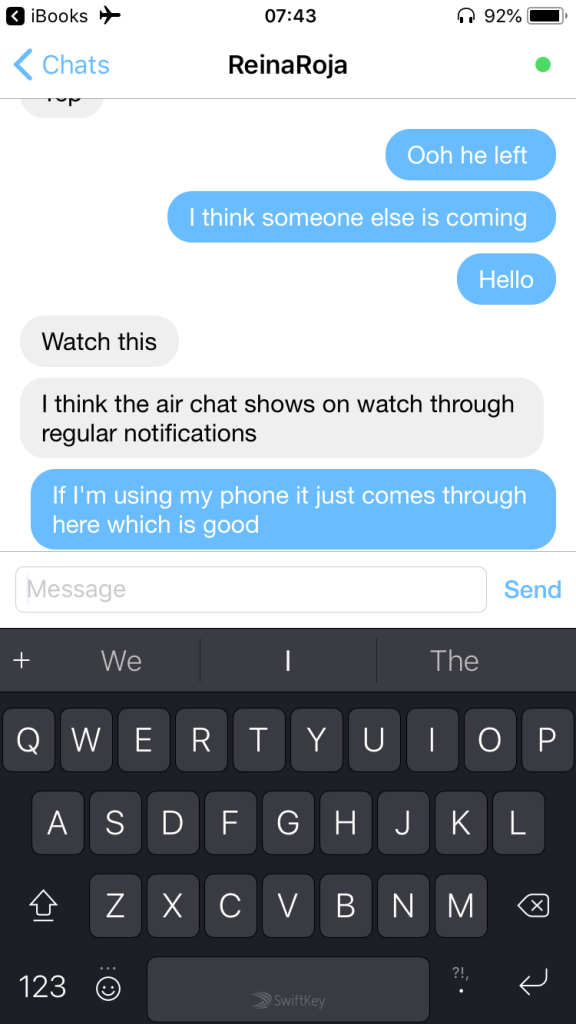
Flying back from the US yesterday, Tim and I had window seats one row behind the other (by choice, long story).    I’m a nervous flyer and this was the first time I haven’t had him right next to me so as we boarded I started to get more tense.  Tim suggested we find a way to message each other during the flight and quickly found Air Chat which we both downloaded.  It provides encrypted bluetooth messaging.

IMG_2246

We paired our phones and that was it, we were able to chat the entire flight (Airplane mode does not require BT being disabled).  I’m not sure how far it would reach in a cabin, we were a row apart and it’s obviously limited by BT distance.  Useful I would have thought for families or groups travelling together.

Best of all they have a watch app so when my phone was turned off and he messaged me it would vibrate on my wrist and I could read it.  I couldn’t reply from the watch but we probably talked more during this flight than we do sitting next to each other.


IMG_9855


Destination Domino (yes, yes I’m late to the party) **

Well this is a lot of good news all at once.  IBM have launched the Destination Domino site – a one stop shop for all your Domino v10 and future strategy news.  If you doubt their commitment to the future development of Domino and the community that believes in it, well just look at all that yellow.

On Thursday 24th May (the day after Engage) I’ll be participating in a webcast on what’s new for Mail, Verse, and Chat for v10.  I will be joining Andrew Manby (Director of Product Management @ IBM) and Ram Krishnamurthy (Chief Architect, Notes, Designer and Xpages @ HCL) on the call.  Registration is here. I recommend you also sign up to the newsletter on the Destination Domino site to stay on top of the developments happening because those are coming at us pretty fast.

I was fortunate enough to visit HCL’s offices in Chelmsford, MA last week and met many of the development teams working on Domino, Verse, Traveler and Sametime.  Some I have known from their years at IBM before they moved to HCL and some were new to me – most of the day is under NDA and you’ll be hearing more about what they are going to deliver at some point if you attend Engage, DNUG, MWLUG and other conferences this summer. If you can’t attend just keep an eye on the Destination Domino site.

One thing I can share that isn’t under NDA is how impressed I was not just with the rapid development of features many of us have been waiting a long time for but also the innovative and open thinking behind Domino as a development platform and the energy and enthusiasm just about everyone I met that day (over 30 people) had.  We are going to see a lot more on the Notes client for iPad and the integration of Node.JS in the next few months and that’s all very exciting.

**I have a good excuse since I’m currently on holiday in St Lucia BUT we interrupt this pool / beach time because this is really important.

That Scream You Just Heard? Thanks Apple

<still screaming>

I take screenshots probably 30x a day every day. Sometimes to a file (CMD-SHIFT-4) and sometimest to the clipboard (CMD-CTRL-SHIFT-4). Imagine my delight when I got my new Macbook Pro and discovered I could add the “screenshot” icon to my touchbar.  No more key combinations, just press the touch bar.  After presssing the touch bar it shows me options of clipboard, desktop, documents etc and remembers what I last used.

What a great feature.  Until it wasn’t.

Apparently Apple “thought” that those touchbar settings should always and with no warning override the keyboard options.  Here I was in a presentation this morning taking about 100 screenshots (laptop closed using external monitor) CMD-SHIFT-4 only to discover none of them NONE OF THEM were on my file system because apparently Apple now use the touchbar settings (which I can’t see with the laptop closed) to override any keyboard settings.

There’s no excuse for that terrible assumptive UI behaviour.  None.  Hopefully this saves someone else the same pain and I’ll revert to using Skitch where I need to be certain.

Macbook and Me

Last week I changed to a new Macbook Pro 13in with touchbar.  I had my doubts but it was the only model with the disk and RAM I needed.  I planned to just ignore the features I didn’t think I’d use (especially anything touch related as I was fairly sure dirty or greasy fingers would render it useless).

Favourite things about my Mac week 1:

  1. Touch ID to login and access admin settings.  I enabled multiple fingers and added some fingerprints for other people too.  It does require a full password entry every 48hrs (I think) even if I don’t restart but I’m fine with that
  2. I enabled filevault which encrypted my entire disk.  There were issues with earlier versions of filevault and using time machine so I had avoided it but the more recent versions (in the past 12 months or so) have been stable and there seems to be little latency on encrypting / decrypting.  The main change is that now I have to login after boot to unlock the disk rather than login after the OS loads.  It’s an almost unnoticeable change but I opted to also increase my password to a very lengthy phrase since there’s little point encrypting a disk with a flimsy password.
  3. USB C. I thought I’d hate the loss of my magsafe connector for power, the number of times I’ve tripped over my own cable and the magsafe popped off rather than drag the Mac to the ground. The new Mac has 4 USB C ports which can be used for anything including charging and I find being able to plug the power into any of 2 ports either side of my Mac is so much easier than being forced to plug it into one side and means I’m less likely to get tangled up in my own cables.
  4. Love my Touchbar – LOVE.IT.I know a lot of people hate it so clearly its appeal is closely tied to how people work. I’m very much a keyboard person, I prefer keyboard shortcuts to any mouse action for instance and with the Touchbar I can configure it to display what I find useful in each application.  I have done that in some examples below and am completely addicted
    Finder

    Finder. I’ve added the “share” icon which allows me to Airdrop items (the touchbar changes to photos of people I can airdrop to) as well as quickview and delete., The best feature is that I can add the screenshot icon to my default touchbar. I screenshot all day and the key combination is hard to get working in a VM

    Safari

    Safari shows me all open tabls I can touch to move between them as well as opening a new tab and I added the history toggle because I go there all the time

    Windows10Parallels

    The touchbar even works in Windows 10 running in a Parallels VM where I use the explorer icon all the time to open Windows explorer. I would get rid of Cortana but it’s in the default set

    Keynote

    Keynote mode 1: When writing a presentation I can change the page size move through slides and indent / outdent

    KeynotePresenter

    Keynote mode 2: when presenting I can see a timer and the upcoming slides I can touch to move backwards and fowards. I think I’m going to use this a lot

On the other hand I also bought a new iPad mini to replace my 4 year old iPad.  I bought the mini because I didn’t want to go bigger with an iPad to a pro.  My old iPad worked fine other than freezing in iBooks, being slow and restarting itself regularly.  My new iPad restored from a backup of my old one exhibits the same behaviour. I think it’s going back.


Me vs iBooks: The Return. I win (barely)

This blog is for future me and for anyone else wanting to understand some iBooks structure.  It’s not an attack on Apple – I know I’m an extreme case.

Some of you may know my fondness for books.  A habit that led to me buying so many books when the iPad came out I actually broke the iBooks app (too many books to display on the “purchased” screen) which took a year to fix.  Fast forward several years..

It’s been an unexpected few days of technical support. Rumour is that Apple will be changing the iBooks app in an upcoming release and that always makes me nervous.  I buy around 30 books a month and have 3859 on my iPad and iPhone.  Probably about 60/40 iTunes and Amazon.  Losing my books would be equivalent to someone who cares about music losing all their music or a gamer losing all their games.  It would be bad.  Give her space. Don’t try and talk to her. Back away slowly. Bad.

I carefully backup (and have to remove DRM to do it) about once a month.  Why?  Because Apple may decide to drop iBooks at any time and then where would I be with 4000 (or at least 2000) unreadable books?

So I needed to backup and since upgrading to High Sierra that’s been impossible.  The technology I used only worked up to  Sierra.  That’s OK, I use Parallels , can download Sierra at no cost from the App Store and create a VM running Sierra. Of course I had to authorise that VM with my iTunes account so it could read the books which meant deauthorising everything else first since I was at 5 devices. Top tip, if you buy new kit, make sure you deactivate iTunes before flattening the old kit.

Step 1: Getting the books into my VM

In theory because I sync my books to the cloud I should be able to just launch iBooks and auto redownload. Unfortunately that didn’t happen. The books display as in the cloud but have to be manually downloaded.   Understandably selecting nearly 4000 books and telling iBooks to download them all caused it to crash. Repeatedly.  So I needed a better way.

Step 2: Why not just copy the books from my laptop which is the host machine for the VM?

Some digging uncovered that my epubs are stored in

~/Library/Containers/com.apple.BKAgentService/Data/Documents/iBooks/Books

so surely I can just copy them over from one machine to another?  Why yes I can and when I launch iBooks they all display – kind of.  They can’t be read and most of the covers are missing but otherwise.. great! Some more digging later and I realised that although I had copied over the books.plist (which is a preferences file containing and index of all the books iBooks knows about), I didn’t get the SQL database that iBooks uses that is in ~/Library/Containers/com.apple.iBooksX.  

So that isn’t going to work. A few hours of trying to get covers to appear or books to be readable and I realised I needed to take a step back.  

Step 3: Maybe I was overthinking this. iBooks builds the index when you add books to the app by choosing “add to library” or just drag and drop them so why not drag the 4000 epubs into iBooks.  I knew they were already there but I tested and it does prompt you with the option to “Replace” all books that are already there instead of creating duplicates (of course what I could really do with is “Skip” rather than “Replace” but I get i’m in a niche situation).

So – drag 4000 books to iBooks and choose “Replace” and wait.  There’s no progress bar. Nothing.  The only way I can see that anything is happening is by launching activity monitor and noting that bkagentservice was consuming 80+% CPU.  Eventually “lots” of books appear.  This is the point where I realise there’s no way to count how many books are in iBooks.  I knew “lots” wasn’t all because I got this dialog “<epub filename> couldn’t be opened because you don’t have permission to view it”

Screen Shot 2018-02-05 at 07.54.25

I click OK and got another, and another and another. Eventually having to Force Quit iBooks and restart.

Fair enough.  Maybe when copying over the files from host to guest the permissions came with them and my new guest account doesn’t have permissions.  I spend some time making sure all permissions are OK, applying my new account as well as “Everyone” to that folder and all files contained in it.  I finally test by dragging and dropping individual files into iBooks that work with no error so I decide that error is a red herring – it’s more a “gah! iBooks can’t handle you doing that and has tripped over itself – try adding fewer books”

So now I have a new problem.  What books are missing?  If I knew what books were  missing I could manually add them.   Unfortunately not only do I not know what books are missing,  I don’t know if it’s 10 books or 2000.

Step 4: The search for the missing books

Those filenames aren’t terribly helpful but I know what books I have so I search in iBooks for certain book titles and discover some that aren’t there that should be (and are in my iBooks on my host machine).  How do I find the filename that matches the book title if I know I have the epub in the correct directory?  Here we head to terminal.  In the directory

~/Library/Containers/com.apple.BKAgentService/Data/Documents/iBooks/Books

I type grep “some phrase” ./*.epub -r

that “some phrase” could be author, booktitle, any text found in the book.  It’s weirdly powerful so make it as specific as you can.  I find the epub filename for a book I know should be there, I find that the epub  is in the right folder and I drag and drop that epub into iBooks. It works!.  Then I try with some of the files it said I had no permissions for… those work too.  OK so since I know it works and I can’t add all 4000 books at once,  now all I need is a list of what books it thinks I have in my Library to compare with the ones I have on the file system.
Easy right?
Step 5: We’re going to need some XCode
The list of books it thinks I have in the library is in the preferences file books.plist in ~/Library/Containers/com.apple.BKAgentService/Data/Documents/iBooks/Books.  Unfortunately the only thing that can easily read  a preferences file is Xcode so off I go into developer territory and installing XCode.  Once I do that I can open and read that preferences file.  Of course XCode is 10GB and my books are 12GB so I’m fast running out of space on the small VM I started with.  
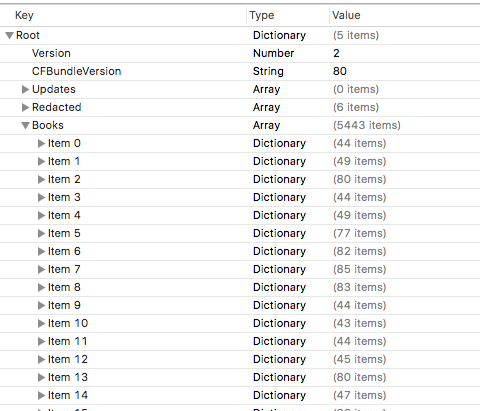
When I do that I see this.  That’s right, an array of 5443 items each one representing a book.  Yes I know I said I had 4000 and it failed to add them all but clearly something is awry in the index too – one problem at a time.
Screen Shot 2018-02-05 at 11.56.37
Step 6: A New Plan
I can now read plist files and in theory get an export of items in that file.  If I can export all the books and filenames in the guest machine and do the same on the host machine I can import both lists into Excel and compare to see what files are missing – then manually add them.  Simple!
I don’t do code. I know what I want to do and what I want to do needs code but I will avoid it if I can.  Unfortunately here it’s the simplest way to get what I want.
Using “Script Editor” (part of the native OS) I write a script like this

tell application “System Events”

tell property list file “/Users/gabrielladavis/Library/Containers/com.apple.BKAgentService/Data/Documents/iBooks/Books/Books.plist”
set Booklist to value of property list item “Books”
set Output to “”
set Counter to 0
repeat with a from 1 to length of Booklist
set theCurrentListItem to item a of Booklist
try
set author to artistname of theCurrentListItem
set booktitle to itemname of theCurrentListItem
set thefile to sourcepath of theCurrentListItem
set Output to Output & author & “,” & booktitle & “,” & thefile & return
end try
set Counter to Counter + 1
if Counter mod 50 = 0 then
log (Counter)
end if
end repeat
log Counter
return Output
end tell
end tell

The counter was so I could see it was actually doing something as it ran.  The “try” was to check if the item has an author etc since my PDFs often didn’t and the code would fail otherwise.

It may not be pretty but it gave me what I wanted which was thousands of lines like this

Pamela Hartshorne,Time’s Echo,/Users/gabrielladavis/Library/Containers/com.apple.BKAgentService/Data/Documents/iBooks/Books/1F31185F755DD6B65C00B1CF641409B4.epub

Riggs, Ransom,Miss Peregrine’s Home for Peculiar Children,/Users/gabrielladavis/Library/Containers/com.apple.BKAgentService/Data/Documents/iBooks/Books/46D721416EA9EBB037E767DF155A4395.epub


Step 7: An afternoon with Excel

Running the agent twice against the host and guest books.plist gives me the data I need.  The host machine plist gives me 3789 entries and the guest machine 5443 entries. It appears every time I attempted to drag and drop a file in the guest copy of iBooks it created a new plist entry.  I enjoy data manipulation in Excel and after cleaning things up and playing with INDEX/MATCH I discover…. it’s not going to work.

The problem is that the plist filename is only updated when the books are added to the library so there was an unreliable mismatch between the guest and host plists.

Step 8: Take a step back and try playing by Apple’s rules

I take a copy of the iBooks directory into another folder (“movedbooks”)then I launch iBooks itself and (making sure iCloud is completely disabled on the guest machine so there’s absolutely not syncing to any device) I remove every.single.book from within iBooks.  Several scary minutes later iBooks is empty and so is the iBooks folder and the plist file.

Meanwhile I still have a copy of all the books in “movedbooks” – I know iBooks didn’t like me dropping 4000 books in but at this point I’m prepared to meet it half way.  After some trial and error, I copy the books in 250 or so at a time.  I verify they are added correctly by checking the books count that appears in the iBooks folder.  It takes about an hour but when I’m done, the iBooks folder is 170 items smaller than the movedbooks backup.

GAH

Step 9: The search for the missing books

I now need a tool to compare the contents of the movedbooks folder to the ibooks folder and tell me which files re present in the first but missing in the second i.e. are missing from iBooks.  A free app called “Compare Folders” does that for me nicely.  Unfortunately it won’t let me export the list but at list I can see the list of missing files.

Step 10: The final piece

170 is a manageable number so now, one by one, I find the missing files and drop them into iBooks.  That works and I end up 3849 books in iBooks and in the directory.  If you’ve spotted that’s 10 less than I should have then congratulations, that’s not a typo.  10 books completely resisted being added to the guest, no error, nothing, they just won’t add.  Even weird when I check my Excel spreadsheet and decide I don’t care about those 10.  But I make a note in case in care in the future.

So that’s it.  I shouldn’t need to do this again as I can add books in small numbers as I buy them and never again have to add all books I’ve bought.  In theory.

A final note.  If you have a Mac , buy yourself a copy of DiskWarrior, but that’s a story for another day.

This Is Us

About a month ago in a conversation with someone they mentioned to me that, having visited our website, they didn’t really understand what Turtle did.  That wasn’t a complete surprise,  updating our website has been on the todo list for a very long time.  In some ways what held us back was overthinking or trying to work out how to emulate “proper” websites whilst still conveying who we are.

Fast forward one month and Tim** has put together our new site which we’re all delighted with.  We wanted to streamline the content and just clearly show you who we are and what we can do.

I hope you like it, or it is at least useful.  Feedback is always welcome. Good feedback even more so :-).

**thanks to Abigail Roberts for all her creative ideas and input..

Screen Shot 2018-02-03 at 14.52.14

Producing A Champions Expertise Presentation (since you asked)

A few people have asked how I created the Champions Expertise presentation on containerisation that I published last week.  There are lots of Champions out there keen to produce their own next month so hopefully this helps someone.

I wanted a structured presentation with my voice overlayed describing each slide. I deliberately didn’t want video / my face on screen alongside the presentation.  That’s good because it’s a pain in the bum to do but mostly I find that having a talking head is distracting people from reading slides. That’s may not be true to everyone but not having video is my personal preference.

Equipment:

Macbook Pro (2014)

Keynote 7.3.1

BeatsX headphones connected via bluetooth.
I find having a good headset ensures there is no bleed or sound in from the surrounding space and these are the best headphones I’ve ever owned, plus they are really fast to charge so rarely run down.

Rehearsing:

I use Keynote on my Mac but Powerpoint does the same thing.  I wrote the presentation including speaker notes for myself , the speaker notes contained the key points I wanted to make sure I didn’t miss when going through each slide.  I try not to write too many speaker notes because I end up reading those instead of presenting so my notes are usually one word prompts.

Once I finished writing I ran through it in presenter mode which shows me a clock countdown as well as the speaker notes. That way I can get comfortable with what I am saying so it flows better when recorded.  I was aiming to run for 10 minutes talking quickly which, in my opinion, is a good length for wanting people to watch online.  I rehearsed 3 times but then I’m a committed over preparer, I suspect most people would rehearse less or not at all.

Recording:

So now I’m ready to record.  Keynote (and Powerpoint) has a feature called “Record Slideshow” when I choose that I go into presenter mode and have a “record button”. The clever thing is that the audio is recording as part of each slide not as a separate file.  I can stop anytime and pick up the recording again or clear a particular part of the recording and do over.  I chose to do it all in one hit.  My secret weapon was to ask someone to sit near me so I could present to them rather than into thin air. I felt that made me sound more natural (hopefully) and it was certainly easier to get into the flow. It did mean I ended up stumbling when he asked me a question part way in but that’s OK, it highlighted where I wasn’t being clear enough so I fixed the slide and started over

Publishing:

Once I was happy with the slides and audio I just saved the file and uploaded it (80MB) to my blog. I could have shrunk it down more and had lower quality, certainly with only audio it wouldn’t have made a lot of difference and I may go back and do that. My blog was also cross posted to twitter and linkedin

And that’s it.  If you have either Keynote or Powerpoint and a decent headset then it’s very easy.  I hope you enjoyed listening and look forward to more expertise presentations next month.