How I Wrangled Control Back From My Browser

I’ll admit it, I’m a privacy freak.  I limit what information I share publicly, I never give my actual date of birth, mother’s name, or correct answer to any question.  I have dummy mail accounts set up for when sites want me to register and I VPN if I’m anywhere but at home.  I think it’s important to be aware of what’s happening when you’re working in a browser, what happens when you leave tabs open and the degree to which you can and are tracked.  For me the convenience of letting a company know more about me in return for them customising my experience is an insanely unequal exchange.   I also know a lot more now about how Google etc track and use information (thanks to my brother in law Rob for his expertise).

But then again I also refuse to have loyalty cards.  Taking some degree of control back from your browser activity is not only responsible it’s empowering and healthy 🙂

Like notes.ini settings, more is not always better so I’ve gradually built up a handful of extensions that give me more control over my browsing and recently added a couple more that have the added benefit of being fascinating to watch and mostly free.

Toolsbar with Extensions

Extensions

1Password stores my passwords for multiple sites so I never have to reenter them.  I used to use this a lot but much less so since I switched to using password patterns which I change every 4 months.  I have 3 patterns at a time one for “I don’t care if someone gets at this” , one for “this has information on it i’d like to keep secure but nothing financial” (like my IBM registration), one for sites which hold payment information.  Each site has a unique password constructed from a pattern eg “first two letters of site in caps plus the number 1111 plus the letter X in caps” but not that 🙂

Evernote web clipper isn’t about security or privacy but it allows me to snap any browser page into Evernote.  I store all my reference documents personal and business (some encrypted) in Evernote and sync it to my iPad.  It also recognises when I snip a recipe and stores that both in itself and in its companion free iPad app called recipes.

AdBlock blocks ads.  There are sites that simply are unreadable and do not render in Safari unless all the ads are blocked and then they look normal.

AVG Do Not Track prevents sites I visit tracking me and sending information back to social networks and advertisers.  I have the option of allowing tracking but I find leaving this on allows me to clearly see what’s being attempted by sites I visit.

ClicktoPlugin for Safari prevents plugins from loading automatically on any site unless I then click to run them.  Even better it replaces media including flash with HTML5.  Whenever Safari was sucking CPU it was always down to some flash running somewhere, installing this has completely fixed that problem.

My two newest plugins are DuckDuckGo and Disconnect.Me.  DuckDuckGo is a search replacement that honours privacy.  It conducts a simultaneous search of Google and Bing if you want but your searches aren’t filtered (“customised”) by your assumed preferences from your search history.  Read more about it here http://dontbubble.us and here http://donttrack.us . Nothing is saved or tracked.

Disconnect.me is theoretically similar to Do Not Track but much more granular and is showing me more information about what a site is doing.  I’m easy to disappear down the rabbit hole here but take a look at this report from visiting the Facebook homepage

Disconntect.me on Facebook

So we have (confusingly green means blocked) – 4 advertising requests, 3 analytics requests and 215 content requests.  What Disconnect.me does is restrict content that doesn’t come directly from the site and page you visited.  They recommend you do not block content unless you’re 100% sure as it may affect site rendering.  At the bottom you can see they claim to save significant time and bandwidth in page loading too.  I don’t have any issues with Bandwidth myself and it’s not something I’m that worried about so I honestly haven’t tested if that’s true.  For each section you can expand and see what has been blocked and choose to whitelist sites.

My favourite feature is the visualize page button which gives me this rendering of sites requesting access and which ones are blocked.  I can mouse over any icon, see the site and whitelist / blacklist it.

So that’s it.  I can’t think of anything I’m missing (that frustrates me and i’d like to take control of) but I’m open to suggestions..
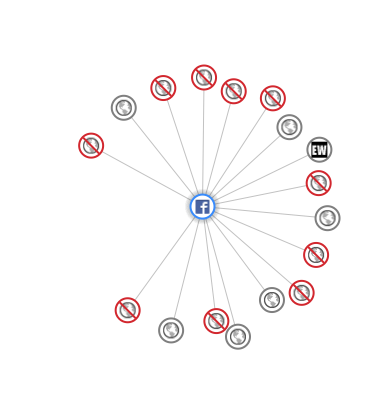
Visualisation of Site Requests


One Of Those Faces….

Walking on Brighton seafront this weekend we came across the “Tight Modern” a tiny replica of the Tate Modern containing artworks by 60 disabled artists.  Well worth a look but that’s not important right now…What is important is that as I came out , one of the guides stopped me and said:

“I know you don’t I?”

Well no, no she didn’t but I come across this all the time.  It’s weird that people think they know me.. Not just “I might know you” but “I DO know you”.  So I responded whilst smiling:

“No I just have one of those faces, people think they know me all the time”

From here we move to the next step which is the person who claimed to know me insists that my memory is faulty:

“We met at one of Simon’s get togethers” – said quite forcefully whilst gesturing at whoever Simon is.

These are my favourite responses , the best of which was from a guy at immigration in Chicago who insistently said:

“We were on the same kibbutz a few years back”

When I continue to deny knowing them the whole atmosphere gets very frosty and the person who is convinced they know me is now convinced I’m lying for some reason.  I then get a dismissive goodbye.

So there you have it, in a few short seconds my new friend goes from delighted to see me again to annoyed I’ve turned into such a lying b***h.  I clearly need a better strategy to deal with these confrontations because they do keep happening and I must  just have one of those faces

Or I’m part of a science fiction plot / movie and there are hundreds of me’s out there that I’m unaware of.  Maybe one of the other me’s also has a blog?

Solving My Macbook Battery Problem

In the past few months I’ve been frustrated by my Macbook Air, which is less than a year old, constantly draining the battery when I leave it unplugged and on sleep.  I often have work to do in the middle of the night or early morning so I’ll bring the fully charged laptop to bed, put it on sleep and set the alarm for 4am – then when I wake up and go to do work I discover the battery is almost completely drained.

I found a thread on the apple support forums from late last year where people were complaining of something similar but that seemed to be entirely related to the Avast software which I don’t have.  I also saw a few comments about using a keyboard cover preventing the screen closing properly which worried me as I didn’t want to give up on my mophie cover but on testing (putting it to sleep manually rather than just closing the cover) I discovered the drain still happened.

My solution was finding the command

pmset -g assertions

running that in a terminal window gave me this

Assertion status system-wide:
BackgroundTask 0
PreventDiskIdle 0
ApplePushServiceTask 0
UserIsActive 1
PreventUserIdleDisplaySleep 0
InteractivePushServiceTask 0
PreventSystemSleep 1
ExternalMedia 0
PreventUserIdleSystemSleep 0
NetworkClientActive 0
Listed by owning process:
pid 69(hidd): [0x0000000a00002102] 02:04:08 UserIsActive named: “com.apple.iohideventsystem.queue.tickle”
Timeout will fire in 596 secs Action=TimeoutActionRelease
pid 67(InternetSharing): [0x000000080000215f] 02:02:51 DenySystemSleep named: “com.apple.InternetSharing”
No kernel assertions.

See that last one?  I have internet sharing on because once when at a conference where only I could connect, Tim and I shared my wifi connection. That option was stopping my laptop from ever properly going into sleep.  I disabled it in system preferences , shut my laptop lid and found it still 100% charged 5 hrs later.

Oh and the first time I ran the pmset command it didn’t show me that, instead it showed me this

PreventUserIdleSystemSleep named: “com.apple.iTunes.syncing”

Yes iTunes was preventing idle sleep, but more importantly until I shut down iTunes it didn’t show me the bigger problem of Internet Sharing preventing it.

Problem solved.

Get a load of these speakers…

I’m really excited by the breadth of world class speakers and moderators joining us at CSCEvent.   Take a look below and visit our agenda.  It’s only 2 weeks away and not only do you have us, LDC and these speakers but it’s being held at one of the most fun locations in London, The Soho Hotel (look at those seats!).  There are still a few places left so please join us and register here

The Collaboration Stack Community event, taking place in London on March 21st is nearly at capacity (although we have been warned people register and don’t come 😦 )  Hope to see you there!

Something Different This Way Comes..

If you’re in the UK (or visiting) and have any kind of interest or background in Collaborative technologies, we, together with our friends at LDC, are putting together a new networking event in London on March 21st.  The agenda can be found on our website http://cscevent.com/agenda and you’ll see we are trying something different (and no-one, least of all us, will be selling to you.)

This is a technologically agnostic networking event for those who work in or are interested in collaborative software. Our goal is to create space for ideas, to learn from others and get a view of how various sectors like cloud, mobility and security are unfolding.

It’s a chance to step back, consider and develop your strategy in the context of others’ experiences. We hope you come along with a willingness not just to listen but also to share.

We have two types of sessions during the day, followed by an evening drink / beers in nearby Soho.

Talking Technical

In this room each event will present two or three speakers who want to offer their views
on a technology and why they like it. We will then open up the floor for further
discussion with the audience who are welcome to ask questions and offer their own
content or viewpoints

Work and Life

This room brings informal discussions and roundtables around a variety of subjects
that effect us all. How do we run our work days, our lives, our downtime and our
interests. How do we get trained, plan work, track work and connect with each other.
Each event will be an open discussion with a moderator working through a series of
prepared questions for the room to open up discussion. The moderators here are not
necessarily subject-matter experts and the audience is expected to participate.

We will have to limit numbers to CSCEvent so if you definitely want to come you can register via  Eventbrite

Hope to see you there!

IBM Connect Wrap Up

Hello again.. well i’m still in the US but now fully recovered from Connect and the nasty bug that took me out and apparently used me as a carrier to take out 40% of the community.  Last year I spent most of Connect down with flu so this year I thought ahead, got a flu jab and lasted until Weds night, right after the geek challenge before being wiped out by a stomach bug.  Curse you random travel bugs preying on my lack of sleep and reduced immunity!!!

So how was my Connect?  Truthfully I had braced myself for this year , I was concerned there would be a small pocket of techies roaming amongst HR bods and it would feel like we were visiting our own conference.  There was definitely a touch of that,  but mostly I was really pleased to see so many first time attendees in sessions and certainly the ones I was at and did were well attended.  It was a very different Connect for me as well.  Usually I am tied up doing presentations but manage to get to sessions too and meet with friends – this year it was wall to wall presentations , customer meetings and IBM meetings.  I barely managed to get to the labs and to the showcase not at all.  I didn’t even make the Social Cafe at the back of the showcase – one minute it was Sunday and everyone was setting up and next it was Thurs morning and it was all over.  From a business sense it was great and I made a lot of contacts within IBM that may regret giving me their business cards,  but I didn’t get to learn as much as I do usually and I have a long list of sessions to track down.

What about the news from IBM? I actually enjoyed the Opening General Session which was well paced and i’m used to there being little technical “how we did this” content.  That’s not what the OGS is anymore and no I don’t expect to hear new features about Notes or Domino during it.  Those are both mature established products, I want to know IBM is continuing to support and develop them yes but I don’t expect exciting news to come just from those products.  Mail Next is interesting and reinforces support for Domino which is clearly the back end architecture.  It’s good to see IBM attempting to innovate in the mail , calendaring, personal productivity space and using their best server to do that – overlaying what appears to be a slick web interface with some , I assume, J2EE application analytics.  All I need to know about Mail Next is that it was in the Design , not Development, lab for us to see.  It’s an evolving concept and I don’t need to know answers to the technical questions beyond “yes it’s Domino underneath” right now. We’ll see what happens and I hope there’s a design program to support its development throughout 2014.

Other than that there were some great technical sessions. There’s no doubt the combination of technologies available to us is getting more complex, not just within IBM, and so the technical skill required to select, design, install and support them is too.  That led to some difficulty in writing sessions – mine with Chris Miller entitled “Simplifying The S’s: Single Sign-On, SPNEGO and SAML” took some creative thinking as well as some real concentration when attending them.  In short if you come to Connect to learn, the lotusphere track presentations this year were at a higher technical level than ever before.

Other than that I saw a few friends this week, not as many as I’d like.  The Dolphindor cards put together by Julian Robichaux, Kathy Brown, Chris Miller and myself were, I think, a big success.  Check out our Facebook page for some hilarious photos – thanks to everyone to joined in, hope you had a good time.  The Spark Ideas sessions were wonderful even if they did make me cry and hopefully Chris will be able to upload the videos to the Nerd Girls’ Vimeo channel so you can all see them. The Great Geek Challenge, possibly our last one, was a lot of fun and thanks to Carl for bringing the electrocution machine to make awarding the final big prize fair and to Kathy and Katie for running the room.

My final thank yous to the guys at LDC Mark Myers, Matt White, Julian Woodward to the goddess herself, Susan Bulloch, to Chris and Kathy and Carl and Paul and everyone who laughed with me and made me feel part of the community.

It was a good year.  Possibly one of my best despite all the things, and people, I missed.  I’m cautiously optimistic about 2015.

Dukes of Hazzard Analogy

I was talking about development and customers today, and remembered an email I once sent to a customer a long time ago.

The customer was complaining that the system that we had developed and that he had been using for a few years did not do a certain thing. We should add it for free because it should have been included from the beginning as it was an obvious requirement.

I used this analogy in my reply:

Imagine you are the Dukes of Hazzard. You have been getting in and out of your car by the windows for years. The doors were welded shut and you did not spend the extra money to strengthen the car while still allowing them to open. However, you always get in and out by the windows so you have never minded this. Now you would like to open the doors and want the mechanic to make this happen for free because obviously doors should open.

He accepted this argument, and gave us the money to fix the doors.

The Worst Product Apple Have Ever Released

It hurts me to say this and goodness knows I’m not a fan of the “if Steve Jobs” were alive mantra but Apple have finally managed to release a product so bad, so beta, so limited and so shonky that I had to spend time working out how to remove it and that takes me back to my windows days.

So what is it? Well most of you won’t even notice but in Mavericks Apple kindly introduced iBooks for OSX.  I read a lot on my iPad on my iPhone and  – you know – actual books.  I have over 2000 books in iTunes syncing across devices.  I never had any real urge to read books on my computer but Apple obviously thought I did (or they were up to something nefarious) so they brought out iBooks.  Why is iBooks so terrible?   Well let’s start with the fact that it removes your books from iTunes completely and imports them into “iBooks” where they can no longer be found via spotlight.  If you’re looking , and looking , and looking you’ll find them hidden away in

~/Library>Containers>com.apple.BKAgentService>Data>Documents>iBooks>Books  – intuitive eh?

Of course not ALL books are there, no, no, .  I went from 2058 books in iTunes to just over 1600 books in iBooks with 400 odd left behind in my old iTunes folder (I spotted that, iBooks certainly didn’t tell me).  I believe those are ones I dropped in from other sources and not from the iBookstore.  So that’s annoying but I’ll just carry on using iTunes and ignore iBooks…..

Unfortunately no.  As soon as you launch iBooks it starts the ibookstoreagent and that takes over from iTunes, you no longer have a books folder in iTunes and none of your books are visible there.  Your iPad or phone syncs with the new iBooks app (the one with 400 books missing).  The iBooks app itself is horrific, you can’t edit any metadata on books (like correcting author names or titles or book covers) or sort the books the way you want – basic stuff that we could do in iTunes.  So now I have 400 books missing, a useless app oh and all my books moved to that container folder have been given a numeric code instead of the useful filename so I can’t search for them by title or author in spotlight.

I check my iPad and iPhone and neither have all books on them, even all books bought from Apple.  If I look at “purchased” I have tons to download manually because they won’t sync.  At this point I’m ready to roll back to Mountain Lion .. but some kind person on the Apple support community (well several kind people) offered a way to remove iBooks and go back to my happy place with iTunes and books management in there.  Here’s what I did

1. Used Activity Monitor to stop the iBookstoreagent

2. Found the ibookstoreagent and moved it to trash (otherwise it will keep restarting

3. Used AppCleaner (free to install but not from AppStore) to remove iBooks and all its related files completely

4. Launched iTunes and my books folder was back with the 400 missing books in it

5. Dragged / dropped all the books in that container folder into iTunes

6. Choose File – Library  – Organize Library to get all those books back into the iTunes folder structure

7. Deleted the container and everything in it including the copies of books I now had back in iTunes

That’s it.  It took about 5 mins (10 if you need to download AppCleaner)  and now I am back to the way I worked before, all collections etc intact and 2058 books in place.

I’m now very nervous about any iTunes or OSX updates going forwards, for the first time since I moved to Mac 6 years ago, i’ll be holding off to let others go through that pain barrier first.  If you haven’t launched iBooks yet, I’d recommend you don’t.

Bad Apple.  Bad.

Rethinking the iPad Air

Yesterday I switched my iPad for an iPad Air. I had an iPad and I have an iPad mini which I thought would replace my regular iPad but it’s now barely used. The iPad has two SIM cards, one for O2 in the UK (which also works in Europe at no charge which I suspect O2 don’t know) and one for AT&T in the US. Despite its size and weight (and how difficult it is to fit in a handbag) I find it more enjoyable to read books on and it’s really reliable for data connections. The iPad mini is now used only on planes really where it’s small enough to fit on the seat tray so I can watch videos

So why bother upgrading at all ? Well I had skipped 2 versions already (I also don’t update my iPhone) and my books were taking a noticeable time to load (10 seconds or so which is FAR too long) plus “lighter” sounded good and I could pass down my old one to my mother replacing her even older one. I can’t say I was excited about it though….

Well a day later and using it today I love it. It’s smaller, thinner and lighter to fit in my bag, I can hold it easily with one hand and the reduction in bezel size means my thumbs reach the middle when typing which makes it more accurate to use. On and the books load much faster. I debated upgrading to the Air but knowing what I do now I’d definitely recommend it. The mini may find a new home though.