In this 8th episode of my #Perfect10 webcast I look at why understanding priorities and dependencies are an important part of planning an upgrade.
Next Up: Estimating Work Effort & Downtime
In this 8th episode of my #Perfect10 webcast I look at why understanding priorities and dependencies are an important part of planning an upgrade.
Next Up: Estimating Work Effort & Downtime
So much interesting activity going on around the IBM/HCL products so in case you missed them I thought I could summarise for you. All are worthy of your time if you care about the future of Domino, Traveler, Verse or Sametime
BETA
Firstly – no time to lose – the registration for Beta 2 of Domino , Notes and Traveler closes TODAY at 12pm EST/5pm GMT. If you want access to that Beta due this month hopefully then go and sign up here now https://www.ibm.com/blogs/collaboration-solutions/2018/06/11/announcing-ibm-domino-v10-portfolio-beta-program-sign-today/. Don’t leave it then be disappointed when you don’t get access.
IDEAS
If you have ideas for what you want in Domino, Notes, Traveler, Sametime or anything else – there is a new site (requiring no login) where you can add your ideas and vote on other people’s. It’s been running for a few weeks and there are some great ideas there already to vote for so it’s a good place to browse during your next coffee break. Remember the rule – if you don’t ask you don’t get https://domino.ideas.aha.io/ideas
DEMOS
HCL are publishing a series of videos showing how features that are in v10 will behave. Here are three interesting features announced so far.
By Tim Davis – Director of Development
Last month, I presented a session at Collabsphere 2018 called ‘What is Node.js?’
In it I gave an introduction to Node and covered how to set it up and create a simple web server. I also talked about how Domino 10 will integrate with it, and about some cool new features of JavaScript you may not be aware of.
Luckily my session was recorded and the video is now available on the YouTube Collabsphere channel.
The slides from this session are also available on slideshare.
If you are interested in learning about Node.js (especially with the npm integration coming up in Domino 10) then its worth a look.
Many thanks to Richard Moy and the Collabsphere team for putting on such a great show!
Next up in “cool admin things coming your way in v10” – folder syncing. By selecting a folder on a cluster instance you can tell the server to keep that folder in sync across the entire cluster. The folder can contain database files (NSFs and NTFs) but also NLOs.
Well that’s just dumb Gab.. NLOs are encrypted by the server ID so they can’t be synced across clustermates but a-ha! HCL are way ahead of you. The NLO sync involves the source server decrypting the NLO before syncing it to the destination where it re-encrypts it before saving.
So no more making sure databases are replicated to every instance in a cluster. No more creating mass replicas when adding a new server to the cluster or building a new server and no more worrying about missing NLOs if you copy over a DAOS enabled database and not its associated NLO files.
Genius.
If you follow this blog you know that v10 of Domino, Sametime, Verse on Premises, Traveler etc are all due out this year and I want to do some – very short – blog pieces talking about new features and what my use case would be for them.
So let’s start with FILE REPAIR (or whatever it’s going to be called)
The File Repair feature for Domino v10 is designed to auto repair any corrupted databases in a cluster. Should Domino detect a corruption on any of its databases that are clustered, it automatically removes the corrupted instance and pulls a new instance from a good cluster mate. Best of all this happens super fast, doesn’t use regular replication to repopulate, doesn’t require downtime and the cluster manager is fully aware of the database availability throughout.
I can think of plenty of instances where I have had a corrupted database that I can’t replace or fix without server downtime. No more, and another good reason to cluster your servers.
In the 7th of my Perfect10 webcasts I jump ahead to “What Can I Do In Advance” to talk about Beta testing. Beta versions of the v10 products are due this summer in a publicly available release so now is the time to start planning what you will do.
Next Up: Upgrade Priorities and Dependencies
If this blog is tl:dr then here’s your takeaway
I can’t thank everyone at HCL enough for throwing open the doors and leaving them open. Together we will continue to innovate great things for customers
Last week Tim and I were invited to the 1st CWP Factory tour held by HCL at their offices in Chelmsford. “CWP” stands for “Collaboration Workflow Platform” and includes not only the products HCL took over from IBM late last year such as Domino, Traveler, Verse on Premises and Sametime but also new products that HCL are developing as extensions of those. These (that I can talk a little bit about) such as HCL Nomad (Notes for iPad) and HCL Places (a new client runnvetaing against Domino 10 and providing integrated collaborative services such as chat, AV , web and Notes applications) will be leapfrogging Domino far over its competitors.
I want to start by thanking HCL for inviting us inside to see their process. We met and made our voices heard with more than 30 developers and executives, all of who wanted to know “do you like this?” “what are we missing?”. I came away from the two days with a to-do list of my own at the request of various people to send in more details of problems or requirements I had mentioned when there. John Paganetti, who is also a customer advocate at HCL, hosted the “ask the developers” impromptu session (we had so many questions so they threw one into the agenda on day 2). We were told to get to know and reach out directly to the teams with our feedback and questions. If you don’t have a route to provide feedback and want one then please reach out.
Back in February I attended a Domino Jam hosted by Andrew Manby (@andrewmanby) from IBM in London. These were held all over the world and attendees were pushed to brainstorm around features that were missing or needed. That feedback was used to create priorities for v10 and many of the features requested at my session and others have appeared in the current beta and are committed to a v10 release. At the end of the 2nd day of the factory tour we again had a Domino Jam hosted by Andrew Manby but this time for Domino 11 features – wheeeeeeee! With the Jams and the Destination Domino blog as well as the #domino2025 hashtag activity, IBM are really stepping up to the products in a way they haven’t in several years. I want to recognise the hard work being done by Andrew, by Uffe Sorensen, and by Mat Newman amongst others, to make this IBM/HCL relationship work.
So what was the factory tour? It was a 2 day conference held at HCL’s (still being built) offices. I am pleased to say it was put together very informally, we were split into groups of about 10 (hi Daniel, Francie, Julian, Richard, Paul, Nathan, Devin, Fabrice!) and one by one the development teams came and took our feedback on the work they are doing. We worked with the Verse (on premises) team, the TCO team (looking at the Domino and Sametime servers), the Notes client team, the Nomad team and the Application Development team. It was an intense day in a good way with so much information being shared with us and questions being asked of us. It was also good to be told that the majority of what we saw and discussed could be shared publicly.
A few highlights (out of many) from the two days that were new to me:
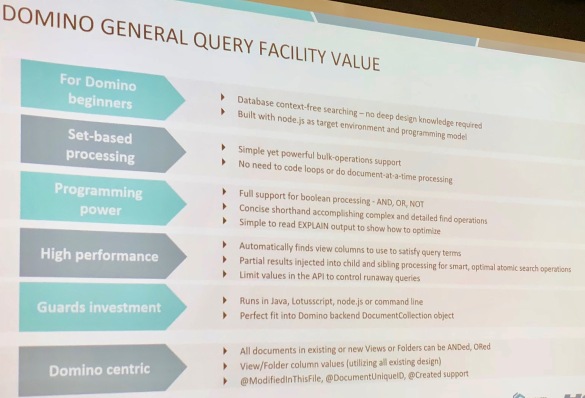
By Tim Davis – Director of Development
In my previous post I talked about what Node.js is and described how to create a very simple Node web server. In this post I would like to build on that and look at how to flesh out our server into something more substantial and how to use add-on modules.
To do this we will use the Express module as an example. This is a middleware module that provides a huge variety of pre-built web server functions, and is used on most Node web servers. It is the ‘E’ in the MEAN/MERN stacks.
Why should we use Express, since we already have our web server working? Really for three main reasons. The first is so you don’t have to write all the web stuff yourself in raw Node.js. There is nothing stopping you doing this if you need something very specific, but Express provides it all out of the box. One particularly useful feature is being able to easily set up ‘routes’. Routes are mappings from readable url paths to the more complicated things happening in the background, rather like the Web Site Rules in your Domino server. Express also provides lots of other useful functions for handling requests and responses and all that.
The second reason is that it is one of the most popular Node modules ever. I don’t mean therefore you should use it because everyone else does, but its popularity means that it is a de facto standard and many other modules are designed to integrate with it. This leads us nicely back around to the Node integration with Domino 10. The Node integration with Domino 10 is based on the Loopback adaptor module. Loopback is built to work with Express and is maintained by StrongLoop who are an IBM company, and now StrongLoop are looking after Express as well. Everything fits together.
The third and final reason is a selfish one for you as a developer. If you can build your Node server with Express, then you are halfway towards the classic full JavaScript stack, and it is a small step from there to creating sites with all the froody new client-side frameworks such as Angular and React. Also, you will be able to use Domino 10 as your back-end full-stack datastore and build DEAN/NERD apps.
So, in this post I will take you through how to turn our simple local web server into a proper Node.js app, capable of running stand-alone (e.g. maybe one day in a docker container), and then modify the code to use the Express module. This can form the basis of almost any web server project in the future.
First of all we should take a minute or two to set up our project more fully. We do this by running a few simple commands with the npm package manager that we installed alongside Node last time.
We first need to create one special file to sit alongside our server.js, namely ‘package.json’. This is a text file which contains various configuration settings for our app, and because we want to use an add-on module we especially need its ‘dependencies’ section.
What is great is we don’t have to create this ourselves. It will be automatically created by npm. In our project folder, we type the following in a terminal or command window:
npm init
This prompts you for the details of your app, such as name, version, description, etc. You can type stuff in or just press enter to accept the defaults for now. When this is done we will have our package.json created for us. It isn’t very interesting to look at yet.
We don’t have to edit this file ourselves, this is done automatically by npm when we install things.
First, lets install a local version of Node.js into our project folder. We installed Node globally last time from the download, but a local version will keep everything contained within our project folder. It makes our project more portable, and we can control versions, etc.
We install Node into our project folder like this:
npm install node
The progress is displayed as npm does its job. We may get some warnings, but we don’t need to worry about these for now.
If we look in our project folder we will see a new folder has been created, ‘node_modules’. This has our Node install in it. Also, if we look inside our package.json file we will see that it has been updated. There is a new “dependencies” section which lists our new “node” install, and a “start” script which is used to start our server with the command “node server.js”. You may remember this command from last time, it is how we started our simple Node server.
We can now start our server using this package.json. We will do this using npm, like this:
npm start
This command runs the “start” script in our package.json, which we saw runs the “node server.js” command which we typed manually last time, and our server starts up just like before, listening away. You can imagine how using a package.json file gives us much more control over how our Node app runs.
Next we want to add the Express module. You can probably already guess what to type.
npm install express
When this is finished and we look inside our package.json, we have a new dependency listed: “express”. We also have many more folders in our node_modules subfolder. Express has a whole load of other modules that it uses and they have all been installed automatically for us by npm.
Now we have everything we need to start using Express functions in our server.js, so lets look at what code we need.
First we ‘require’ Express. We don’t need to require HTTP any more, because Express will handle all this for us. So we can change our require line to this:
const express = require('express')
Next thing to do is to create an Express ‘app’, which will handle all our web stuff. This is done with this line:
const app = express()
Our simple web server currently sends back a Hello World message when someone visits. Lets modify our code to use Express instead of the native Node HTTP module we used last time.
This is how Express sends back a Hello World message:
app.get('/', (req, res) => {
   res.send('Hello World!')
} )
Hopefully you can see what this is doing, it looks very similar to the http.createServer method we used previously.
The ‘app.get’ means it will listen for regular browser GET requests. If we were sending in form data, we would probably want to instead listen for a POST request with ‘app.post’.
The ‘/’ is the route path pattern that it is listening for, in this case just the root of the server. This path pattern matching is where the power of Express comes in. We can have multiple ‘app.get’ commands matching different paths to map to different things, and we can use wildcards and other clever features to both match and get information out of the incoming URLs. These are the ‘routes’ I mentioned earlier, sort of the equivalent of Domino Web Site Rules. They make it easy to keep the various, often complex, functions of a web site separate and understandable. I will talk more about what we can do with routes in a future blog.
So our app will listen for a browser request hitting the root of the server, e.g. http://127.0.0.1:3000, which we used last time. The rest of the command is telling the app what to do with it. It is a function (using the arrow ‘=>’ notation) and it takes the request (‘req’) and the response (‘res’) as arguments. We are simply going to send back our Hello World message in the response.
So we now have our simple route set up. The last thing we need to do, same as last time, is to tell our app to start listening:
app.listen(port, hostname, () => {
   console.log(`Server running at http://${hostname}:${port}/`);
});
You may notice that this is exactly the same code as last time, except we tell the ‘app’ to listen instead of the ‘server’. This helps illustrate how well Express is built on Node and how integrated it all is.
Our new updated server.js should look like this:
const express = require('express');
const hostname = '127.0.0.1';
const port = 3000;
const app = express();
app.get('/', (req,res)=> {
   res.send("Hello World!")
});
app.listen(port, hostname, () => {
   console.log(`Server running at http://${hostname}:${port}/`);
});
This is one less line than before. If we start the server again by typing ‘npm start’ and then browse to http://127.0.0.1:3000, we get our Hello World message!
Now, this is all well and good, but aren’t we just at the same place as when we started? Our Node server is still just saying Hello World, what was the point of all this?
Well, what we have now, that we did not have before, is the basis of a framework for building proper, sophisticated web applications. We can use npm to manage the app and its add-ons and dependencies, the app is self-contained so we can move it around or containerise it, and we have a fully-featured middleware (i.e. Express) framework ready to handle all our web requests.
Using this basic structure, we can build all sorts of things. We would certainly start by adding the upcoming Domino 10 connector to access our Domino data in new ways, and then we could add Angular or React (or your favourite JS client platform) to build a cool modern web UI, or we could make it the server side of a mobile app. If your CIO is talking about microservices, then we can use it to microserve Domino data. If your CIO is talking about REST then we can provide higher-level business logic than the low-level Domino REST API.
In my next blog I plan to talk about more things we can do with Node, such as displaying web pages, about how it handles data (i.e. JSON), and about how writing an app is both similar and different to writing an app in Domino.
By Tim Davis – Director of Development.
I have talked a little in previous posts about how excited I am about Node.js coming to Domino 10 from the perspective of NoSQL datastores, but I thought it would be a good idea to talk about what Node.js actually is, how it works, and how it could be integrated into Domino 10. (I will be giving a session on this topic at MWLUG/CollabSphere 2018 in Ann Arbor, Michigan in July).
So, what is Node.js? Put simply, it is a fully programmable web server. It can serve web pages, it can run APIs, it can be a fully networked application. Sounds a lot like Domino. It is a hugely popular platform and is the ‘N’ in the MEAN/MERN stacks. Also it is free, which doesn’t hurt its popularity.
As you can tell from the ‘.js’ in its name, Node apps are written in JavaScript and so integrate well with other JavaScript-based development layers such as NoSQL datastores and UI frameworks.
Node runs almost anywhere. You can run it in Windows, Linux, macOS, SunOS, AIX, and in docker containers. You can even make a Node app into a desktop app by wrapping it in a framework like Electron.
On its own, Node is capable of doing a lot, but coding something very sophisticated entirely from scratch would be a lot of work. Luckily, there are millions of add-on modules to do virtually anything you can think of and these are all extremely easy to integrate into an app.
Now, suppose you are a Domino developer and have built websites using Forms or XPages. Why should you be interested in all this Node.js stuff? Well, IBM and HCL are positioning the Node integration in Domino 10 as a parallel development path, which is ideal for extending your existing apps into new areas.
For example, a Node front-end to a Domino application is a great way to provide an API for accessing your Domino data and this could allow easy integration with other systems, or mobile apps, or allow you to build microservices, or any number of things which is why many IoT solutions are built with Node as a platform, including those from IBM.
In your current Domino websites, you will likely have written or used some JavaScript to do things on your web forms or XPages, maybe some JQuery, or Server-Side JavaScript. If you are familiar with JavaScript in this context, then you will be ok with JavaScript in Node.
So where do we get Node, how do we install it and how do we run it?
Getting it is easy. Go to https://nodejs.org and download the installer. This will install two separate packages, the Node.js runtime and also the npm package manager.
The npm package manager is used to install and manage add-in modules and optionally launch our Node apps. As an example, a popular add-on module is Express, which makes handling HTTP requests much easier (think of Express as acting like Domino internet site documents). Express is the ‘E’ in the MEAN/MERN stacks. If we wanted to use Express we would simply install it with the simple command: ‘npm install express’, and npm would go and get the module from its server and install it for you. All the best add-on modules are installed using the ‘npm install xxxxxx’ command (more on this later!).
Once Node is installed, we can run it by simply typing ‘node’ into a terminal or command window. This isn’t very interesting, it just opens a shell that does pretty much nothing on its own. (Press control-c twice to exit if you tried this).
To get Node to actually do stuff, we need to write some JavaScript. A good starting example is from the Node.js website, where we build a simple web server, so let’s run through it now.
Node apps run within a project folder, so create a folder called my-project.
In our folder, create a new JavaScript file, lets call it ‘server.js’. Open this in your favourite code editor (mine is Visual Studio Code), and we can start writing some server code.
This is going to be a web server, so we require the app to handle HTTP requests. Notice how I used the word ‘require’ instead of ‘need’. If we ‘require’ our Node app to do anything we just tell it to load that module with some JavaScript:
const http = require('http');
This line essentially just tells our app to load the built-in HTTP module. We can also use the require() function to load any other add-on modules we may want, but we don’t need any in this example.
So we have loaded our HTTP module, lets tell Node to set up a HTTP server, and we do this with the createServer() method. This takes a function as a parameter, and this function tells the server what to do if it receives a request.
In our case, lets just send back a plain text ‘Hello World’ message to the browser. Like this:
const server = http.createServer((req, res) => {
 res.statusCode = 200;
 res.setHeader('Content-Type', 'text/plain');
 res.end('Hello World!\n');
});
There is some funny stuff going on with the arrow ‘=>’ which you may not be familiar with, but hopefully it is clear what we are telling our server to do.
The (req, res) => {…} is our request handling function. The ‘req’ is the request that came in, and the ‘res’ is the response we will send back. This arrow notation is used a lot in Node. It is more or less equivalent to the usual JavaScript syntax: function(req, res) {…}, but behaves slightly differently in ways that are useful to Node apps. We don’t need to know about these differences right now to get our server working.
In our function, you can see that we set the response status to 200 which is ‘Success OK’, then we make sure the browser will understand we are sending plain text, and finally we add our message and tell the server that we are finished and it can send back the response.
Now we have our server all set up and it knows what it is supposed to do with any request that comes in. The last thing we want it to do is to actually start listening for these requests.
const hostname = '127.0.0.1';
const port = 3000;
server.listen(port, hostname, () => {
 console.log(`Server running at http://${hostname}:${port}/`);
});
This code tells the server to listen on port 3000, and to write a message to the Node console confirming that it has started.
That is all we need, just these 11 lines.
Now we want to get this Node app running, and we do this from our terminal or command window. Make sure we are still in our ‘my-project’ folder, and then type:
node server.js
This starts Node and runs our JavaScript. You will see our console message displayed in the terminal window. Our web server is now sitting there and happily listening on port 3000.
To give it something to listen to, open a browser and go to http://127.0.0.1:3000. Hey presto, it says Hello World!
Obviously, this is a very simple example, but hopefully you can see how you could start to extend it. You could check the ‘req’ to see what the details of the request are (it could be an API call), and send back different responses. You could do lookups to find the data to send back in your response.
Wait, what? Lookups? Yes, that is where the Node integration in Domino 10 comes in. I know this will sound silly, but one of the most exciting things I have seen in recent IBM and HCL presentations is that we will be able to do this:
npm install dominodb
We will be able to install a dominodb connector, and use it in our Node apps to get at and update our Domino data.
Obviously, there is a lot more to all this than I have covered in the above example, but I hope this has given you an idea of why what IBM and HCL are planning for Domino 10 is so exciting. In future blogs I plan to expand more on what we can do with Node and Domino 10.
In this 5th episode of my #Perfect10 webcast I look at how to identify any performance issues in your Domino environment prior to upgrade. Assuming most people will be doing an in place upgrade, we want to resolve or at minimum document any existing issues before starting
 The Turtle Partnership Blog