Think-Ing From Far Away Pt5 – The Big Wrap Up

Our final podcast of Think-ing from far away is a wrap up of the week, announcements and thoughts in general.  We were joined by Maria Nordin from ISW, Kris de Bisschop from Groupwave and Christoph Adler from Panagenda. All dosed up with coffee at 8am on the last day in San Francisco.

The final wrap up podcast is here

Content from Think is already beginning to be posted here  You must have an IBM ID to login and download although you don’t need to be a registered Think attendee.  Some content already available including:

Supercharged Notes 10 Upgrade: Turning the Worst Notes Deployments into the Best from Christoph Adler and Jared Roberts

Domino on Docker Boot Camp from Thomas Hampel (and Daniel Nashed)

Get Started with IBM Connections Customizer for Dummies  from Wannes Rams and Martin Donnelly

Best Practices for Maximizing Your Investment in IBM Verse On-Premises from Drew Birnbaum and Barry Rosen

Using Node-RED to Bring IBM Domino Content into Your Web and Mobile Applications from Scott Good

Register for one of the IBM Connections in person design “jams”

Keep an eye on the Social Connections site for the announcement of where the European even in September this year with a keynote from Richard Jefts will be held.

Follow Twitter

@IBMSocialBiz

@IBMChampions

@HCL_CollabDev

@IBMLive

@planetlotus 

IBM Champions- All – List

Blogs

PlanetLotus http://planetlotus.org

IBM Collaboration Solutions Blog https://www.ibm.com/blogs/collaboration-solutions/

HCL Collaboration Workflow Platforms https://www.cwpcollaboration.com/blogs

Aha! Domino Ideas Lab https://domino.ideas.aha.io

Aha! Connections Ideas Lab https://connections.ideas.aha.io

Collaboration Today https://collaborationtoday.info

Other In Person Events Already Announced For 2019

https://engage.ug

https://collabsphere.org

https://admincamp.de

https://dnug.de

https://isbg.no

https://socialconnections.info

Think-Ing From Far Away Pt4 – It’s All Connections

Today’s podcast of Think-ing from far away is all about Connections.  We have heard so much news coming out of Think already regarding Connections so we were joined by Sandra Buehler from Belsoft and Wannes Rams from Ramsit – both kindly sat on the floor in a quiet corner of the Moscone Center!.  We were also joined by Chris Reckling who leads the design team in Littleton MA to talk about what’s new and what’s coming.

The Connections podcast is here

What is new with CR4, what’s coming with CR5, how to work with customiser and how to register for the design jams rolling out this year starting in April and May.

A great summary page of all that’s new in Connections

Register for one of the IBM Connections in person design “jams”

Keep an eye on the Social Connections site for the announcement of where the European even in September this year with a keynote from Richard Jefts will be held.

Great to hear so much news from Community and developments continuing to progress fast during the transitiion from IBM to HCL.

Next up: Connections from Think 2019 !

Follow Twitter

⁦@IBM @ Think

@IBMSocialBiz

@IBMChampions

#Think2019

#IBMThink2019

@HCL_CollabDev

@IBMLive

@planetlotus 

IBM Champions- All – List

Blogs

PlanetLotus http://planetlotus.org

IBM Collaboration Solutions Blog https://www.ibm.com/blogs/collaboration-solutions/

HCL Collaboration Workflow Platforms https://www.cwpcollaboration.com/blogs

Aha! Domino Ideas Lab https://domino.ideas.aha.io

Aha! Connections Ideas Lab https://connections.ideas.aha.io

Collaboration Today https://collaborationtoday.info

Other In Person Events Already Announced For 2019

https://engage.ug

https://collabsphere.org

https://admincamp.de

https://dnug.de

https://isbg.no

https://socialconnections.info

Think-Ing From Far Away Pt3 – Community Day & Chairman’s Address

Today’s podcast of Think-ing from far away is entirely “far away” as we welcome Andreas Ponte from Belsoft in Switzerland and Mike Smith from The Turtle Partnership to discuss the news from Community Day and the Chairman’s Address from Ginni Rometty that we all watched via live stream.

The Community & Chairman’s address podcast is here

What is IBM’s new message and what does that mean to those of us working in the collaboration space?

Replays including the Chairman’s address:

Watch sessions live stream: https://www.ibm.com/events/think/watch/

Think Today “newsdesk

The new HCL Partner Connect Program https://www.cwpcollaboration.com/hcl-partner-connect-registration.html

Domino 11 Sneak Peek registration on March 14th

Register for one of the IBM Connections in person design “jams”

Great to hear so much news from Community and developments continuing to progress fast during the transitiion from IBM to HCL.

Next up: Connections from Think 2019 !

Follow Twitter

⁦@IBM @ Think

@IBMSocialBiz

@IBMChampions

#Think2019

#IBMThink2019

@HCL_CollabDev

@IBMLive

@planetlotus 

IBM Champions- All – List

Blogs

PlanetLotus http://planetlotus.org

IBM Collaboration Solutions Blog https://www.ibm.com/blogs/collaboration-solutions/

HCL Collaboration Workflow Platforms https://www.cwpcollaboration.com/blogs

Aha! Domino Ideas Lab https://domino.ideas.aha.io

Aha! Connections Ideas Lab https://connections.ideas.aha.io

Collaboration Today https://collaborationtoday.info

Other In Person Events Already Announced For 2019

https://engage.ug

https://collabsphere.org

https://admincamp.de

https://dnug.de

https://isbg.no

https://socialconnections.info

Think-Ing From Far Away Pt2 -News So Far & What’s Coming Up (Tuesday)

Today’s podcast of Think-ing from far away features is an accidental Lifetime Champion full house with guests Paul Withers from Intec and Daniel Nashed from Nashcom alongside Julian, Theo and myself.  We discuss the news so far including work Daniel has been working on providing Docker scripts that is being presented by Thomas Hampel this week and the relaunch of code snippets by OpenNTF.  We also discuss how us far away users are playing along with Think from home by watching live streams and monitoring blogs.

The Penumbra Group were very happy to present this year’s Prism award given to the IBM’er who most helped the BP Community this year to the amazing Mat Newman , Global Executive, IBM Collaboration Solutions.  More details and photo here http://penumbragroup.com.  A big thank you from everyone to you Mat.

Tuesday’s podcast is here

In the podcast we again mention hashtags , blogs and twitter accounts those of us who aren’t at Think should keep an eye on this week but we now also have live stream content and replays

Replays including the Chairman’s address:

Watch sessions live stream: https://www.ibm.com/events/think/watch/

Think Today “newsdesk

Openntf XSnippets

Daniel’s Docker Github where the scripts will be posted

Paul’s Github for Nodered

Download the Think mobile app for iOS or Android to stream content from there

What’s happening for  ICS during Think

Collaboration Sessions Guide

Tomorrow we hope to have two podcasts on both the Chairman’s address and one focused around Connections announcements so stay tuned.

Follow Twitter

⁦@IBM @ Think

@IBMSocialBiz

@IBMChampions

#Think2019

#IBMThink2019

@HCL_CollabDev

@IBMLive

@planetlotus 

IBM Champions- All – List

Blogs

PlanetLotus http://planetlotus.org

IBM Collaboration Solutions Blog https://www.ibm.com/blogs/collaboration-solutions/

HCL Collaboration Workflow Platforms https://www.cwpcollaboration.com/blogs

Aha! Domino Ideas Lab https://domino.ideas.aha.io

Aha! Connections Ideas Lab https://connections.ideas.aha.io

Collaboration Today https://collaborationtoday.info

Other In Person Events Already Announced For 2019

https://engage.ug

https://collabsphere.org

https://admincamp.de

https://dnug.de

https://isbg.no

https://socialconnections.info

Updates from HCL & IBM In London

Today Tim and I attended the Domino 11 Jam in London with Andrew Manby as the ringmaster, it’s been a year since the original Domino 10 London Jam and it was great to see things continuing with Domino 11.  What was made clear in today’s discussion was that whereas Domino 10 was primarily about the back end and TCO features, Domino 11 is all about the client experience.  There were two new HCL UX designers present today to listen to what was said and provide their input.

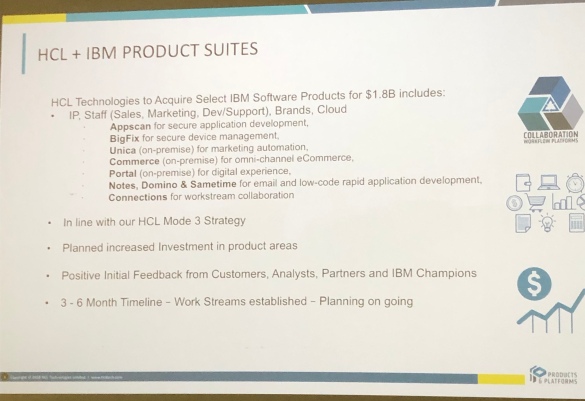
First up Richard Jefts (VP & General Manager @ HCL) laid out for us what the HCL deal with IBM entails.   There are new products that are now owned by HCL including Portal, Connections and BigFix (love BigFix and want to dig into that more). The $1.8bn purchase included not just the products but taking on board all the related staff  (basically everyone except services)

fullsizeoutput_3596

As HCL say on their Collaboration site

“A customer centric approach is the foundational element of the HCL Products business philosophy and a key component of the HCL Products and Platforms strategy to drive overall success of the product portfolios.”

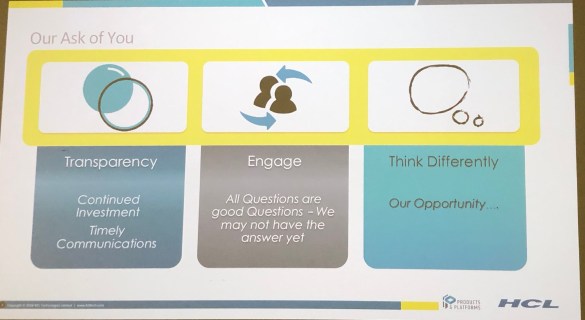
That means working with customers and partners.  As Richard Jefts said today “This is an opportunity for us to revisit what we want the products and solutions to be” – Think Differently.  This isn’t just marketing speak – in the past few months we’ve seen a lot of effort by HCL to reach out , from presentations to the factory tours where many of us got to meet the development teams directly (and those continue this year) and direct sponsorship and involvement at user group events.  They are walking the walk.

fullsizeoutput_3597

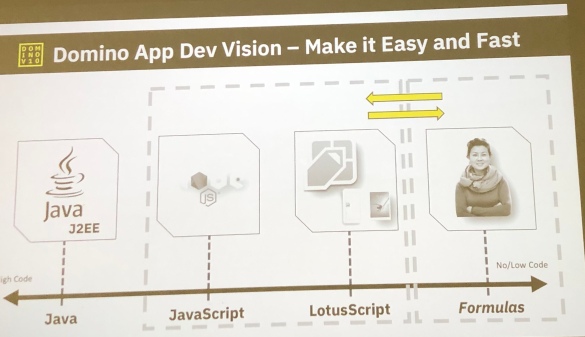
Finally I wanted to share what they are calling the future of Low Code to No Code – these platforms are developer driven and regardless of your level of expertise as a developer, there will be a way in for you with Domino 11 and its successors.

fullsizeoutput_3594

Unfortunately I had to jump out of the jam far too early because I had a support emergency so I missed a lot of the big thinking fun but I wanted to share these screenshots with you as I think they explain a lot about where HCL stand and how they see the future.

Also on my way out the door I met and briefly chatted to another Business Partner – if you were the guy who talked to me about this blog, please connect on LinkedIn, I didn’t get your card 🙂


Domino 11 Jam Coming To London

The Domino jams continue, now onto Domino 11 and with a date of January 15th in London. No location yet but I’d be very surprised if it’s not IBM South Bank.

I attended a couple of jams last year and I can confirm many of the comments made and items requested ended up in the v10 products and several have already been prioritised into v11.  If you are interested in the future of the collaboration products and especially Domino then you will want to contribute ideas to the jam so email Brendan McGuire (MCGUIREB@uk.ibm.com) and ask to attend.

We all hope to be there investing in the future or products we believe in.  Hope to see you there as well.

If you are interested in locations other than London check out this URL  where there are already locations and some dates announced.

#dominoforever

HCL Launch New Collaboration Site & Client Advocacy Program

Today HCL went live with their own site for their collaboration products at https://www.cwpcollaboration.com. It’s Domino-based and we even have new forums you can sign up for (and the sign up process is easy).

The big news for me is the launch of their Client Advocacy Program which you can read about and sign up to on the site. The Client Advocacy program connects customers directly with a technical point of contact in development, it’s free and open for registration now.  You can read more in their FAQ here, but for those of you who are tl:dr here’s a taster.

Why is HCL Client Advocacy participation beneficial?

A Client Advocate provides the participant:

  • opportunity to discuss successes, challenges, and pain points of the customer’s deployment and product usage
  • a collaborative channel to the Offering Management, Support and Development Teams
  • proactive communications on product news, updates, and related events/workshops
  • more frequent touch points on roadmaps and opportunity to provide input on priorities
  • facilitation of lab services engagements or support team as appropriate

You can request to sign up here

I think we can all agree that even in these early days HCL are showing customer focused intent and following up quickly with real actions to reach out and encourage us to talk to them directly.  I know this is just the beginning, the foot is down hard on the acceleration pedal and I’d recommend you follow HCL_CollabDev on twitter as well as the new Collaboration site.  And feed back.  They want to hear what you think and what you want.  If you feel something is missing or you have an idea, feed back.

Above all don’t paint HCL with the IBM brush, this is a new company with new ideas and their own way of doing things.  Exciting times.

Whooomf – All Change. HCL Buys The Shop…

According to this Press Release as of mid June 2019, HCL take ownership of a bunch of IBM products including Notes, Domino and Connections on premises. Right now and since late 2017 there has been a partnership with IBM on some of the products such as Notes, Domino, Traveler and Sametime* so this will take IBM out of the picture entirely. Here are my first “oh hey it’s 4am” thoughts on why that’s not entirely surprising or unwelcome news ..

HCL are all about leading with on premises, not cloud. The purchase of Connections is for on premises and there are thousands of customers who want to stay on premises. Every other provider is either entirely Cloud already or pushing their on premises customers towards it by starving their products of development and support (waves at Microsoft). *cough*revenue stream*cough*

HCL have shown in 2018 that they can innovate (Domino’s TCO offerings, Notes on the iPad, Node integration etc) , develop quickly and deliver on their promises. That’s been a refreshing change.

They must be pleased with the current partnership products to buy them and more outright.

When HCL started the partnership with IBM they brought on some of the best of the original IBM Collaboration development team and have continued to recruit at high speed. It was a smart move and one I hope they repeat across not just development but support and marketing too.

HCL already showed with “Places” that they have ideas for how collaboration tools could work (see this concept video https://youtu.be/CJNLmBkyvMo) and that’s good news for Connections customers who gain a large team and become part of a bigger collaboration story in a company that “gets it”.

Throughout 2018 HCL have made efforts to reach out repeatedly to customers and Business Partners, asking for our feedback and finding out what we want. From sponsoring user group events (and turning up in droves) around the world to hosting the factory tour in June at their offices in Chelmsford where we had two days of time with the developers and their upcoming technologies. I believe they have proven they understand what this community is about and how much value comes from listening and – yes – collaborating.

Tonight I am more optimistic for the future of these products and especially Connections than I have been in a while. HCL, to my experience, behave more like a software start up than anything else, moving fast, changing direction if necessary and always trying to lead by innovating. I hope many of the incredibly smart people at IBM (yes YOU) who have stood alongside these products for years do land at HCL if that’s what they want, it would be a huge loss if they don’t.

*HCL have confirmed that Sametime is included

Domino – Exchange On Premises Migration Pt1: Migration Tools

It’s been an interesting few months intermittently working on a project to move Notes and Domino users onto Exchange on premises 2013 and Outlook 2013.  I’m going to do a follow up blog talking about Outlook and Exchange behaviour compared to Notes and Domino but let’s start at the beginning, with planning a migration.

The first thing to know is that if your company uses Domino for mail, Exchange on premises is a step down.  I’m sorry but it is and I say this as someone with a lot of experience of both environments (albeit a LOT more in Domino). At the very least you need to allow for the administrative overhead to be larger and to encompass more of your environment. Domino is just Domino on a variety of platforms, Exchange is Active Directory and DNS and networking and a lot more besides.  In fact Microsoft seem to be focusing on making the on premises solution ever more restrictive and difficult to manage (better hope you enjoy Powershell) to encourage you to move to O365.

To give you an example, during the migration we had an issue where mail would suddenly stop sending outbound.  The logs gave no clue, I spent 2 days on it finding nothing and eventually decided to pay Microsoft to troubleshoot with me to find out what I’d done wrong.  5 hrs of joint working later we found it.  It wasn’t Exchange or any box I worked on.  It was one of the Domain Controllers that didn’t have a service running on it (kerberos key distribution center) that was causing the issue.  Started that service on that box and all was fine.  Three days wasted but at least it wasn’t what I did 🙂

MIGRATION TOOLS

First of all we need a migration tool unless you’re one of the increasingly large number of companies who just decide to start clean.  This is especially true when moving to O365 because there often isn’t either the option or the capability to upload terabytes or even gigabytes of existing mail to the cloud.  Having tested 5 different tools for this current project here were my biggest problems:

  1. A tool that was overly complex to install, outdated (requiring a Windows 7 OS) and the supplier wanted several thousand dollars to train me on how to install it
  2. Tools that didn’t migrate the data quiitteee right. It looked good at first glance but on digging deeper there were misfiled messages and calendar entries missing
  3. Tools that took an unfeasibly long time (>12hrs per mail file or even days).  The answer to that problem was offered as “you are migrating too much, we never do that” or “you need a battalian of workstations to do the migration”
  4. Tools that required me to migrate everything via their cloud service i.e send every message through their servers¨. I mean it works and requires little configuration but no.  Just no.

Whatever tool you decide to use I would recommend testing fully against one of your largest mail files and calculating the time taken against what that does to your project plan.  For my current smaller project I am using a more interactive tool that installed on a workstation and didn’t require any changes on either the Domino or Exchange end.

You’ll notice I’m not naming the tools here.  Although there are a couple where the supplier was so arrogant and unhelpful I’d like to name them, there are also several who were incredibly helpful and just not the right fit for this project.  Maybe for the next.  The right migration tool for you is the one that does the work you need in the time you need and has the right support team behind it to answer finicky questions like ‘what happened to my meeting on 3rd June 2015 which hasn’t migrated”.  Test. Test. Test.

Many of the migration tools are very cheap but be careful that some of the cheapest aren’t making their money off consultancy fees if paying them is the only way to make the product work.

QUESTIONS

So our first question is

“What do you want to migrate?”

Now the answer to this will initially often be “everything” but that means time and cost and getting Exchange to handle much larger mailboxes than it is happy to do.  That 30GB Domino mailfile won’t be appreciated by Exchange so the second question is

“Would you consider having archives for older data and new mailboxes for new”

You also need to ask about rooms and resources and shared mailboxes as well as consider how you are going to migrate contacts and if there needs to be a shared address book.  The migration of mail may be the easiest component of what you are planning.

Now we need to talk about coexistence.  Unless you plan to cutover during a single period of downtime during which no mail is available you will need a migration tool that can handle coexistence with people gradually moving to Exchange and still able to work with those not yet migrated from Domino without any barrier in between.  Coexistence is a lot more complex than migration and the migration tools that offer it require considerably more configuration and management for coexistence than they do for the migration.  Consider as well that your coexistence period could be months or even years.

One option, if the company is small enough, is to migrate the data and then plan a cutover period where you do an incremental update.  Updating the data every week incrementally allows you to cutover fairly quickly and also gives a nice clean rollback position.

EXCHANGE CONFIGURATION

The biggest issue in migrating from Domino to Exchange is how long it takes getting the data from point A to point B.  I tried a variety of migration tools and a 7GB mail file took anywhere from 3hrs to 17hrs to complete.  Now multiply that up.   Ensuring your Domino servers, migration workstations and Exchange servers are located on the same fast network is key.

Make sure your Exchange server is configured not to throttle traffic (because it will see that flood of migration data as needing throttling) so configure a disabled/unlimited throttling policy you can apply during the migration.

Exchange’s malware filter, which is installed by default and only has options for deleting messages or deleting their attachments, is not your friend during a migration.  Not only will it delete your Domino mail that it decides could be malware as it migrates but it also slows the actual migration down to a crawl whilst it does that.  You can’t delete the filter but you can temporarily disable it via Powershell.

Next up.. the challenges of the Outlook / Exchange model to a Notes / Domino person.


Using Node.js to access Domino

You will be pleased to hear that the Domino 10 module for Node.js is now in beta (you can request early access here) and in this article I would like to show you how easy it will be to use.

Before we get started using the Domino module in Node, we do need to do some admin stuff on our Domino server. It has to be running Domino 10 and we have to install the Proton add-in, and we also have to create the Design Catalog including at least one database. (The Proton add-in listens on its own port, by default 3002, and is separate from HTTP.)

More detail on these admin tasks will be covered in a companion blog, but here I would like to focus on the app-dev side.

Lets build a simple Node.js system that will read some Domino documents and get field values, and also create some new documents. In my next post we can integrate this into the basic Node stack we developed in my previous post to create an actual API.

Assuming our Domino server is all set up, the first thing we do is install the new dominodb module. When this goes live later in the year, we will do this with the usual  ‘npm install dominodb’, but while we are still in beta we install it from the downloaded beta package:

npm install ../packages/domino-domino-db-1.0.0.tgz --save

Once we have the dominodb connector installed, we can use it in our Node server.js code. The sequence is almost exactly the same as in LotusScript. First, we connect to Domino and open the Server (sort of equivalent to a NotesSession), then from this we open our Database, and then using the Database we can access and update Documents.

We start the same way as with all other Node.js modules, with a ‘require’:

const { useServer } = require('@domino/domino-db');
This ‘useServer’ is a function and is going to create our server connection. We give it the Domino server’s hostname and the Proton port, and it connects to our server like this:
serverConfig = {
    hostName: 'server.mydomain.com',
    connection: { port:'3002'}
};
useServer( serverConfig )
The useServer function returns a ‘server’ object. This is inside a javascript promise (I talked about promises in an earlier post), so we can use the server object inside the promise to open our database like this:
useServer( serverConfig ).then( async server => {
    const database = await server.useDatabase( databaseConfig );
The databaseConfig contains the filepath of our database on the server:
const databaseConfig = {
    filePath: 'orders.nsf'
};

Notice how we are using ‘async await’ to simplify the asynchronous nature of getting the database. This code looks very similar to the LotusScript equivalent.

So we have created a server connection and opened a database. Now we want to get some documents.

The domino-db module uses the new Domino Query Language (DQL) which comes with Domino 10. This can perform very efficient high-performance queries on Domino databases.

It is very much like getting a document collection with a db.search( ) in LotusScript, and the query syntax is similar to selection formulas, for example:

const coll = await database.bulkReadDocuments({
    query: "Form = 'Order' and Customer = 'ACME'"
});
This returns a collection of documents in a JSON array. These documents do not automatically contain all the items from the Notes documents. By default they only have some basic metadata, i.e. unid, created date, and modified date:
{
  "documents":[
    {
      "@unid":"A2504056F3AF6EFE8025833100549873",
      "@created": {"type":"datetime","data":"2018-10-25T15:24:00.51Z"},
      "@modified": {"type":"datetime","data":"2018-10-25T15:24:00.52Z"}
    }
  ],
  "errors":0,
  "documentRange":{"total":1,"start":0,"count":1}
}
To get field data from the documents, you need to specify which fields you want returned, and this is done with an array of itemNames:
const coll = await database.bulkReadDocuments({
  query: "Form = 'Order' and Customer = 'ACME'",
  itemNames: ['OrderNo', 'Qty', 'Price']
});
Then you get the field data included in your query results:
{
"documents":[
  {
    "@unid":"A2504056F3AF6EFE8025833100549873",
    "@created":{"type":"datetime","data":"2018-10-25T15:24:00.51Z"},
    "@modified":{"type":"datetime","data":"2018-10-25T15:24:00.52Z"},
    "OrderNo":"001234",
    "Qty":2,
    "Price":25.49
  }
],
"errors":0,
"documentRange":{"total":1,"start":0,"count":1}
}
We can output the document field data with JSON dot notation in a console.log (with the JSON.stringify method to format it properly):
console.log( "Order No: " + JSON.stringify( coll.documents[0].OrderNo ) );

So this is how to read a collection of documents. Now lets look at creating a new document, which is even easier.

First we build our document data in an ‘options’ object, including the Form name and all our other item values:

const newDocOptions = {
  document: {
    Form: 'Order',
    Customer: 'ACME',
    OrderNo: '000343',
    Qty: 10,
    Price: 49.99
  }
};
Then we simply call the ‘createDocument’ method, like this:
const unid = await database.createDocument( newDocOptions );

We don’t need to call a ‘save’ on the document, it is all handled in one operation. The return value is the unid of the newly-created document, so we can act on it again to update it if we want to.

To update a document, we get it by its unid with the ‘useDocument’ method, and then we can call ‘replaceItems’ on it.

This takes the new values in a ‘replaceItems’ parameter, but it only needs to contain the fields to update:

const document = await database.useDocument({
  unid: coll.documents[0]['@unid']
});
await document.replaceItems({
  replaceItems: { Qty: 11 }
});

Here we are using the ‘@unid’ value from the collection we got earlier. This is a bit fiddly because ‘@’ is a reserved symbol in JSON, but we can use the JSON square bracket notation to get around this.

We have got documents and created and updated documents. In addition to all these, the domino-db module provides a variety of methods for reading, creating and updating documents, allowing you to do anything you would need.

Also, the DQL syntax has sophisticated search facilities that can return large numbers of documents and can even search in views and columns.

There are couple of things to be aware of:

The first is that by default the connection to Domino is unsecured, but you can easily make it use TLS/SSL. You may need help from your Domino admin to provide you with the certificate and key files, but this is all explained in the documentation.

The second thing is that currently this access is either Anonymous or can be set to a single Domino user account in TLS/SSL by the client certificate (which maps to a Domino person document). So in the beta there is no user authentication per se, but this will be coming later with OAuth support.

I hope you found this both useful and exciting. In my next article I plan to show how to build these domino-db methods into a Node HTTP server and create an API gateway.