Connections CCM Problems – Libraries not “quite” working

My 2nd PMR this week was for Connections and Content Manager.  I had already installed FileNet in the test environment for this customer and the only difference between test and production was really the number of servers with CCM having its own dedicated VM.  The install completed and I tested uploading files, editing files, clicking “like” etc and it all seemed OK so I handed it over to the customer.

Turns out there was a problem.  No library , once created, could be edited.  Not the title, not the security, nothing.  Any editing threw up an error

All the installs were correct.  The updates had applied OK.  The correct versions of FileNet were running.  We even checked the security on the ICObjectStore in FileNet’s ACCE administration interface.  Nothing looked wrong but the error message was strange

“The requested approval  action could not be performed because the library, CCM Libraries, is not enabled for document approval. The library’s repository, ICObjectStore, might not have the document approval addon installed, or the library might not be a teamspace. Contact your administrator and report this error message”

As part of the investigation trying to find out what was wrong (and whilst waiting for L3 to review) I saw this option when I right clicked on the ICObjectStore in ACCE – add on features.  AddOnFeatures


So , whilst we waited, the IBM support guy (can I name him here?) sent me a list of all his add ons and I compared them to all of mine and sure enough about 8 were missing.  I added those and everything started working.  Why those 8 failed to install is another matter since all the logs said everything installed fine.  Interestingly at this customer we’ve had trouble deploying applications in the past due to network timeouts between the Dmgr and other servers so I do wonder if that was it (for instance CR3 seemed to install but several of the applications were corrupted when we tried to use them and I had to install them again manually).

An interesting one and a nice easy fix.  I’ve added screenshots below of all the add ons we should have had so you can compare if you find a similar problem.
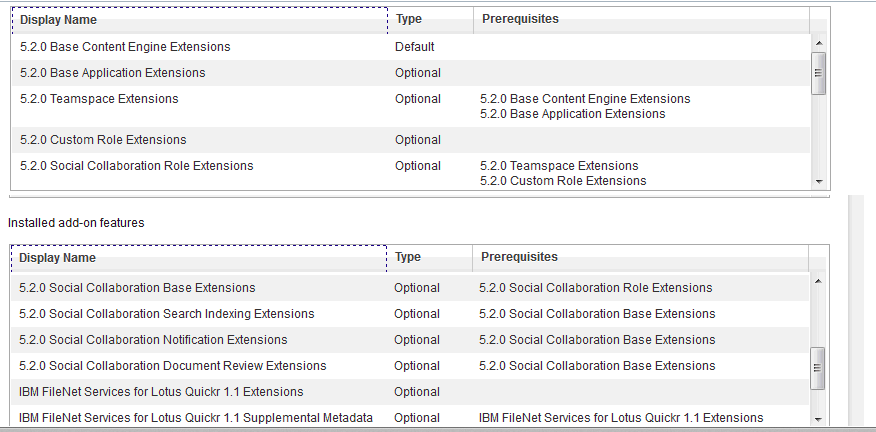
Addons Pt1 Addons Pt1


Choose Your Installation Manager Carefully….

In both Sametime and Connections builds I have come across customers installing different versions of Installation Manager than that recommended or supplied with the product. The ST and Connections apps are both 32bit so although they will install under a 64bit version of Installation Manager, you will get a warning about it being 64bit.  Don’t ignore that.

There’s no advantage to you choosing 64bit Installation Manager over 32bit on a 64bit platform and worse, since it manages all your installs, if you discover it’s a problem later you can’t fix it because you can’t uninstall it without uninstalling everything it installed itself.  I did a workaround at a customer  I was brought into once where we renamed the IM folder and installed a new 32bit version to make sure ST Media Manager would install but that’s a fudge.

Do yourself a favour, you can’t go wrong with 32bit 🙂

When bad wasadmins go missing

Working yesterday on deploying a new application in a test Connections environment I was logged into the ISC using wasadmin for hours. Eventually I finish my work and restart everything to test.  I go to login to the deployment manager and no account will work, not wasadmin nor any of the LDAP administrative accounts set up.  So what do I do?  Well first I need to work out what’s going wrong and I check SystemOut.log when trying to login and see this error as a root cause

CWWIM2009E The principal ‘AnonymousUser’ does not have the role ‘administrator’ required for the operation ‘GET CONFIGURATION’

Well OK, let’s back up ,since it happened after a reboot the change could have been made any time since the previous restart and wasn’t necessarily related to the work I was doing at all.  First I need to get into the ISC and to do that I need to disable ISC security so I can get in.  I edit security.xml in the /profiles/dmgr/config/cells/<cellname> directory and find the first enabled=”true” in the security tag and change that to enabled=”false” (make sure you save a copy of this file first).  Then stop the dmgr and start it again. I have trouble stopping it as the authentication isn’t working so , since the dmgr is the only WAS server running , I just terminate java.exe from task manager.  Having done that the URL for the dmgr  <hostname>:9043/ibm/console no longer asks for a password and lets me login using just a user name.  and I’m IN – albeit with no security so no way to start servers.

I go look at the Administrative users configured in the system and sure enough the LDAP admin accounts are there but wasadmin is gone.  I can’t add wasadmin because security is disabled and it can’t find the account.  I can work around it but a better solution is to tell the ISC to use the LDAP realm instead of the defaultWimFileBasedRealm (which contains wasadmin).  I go to Global Security, re-enable security from that screen (it was disabled by my earlier security.xml change) and then go into the federated repository and change the realm name from o=defaultWIMFileBasedRealm to whatever my LDAP realm is (in this case “root”) and then change the Primary administrative user name to one of my LDAP admin accounts (in this case gabdavis).

Global Security

Now I can restart dmgr and login to the ISC with the name gabdavis (my ldap account) and its ldap password.  Once in there I can go to Administrative Users and re-add wasadmin with all the roles I need then (if I wanted to) go back to Global Security and revert the realm and primary administrative account back to what was set originally (above).

And that’s it.  I hope this is useful for anyone else who has a wasadmin go astray…Backup your deployment manager profile regularly people !

Connections .. um Next?

Next week on May 21st sees the launch of IBM Connections Next, coming 14 months after Connections 4.5.  Initially it will be in IBM’s cloud only but by the end of June we will have software to install on site.  That timeline matches IBM’s promise of end of Q2.  This is a major release so everyone is under NDA until May 21st.

If you’re a Connections customer and you don’t have a test environment in place then you are going to want one to validate your customisations, scripts and applications.  As far as your production environment is concerned ,  I don’t know if IBM will support an in-place upgrade, they certainly have before but my preference is always side by side to minimise downtime and risk.  If Connections Next is based upon WebSphere 8.5 (as Sametime is) rather than WebSphere 8.0 then side by side will likely be the only option.  We’ll see if that’s the case when the documentation appears..

The best public information right now is this presentation from Luis Benitez @ Connect 2014

there is also a Q&A with Luis and Suzanne Livingston on May 22nd  you can register for here

In the meantime – enjoy this great trailer for Connections Next 

Exciting things are coming!

Connections DB Schemas

A fantastic visual representation of the key relationships in Connection database schemas by Mark Myers.  None of this is documented by IBM publicly so this is entirely Mark’s effort to take apart and document.  Some of us have tried it in pieces but this is by far the most comprehensive and useful attempt to document the underlying architecture I’ve seen.

Another one for the bookmarks…

http://www.stickfight.co.uk/blog/Connections-Db-Schema-Tip2-Finding-the-UserID

Adventures With CCM and Libraries

Recently I’ve run into all sorts of problems deploying CCM for a customer who is running multiple servers.  In this case two of the biggest problems were down to the Filenet application server being different from the Connections application server so I’ll write them up here in case anyone else runs into the same thing.

Problem No.1 CreateObjectStore batch file fails with

“CC0050E CONTENT_FCA_ROOT_DOES_NOT_EXIST the root folder does not exist d:\ibm\connections\data\shared\ccm”

After much checking that the folder was there and did exist and the account running the CreateObjectStore did have rights I realised that it wasn’t looking on the Deployment Manager server (where the Filenet files are installed and where the batch files are run from) but on the WebSphere Application Server designed to run the CCM Application.  That server, which was a completely separate machine,  didn’t even have a D drive. It had an E drive.  Once I was able to create d:\ibm\connections\data\shared\ccm on that second server, the setup completed.

Problem No.2 Principal Name not found when running CreateGCD

This failed multiple times no matter what account we used although we had a specific account set up for CCM called ccm_administrator that had a valid email address and was in LDAP, this kept failing.  I could see the account in LDAP (Domino) , through an LDAP browser and could validate the password but CCM didn’t like it.  In the end we discovered that the site had a filter for LDAP users in Connections that required a certain attribute to be complete, that account didn’t have that attribute set so even though it was a valid LDAP account it wasn’t authorised as a Connections account.  Once that attribute was set the CreateGCD ran perfectly.

Problem No.3.  Mobile app doesn’t display library contents

This is actually a bug which is due to be fixed in a new version of the Connections mobile application (est. end April).  If the CCM application is on a server with a different hostname than the Mobile application, you can see Libraries in the Mobile application and even go into them but you can’t see library contents.  Using a browser on a mobile device works fine.

So that’s it.  A few CCM things that have stalled me or tripped me up in the past few months that I hope you can avoid 🙂

BP304: What We Wish We Had Known: Becoming an IBM Connections Administrator

This is my presentation with Paul Mooney on Connections administration.  In it we attempted to cover all the key things about Connections administration we think you need to get started.  I realise it’s a very heavily graphics based presentation and I will be uploading some speaker notes to go with it next week hopefully.

Sametime Launch – Backing Out Of The Race

Today is the launch day for Sametime 9 which means the gold code should be available to download and install.  Usually on gold release day I see a rush on blogs and twitter to download the software get it installed and start talking about it which always makes me feel under pressure.  Added to that is that i’m currently at the airport heading to Florida to do some presentations on Connections Content Management, Quickr migration and Filenet so the chances of me getting a) time and b) decent enough internet to download 15+GB of files is slim.

Once I do get everything downloaded this is the plan

1. Build a new VM with DB2 10 and the System Console on Windows 2008 (because I find DB2 management on Windows easier but that’s just me and it’s changed since we no longer have a control center

2. Build a second VM to install Meetings, ST Advanced code, ST Proxy on RedHat

3.  Build a third VM to install the Media components including the new Video Managers

That should take 2 days from starting download to completing install if all goes well, then I will go back a step, clone my 8.5.2 environment and start testing migration.

I probably won’t blog about my upgrade and migration experiences until the week after next.  Meanwhile I’m focussing in on my Content Management presentations, I’ve learnt a huge amount about Filenet itself as a part of learning CCM in the past few months and I’m excited to be presenting something new (and I hope interesting).  Bring on the 97 degree heat / 90% humidity!

Icon UK Presentations

Doesn’t time fly? Icon UK is already nearly two weeks’ behind us but here, finally , are my presentation slides.  I did two presentations this year both with great presenters.   My first one was with Mark Myers (who, despite having a genius brain, has not grasped that I understand very little of what he says regarding development).  Our presentation was on how Administrators and Developers have to work together when doing Connections customisations and developments and was based on our experience working together on the SocialBizUG site.  Our presentation is here and was a new idea we’re hoping people liked.

Chimera

I also did a presentation with Paul which was an update on planning and preparing for Connections 4.5 installs, it’s aimed at anyone wanting to know what’s involved in deploying Connections or who is about to being an install themselves.

PreparingForFirstConnectionsInstall