Sorry for the cross posting but whilst I wait for Connections101.info to update on PlanetLotus I’ll add new updates here
Installing Installation Manager
Working With Installation Manager & Setting Up Repositories
Sorry for the cross posting but whilst I wait for Connections101.info to update on PlanetLotus I’ll add new updates here
Installing Installation Manager
Working With Installation Manager & Setting Up Repositories
This one is for me and anyone else who will find it useful. The Connections 5.5 download files are available and here are some key Windows and Linux part numbers plus the eAssembly part numbers which will give you all products/platforms.
Happy Downloading!
| CRY8GML | IBM Connections V5.5 Multiplatform Multilingual eAssembly |
| CN807ML | IBM Connections V5.5 Quick Start Guide for AIX, Windows, Linux Multilingual |
| CN808ML | IBM Connections V5.5 for Windows Multilingual |
| CN80AML | IBM Connections V5.5 for Linux Multilingual |
| CN80DML | IBM Connections V5.5 Wizard for Windows Multilingual |
| CN80EML | IBM Connections V5.5 Wizard for Linux, AIX Multilingual |
| CN80GML | IBM Connections V5.5 Cognos Wizard for Windows Multilingual |
| CN80IML | IBM Connections V5.5 Cognos Wizard for Linux Multilingual |
| CN80KML | IBM Connections Community Surveys V5.5 Windows Multilingual |
| CN80LML | IBM Connections Community Surveys V5.5 Linux x86 Multilingual |
| CRY8NML | IBM Connections Content Manager V5.5 for IBM Connections Suite V5.5 Multiplatform Multilingual eAssembly |
| CN214ML | IBM FileNet Content Engine V5.2.1 Linux Multilingual |
| CN216ML | IBM FileNet Content Engine V5.2.1 Windows Multilingual |
| CN217ML | IBM FileNet Content Engine V5.2.1 Linux on System z Multilingual |
| CN223EN | IBM FileNet Content Engine Client V5.2.1 Linux English |
| CN225EN | IBM FileNet Content Engine Client V5.2.1 Windows English |
| CN22AML | IBM FileNet Content Federation Service for Content Integrator V5.2.1 Linux Multilingual |
| CN22CML | IBM FileNet Content Federation Service for Content Integrator V5.2.1 Windows Multilingual |
| CIQ59ML | IBM System Dashboard V5.2 for Enterprise Content Management Multiplatform Multilingual |
| CN22FML | IBM FileNet Content Search Services V5.2.1 Windows Multilingual |
| CN22GML | IBM FileNet Content Search Services V5.2.1 Linux Multilingual |
| CN22LEN | IBM Composite Platform Installation Tool V5.2.1 Windows English |
| CN22MEN | IBM Composite Platform Installation Tool V5.2.1 Linux English |
| CRY8IML | IBM DB2 10.5 and Tivoli for Connections 5.5 for Multiplatform Multilingual eAssembly |
| CN3Z2ML | IBM DB2 Enterprise Server Edition – Authorized User Single Install Option – Quick Start and Activation V10.5.0.5 for Linux, UNIX and Windows Multilingual |
| CIXV0ML | IBM DB2 Server V10.5 for Linux on AMD64 and Intel EM64T systems x64) Multilingual |
| CIW3YML | IBM DB2 Server V10.5 for Windows on AMD64 and Intel EM64T systems x64) Multilingual |
| CZ9MJML | IBM Tivoli Directory Integrator Identity Edition V7.1 for Windows x86, Multilingual |
| CZ9MKML | IBM Tivoli Directory Integrator Identity Edition V7.1 for Windows x86-64, Multilingual |
| CZUF2ML | IBM Tivoli Directory Integrator Identity Edition V7.1.1 for Linux – x86, Multilingual |
| CZUF3ML | IBM Tivoli Directory Integrator Identity Edition V7.1.1 for Linux – x86-64, Multilingual |
| CRS4MML | IBM WebSphere Application Server V8.5.5 for Connections 5.0 for Multiplatforms Multilingual eAssembly |
| CIK2HML | IBM WebSphere Application Server Network Deployment V8.5.5 1 of 3) for Multiplatform Multilingual |
| CIK2IML | IBM WebSphere Application Server Network Deployment V8.5.5 2 of 3) for Multiplatform Multilingual |
| CIK2JML | IBM WebSphere Application Server Network Deployment V8.5.5 3 of 3) for Multiplatform Multilingual |
| CIK1VML | IBM WebSphere Application Server V8.5.5 Supplements 1 of 3) for Multiplatform Multilingual |
| CIK1WML | IBM WebSphere Application Server V8.5.5 Supplements 2 of 3) for Multiplatform Multilingual |
| CIK1XML | IBM WebSphere Application Server V8.5.5 Supplements 3 of 3) for Multiplatform Multilingual |
| Installation Manager | |
| http://www-01.ibm.com/support/docview.wss?uid=swg24040291 | |
| CRY8KML | IBM Connections Docs V2.0 for Connections 5.5 for Multiplatform Multilingual eAssembly |
Yesterday IBM announced that Connections 5.5 and IBM Docs 2.0 will be shipping very soon. Today in fact (that’s the “when”). I’ll hopefully be downloading and installing sometime next week – the good news is , from looking at the system requirements, the architecture and core software versions remain the same as 5.0. That makes an in place upgrade easier and – my preferred route – a side by side install less work. For instance the supported version for WebSphere right now is 8.5.5 Fixpack 4 – with Connections 5.5 that becomes 8.5.5 Fixpack 6.
Detailed system requirements here for those of you wanting to get right to the meat of things 🙂
I’ve been stalled on Connections101 awaiting this release so I’m going to be documenting my experiences installing a) as a fresh install and then b) as an upgrade on that site. I am also going to be able to talk about upgrading to Connections 5.5 in my Connect 2016 talk in Florida in January
Plan & Complete a Connections Upgrade
Tuesday 2nd February at 5.15pm (eek!) in Lake Mizell AB
So this upgrade has been touted as “containing all the new features we’ve been gradually adding to the Cloud” – IBM did a webcast earlier this week going through all the new features and you can watch the replay here with the slides and audio.
Based on the features shown on the webcast (no software yet so I haven’t tested, no documentation yet so I can’t verify) this seems to be an important upgrade, it plays catch up with functionality that should have already been there (nested folders FTW!) but, importantly, introduces a lot more simple customisation to bring the display in line with what you are working on. That last sentence reads a bit marketing speak but stick with me, here are a few of my highlights
All of this will hopefully encourage a feeling of personalisation and ownership amongst members.
Those are just some of my highlights – the search and Community changes alone will I think provide a good reason to upgrade. There are many more features I haven’t mentioned and which are covered in the webcast.
At the same time as Connections 5.5 ships, IBM are shipping Docs 2.0. IBM Docs isn’t part of your standard Connections licensing although the file viewer component is. If you haven’t used Docs it’s essentially simultaneous co-editing of any Microsoft Office or OpenOffice files within Connections. I can upload an Excel spreadsheet into a Community and then everyone can work on it at the same time, seeing each other’s edits in real time and updating different versions. The editors don’t need to have Excel installed and this is all done through a browser without any need to download the file. I have several customers using it who really like it and if you are using, or plan to use, Connections for content editing or management I recommend you take a look.
So that’s it – my high points. Once I get started installing I hope to be in a position to talk to customers about deploying or upgrading in a few weeks’ time. I expect to be discovering more goodness along the way.
I’ll be blogging my activity on Connections101 and I’m sure we’ll all have a lot to talk about in January at Connect – you’re coming right?
Thank you everyone for the great feedback and interest in our external users registration app. I had hoped that people would find it useful and I think we have a way of distributing it at no cost to anyone interested.
The app is a single Domino database which has two versions depending on whether you want users to be able to register themselves or be invited to register by your internal users. I’ve tried to show both below
The Notes menu is very simple because it’s not intended to be used by anyone other than the occasional administrator. Everything else is done via a web interface
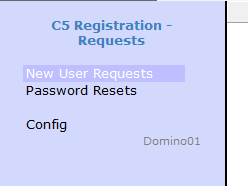
The Notes client menu
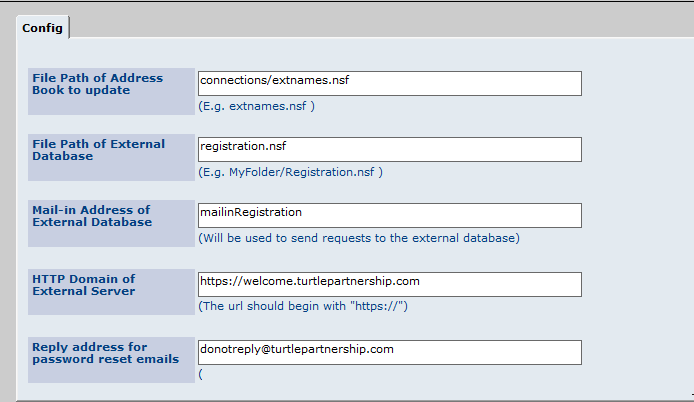
First you need to set up the configuration telling the app where the Directory that will contain external user names is. This the directory that TDI will reference when creating policies but user accounts aren’t copied into it until the registration process is entirely complete.
This setup is for the internal registration app
This is the registration page for the public registration where anyone can sign up for access. Obviously you could modify this to have further checks in place but bear in mind Connections only allows access for external users to Communities they are invited into so if I did register myself and login, I wouldn’t be able to see or do anything without a further invite.
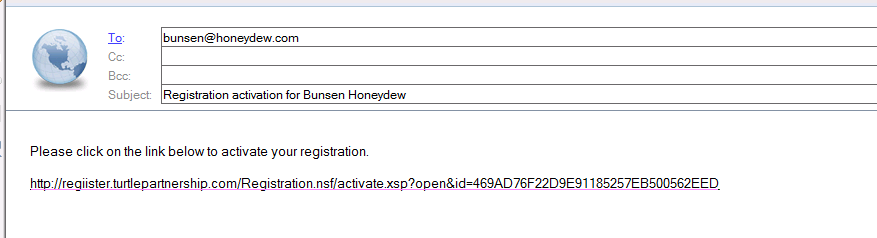
We ask for an email address and confirm the registration back to that address asking the external user to click a link to activate – that way we ensure the email addresses are valid and monitored. The code also checks that no one else has registered with the address already

An external user would then receive an email with an activation link to click on
The registration page used for the internal invite model is slightly different but still checks the email address being registered is not already being used.
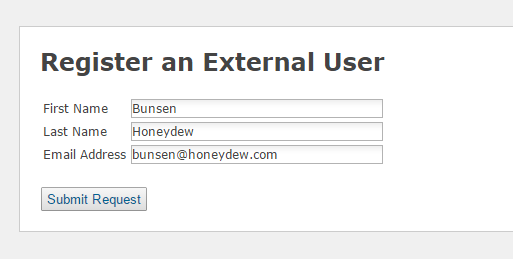
Then generates a unique registration code that can be emailed out to the external user manually (or automated if you want to add that code)
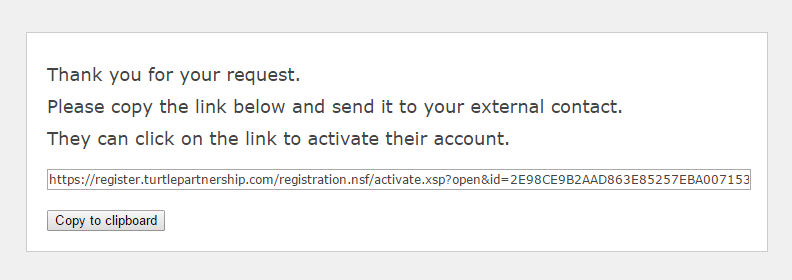
In each case the activation screen resulting from clicking on the link is the same. The password requirements can be modified by changing the code.
 And finally when the external user creates a valid password they get the following screen

So how do you get hold of a version of the app? Obviously this is only part of the external user registration process which also includes LDAP and TDI configuration. I would be very happy to quote on helping you with those pieces too but it’s not a requirement you use my consultancy to get access to the app, we are happy to make it available. I believe the setup can be completed in 2 – 3 hrs at most and again I’m happy to bill you to do that if you need me to or you can ask another Business Partner. You are welcome to take the app and support it yourself but in all cases our copyright remains in place (and is everywhere 🙂
THE SOFTWARE IS PROVIDED “AS IS”, WITHOUT WARRANTY OF ANY KIND, EXPRESS OR IMPLIED, INCLUDING BUT NOT LIMITED TO THE WARRANTIES OF MERCHANTABILITY, FITNESS FOR A PARTICULAR PURPOSE AND NONINFRINGEMENT. IN NO EVENT SHALL THE AUTHORS OR COPYRIGHT HOLDERS BE LIABLE FOR ANY CLAIM, DAMAGES OR OTHER LIABILITY, WHETHER IN AN ACTION OF CONTRACT, TORT OR OTHERWISE, ARISING FROM, OUT OF OR IN CONNECTION WITH THE SOFTWARE OR THE USE OR OTHER DEALINGS IN THE SOFTWARE.
Please email Mike Smith (mikes @ turtlepartnership.com) or myself if you need more information or a copy of either the public registration or internal registration app. Bear with us and we’ll get it out to you as soon as we can.
Ever since Connections 5 gave us the ability to add external users to Communities it has been the number one requested feature from customers. The problem is that external users must exist in a LDAP source and also must have a profile in Connections that is created via TDI.
There are lots of ways to do this but few that are end user friendly and simple. For that reason, some time ago we started to use our own XPages application that we make available to customers that automates the onboarding of external users into Connections. The application is very simple and has two possible modes you can run in
It’s a single Domino database and can be set up in only a couple of hours. Of course you still have to create the TDI sync but that’s a requirement no matter what you do. For some time we’ve been considering how to make this tool available to the community at large since every customer we work with struggles with the same issue and we now have several good iterations of it we could share. We aren’t a product company and don’t want to sell it but we also can’t afford to commit to free support for a free download.
I’m not entirely sure of the answer. So far it’s been a non-issue since I’ve given it to customers we already do consultancy for or who ask us for consultancy. We’ve only charged for custom changes if required. If you’d be interested in a copy of the database, seeing or testing it let me know and we’ll work something out. It’s not open source, the code is our copyright but If you have any suggestions as to how we can make it more available without committing a lot of resource to productise it (which I would have to do for OpenNTF) I’d be very happy to hear them.
This is one of those posts that scare me – I’m fairly sure someone else must have seen and blogged this but since I can’t find anything I am writing this up.
I recently did a Connections 5 install for a customer, it was a clean install on clean hardware. We did migrate the data but not the artifacts (the lc-export function) because we wanted to have clean XML and configuration files. Once installed the mobile application worked perfectly on iOS but on Android there were no applications listed when you logged into the mobile application. Since the configuration for mobile isn’t OS specific (or isn’t documented as being so) I assumed the mobile-config.xml was correct as it worked for iOS. So the customer went ahead an opened a PMR, the response from IBM was
“Your Connections engineer missed a step in migrating the mobile application”
Well that’s strange because this wasn’t a migration and if I look at the migration documentation in the IBM Knowledge Centre there’s no mention of any tasks related to mobile-config.xml. A follow up IBM email said we had a missing “NavigationGroups” section so I check the mobile-config.xml. The section is there but with no real entries in the default version
<NavigationGroups>
<NavigationGroup name=”Favorites”>
<Expanded>false</Expanded>
<HideNavGroup>false</HideNavGroup>
</NavigationGroup>
<NavigationGroup name=”Updates”>
<Expanded>true</Expanded>
</NavigationGroup>
<NavigationGroup name=”Applications”>
<Expanded>true</Expanded>
</NavigationGroup>
</NavigationGroups>
<NavigationGroups>
The only document on the knowledge base that has the words “NavigationGroups” in it is the one that talks about extensibility of the Mobile app – here. So OK, I take the example from there and attempt to modify my mobile-config.xml but on checking it back in using MobileConfigService.checkInConfig it returns an invalid XML error. Looking at the IBM example it seems their XML structure is wrong. If you are going to have an ApplicationList node entry then it MUST come after the Expanded and HideNavGroup entries.
The IBM suggested content is below – this fails
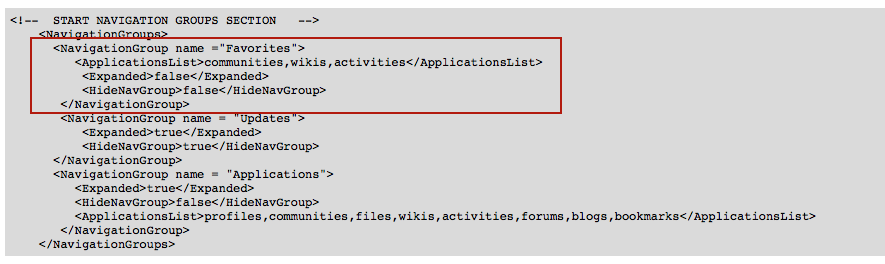
The ApplicationList node entry before the Expanded node entry is invalid XML structure
The final correct format I used is
<NavigationGroups>
<NavigationGroup name =”Favorites”>
<Expanded>false</Expanded>
<HideNavGroup>false</HideNavGroup>
<ApplicationsList>communities,wikis,activities</ApplicationsList>
</NavigationGroup>
<NavigationGroup name = “Updates”>
<Expanded>true</Expanded>
<HideNavGroup>true</HideNavGroup>
</NavigationGroup>
<NavigationGroup name = “Applications”>
<Expanded>true</Expanded>
<HideNavGroup>false</HideNavGroup>
<ApplicationsList>profiles,communities,files,wikis,activities,forums,blogs,bookmarks</ApplicationsList>
</NavigationGroup>
</NavigationGroups>
I am still awaiting more testing but it does seem from IBM’s response that the Android OS requires this section to be completed in a way that the iOS OS doesn’t. It’s not part of the migration documentation though
…a few more notes from my latest IBM Docs install. Previous installs including in test at this customer proceeded with no problems but this one presented several challenges so I’m sharing them here in case anyone else has the same. Firstly since there’s a Windows machine involved let’s rule out the biggest possible issues
1. Make sure Windows is activated. Microsoft does restrict behaviour and performance in non activated Windows. No I don’t have proof I just have solid evidence of that behaviour. Activating Windows often makes the pain go away
2. Make sure you disable the Windows local firewall. Even if you can only do so during the install. The server is going to have to talk to – and be talked to – the deployment manager at least and with Windows firewall enabled your install will fail
3. Make sure every server can ping every other server, even itself. And using an IPV4 not IPV6 routable address
4. Disable UAC. PLEASE. In Windows 2012 that’s a registry hack where you set EnableLUA to 0 under “HKEY_LOCAL_MACHINE\SOFTWARE\Microsoft\Windows\CurrentVersion\policies\system”
So now we’re ready to install. There are two options – Installation Manager and using the manual scripts. Obviously Installation Manager is easier, if you’re installing all components at the same time and if it works. Here are the standard components I’d usually install for full IBM Docs in a Connections environment with no CCM.

My problem was that in this instance the installer failed during the Docs Proxy server install. I could see in the logs (found under the IBM Docs Conversion install directory – in my case D:\IBM\ConnectionsDocs\Conversion\logs) that Conversion, Docs and Viewer all installed and deployed with no problems. However since I chose six components, when it failed on one it rolled back the entire thing.
The error was “Target with name docsserver.domain.com was not found“. Why would it say that when the script is running on doscserver.domain.com and it can certainly find itself? The answer is in how the installer works. It has local python scripts that are actually called by the Job Manager in your Deployment Manager so the error (which exists only on the docs server) is basically saying “the Deployment Manager cannot run the python script on this server”. That’s curious. Then I realise that to run a remote script the Deployment Manager must contain a job target. A configuration setting that tells it how to reach a remote server and gives it credentials to run the code. I checked and although the installer had created a job target , when I tested there were no stored credentials. My guess is this was from an earlier attempt when UAC wasn’t fully disabled and the job target was created incompletely. I re-created it to make sure it worked ok (it tests on save).

So back to square 1 (or snapshot 1). I removed the half created clusters for Docs, Conversion and Viewer, I removed the Docs Proxy cluster, but I left the job target in place and relaunched the install. This time my plan was to install in stages taking snapshots between each one. This was a VERY bad idea. Docs and Conversion installed and tested perfectly. However when I went to Installation Manager and chose “Modify” to add the Viewer component it failed. It took 8hrs to fail, during which time I monitored the logs carefully and this is what it did.
It wasn’t so much the time lost as my fear that during the whole uninstalling / reinstalling of perfectly good servers it would somehow fail and break something that worked. So. New plan.
I now had a working IBM Docs and Conversion server to which I needed to add Viewer and Docs Proxy. I’m staying away from Installation Manager at this point. I want more control and I don’t want to waste another 8hrs before I can troubleshoot. Luckily we do have the option to manually install components instead of using installation manager. To do that I extracted the installers and modified the cfg.properties files as per the documentation. That worked fine after an initial failure. The instructions don’t say to pre-create the Clusters and server members before running the scripts but you must do that and use the Cluster server names as in the documentation. If you don’t, the scripts will fail when they try and connect to the deployment manager to find the servers to install onto. If you’re using Installation Manager you don’t need to do this as the installer does it for you.
Finally there are test URLs as you install each component of <hostname>/componentname/version.txt eg http://connect.turtlepartnership.com/docs/version.txt. To ensure this works you must regenerate and propagate the plug-cfg.xml and restart your IHS server. Also bear in mind the syntax must be lower case /docs/version.txt /viewer/version.txt and /conversion/viewer.txt.
So there you go. This was probably the 5th 1.0.7 install I’ve done and the first one to hit a problem. Try it first with Installation Manager. Make sure you backup (or better yet snapshot) both Deployment Manager and your IBM Docs server before starting and if it starts failing switch to running the manual scripts.
Have fun!
In just over two weeks’ time I’m heading to Atlanta for the MWLUG conference. It’s my first MWLUG visit and this year’s conference is ridiculously packed with technical experts, champions, sponsors and more great content than you’re going to see in person anywhere else in the US this year. Take a look at this schedule (you’ll see me on it).
4.45 on Thursday I have a Domino session called “What is your server trying to tell you“. I’ve done similar sessions with this title before but I always update it to talk about the best tools and new tricks I use to manage or healthcheck Domino environments. It’s great having a pure Domino Admin session so I hope you’ll stick around to catch mine.
11.30 on Friday morning I have a session on “Planning and Completing A Connections Upgrade” whether it’s a version upgrade in place, a side by side upgrade, a fixpack or a cumulative release I’ll talk about how to plan, what to look out for, how not to finish until you’re completely done and deciding when to upgrade and when not. If you’re thinking of upgrading to CR3 which shipped last week this should be a valuable session.
If you haven’t registered go do that now and i’ll see you there (the weather should be balmy in August yes?) REGISTER
IBM Docs is a really nice add on to IBM Connections, what’s more it’s not particularly hard to install. It does have one requirement, a big one, a show stopping one, a requirement that prevented my customer build from working for about four weeks until IBM and I came up with an agreement for how it could work. Hopefully this will help you fast forward through that four weeks yourself ..
IBM Docs Infrastructure – The Simple Version
IBM Docs has four component WebSphere servers with applications stored on each

The servers also need access to three data shares; the standard Connections share, a new share for IBM Docs data and a new share for IBM Docs Viewer. I created the two new shared on the Linux server that currently hosted the CIFS Connections share and installed Samba to enable a Windows server to access them.
I had one problem where it consistently failed during install if I didn’t use capital letters for the mapped drives. It didn’t refuse to accept lower case letters, it just failed the install. If your install fails make sure you aren’t using lower case letters.
Challenges
The key requirement for IBM Docs to actually work is that
1. The shares must use mapped drive letters and those drives letters must exist prior to the IBM Docs elements being started
2. The IBM recommendation for achieving this is to create a batch file on the IBM Docs OS (which must be partially if not wholly Windows) to do the drive mapping and have that load in Windows task scheduler on startup.
3. The WAS servers must then be run as services not using a system account but using a named Windows account that matches the one assigned to run the batch file in task scheduler
This solution had two problems, I hated it, and it didn’t work.
I hated this idea because my customer doesn’t run AD at all and their share was a samba share on a Linux box using CIFS. That means there is no account that can be used to start the services that can also be used to map the drives. There is no easy way to have Windows pass credentials to mount the shares without storing both the name and password that samba recognises in the batch file – like this
net use m: \\hubshared\ibmdocsdata sambapassword /user:sambaaccount
net use n: \\hubshared\ibmdocsview sambapassword /user:sambaaccount
net use l: \\hubshared\conntestshare sambapassword /user:sambaaccount
Unfortunately after several weeks of different ideas from L3 support we admitted defeat to allow me to move on with the install. I have minimised risk by ensuring the account isn’t a linux account and only has access to the samba shares.
The second part of the solution is the assumption that if you map the drives through task scheduler owned by a Windows user and that same Windows user starts the WAS services – the WAS services will be able to see the mapped drives. To everyone’s disappointment that absolutely didn’t work because Microsoft kindly mapped the drives from the batch file in a different session to the one where it started the WAS services. The servers couldn’t see the mapped drives.
So the install was simple but getting everything running securely and without the customer having to manually do anything held us up for weeks. In the end I opted for a solution where I created a batch file to both map the drives and then start the WAS servers in a scheduled startup script. That worked beautifully and this is what it looks like
net use m: \\hubshared\ibmdocsdata sambapassword /user:sambaaccount
net use n: \\hubshared\ibmdocsview sambapassword /user:sambaaccount
net use l: \\hubshared\conntestshare sambapassword /user:sambaaccount
Call “c:\IBM\WebSphere\AppServer\profiles\IBMDocs\bin\startnode”
Call “c:\IBM\WebSphere\AppServer\profiles\IBMConversion\bin\startnode”
Call “c:\IBM\WebSphere\AppServer\profiles\IBMViewer\bin\startnode”
Call “c:\IBM\WebSphere\AppServer\profiles\IBMDocsProxy\bin\startnode”
As you can see I only start the nodeagents. The servers themselves and the applications on them are bootstrapped to the start of those. To do that modify the server’s monitoring policy which is found under Java and Process Management for each server
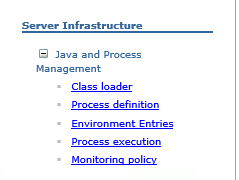
Then set the “Node Restart State” to “RUNNING”

I wanted to share a recurring WebSphere bug that I noticed over a year ago because although it was irritating then, if it occurs now it can actually prevent you from deploying Connections external users the way you want.
Here’s the scenario (and it’s fairly common for me).
IBM Connections 5 CR2 on WebSphere 8.5.5 FP3
Primary LDAP is a Domino server
Secondary LDAP for external users is a separate Domino server in an isolated domain
When we want external users to access our Connections environment, the most secure approach is to have a dedicated LDAP server or branch for external users to appear in. Especially if (as we do) you have a self registration / password reset process for those users. The problem occurs because we want to use Domino as our LDAP. LDAP servers other than Domino are built with hierarchical entries so on the WebSphere configuration screen where we are asked for the “unique distinguished name of base entries” that’s very easy, we just select the top level of the hierarchy. Unfortunately in Domino LDAP we don’t always have a hierarchy – we have flat names and we have flat groups so if we try and use a O= xx value – those names and groups aren’t picked up.
We used to use C=US which would trick WebSphere into querying a level above O= and that would work but since WebSphere 7.0.0.23 we have been using the word “root” which validates both flat names and all hierarchies on the server.
So far so great.
Now we want to add another LDAP server which will be a Domino server where people will register. We’ll have two TDI processes one connecting to the internal Domino server for internal users and another to the external Domino server for external user access. It’s Domino so we want to use “root” as our base entry but since WebSphere requires all federated repositories to have unique base entries and since we already use “root” for our internal server, I have to fake a hierarchy for external users just so I can add the 2nd LDAP. It’s ugly but not unworkable. It’s also not our problem.

The problem is that once I add the second Domino server or even a third. My federated repositories in WebSphere look like this
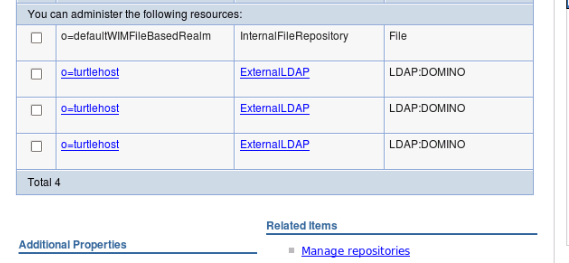
Can you see what’s wrong? That table reads from the underlying wimconfig.xml file found under the Deployment Manager profile /config/cells/<cellname>/wim/config. That wimconfig.xml is fine which is why if I click on Manage Repositories they are all there. I just can’t edit them from this screen, I can only edit from the previous screen and that one links to the last LDAP entry I added.
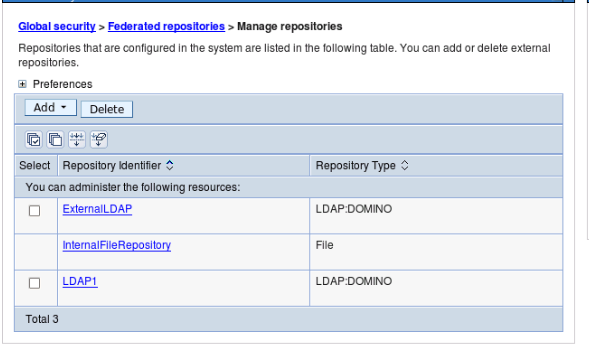
So that’s part of our problem. It’s been there for a few years but since we could manually edit the wimconfig.xml to overwrite settings it was workable. This is caused by the “root” base entry on the first LDAP. That word “root” translates to an empty baseentries name= value in wimconfig.
Here’s the internal LDAP with baseEntries name=””

Here’s the external LDAP where I have defined a base entry of o=turtlehost

The additional side effect of this bug (and I’m not sure we can call it a WebSphere bug since expecting hierarchical LDAP is a fairly standard thing) is that in the latest version of WebSphere, it refused to search the second external directory. No error. Nothing. Just refused to search it which meant those users couldn’t login.
I edited wimconfig.xml and added a O=Turtle to replace the baseentries name=”” etc and that fixed both the WebSphere view and the ability of users to login.
So where does that leave us. Well it’s a problem because I want to use Domino. I don’t want to have to force a single hierarchy. C=xx doesn’t work anymore to trick WebSphere. “root” breaks both WebSphere and authentication. That means I can’t have a secondary Domino server for external users and still use a “root” base entry for the internal server. Without that “root” value, the flat Domino groups will be ignored.
That leaves me with a few options
1. Force a fake hierarchy on groups so I can have a base entry value that works and not use root
2. Use Directory Assistance and “root” but that allows external users to authenticate against my internal directory. I don’t like that
3. Use an LDAP attribute to separate external from internal users instead of a dedicated LDAP server. For security reasons i’m no fan of that either
4. Don’t use Domino for both LDAPs, only for one of them. One “root” defined Domino server will work fine
 The Turtle Partnership Blog