Announcing A New Kind Of Event For The UK

I’m very happy to announce that, together with our friends at LDC we are putting together a technical networking event in London this March. This is something new and different and we hope people will come to exchange ideas across a broad range of topics, share what they are working on and learn from others.

Collaboration Stack Community Event
Do you work with collaboration platforms? Meet your peers at an informal, technical get-together. Whilst making valuable new contacts, you can share ideas, debate best practice and explore emerging technologies.

We hope to have interactive talks on broad topics such as security, development languages, and single identity including round table discussions where we can brainstorm ideas.

The date of March 21st is set and it will be in central London. It will also be free.

This is a community event, we will not be having a sponsor area , but if you or your company want to get involved please contact anyone from Turtle or LDC. We will be looking for topic ideas and round table moderators as well as session leaders.

Watch our site http://cscevent.com for more news and registration details.

One Of Our Sparks Is Missing…

Stupidly amongst all my cutting / pasting last week to get the Sparks in place on the Nerd Girls blog I completely lost one of them.  Apologies to Stuart McIntyre who spotted he’d been lost in the shuffle, I think you’ll agree his is one not to be missed.  I’ve updated the Nerd Girl Blog as well

Is love enough? The passion to help children find a home for good (Stuart McIntyre)
Parents to two boys and two girls (currently 9-16 years old), home educators and business owners, surely life is chaotic enough already? Why would we want to throw open our doors to other children (and their birth parents), let alone those with possible addiction, behaviour or other issues? Hear why Stuart and his family entered the exhausting approval process, why way more than just love is required, how fostering is working so far and why it might just be something for your family to consider!

My Search For The Perfect Doorbell Is Over (Yes Seriously)

Last March the build of our home office was completed.  It sits at the end of our , not very long garden and is s our primary place to work now.  We love it.

About 20m from the back of the house

About 20m from the back of the house

The only downside to the office is that it’s the full length of the house and the length of the garden away from the doorbell.  We order plenty of things for home delivery and our poor neighbours were having to take things in because we never heard the bell ring.  So we tried a few things

1. Buying the most expensive doorbell in Homebase that claimed the furthest range (25m).  Didn’t work at all

2. Importing a doorbell from the US that cost 140 USD plus import charges that claimed a 100m range.  Worked intermittently but not well enough

Finally Carl sent me a link for a new product that hadn’t yet launched called the Doorbot. The Doorbot connects to your wireless internet and has a mobile app that works on iOS and Android , when someone rings the bell the app launches.  You register the app with the serial number of your doorbot(s)) and you can “answer” the bell which triggers the video camera and a microphone. For me it means I’m able to trigger the mic and talk  to the person at the door as well as   see who’s there and if I even want to answer it (hello 6pm Jehovah’s Witnesses)

Since it uses push notifications there’s a small delay but at home it’s not even  a couple of seconds. Maybe when I’m away from home and on 3G it might be longer but my use case for talking to someone at my door when i’m away from home is small.  We received it Monday (14 quid import duty) and set it up and had 3 deliveries Tuesday and 3 visitors Wednesday all worked beautifully.  For some reason other people aren’t as excited as I am when I open the door and explain how thrilling our new doorbell is, I guess if you don’t know about it, it’s just a doorbell.

I had no solution for what we’d do if the Doorbot didn’t work so very glad it does and highly recommended for anyone who has trouble getting to the door on time or wants to keep an eye on people who ring their doorbell.

Doorboat

Connect 2014 Sessions, Plans For The Month & Thank Yous

Let’s start with the thank you’s – I was delighted to be named an IBM Champion again for 2014 and for that I have to thank the (anonymous) people who nominated me.  I find the whole nomination / tell us why you’re good process very difficult to work with as I think I lot of English people do.  Being self effacing is more our style but this year I made a promise to myself that if I were nominated I would take a deep breath and fill in as much information as I could on why I thought I should be a champion. I think that exercise was good for me and appreciate both the reward and the journey 🙂

Moving On !  It’s January so this month is jam packed.  I actually leave for Florida on the 19th  so only 10 days to go for me and much to organise.  The presentations are written but there’s the Great Geek Challenge to organise, gifts to ship, banners to print, Spark Ideas to blog  and a surprise put together by Chris, Julian, Kathy and myself which may be as fun as we think or fall flat as a stone.  We’ll see.  Meanwhile the week is filling up and I’m very excited about my presentations now they’re complete..

Monday BP304 What We Wish We Had Known: Becoming an IBM Connections Administrator with Paul Mooney

Dolphin S.Hem 1 at 3.45pm

This is where Paul and I attempt to share all the stupid mistakes, bad decisions and dumb moves we made when first starting out with  IBM Connections and how much easier it is if you just know.. stuff.  We’re trying something very new in the format of  this presentation and I’m nervous about that but pleased with the work and what we have to tell you.

Tuesday NERD101 Spark Ideas ! (brought to you by Nerd Girls)

Swan Mockingbird 1 & 2 at 11.15am

This is our 4th year for Spark Ideas and we have a packed lineup that doesn’t include me.  I’m just logistics girl and I’ll be acting as MC with my friend Susan Bulloch acting as roper to drag people off stage if they run over their 6 minutes. If you’ve never seen a Sparks session check out our Vimeo channel.  6 minutes to share an inspirational idea. More details on that soon but thanks in advance to  Bill Buchan, Colleen Burns, Deborah Cole, Julian Robichaux, Norman Cox, Stuart McIntyre, Tim Davis, Gaby Spaszewski and Jamie Magee.  Watch out on this blog and the Nerd Girls blog for details of their talks.

Tuesday BP101 Adminblast 2014! with Paul Mooney

Dolphin N.Hem E 3pm

Another year another new Adminblast – Paul asked me to join him putting this together last year and we’re joining forces again this year.. some new tips, a few favourites and more slides than are sensible.  This year I hope not to be ill , nearly pass out on stage and remember almost nothing.  Last year I was saved by an ice cold bottle of beer handed to me by Mat Newman as we were about to start (just to keep from overheating)….

Wednesday BP104 : Simplifying The S’s: Single Sign-On, SPNEGO and SAML with Chris Miller

Dolphin S.Hem III 10am

This session will be an overview of all your options with regards to single sign on and single password and will be performed entirely as a series of mimes.

Wednesday SHOW401 : Taking IBM Sametime Mobile with Paul Mooney

Swan Osprey 1&2 4.30pm

This is a Show and Tell , 270+ pages on how to take a standard Domino server and turn that into Sametime on a mobile device , every step explained and detailed including our tips along the way about firewall rules, SSL certificates and performance.

Wednesday Great Geek Challenge

Fountain Restaurant 8pm – 10.30pm

Thanks to  generous sponsors the best night out at Connect is back for our 4th year.  Come and queue early, when we hit capacity we have to close the doors (well there are no doors but we’ll stand a bouncer at the gate to stop you coming in!)

So that’s my week.. in between I hope to find time to do everything else include visit the labs, meet with customers and hang out with friends.  Oh and attend a few sessions!  Mostly right now I’m looking forward to some sunshine.

See you there

Gab

The Worst Product Apple Have Ever Released

It hurts me to say this and goodness knows I’m not a fan of the “if Steve Jobs” were alive mantra but Apple have finally managed to release a product so bad, so beta, so limited and so shonky that I had to spend time working out how to remove it and that takes me back to my windows days.

So what is it? Well most of you won’t even notice but in Mavericks Apple kindly introduced iBooks for OSX.  I read a lot on my iPad on my iPhone and  – you know – actual books.  I have over 2000 books in iTunes syncing across devices.  I never had any real urge to read books on my computer but Apple obviously thought I did (or they were up to something nefarious) so they brought out iBooks.  Why is iBooks so terrible?   Well let’s start with the fact that it removes your books from iTunes completely and imports them into “iBooks” where they can no longer be found via spotlight.  If you’re looking , and looking , and looking you’ll find them hidden away in

~/Library>Containers>com.apple.BKAgentService>Data>Documents>iBooks>Books  – intuitive eh?

Of course not ALL books are there, no, no, .  I went from 2058 books in iTunes to just over 1600 books in iBooks with 400 odd left behind in my old iTunes folder (I spotted that, iBooks certainly didn’t tell me).  I believe those are ones I dropped in from other sources and not from the iBookstore.  So that’s annoying but I’ll just carry on using iTunes and ignore iBooks…..

Unfortunately no.  As soon as you launch iBooks it starts the ibookstoreagent and that takes over from iTunes, you no longer have a books folder in iTunes and none of your books are visible there.  Your iPad or phone syncs with the new iBooks app (the one with 400 books missing).  The iBooks app itself is horrific, you can’t edit any metadata on books (like correcting author names or titles or book covers) or sort the books the way you want – basic stuff that we could do in iTunes.  So now I have 400 books missing, a useless app oh and all my books moved to that container folder have been given a numeric code instead of the useful filename so I can’t search for them by title or author in spotlight.

I check my iPad and iPhone and neither have all books on them, even all books bought from Apple.  If I look at “purchased” I have tons to download manually because they won’t sync.  At this point I’m ready to roll back to Mountain Lion .. but some kind person on the Apple support community (well several kind people) offered a way to remove iBooks and go back to my happy place with iTunes and books management in there.  Here’s what I did

1. Used Activity Monitor to stop the iBookstoreagent

2. Found the ibookstoreagent and moved it to trash (otherwise it will keep restarting

3. Used AppCleaner (free to install but not from AppStore) to remove iBooks and all its related files completely

4. Launched iTunes and my books folder was back with the 400 missing books in it

5. Dragged / dropped all the books in that container folder into iTunes

6. Choose File – Library  – Organize Library to get all those books back into the iTunes folder structure

7. Deleted the container and everything in it including the copies of books I now had back in iTunes

That’s it.  It took about 5 mins (10 if you need to download AppCleaner)  and now I am back to the way I worked before, all collections etc intact and 2058 books in place.

I’m now very nervous about any iTunes or OSX updates going forwards, for the first time since I moved to Mac 6 years ago, i’ll be holding off to let others go through that pain barrier first.  If you haven’t launched iBooks yet, I’d recommend you don’t.

Bad Apple.  Bad.

Rethinking the iPad Air

Yesterday I switched my iPad for an iPad Air. I had an iPad and I have an iPad mini which I thought would replace my regular iPad but it’s now barely used. The iPad has two SIM cards, one for O2 in the UK (which also works in Europe at no charge which I suspect O2 don’t know) and one for AT&T in the US. Despite its size and weight (and how difficult it is to fit in a handbag) I find it more enjoyable to read books on and it’s really reliable for data connections. The iPad mini is now used only on planes really where it’s small enough to fit on the seat tray so I can watch videos

So why bother upgrading at all ? Well I had skipped 2 versions already (I also don’t update my iPhone) and my books were taking a noticeable time to load (10 seconds or so which is FAR too long) plus “lighter” sounded good and I could pass down my old one to my mother replacing her even older one. I can’t say I was excited about it though….

Well a day later and using it today I love it. It’s smaller, thinner and lighter to fit in my bag, I can hold it easily with one hand and the reduction in bezel size means my thumbs reach the middle when typing which makes it more accurate to use. On and the books load much faster. I debated upgrading to the Air but knowing what I do now I’d definitely recommend it. The mini may find a new home though.

A word of warning about Sametime 9 Community Server

Someone on our Sametime exam team questioned this this morning and I realised it definitely needs to be publicly called out. The Sametime 9 Community Server no longer has any stpolicy.nsf database or a policies view under the old school web based admin. If you upgrade to Sametime 9 you must install the system console (and db2) to be able to manage and maintain policies going forward.

Something for your planning…

Sametime Pt 3: Installing Communicate

As I said when Sametime 9 shipped, I wanted to spend a few weeks working with it and trying to install it and migrate my existing sites before I blogged.  I’m coming near the end of that now and so wanted to share a few things.  This first blog is about Sametime Communicate which includes Domino , Sametime Community Server, DB2, LDAP, Sametime System Console and Sametime Proxy.  It also includes installing the Sametime Advanced server for Persistent Chat and Broadcast Tools but I want to talk about that separately.

Whether you have installed Sametime 8.5x with WebSphere components or not, Sametime 9 and its install is a very different proposition.  I’m going to start by saying that I would never attempt to upgrade an existing install of WebSphere elements.  IBM in fact say that you should do a side by side upgrade and then move the existing databases for the System Console, Meetings, Advanced and ST Proxy (possibly) over.  That basically involves building an entirely new environment and then switching DNS when you’re ready so your users point there.

It’s my nature to be risk averse and in my testing migrating the existing System Console database is a nightmare. The version of DB2 you should use for Sametime 9 is 10.1, so that means that you’d have to upgrade the database as you migrate. In addition, the schema for the Sametime 9 system console database is not the same as for Sametime 8.5x and, though you can theoretically fix that using the scripts IBM supply, I would rather start completely clean.  The only databases I would make an effort to migrate over are the Meetings and Sametime Advanced because they contain data you can’t lose.  Even so there are no good instructions in the documentation for migrating a Sametime 8.5x Meetings database on DB2 9.7  to a Sametime 9 Meetings database on DB2 10.1 – I would contact IBM support in advance and ask for a tech note with instructions because the documentation has some large gaps there.

Of course, if you don’t have Meetings or ST Advanced right now then you can go ahead and create shiny new databases for your new install.

Download: The first step is to download all the software and get it in place.  Sametime 9 uses WebSphere 8.5 which installs differently than with previous versions of Sametime.  It’s actually a much nicer and easier to manage install, but you will need to install WebSphere by itself before you can install any of the Sametime components.  Make sure you download the version of WebSphere and Installation Manager that is part of the Sametime eAssembly or verify very carefully with the system requirements that you are installing the right version.  Sametime 9 uses WebSphere 8.5 (no fix packs) with additional Sametime specific iFixes, all of which can be downloaded together.

DB2: The version of DB2 supported for Sametime 9 is now 10.1 which is very different in UI from DB2 9.7. For starters, there is no longer a Command Center with a graphical interface allowing you to see and manage databases.  You have to install a separate DB2 client if you want to access the DB2 server and look at the databases. You can install that client on any machine that can access the DB2 server.

WebSphere:  One of the main reasons an in-place upgrade can’t be done is that the underlying version of WebSphere has changed and can’t be upgraded for Sametime.   We have to install WebSphere cleanly.  When installing WebSphere 8.5 you’ll notice the download comes in three parts.  You’ll need to extract all three parts to the same directory which will then contain folders disk 1, disk2 and disk 3 and a file called repository.config in the root folder.  When you install Installation Manager you can then use it to install WebSphere and every other product (other than Domino and the Community Server). You launch Installation Manager and point to the folder where you put your extracted files, it will do the rest.  It sounds complicated but it’s actually very simple and has a huge advantage in that it’s able to search the IBM site for fixes and updates rather than download them each time.

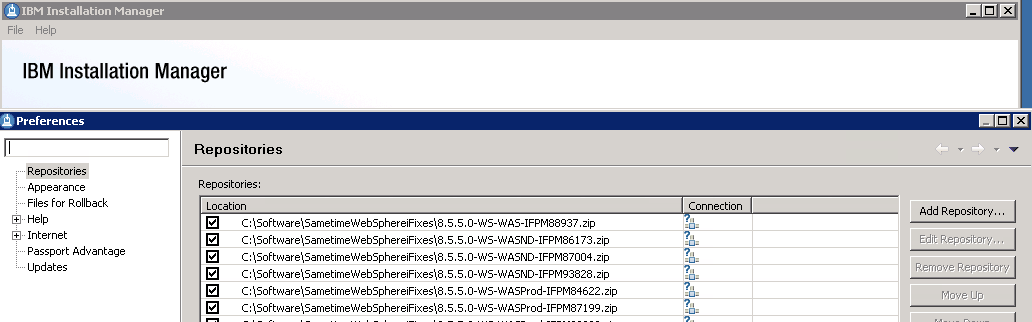
Launch Installation Manager – Choose File – Preferences from the menu and set up your repositories as I have done below (these point to the fixes which were zip files, these didn’t need to be extracted but I wanted them listed separately so I could check them)

Installation Manager - Adding Repositories

Community Server: When installing the Community Server, IBM have added some much needed additional steps to the documentation providing details on performance tuning Windows 2008 and 2012 networking and securing the server to protect against vulnerabilities discovered in the past few years.  None of this is new, it was all public information in technotes but it’s good to see it brought together in the documentation as part of the deployment instructions.  Don’t be tempted to skip over these steps and come back later, they will double the amount of time it takes to install a Community server (from about a day to about a day and a half) but they are important.

If you are moving from an earlier version of Sametime you will need to be using LDAP if you aren’t already and you can’t use your Sametime Community Server as its own LDAP server, that’s not supported and will  present problems.  In fact you should disable LDAP on the Domino server running Sametime completely.

Sametime Proxy Server: The Sametime Proxy server is used for mobile clients, for awareness in web based meetings, for a browser based IM client and more.  You need to install this as a WebSphere component.  It is IBM’s recommendation that each component have its own VM but I have had success in the past co-locating multiple server elements depending on number of users.  There are a few more  settings some of which were available in Sametime 8.5x but again in technotes, etc and so weren’t well known.  Once a Sametime Proxy Server is installed there are several steps to finish the install, as with the Community server, that will improve performance and security. One interesting item that everyone now will probably come across is that the Sametime Advanced server must use the same SSL certificate as the Sametime Proxy server for awareness to work, making wildcard certificates more suitable to our installs.  Previously I had avoided wildcard certs since WebSphere had issues with them in earlier releases but that appears to be resolved now.

Additional steps on completing the install of Sametime Proxy include making sure you connect to the notification servers for both Apple and Google to ensure mobile devices running iOS and Android can receive updates.  There are also settings to tell the Sametime Proxy server to not connect to the user’s home Community server allowing you to explicitly direct traffic to a dedicated Community member instead.  Instructions for that here.

Finally we usually have a WebSphere Proxy server in front of our Sametime Proxy to handle traffic over port 443.  In the Sametime 9 documentation IBM now seem happy to recommend a reverse proxy for accessing  the Sametime Proxy (I have customer doing that and using products like Netscaler) and only using a WebSphere Proxy in front of a cluster of servers.  The WebSphere Proxy is an intelligent authenticating server that will validate the user prior to directing traffic to a Sametime Proxy server.  If you have multiple Sametime Proxy servers in a cluster, the WebSphere Proxy may redirect the traffic to any of them.  Performance tuning for the WebSphere proxy has been nicely consolidated here.

This was meant to be a short blog entry, obviously I haven’t covered everything but hopefully I have given you some pointers.  More to follow…

Keeping It Clean

Two recommendations for accessories for my Macbook Air extremely useful for both what they are meant to do and also as something completely different.  The first was a simple privacy screen to keep things private when I’m sat in meetings making notes I don’t want seen travelling.  The second is a keyboard cover to protect the keys from my aggressive typing (I wore the M and N keys away in 6 months on my last laptop).

The unexpected bonus of the privacy screen is that  I bought one that had guide rails stuck to the side bezels so it can be slotted in and out as needed. This also stops me getting fingerprints all over my monitor.  I just take it out and clean it with soapy water, plus it only cost about 15 dollars so i’m happy to replace it if I need to.

My keyboard cover (as recommended by Kathy) actually does an second  job of catching crumbs and long bits of hair (the classy fallout of not stopping work to eat and being on the keyboard 18+hrs a day).  I love the Moshi keyboard protector which is so light and thin I don’t notice it’s there and doesn’t effect my typing – in fact i’d buy it purely to protect the keyboard from debris.  I was surprised by how nice the Moshi was compared to other covers I have seen which created too much of a buffer between my typing and the keys to make them workable.

If you want to try it out, here’s the keyboard cover. Again it “sits” on the keys , it’s not glued on so can be removed and cleaned (spot a pattern here ?}

Moshi Keyboard Cover