Adding External Users To Connections 5

Last week I did a presentation at Icon UK on the new Connections 5 feature that allows you to add external users into your Connections environment.  To write the presentation I built my own environment multiple times using different techniques for adding external users and discovered some interesting stuff along the way.  Since the presentation doesn’t have my commentary on it i’ll try and summarise that here

1. On page 6 are a list of things an external user can do according to IBM documentation.  Some of the items on that page (in italics) actually didn’t, in any of my testing, work.  This is because there are conflicting security limitations on what a user can’t do (see items in bold on page 7)

So for example although the documentation states that an external user can share files with people or communities, it also states that they can’t use type ahead or directory lookups.  Preventing type ahead and directory lookups actually disables the ability to share files with a user since there’s no way to lookup a user.  Sharing files with a Community works fine.

2. The external users can be added via an LDAP attribute from your LDAP server or by a separate LDAP server or branch.  Although an entirely separate LDAP server is more secure and in my opinion preferable, it must use a search base which means flat names in Domino can’t be part of the external LDAP source.

To counteract this in one instance I faked a hierarchy as the users were created (using a simple Xpages app to allow people to self register and manage their own passwords and setting a fake hierarchical name for them in the background).  In the other instance I used the same LDAP source as for internal users but with a specific attribute set to the word “external”

In general the external users feature has been locked down securely enough that i’d highly recommend it for inviting people to work with your Connections communities .

Icon UK Presentation – External Users in Connections 5

Today I am finishing my presentation for ICON UK on external users in Connections 5.  There’s a lot to cover and I’m trying to run neither over or under time and pull off the goldilocks of presentations covering…

  • How external access works
  • What can external users do (and not do)
  • How your internal users interact with external users
  • Configuring external user access
  • Securing the perimeter
  • Implications and things to think about…

I’ll post the presentation here once I’m done but of course it won’t come with me talking over each page (is that good or bad?)  – so if you can make it to Icon tomorrow at IBM South Bank in London, I hope to see you there.  My session is at 11am.


WebSphere Things That Drive Me Insane – Pt..um.. 3

I actually like WebSphere. Honestly I do.  But it really really does not like Domino and Domino is my first love (well 2nd love.. ccMail you’ll always be first in my heart).  I have always run into problems configuring Domino within WebSphere mostly due to the fact that Domino LDAP isn’t always hierarchical the way every other LDAP is.  Back in the original Sametime 8.5 days we couldn’t have users of ST who didn’t have hierarchical names and we used to have to fake a hierarchy (C=US) to trick WebSphere.

My latest hair tearing out insanity is shown below.  To configure external users for Connections you can choose to set up an alternate LDAP source – in this case I’m using a dedicated Domino server I can make publicly available for people to register themselves.  Here are my repositories set up in WebSphere showing the two Domino LDAP sources..

LDAP1 is our internal directory LDAP SSO the external / public facing

LDAP1 is our internal directory
LDAP SSO the external / public facing

Here’s the fun bit.. this is what the federated repositories actually look like in WebSphere

Federated Repositories

As soon as I added the external Domino LDAP repository it changed the original internal one to the external one so that’s listed twice.  Try and add it again and it adds the same one a third time.  Even more hilarious, only the original (unlisted) one actually works and lists / authenticates users.

And yes, if I try and delete one it actually deletes all three.  Off I go to edit some XML files….I’ll post a fix when I get there

IHS Errors or WHY Won’t Connections SSL Work

It happens.  Usually when I’m building a test server on a single box and i’m building in a hurry.  I get everything configured and installed and take a brief stopover at IHS configuration on my way to completing security setup.   I create my keyfile using ikeyman, I import my trusted root certificates from whichever CA I plan to use and I generate a personal certificate.  I think it’s all working fine then I restart IHS and one of two things happen

1. IHS starts but only for 80 not 443

2. IHS starts on both 80 and 443 but I get an error 500 trying to access any Connections page over SSL

The logging on the 2nd error isn’t terribly useful and it’s tempting to run around checking the module mappings and LotusConnections-Config.xml for the source of the problem.  For some reason, even though I’ve seen each of these lots of times, my brain insists on starting at the beginning with debugging and looking at the logs.  So this blog is for you brain – next time just come here and check this first

1. The solution is often that the keyfile either isn’t where I told httpd.conf it was OR where the plugin-cfg.xml is looking for it.  Take time to go check the plugin configuration under your webserver in the ISC and make sure the name and location are what you think they are.  Then go and actually make sure they are there

2. A handshaking error caused by either the signer certificates used by the application servers not being imported into the keyfile OR (and this one drives me batty) installing everything on one box with the same hostname for the WebSphere servers as the IHS server.  In the 2nd instance you can’t have two totally different certificates both claiming to be the same hostname trying to talk to each other.  I export the certificate from WAS trusted key store and import it into ikeyman (or import into WAS and map each of the servers).

In general when I’m configuring IHS it’s always down to a file not being where I told httpd.conf it was.

Here are my rewrite and plugin lines for 64bit IHS on this particular Linux box

LoadModule was_ap22_module “/opt/IBM/WebSphere/Plugins/bin/64bits/mod_was_ap22_http.so”

WebSpherePluginConfig “/opt/IBM/HTTPServer/Plugins/config/webserver1/plugin-cfg.xml”

RewriteEngine On RewriteRule ^/$ https://<hostname>/homepage [R,L]

Update: I should have linked to this document which I found in the past and is always useful. Troubleshooting IHS

The IBM Champion – Dilemma

It’s IBM Champion nomination time once more.  I’ve been extremely appreciative of being made a Champion in both 2013 and 2014 (since the program for Collaboration Services started) but each year it becomes a very stressful experience (not quite on a par with wondering if I’ll get to present in January but close).

The process works by someone nominating you using this URL  on Greenhouse.  Existing Champions reset each year so having been one before is no guarantee you will be one again.  Why the dilemma? Well each year you can nominate yourself because – hey – who knows better what stuff you do than you ? The problem is where that process meets my own feelings about being a Champion, basically that if I did anything worth being a Champion people will nominate me and if I didn’t they won’t.

Nominating myself isn’t something I would feel comfortable doing so I wait and see if anyone out there considers me worth nominating.

So what’s the point of this post?

Last year a few friends who I thought would certainly be “Championed” were not nominated by anyone – not themselves and shamefully not me.  I had assumed that other’s would do it and they, like me, assumed if they added any significant community value then someone would nominate them.  But that’s not how this works and many many people (rightfully) nominate themselves.   So this post isn’t to ask you to nominate me, it’s not to give you a list of things I’m proud of doing or that I hope have added to the community in some way.  It’s to ask you to consider nominating anyone you think should be a champion, even if you don’t know much more about them than you’ve seen them present or read their blog or they’ve helped you out personally when they didn’t have to.  If they made a difference to you, go ahead and nominate them. The form itself is a bit overwhelming although you need only fill in a small amount and the nominee then gets asked to complete any “additional information” they think the committee should know.

And.. (my fingernails are curling back with embarrassment whilst typing this) but if you genuinely feel I added value to the you or the community this year then I would of course appreciate a nomination.  

Access Denied – Me vs OS and WebSphere Security

Today I went to apply a patch to a customer’s Sametime Proxy server.  This is a server that’s been around for a few weeks.  I’ve logged into the SSC countless times in that time.  I launch Installation Manager (using “run as administrator”) and when it gets to the “sign on to SSC” part it fails saying it can’t connect.  I check the logs in /users/myname/appdata/local/temp/SSCLogs and find the error saying it can’t resolve <sschostname>:9443/console/deployment/login.  So I try that URL in a browser myself  and sure enough it does fail.

Well I can guess what that is and it’s an easy fix.  In Sametime we map virtual hosts for each application including the SSC containing the hostnames and ports used by that application.  So I went to check that the default_host virtual host used by the SSC had 9443 in it.

Go to SSC on the Deployment Manager server through a browser, try and login using my file repository account.  Login failed.  Try again. and again.  and again. and again. Type into notepad to make sure there’s no caps lock or language issues.  Failed again. This is worrying, no-one else has access right now so no-one has changed any password. I check the SystemOut.log for dmgr and there are errors in there and in the FFDC files saying Password is wrong.  OK.  No need to panic.  I’ve seen this before when Dmgr gets low on memory so first things first, let’s restart the box.  If in doubt, reboot WebSphere.  Server comes back up and still I can’t login.

OK so now I start to worry.  I go find the security.xml file in the config for the cell and decode the password stored in there (don’t ask how because I shouldn’t be able to but it’s possible).  The password says it’s what I think it is.  I really really don’t want to go down the path of changing that password even though I can disable security and do that because that’s going to have knock on effects all over the place….So – deep breath – let’s try this again from another machine.  I go to the SSC from my desktop this time instead of a browser on the DMGR server and it logs in perfectly first time using the name and password that was failing when I tried from the DMGR server.  Back to the browser on the server, login still fails.   This makes no sense.

So the issue isn’t the “wrong password” at all.  The issue is that the security on the SSC OS is preventing me logging in via a browser – I assume preventing the browser accessing the files on the file system in some way.  In addition the SSC was unable to sync any nodes or restart any servers (this was new) although it could tell status – until I restarted everything manually under my account.  This appears to be a problem with the services on the SSC accessing the file system on any of the OS even its own.  The customer is looking into all of that since the environment is tightly locked down and I can’t see anything.

When I finally got in (and yes I could use the LDAP alternative accounts I had in there) I added 9443 and 9080 to default_host under the hostname of the SSC and the Installation Manager ran fine.

Today’s lesson learned..DON’T PANIC!


Connections 5 SPNEGO Confusion – Dogs & Cats Living Together!

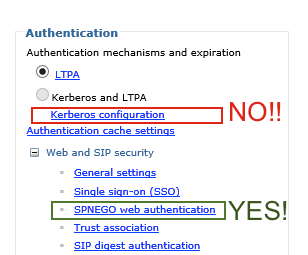
I have been working on a PMR for Connections 5 trying to configure SPNEGO , foolishly as it turns out using the IBM Connections 5 Knowledge Center.  I have just finished a 3hr screenshare with WebSphere security support who started the call asking why on earth I was configuring it the way I was.  When I showed them the documentation on the Knowledge Center for configuring SPNEGO I was asked “why are the Connections team saying to do that, that will never work”. Imagine my joy having spent nearly 2 days working on it before opening a PMR.

They are going to fix the knowledge center documentation hopefully but in the meantime this handy dandy little screenshot should help you

BADSPNEGO

The incorrect documentation (and hopefully it will be fixed before you even click on it) is here

In addition the WebSphere security team disagree with the Connections team on creating a keytab for the IHS server only in any circumstances which this document says to do

Finally they also disagree on requiring the connectionsAdmin account to be the one that is used to start Windows services which may be a bad use of wording on this document here (See item 6).   They have advised that as far as SPNEGO is concerned any AD account would do.

They have also advised that you should make sure there are no other SPNs for that hostname floating about (I don’t have visibility of AD but it’s one for the customer to check)

I have asked for definitive documentation from the Connections and Websphere teams on how they want this configured before moving forward

Anyone Fancy An Indispensbile Tool For Connections Migrations?

When working with Connections so much of the configuration is done in XML or properties files on the file system of the servers.  That means, no matter how organised I try and be, I often find multiple copies of files each with different date/time stamps or even with different names (LotusConnections-Config.PreNewNode for example) for me to identify.  This is especially true with the TDI syncing where I often end up creating multiple TDISol directories over the course of a deployment as customers want to change what data syncs, how and where.

The problem with this is that everything is very reliant on how well the files are commented and more often than not I’m coming in behind someone else so I have to look at files with no commenting at all or commenting that only makes sense to the person who wrote it.

As an admin I have never really needed to compare the contents of one file with another to spot the differences (that’s more a coding problem) but with Connections I need to use that technique all the time.  Take my work this week for instance, upgrading a Connections 4.5 server to Connections 5 .

The first question is, looking at the TDISol directory, have any of the properties files I need to update changed since 4.5. If not then great, I can just add new servers and passwords and away we go.  If they have I have to merge the old settings into the new and I’d rather not rely on me reading each line and visually comparing them across several dense pages.  To do this my favourite tool is Kaleidescope  for the Mac.  It’s not free (it’s about 70 dollars) but it has a great UI , features and does the job.  I’ve been using it for a couple of years and they keep adding new features.  It also does a great job on comparing and spotting changes in images – or what I call the “hey that’s been photoshopped” feature.


Kaleidescope


In the picture above i’m comparing the profiles_tdi.properties file from the 4.5 install to a new one for the 5.0 install to make sure I don’t miss any custom settings.  I did the same with mapdb_repos_from_source.properties and mapdb_repos_to_source.properties.  As you can see from the screenshot (the one on the left being the 4.5 one), any additions are in green, deletions in red and changes in purple (with the actual changed words being darker purple).  This makes it very easy for me to spot what needs to be changed from one file to the other.  It’s not perfect , if the format of the file means that some lines appear a page further down in one document vs the other then you will see markup for both but it’s a lot better than any hope I have to spot all the differences myself.


Champion Gift Finding A Good Home

Thanks to IBM my gifts for being an  IBM Champion have arrived.  This year we were given an amount to spend in the online store on various items like jackets and shirts and I chose to buy many of these hot and cold drinks containers which I can donate to charity.  As well as keeping a set myself 🙂  They are very nicely made.


IMG_3889