Connections Failure To Authenticate

Last week was spent working on a PMR where a newly migrated (side by side) Connections 5.5 environment refused to let anyone access any applications.  I could login using any credential but the Homepage wouldn’t load and any application that required authentication failed including Communities.

Here are some of the errors in the logs

CLFRW0016E: Could not retrieve details for the user with login ID gabriella.davis@domainname.com due to an exception. The exception occurred when retrieving the details via the virtual member manager directly: {1} (in system out for utilcluster which contains homepage)

ADMN0022E: Access is denied for the expandVariable operation on AdminOperations MBean because of insufficient or empty credentials. (in ffdc)

“CustomAuthent E com.ibm.connections.httpClient.CustomAuthenticatorFactory <init> SONATA: authenticator class name is missing!  {in SystemOut for InfraCluster)

webapp E com.ibm.ws. webcontainer.webapp.WebApp logServletError SRVE0293E: [Servlet Error]- [action]: com.ibm.tango.exception.AuthContextException: com.ibm. connections.directory.services.exception.DSException: com.ibm. connections.directory.services.exception.DSOutOfServiceException: java. lang.NullPointerException (in Systemout for InfraCluster).


Here (amongst others) are the things we tested / changed / reverted that didn’t fix it.  Bear in mind a working 5.0 production environment with the exact same configuration had no problems during this time.

  • LDAP was fine (we could login). For giggles we changed credentials and back again
  • We changed the login options from mail;cn;uid (which we use in this environment and works fine) to uid;mail;cn
  • We removed the mapped credentials for application security that were put there by the installer and put them back again – apparently that sometimes works
  • Set the authentication under application security for Communities and Profiles from None to Everyone just to confirm where the problem was
  • About 100 other things

Basically we managed to establish the issue was any intraservice communication but not why.  Eventually it went to L3 who isolated the error  as being something in the LotusConnections-Config.xml.

CustomAuthent E com.ibm.connections.httpClient.CustomAuthenticatorFactory <init> SONATA: authenticator class name is missing!  

That file had been migrated as an artifact via the migration tool and was the same as 5.0 but in there was the line <tns:customAuthenticator name=”DefaultAuthenticator” xmlns:tns1=”http://www.ibm.com/uiextensions-config”/>;

which they asked to be changed to <customAuthenticator name=”DefaultAuthenticator”/>

That immediately fixed the problem.

No-one is quite sure how that setting ever got into LotusConnections-Config.xml but my guess is during a CCM/Filenet installation.  The interesting thing is that it works in 5.0 but breaks 5.5. Maybe it requires you to have CCM installed to work as the 5.5 environment (mine or IBMs) didn’t have that.

Still a nice simple fix for such a painful problem and maybe somewhere for you to check when doing your own debugging.

Thanks very much to David McCarthy & the IBM L2 team for prioritising and working the problem.
Severe TDI Issue In Connections 5.5

I have been working with a customer who is migrating to Connections 5.5 from Connections 5.0.   When I do a migration I like to do it properly and create clean data by using dbt.jar to migrate content to new databases.  I know a lot of people are happy with the backup/restore of databases idea but for me that leaves too much scope for bad data to carry over from old system to new.

Everything was going fine, the profiles data migrated and then I tried a sync all dns to sync the ldap data to the database.  Something we schedule daily at this customer.  It failed as it tried to hash the database tables.  The error in the ibmdi.log was

Error: The sort page size property – source_ldap_sort_page_size= – must be greater than 10 if it is not 0. Aborting.

That’s a value that is set in profiles_tdi.properties and it was already set to 0.  So why was it aborting?

I decided to troubleshoot just with a cutdown list of names in collect.dns and using populate_from_dn_file function.  Again it failed but with the strangest error that would find the user in LDAP, get all their values then fail to find the user in the database and fail to update.

In SyncUpdates.log I could see the following error no matter what user I chose for populate_from_dn_file.

ERROR [com.ibm.di.log.FileRollerAppender.bc9c35a0-aae5-416e-9a99-1d418c3c564c] – [callSyncDB_mod] [ProfileConnector] null
java.lang.IndexOutOfBoundsException
at java.util.Collections$EmptyList.get(Collections.java:87)

I then tried copying the collect.dns to my 5.0 production environment and running there and it worked fine, found the users as duplicates and didn’t update them which is the correct behaviour.

I compared the map_dbrepos_from_source.properties files in 5.0 with 5.5 and it all looked pretty much the same.  So I opened a PMR which was eventually escalated to development. As soon as they received it they knew what the problem was – apparently a known but not documented bug that was fixed in CR1 with files that you have to manually deploy (we were already at CR1).

Development’s report of the problem was

log4j.logger.com.ibm.lconn.profiles.internal.service=ALL           
                                                                       
in log4j.properties causes TDI populate and sync commands to crash if an
EMPLOYEE is altered        

Well the crashing was true but the value  log4j.logger.com.ibm.lconn.profiles.internal.service=ALL was # out and unused so it wasn’t related to that particular log setting in my case.

The fix was to go find the two files

lc.profiles.core.service.impl.jar
lc.profiles.core.service.api.jar

in the Connections install and copy them to your TDI\lib directory in your tdisol environment.  In my case I had created a folder called TDISOL55 and under that I had a TDI directory with all the properties, script etc files in and the lib subdirectory full of jar files.  That came from the D1 (day 1) release download of Wizards which contained updated TDIPopulation directory and was dated 18th Dec.  There was no new tdisol with CR1 but clearly there should have been.

I found the files in my Websphere Application profile directory for the profiles application server under the directory

D:\IBM\WebSphere\AppServer\profiles\AppSrv01\installedApps\conn55Cell01\Profiles.ear

I copied those two files over and it al-most worked.  I had one more problem.  The value source_ldap_sort_attribute in profiles_tdi.properties which was initially set to empty (not null but = ) had been changed at the request of L2 to source_ldap_sort_attribute=mail which matched the 5.0 properties we were using.  They asked me to change it for exact comparison and that broke the updates.  Once I took out the “mail” mapping the scripts, both populate_from_dn_file and sync_all_dns ran perfectly.

The new environment does use different LDAP servers (but the same source data) and I don’t know if attempting to tell the server to sort the LDAP results failing is a problem with that server configuration (both environments are Domino 9.0.1) or 5.5 itself. I’ll investigate that and update.

So my two fixes were

  • copy the two jar files from your CR1 installedapps directory to your TDISol directory (lib subdirectory).
  • make sure source_ldap_sort_attribute= in profiles_tdi.properties

Sametime For Mobile Users – #NWTL

My final New Way To Learn session today was looking at the Sametime mobile clients, Connections Chat and Sametime Meetings.  I hope you find it useful and as always the full recorded session is available in the #NWTL Community.

The slides by themselves are below

In this session we looked at the architecture behind the Sametime mobile applications for chat and meetings. What do you need to deploy to support mobile users and what features are available to them on the different mobile platforms. We also looked at potential bottlenecks, security and troubleshooting for the mobile clients.

Sametime Audio and Video For External Users – NWTL

Today I did the second in my series of Sametime presentations for IBM’s New Way To Learn (NWTL) initiative.    The session was recorded with audio and is available by joining the Community here http://bit.ly/1t7e0LE . The session slides by themselves are on slideshare and shown below.

If your Sametime environment is going to include Audio and Video you will probably want to be able to talk to people outside your own company, or at least to your own users on their mobile devices who aren’t connected via VPN. In this recorded online session as part of IBM’s New Way To Work initiative we reviewed the infrastructure behind the Audio and Video elements of Sametime and how best to extend those features beyond your firewall.


Upgrading Sametime 9.0.1 – NWTL

I have been participating in IBM’s New Way To Learn (NWTL) initiative with presentations around Sametime 9.0.1.  The presentations are done online and recorded so they can be viewed later and are available with the audio recordings to anyone who joins the NWTL IBM Community.  If you want to watch the presentation and see other great NWTL presentations you can join the community here http://bit.ly/1XXakab

My  first presentation which was last week was on how to upgrade your Sametime 8.5.2 or 9.0 environment to Sametime 9.0.1.  The slides without the audio are on Slideshare and shown below.

In this recorded online session we looked at all the options to upgrade your existing Sametime environment to Sametime 9.0.1. Whether you have only a single Community server on an early Sametime version or an entire infrastructure including audio and video on 9.0 we outlined how to plan for an upgrade and the pros and cons of doing the work side by side vs in place.

Connections and Traveler At ISBG

I was delighted to be invited to speak at the ISBG (http://isbg.org) conference in Norway which this year was held in Oslo.  I’d like to thank the organisers for being so accommodating to the fact that I could only stay 1 day !

I presented on two topics , Upgrading Connections and Managing Traveler.  The content for both is on slideshare and linked below.  My upgrading Connections session had a lot of new content about 5.5 and 5.5 CR1 and I hadn’t written a Traveler management session from scratch in several years.  I’m not sure how well the audience received them but I am pleased with the content at least.  I hope you find them useful.

So you have IBM Connections installed, but now you need to decide what and when to update. It could be a WebSphere fix or a DB2 fixpack, a new application, a database schema or an entirely new version. Some updates are for security, some for performance and some for new features. In this session we’ll discuss how you can decide when and what to upgrade, how to plan for and perform a safe upgrade regardless of its size, and test when it’s complete. We’ll also discuss what things can trip you up along the way.


Traveler is a core component of most companies’ mail infrastructure, but its maintenance and security goes far beyond Domino server management. In this session we’ll look at a Traveler environment from daily tasks to enforcing TLS and starting with understanding how Traveler behaves. We’ll review both standalone and high availability configurations and discuss common problems, as well how best to plan and design a secure and stable infrastructure.

Sametime Critical Hit – Missing Servlets

This week I will be presenting on upgrading Sametime to 9.0.1 as part of IBM’s New Way To Learn program (see here for details – requires login ).  In preparation for that I wanted to take an existing environment I had and step through the upgrade of all components using the documentation.  I discovered a few things I’ll share in my presentation and on this blog but one spectacular reoccuring critical full stop can’t move any further what was THAT – problem I thought best to share now.

After successfully upgrading the Community server (I know it was successful because the installer and the logs told me so 🙂  I discovered that the server couldn’t start the policy servlet.  It was hard to see since all the other servlets started fine but if I watched the console as it tried to start I saw a servlet error when loading Policy and a message saying com.lotus.sametime.admin.policy.PolicyServlet could not be located.  Luckily I’ve seen similar errors before in some 9.0 upgrades and on those it was the STCore.jar file which sits in the Domino program directory that was at fault.  I took a backup of that STCore.jar and replaced the one in the program directory with one from a 9.0 server (bear with me, it was just to prove something) and sure enough, the server came up and launched Sametime this time finding the Policy servlet but missing the UserInfo servlet.  

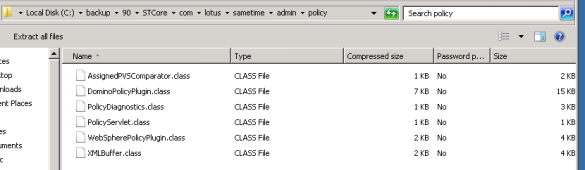
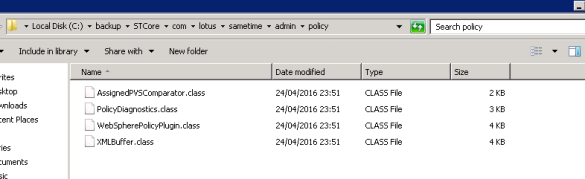
OK so I knew where I was.  The STCore.jar that installed as part of the 9.0.1 upgrade was missing some policy files.  I rename both the new 9.0.1 STCore.jar and the copy of my 9.0 STCore.jar to STCore.zip and then extracted them both so I could compare. I drilled down to the folder it claimed was mising com\lotus\sametime\admin\policy and in the screenshots below you can see my 9.0.1 version only has 4 files whereas my 9.0 version had 6 files including the missing one (PolicyServlet).

skitch 2

The STCore.jar as installed by the 9.0.1 upgrade

skitch

The STCore.jar from my 9.0 server

As you can see, the two missing files include the one the server was looking for.  I extracted the two files and added them to my 9.0.1 folder then compressed everything again as STCore.zip and renamed to STCore.jar.  I copied this new “fixed” (I hope) STCore.jar to the Domino directory and the server started with no problems.  At least none I could immediately see.

I had come across this once before (an incorrect STCore.jar) on an earlier customer upgrade so it’s a recurring problem. I’m not sure what happens during the upgrade process – the file itself is dated 25th April 2016 so it’s not built during the install and isn’t broken for new installs.  So two suggestions

1. Always backup STCore.jar before starting any upgrade along with sametime.ini vpuserinfo.nsf stconfig.nsf etc

2. If your server console is reporting a missing servlet during launch then verify that servlet exists in the  STCore.jar

Sametime 9.0.1 Arrives – Sort Of

Like the sun breaking through the clouds on a gorgeous May holiday weekend, the IBM site has just published a document announcing Sametime 9.0.1 with a release date of May 3.

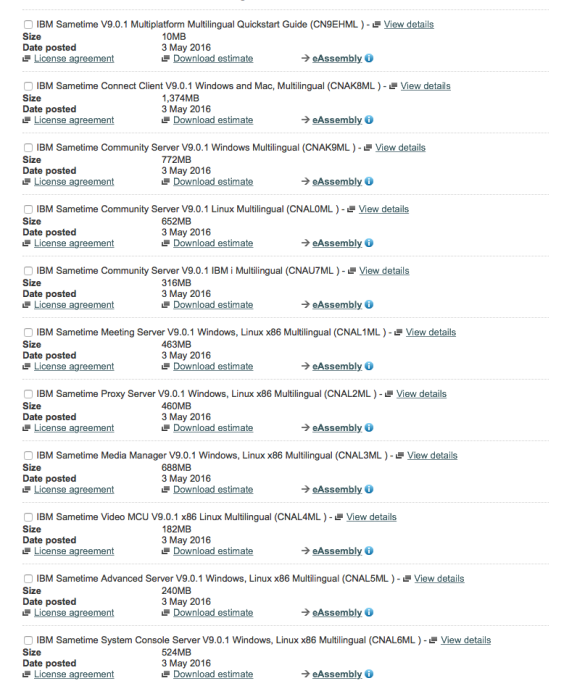
There’s no documentation or even system requirements out there yet but here are some delicious part numbers from the IBM download site to get your teeth into.

I’m not a big fan of installing without documentation but as soon as it appears I’ll be documenting both a clean install and an upgrade process.  If you want any advice on how to upgrade your existing environment feel free to email me.

Screen Shot 2016-05-03 at 14.34.30

Sametime WAS Proxy Stops Working

I’ve had an interesting system down call with an existing Sametime 9.0.1 customer in the past week.  The environment is over 18 months old and consists of every server component in single instances including ST Proxy, Meetings, ST Advanced and all Media components.  The media components were added in Dec 2015 and everything has been fine. The Meeting and Proxy servers both have WAS proxies in front of them to handle traffic over port 80 / 443 separately.  Last week the Meeting node was restarted and the WAS Proxy stopped working.  It would load.  The Meeting server was responding on its own application ports to http(s)://hostname:9080 / 9443 both worked but http(s)://hostname failed with

503 Service Unavailable

The WAS Proxy server showed started.  There were no errors in the logs for that or the ST Meeting server.  Not all WAS proxies were broken because the one in front of the ST Proxy server worked.  In short that error suggests that the Meeting server is offline when we knew it wasn’t and since there isn’t any real configuration for the WAS Proxy other than what node it points to – there was nothing to troubleshoot.  I tried deleting and recreating the WAS Proxy a few times, I tried switching it to use alternate ports 81/444, nothing would fix it.

It took a few days and some combined effort to find.  The WAS team wanted us to upgrade to WAS fixpack 5 but that would mean upgrading 8 working servers in the hopes of fixes one WAS proxy.  There was a suggestion that since the Meeting server was a single, not a cluster, I could just change the Meeting server ports to use 80/443 instead of 9080/9443 and do away with the WAS proxy entirely.  That would get rid of the problem but not fix it, just circumvent it.  I wanted to fix it and find out why it happened.

I had checked the virtual hosts to make sure the hostname / port combination was in the stmeet host and wasn’t anywhere else and discovered that in default_host new wildcard port entries had appeared for ports 80 and 443.  I had already deleted those but that didn’t fix the problem.  How did those port entries appear ? I’ve seen this before when you install new ST servers (as we did with Media in Dec) it come sometimes write virtual host entries to the wrong places.  In fact that was my first guess but after I removed those entries from default_host and it still didn’t fix the problem I was out of ideas.  Then Tony Payne from IBM spotted that the admin_host virtual host which is only used by the SSC had the ports 9080 and 9443 in it when it should only have 8700 and 8701.  Again I assume these were added by the previous server installs and of course I never went to look there because the Meeting server was specifically set to use the STMeet host.

I removed those extra ports from the admin_host virtual host definition and restarted the Meeting node and servers (clearing the temp directories first \profilename\temp and \profilename\wstemp as well as \profilename\config\temp) and that fixed the problem.

So why was the presence of those two ports 9080/9443  (used by the ST Meeting server) that were in a virtual host the ST Meeting server doesn’t even use causing the WAS Proxy to break? Why didn’t the Meeting server itself break and why didn’t the ST Proxy Server which also had a WAS proxy in front of it break?

Turns out that no matter what virtual host mapping you have in place for applications, in Sametime the code checks the admin_host and if a port appears there – it silently disables looking up any other host.  The fact that the Meeting server ports appeared at all in the admin_host meant that the STMeet host was being ignored and the WAS Proxy had no way to direct the traffic.

Unfortunately none of that is visible in the logs or in debug logs which all reported the servers and services using the correct STMeet host.  So it wasn’t something that was able to be seen.  It was a combination of Tony seeing the admin entries and me having had a previous call with a server install which added ports to unwanted virtual hosts that allowed us to find it and fix it.

The ST Proxy server itself wasn’t affected because that server was running on 9082/9445 so its ports weren’t in admin_host and its virtual host therefore wasn’t ignored.

Always good to have a problem fixed and learn a ton of stuff about application behaviour at the same time 🙂

Last week in Eindhoven…

We were in Eindhoven last week at the Engage conference.. over 400 attendees, speakers and IBM’ers gathered for two days of learning, talking and cleaning out the hotel bar of tonic water.. I’ve been to several of the past Engage conferences and Theo always puts on a great event but this was bigger and better than ever.  So why?

IBM sent a lot of executives to Engage with the Opening General Session being given by the new ICS general manager (appointed at Connect in January) Inhi Cho Suh and with product strategy presented by Suzanne Livingston , Sara Gibbons and Chris Crummey.  The first thing Inhi announced was that things are going to change – starting with the Orlando conference which moves to February 22nd at Moscone West in San Francisco.  That’s a big decision and commitment – serious tech companies have conferences in SF and that’s where ICS (IBM Collaboration Services) need to be if they are going to innovate, lead and grow as opposed to maintain.   Inhi also let us know that she has asked the product team to work on a 2020 strategy and that it will include IBM Verse on premise.

Then we got the demo of Verse , Toscana and the thinking behind ICS design.  It’s a shame the OGS wasn’t recorded as Suzanne’s background to their design thinking and Sara & Chris’ demo were both much more detailed (and further advanced) than at Connect in January.  However if you want some idea of what we saw take a look at the OGS video from January (from about 90 seconds in to 20 mins in) here

Aside from the OGS the entire IBM team (of which there were more than 30 in attendance) were everywhere wanting to hear about problems, wanting to listen, wanting to change their relationship with partners, with customers with development for the better.   It’s hard not to be taken up with the positivity and enthusiasm.  I’m an optimistic person but I don’t consider myself naive – I feel that I recognise honesty and intent when people talk to me and I what I heard that ICS was important, investable and part of the core IBM development strategy.

In short I choose to believe until I’m proved wrong.

There were of course plenty of great sessions to attend and, as usual, I missed many of the ones I wanted.  Partly because there were also lots of round table discussions too which I found very interesting.  Apparently I’m still the 8 year old in class first to put her hand up with a question.

My session on SHA2 and SSL vulnerabilities was against Mat Newman’s User Blast and Sara Gibbons’ with Toscana.   We were all along the same corridor and I watched person after person go past my room on their way to Mat or Sara’s , so thank you to everyone who chose to hear about security instead and filled out my room.  I hope you found it useful  (and the hand puppets helpful).  For anyone who wasn’t there I have added it to slideshare 

On the final evening of the event Theo invited speakers to a dinner preceded by a surprise.  The surprise was that 32 of us were sent into the Escape Rooms.. you are locked in a themed room for an hour and have to decode lots of puzzles to find the code to get out.  I’ve always wanted to try an Escape Room and I chose the “Tomb” which was an Egyptian tomb and went in with a team including Tim and Mike, Sue Smith, Bill Malchisky, Mat Newman, Rene Winkelmeyer and Carl Tyler.  We didn’t make it out in time – we were soooooo close.. but a few things to bear in mind

  • The tomb was entirely dark except for a small flashlight Tim found hidden in a basket in a corner and some candles.  My night vision varies from “bad” to “crappy”
  • Having multiple alpha males in a small space all shouting instructions at each other may not be the best way to get out quickly
  • There was sand everywhere.  Everywhere.  My shoes may never recover
  • Tim is great at puzzles but apparently in the dark, without his glasses (which he forgot to bring in) and with 7 people shouting at him to hurry up – not so much
  • There was a really cool effect where we completed a puzzle and lasers appeared out of the eyes of a skull on the wall and we had to position 7 different mirrors around the room to bounce the lasers around to hit a small hole on the wall.  We got so excited doing that we didn’t notice we had completed the puzzle and a new “door” had opened for about 10 mins.
  • I was given a cryptex to decode and open.  I broke it by pulling the end off.
  • With only 1 light source we could only do one thing at a time so some of us spent a lot of time kneeling in the sand feeling around fake skeletons for clues

In the end it was great fun and I’d definitely want to do it again.

All of that plus a chance to talk to lots of customers and see lots of friends – some of which came along just to meet up.

I hope you’re recovered Theo – because we’re all up to do it again next year.