My presentation from IBM Think 2018 on Single Sign On , data responsibility and biometric security
Author Archives: Gabriella
IBM Think so far – well that’s interesting
Curse you Vegas.. you’re not meant to be cold, and by cold I mean I have to wear a light jacket everywhere. I’m very disappointed in you. I’m also not doing well with the massive crowds here at the conference, but that’s because I struggle in crowds. Anyway that’s all the bad stuff out of the way.. now the good stuff
DJs everywhere – music everywhere. I find it hard to be sad if there’s music to dance to. Lots of snack foods and healthy snack foods like veggies with dip. Purell stands everywhere because 30k sweaty people create a lot of “ew”
This conference is BIG – in every way BIG. Breadth of sessions, number of sessions, number of attendees, range of topics, amount of walking. Much of it feels way outside my pay grade but that’s a good thing – I get excited, energised, confused, scared and a little bit intimidated all at once.
First the “excited” stuff – Domino, Notes, Sametime etc v10
Much of the Domino v10 news was announced in the webcast on Feb 28th which I talked about here but the really really big news is Domino Apps for iOS. Know what that is?
It’s a Notes client application deployed on iOS that is able to run your Notes applications directly from your Domino servers with no programming changes required. Lotuscript, formula language, ACLs, reader fields all of it works even replication to the device.
Mind.Blown
Not only can you use your existing Notes applications on an iOS device but you can use Notes application development and the Domino servers to deploy new mobile applications
After that my presentation with HCL talked about changes to the Notes client, Sametime and Verse on Premises coming in v10. The presentation is linked below but some highlights
- Delayed mail send – allowing you to choose a time for the server to release a mail message you create
- Invite others to meetings – controllable by the meeting chair to allow invitees to invite others, invite others with chair approval or not invite. This can be changed for an appointment anytime and that kind of granular control is not something any other calendaring tool has
- Team calendars – where every member can equally create, manage and edit the invites. It can also be used as a team inbox
- Pre send mail hooks – allowing the administrator to determine via policies warnings that are shown to the user pre-send for example “attachment size is too large” “subject is missing” etc
- Sametime entitlement extended to mobile devices
- a commitment to a smaller client footprint, an upgrade from FP10 to v10 directly
The speed at which HCL are developing Domino and Notes (and there’s much much more to come before v10 releases in Q4) is a big change from where we’ve been in the past few years.
The beta program for v10 starts in April
Now the energised and intimidated stuff 🙂
Some of the best and most brain hurting sessions for me were recorded and are available for live replay (they don’t seem to require registration or login). I can even catch up with ones I missed https://www.ibm.com/events/think/watch/replays/
Some of my favourites that I recommend you viewing..


Think Week – With More Than A Little Help From My Friends
IBM Think starts tomorrow for me in Las Vegas. So obviously here I am in a LV hotel room drinking lots of water, trying to plan the sessions I want to see, when I’m going to be free and and then sign up for several of the labs. This year as well as my technical sessions on Tuesday and Wednesday, I will be moderating and contributing to several “soft skills” sessions that are not about technology but about how we work.
Thank you in advance to all the people shown below for joining the panels. Here’s where I’ll be this week.
Technical Sessions
Monday 19th @ 1.30pm
A Guide To Single Sign-On for IBM Collaboration Solutions
Mandalay Bay South, Level 2 Surf B
Single sign-on, single identity and even password synchronization—in this session, we will take you through all the options available to minimize or eradicate logins across IBM’s Collaboration Solutions (ICS); whether it is a Domino web server, IHS, Notes client, Traveler, Sametime, Connections or Verse, on-premises or cloud. The discussion will cover security certificates, password synchronization, IWA, SPNEGO and SAML Federation. I will explain what you can (and can’t) do, and how to do it.
Tuesday 20th @ 2.30pm
Deep Dive: What’s New in Notes, Sametime and Verse On-Premises for Users and Administrators
Mandalay Bay South, Level 2 Surf B
with Ram Krishamurthy of HCL
Join this session to understand the recent advancements in capabilities for mail users and administrators. Learn about what to expect with Notes, Verse and Sametime Chat V10 on the server, on the desktop and on mobile devices.
Soft Skills Sessions
Sunday 18th
User Community Day including IBM Champion Day @ MGM Conference Centre
10.35 (#9219)
How to create, maintain and change a personal brand
11.15 (#9268)
How to become a different kind of Champion – reaching across the aisle
with Wannes Rams of Ramsit and Social Connections
11.35 (#9241)
Roundtable on managing the noise and home working
with Florian Vogler of Panagenda
Sandra Buehler and Andreas Ponte of Belsoft AG
Rob Novak of Snapps
Monday 19th @ Mandalay Bay Conference Centre
9am
Think Academy Soft Skills Pop Up – Remote/Home Working: Creating a Balance
with Adam Brown of ISW
Sandra Buehler of Belsoft AG
Julian Robichaux of Panagenda
In this presentation the panel will share ideas around how to best manage remote working (if you miss working directly with a team), home working (over committing and temptations) and working for customers on different timezones. There are many approaches we all use and we can learn from each other which ones would work best. There are also many tools available to both manage tasks and time and stay engaged with others but which ones prove the most useful for different types of work.
Tuesday 20th @ Mandalay Bay Conference Centre
11am
Think Academy Soft Skills Pop Up – Managing the Noise
with Theo Heselmans of XCeed & Engage UG
Francie Tanner and Tony Holder of Panagenda
Maria Nordin of Infoware Solutions & Social Connections
Many of us are in multiple real time chats in Watson Workspace in Slack in Skype in Sametime i addition to all the online forums we need to at least monitor if not participate in. How can we best manage all the noise generated around us whilst we work and how can we contribute effectively. Also aimed at owners of those communities, what is it reasonable to expect of participants and how do you stop people from failing to join in just because they blinked at the wrong time and missed a discussion.
Wednesday 21st @ Mandalay Bay Conference Centre
9am
Think Academy Soft Skills Pop Up – The Imposter Syndrome
with Maria Nordin of Infoware Solutions & Social Connections
Jon Schultz of Prominic
Tony Holder of Panagenda
Impostor syndrome affects nearly everyone in one way or another and results in feeling intermittently underqualified or even out of place in our work. No matter how successful you are there are multiple ways it can sneak up on you. In this session hear and learn from our panelists about how they each deal with different with their own aspects of it.
I will also be joining some of the round table discussioms taking place at the IBM Champion desk @ Mandalay Bay Conference Centre Bayside D including one on GDPR on Tuesday @ 1.30pm
That Scream You Just Heard? Thanks Apple
<still screaming>
I take screenshots probably 30x a day every day. Sometimes to a file (CMD-SHIFT-4) and sometimest to the clipboard (CMD-CTRL-SHIFT-4). Imagine my delight when I got my new Macbook Pro and discovered I could add the “screenshot” icon to my touchbar. No more key combinations, just press the touch bar. After presssing the touch bar it shows me options of clipboard, desktop, documents etc and remembers what I last used.
What a great feature. Until it wasn’t.
Apparently Apple “thought” that those touchbar settings should always and with no warning override the keyboard options. Here I was in a presentation this morning taking about 100 screenshots (laptop closed using external monitor) CMD-SHIFT-4 only to discover none of them NONE OF THEM were on my file system because apparently Apple now use the touchbar settings (which I can’t see with the laptop closed) to override any keyboard settings.
There’s no excuse for that terrible assumptive UI behaviour. None. Hopefully this saves someone else the same pain and I’ll revert to using Skitch where I need to be certain.
My Favourite Things From Yesterday’s Call – What’s Coming …
Yesterday IBM and HCL hosted a call introducing some of the changes on the way with Domino, Sametime, VOP, etc, as a result of the worldwide Domino Jam sessions they have been running this year. I attended an earlier Domino Jam in London in January which was jointly hosted by IBM and HCL and was very pleasantly surprised by how receptive they were to really unusual ideas as well as honest criticism so I was looking forward to hearing the results.
To start with it’s worth knowing that the strategy is continually evolving, what we were told about and what HCL are committing to is just a first step on a multi-year multi-release journey and that’s good news.
- Modern development tools and frameworks
- Easier and extended authentication and admin options *
- Core performance improvements *
- Slimmer, faster, better looking Client *
- Adding mail and calendar features
- Improved integration for mail and productivity with Microsoft Office
The items with asterisks were those I certainly raised (ok, went on and on about) during the Domino Jam and it’s great to see others did too and pushed them onto the priority list. I was also pleased to hear them talk about Domino as the original NoSQL database server which it was and remains – I honestly believe customers need to be reminded that before NoSQL was what everyone was doing, Domino was doing NoSQL 🙂
The application development innovations include support for Node.js integration and the ability to deploy applications on an iPad – we saw some code but it’s early days for a release due in Q4 and involving such huge amounts of work. There was a definite amount of “teasering” (made up word) going on and a promise of hands-on access to beta code at Think in a few weeks as well as at user groups like SNOUG (in Switzerland), Engage (in Rotterdam) and Collabsphere (in Ann Arbor). If you can make it to Think there’s going to be a lot to hear about and get your hands on, but if you can’t then there will be continual opportunities throughout the year before everything hopefully ships in Q4.
One very interesting thing that came out is that a lot of enhancements were already developed by IBM but never released into the product (for whatever reason) and HCL have been able to use those to leapfrog forwards. Things coming to v10 of Domino include:
- automated database repair (fixup is nice but wouldn’t it be nice if we didn’t have to do that at all)
- removal of the 64GB limit and a new 256GB limit (which suggests a lot of efficiencies in database structure)
- investment in Domino docker images to be made available with installs
- update of SAML (to SAML 4) and improved integration with AD
Obviously this isn’t everything, there are more things appearing every day and much is still under NDA but we’re months away from release and there’s a feeling of a team pushing hard and breaking through old models and definitions to modernise and breathe oxygen into these products.
I have always believed that Domino is the best NoSQL database server and mail server out there and it seems HCL believe that too and are going full out to prove it. Not to mention some of the most exciting stuff being produced is in the area of application development which I’m not best to comment on but still like what I am hearing.
If you were on the fence about attending Think I would suggest climbing off it – not just so you can benefit from learning whilst there but to grab the multiple opportunities to feed back your own ideas. There are people behind these products who want to hear them. If you can’t make Think then sign up for whatever user groups you can. I will be doing the same.
Champions Expertise – Security
The topic for this month’s Champions Expertise presentations is “Security” so I thought it would be a nice idea to share a few highlights from the presentation I will be giving at Think 2018 in Las Vegas in a few weeks on that subject. This is “A Guide To Single Sign-On for IBM Collaboration Solutions” and hopefully even this shortened version (6 minutes instead of 40) is of interest.
Of course I also hope to see you at my presentation on Monday 19th March (Mandalay Bay South, Level 2 – Surf B).
Macbook and Me
Last week I changed to a new Macbook Pro 13in with touchbar. I had my doubts but it was the only model with the disk and RAM I needed. I planned to just ignore the features I didn’t think I’d use (especially anything touch related as I was fairly sure dirty or greasy fingers would render it useless).
Favourite things about my Mac week 1:
- Touch ID to login and access admin settings. I enabled multiple fingers and added some fingerprints for other people too. It does require a full password entry every 48hrs (I think) even if I don’t restart but I’m fine with that
- I enabled filevault which encrypted my entire disk. There were issues with earlier versions of filevault and using time machine so I had avoided it but the more recent versions (in the past 12 months or so) have been stable and there seems to be little latency on encrypting / decrypting. The main change is that now I have to login after boot to unlock the disk rather than login after the OS loads. It’s an almost unnoticeable change but I opted to also increase my password to a very lengthy phrase since there’s little point encrypting a disk with a flimsy password.
- USB C. I thought I’d hate the loss of my magsafe connector for power, the number of times I’ve tripped over my own cable and the magsafe popped off rather than drag the Mac to the ground. The new Mac has 4 USB C ports which can be used for anything including charging and I find being able to plug the power into any of 2 ports either side of my Mac is so much easier than being forced to plug it into one side and means I’m less likely to get tangled up in my own cables.
- Love my Touchbar – LOVE.IT.I know a lot of people hate it so clearly its appeal is closely tied to how people work. I’m very much a keyboard person, I prefer keyboard shortcuts to any mouse action for instance and with the Touchbar I can configure it to display what I find useful in each application. I have done that in some examples below and am completely addicted

Finder. I’ve added the “share” icon which allows me to Airdrop items (the touchbar changes to photos of people I can airdrop to) as well as quickview and delete., The best feature is that I can add the screenshot icon to my default touchbar. I screenshot all day and the key combination is hard to get working in a VM

Safari shows me all open tabls I can touch to move between them as well as opening a new tab and I added the history toggle because I go there all the time

The touchbar even works in Windows 10 running in a Parallels VM where I use the explorer icon all the time to open Windows explorer. I would get rid of Cortana but it’s in the default set

Keynote mode 1: When writing a presentation I can change the page size move through slides and indent / outdent

Keynote mode 2: when presenting I can see a timer and the upcoming slides I can touch to move backwards and fowards. I think I’m going to use this a lot
On the other hand I also bought a new iPad mini to replace my 4 year old iPad. I bought the mini because I didn’t want to go bigger with an iPad to a pro. My old iPad worked fine other than freezing in iBooks, being slow and restarting itself regularly. My new iPad restored from a backup of my old one exhibits the same behaviour. I think it’s going back.
Creative Ideas For Docker (and Domino)
In an earlier post I mentioned that I have been working on new technology projects since the end of last year and I wanted to share here what I’m doing as well as plan to keep you updated on my progress if only to keep pressure on myself. I have been working with, and speaking about, Docker and containers for the past year and it was good news to hear that IBM will now support Docker as a platform for Domino (as of 9.0.1 FP10). http://www-01.ibm.com/support/docview.wss?uid=swg22013200
Good news, but only a first start. Domino still needs to be installed and run in its entirety inside a container although the data would / could be mapped outside. Ideally in a microservices model Domino would be componentised and we could have separate containers for the router task, for amgr, for updall, etc, so we could build a server to the exact scale we needed. However that is maybe in the future, right now there’s a lot we can do and two projects in particular I’m working on to solve existing issues.
Issue 1: A DR-Only Domino Cluster Mate
It’s a common request for me to design a Domino infrastructure that includes clustered servers but with at least one server at a remote location, never to be used unless in a DR situation. The problem with that in a Domino world is also Domino’s most powerful clustering feature, there is an assumption that if a server is in a cluster then it is equally accessible to the users as any other server in the cluster and, if it’s not busy and the server the user tries to connect to is busy, the user will be pushed to the not-busy server. That’s fine if all the cluster servers are on equal bandwidth or equally accessible, but a remote DR-only server that should only be accessed in emergency situations should not be part of that failover process. It’s a double edged sword – we want the DR server to be part of the cluster so it is kept up to date in real time and so users can fail over to it without any configuration changes or action on their part. We don’t want users failing over to it until we say so.
I tend to tackle this by designing the DR server to have a server_availability_threshold=100 which marks it as “busy” and prevents and client failover if the other servers are online. It works ‘ish’ but someone has to disable that setting to ensure all users failover neatly when needed and it isn’t unusual to have a few users end up on there regardless.
So what can Docker do for me?
I don’t see that much value in a standard Domino image for docker in my world. When I build a Domino server it tends to have a unique configuration and set of tasks so although it would be nice, my goal in deploying Domino under docker is very different. It is to create identical containers running identical versions of Domino with identical names e.g Brass/Turtle and Brass/Turtle. Both containers will point to external data stores (either in another container or a file system mount). Both will be part of a larger Domino cluster. Both will have the same ip address. Obviously both can’t be online at the same time so one will be online and operating as part of the cluster and only if that server or container goes down would the other container – at another location – activate. In that model we have passive / active DR on a Domino server that participates fully in workload balancing and failover. I don’t have to worry about tuning the Domino server itself because the remote instance will only be active if the local instance isn’t. I would use Docker clustering (both swarm and kubernetes can do this) to decide to activate the second container.
In principle I have this designed but I have lots of questions I need to test. Not least deciding the location of the data. Having a data container, even a clustered data container would be the simplest method. That way the Domino container(s) would reference the same data container(s) however Domino is very demanding of disk resources and docker data containers don’t have much in the way of file system protection so I need to test both performance and stability. This won’t work if the data can be easily corrupted. The other idea is to have a host-based mount point but of course that could easily become inaccessible to the remote Domino container. I have a few other things that I am testing but too long to go into in this post. More on that later.
Issue 2: Domain Keys Indentified Mail for Domino
In its simplest explanation, DKIM requires your sending SMTP server to encrypt part of the message header and have a public key published in your DNS file that enables the receiving server to decrypt it, thereby confirming it did actually originate from your server. It’s one of the latest attempts to control fraudelent emails and, combined with SPF records, constitutes requirements for DMARC certification.
The DKIM component of DMARC is something Domino does not support either inbound or outbound. It may do in the future but it doesn’t right now and I am increasingly getting asked for DMARC configurations. Devices like Barracuda can support inbound DMARC checking but not outbound DMARC encryption. The primary way I recommend doing that now is to deploy Postfix running OpenDKIM as a relay server between Domino and the outside world, your mail can then be “stamped” by that server as it leaves.
My second docker project therefore is to design and publish an image of postfix + OpenDKIM that can be used by Domino (or any SMTP server).
More on these as I progress.
Think Sessions & Some V10 Content
IBM Think is fast approaching so in mid March I’m off to Vegas to an entirely new conference without much of an idea what to expect. What I do have already is a busy week with three sessions to prepare and deliver.
1.30pm Monday March 19th in “Surf B”
A Guide To Single Sign-On for IBM Collaboration Solutions
This is a new session where I plan to talk not just about the technical aspects of single sign on but how to plan for a single identity environment and how to prepare your users.
4.30pm Tuesday March 20th in “Surf C”
Deep Dive: What’s New in Notes, Sametime and Verse On-Premises for Users and Administrators
This is being presented with Ram Krisnamurthy who has moved from IBM to HCL and is the Chief Architect, Notes/Designer/Xpages there. As part of our presentation we will have content to share on v10 of all the ICS products.
11.30am Wednesday March 21st in “Surf B”
IBM Champion Panel: Stories of Client Success with the Domino Portfolio
An panel discussion with fellow Champions Paul Withers and John Jardin. We will be sharing some client success stories and answering questions from the room.
I have a few other things in the works, including a possible Nerd Girl session but more on that later.
Me vs iBooks: The Return. I win (barely)
This blog is for future me and for anyone else wanting to understand some iBooks structure. It’s not an attack on Apple – I know I’m an extreme case.
Some of you may know my fondness for books. A habit that led to me buying so many books when the iPad came out I actually broke the iBooks app (too many books to display on the “purchased” screen) which took a year to fix. Fast forward several years..
It’s been an unexpected few days of technical support. Rumour is that Apple will be changing the iBooks app in an upcoming release and that always makes me nervous. I buy around 30 books a month and have 3859 on my iPad and iPhone. Probably about 60/40 iTunes and Amazon. Losing my books would be equivalent to someone who cares about music losing all their music or a gamer losing all their games. It would be bad. Give her space. Don’t try and talk to her. Back away slowly. Bad.
I carefully backup (and have to remove DRM to do it) about once a month. Why? Because Apple may decide to drop iBooks at any time and then where would I be with 4000 (or at least 2000) unreadable books?
So I needed to backup and since upgrading to High Sierra that’s been impossible. The technology I used only worked up to Sierra. That’s OK, I use Parallels , can download Sierra at no cost from the App Store and create a VM running Sierra. Of course I had to authorise that VM with my iTunes account so it could read the books which meant deauthorising everything else first since I was at 5 devices. Top tip, if you buy new kit, make sure you deactivate iTunes before flattening the old kit.
Step 1: Getting the books into my VM
In theory because I sync my books to the cloud I should be able to just launch iBooks and auto redownload. Unfortunately that didn’t happen. The books display as in the cloud but have to be manually downloaded. Understandably selecting nearly 4000 books and telling iBooks to download them all caused it to crash. Repeatedly. So I needed a better way.
Step 2: Why not just copy the books from my laptop which is the host machine for the VM?
Some digging uncovered that my epubs are stored in
~/Library/Containers/com.apple.BKAgentService/Data/Documents/iBooks/Books
so surely I can just copy them over from one machine to another? Why yes I can and when I launch iBooks they all display – kind of. They can’t be read and most of the covers are missing but otherwise.. great! Some more digging later and I realised that although I had copied over the books.plist (which is a preferences file containing and index of all the books iBooks knows about), I didn’t get the SQL database that iBooks uses that is in ~/Library/Containers/com.apple.iBooksX.
So that isn’t going to work. A few hours of trying to get covers to appear or books to be readable and I realised I needed to take a step back.
Step 3: Maybe I was overthinking this. iBooks builds the index when you add books to the app by choosing “add to library” or just drag and drop them so why not drag the 4000 epubs into iBooks. I knew they were already there but I tested and it does prompt you with the option to “Replace” all books that are already there instead of creating duplicates (of course what I could really do with is “Skip” rather than “Replace” but I get i’m in a niche situation).
So – drag 4000 books to iBooks and choose “Replace” and wait. There’s no progress bar. Nothing. The only way I can see that anything is happening is by launching activity monitor and noting that bkagentservice was consuming 80+% CPU. Eventually “lots” of books appear. This is the point where I realise there’s no way to count how many books are in iBooks. I knew “lots” wasn’t all because I got this dialog “<epub filename> couldn’t be opened because you don’t have permission to view it”

I click OK and got another, and another and another. Eventually having to Force Quit iBooks and restart.
Fair enough. Maybe when copying over the files from host to guest the permissions came with them and my new guest account doesn’t have permissions. I spend some time making sure all permissions are OK, applying my new account as well as “Everyone” to that folder and all files contained in it. I finally test by dragging and dropping individual files into iBooks that work with no error so I decide that error is a red herring – it’s more a “gah! iBooks can’t handle you doing that and has tripped over itself – try adding fewer books”
So now I have a new problem. What books are missing? If I knew what books were missing I could manually add them. Unfortunately not only do I not know what books are missing, I don’t know if it’s 10 books or 2000.
Step 4: The search for the missing books
Those filenames aren’t terribly helpful but I know what books I have so I search in iBooks for certain book titles and discover some that aren’t there that should be (and are in my iBooks on my host machine). How do I find the filename that matches the book title if I know I have the epub in the correct directory? Here we head to terminal. In the directory
~/Library/Containers/com.apple.BKAgentService/Data/Documents/iBooks/Books
I type grep “some phrase” ./*.epub -r
that “some phrase” could be author, booktitle, any text found in the book. It’s weirdly powerful so make it as specific as you can. I find the epub filename for a book I know should be there, I find that the epub is in the right folder and I drag and drop that epub into iBooks. It works!. Then I try with some of the files it said I had no permissions for… those work too. OK so since I know it works and I can’t add all 4000 books at once, now all I need is a list of what books it thinks I have in my Library to compare with the ones I have on the file system.
Easy right?
Step 5: We’re going to need some XCode
The list of books it thinks I have in the library is in the preferences file books.plist in ~/Library/Containers/com.apple.BKAgentService/Data/Documents/iBooks/Books. Unfortunately the only thing that can easily read a preferences file is Xcode so off I go into developer territory and installing XCode. Once I do that I can open and read that preferences file. Of course XCode is 10GB and my books are 12GB so I’m fast running out of space on the small VM I started with.
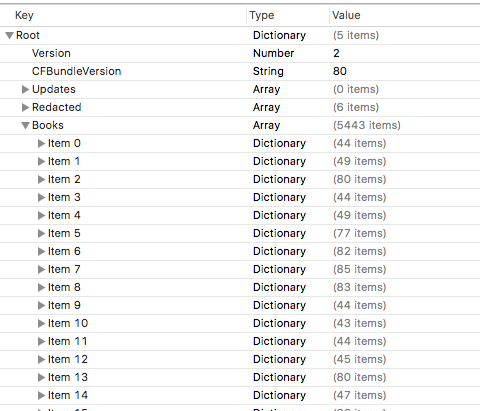
When I do that I see this. That’s right, an array of 5443 items each one representing a book. Yes I know I said I had 4000 and it failed to add them all but clearly something is awry in the index too – one problem at a time.
Step 6: A New Plan
I can now read plist files and in theory get an export of items in that file. If I can export all the books and filenames in the guest machine and do the same on the host machine I can import both lists into Excel and compare to see what files are missing – then manually add them. Simple!
I don’t do code. I know what I want to do and what I want to do needs code but I will avoid it if I can. Unfortunately here it’s the simplest way to get what I want.
Using “Script Editor” (part of the native OS) I write a script like this
tell application “System Events”
tell property list file “/Users/gabrielladavis/Library/Containers/com.apple.BKAgentService/Data/Documents/iBooks/Books/Books.plist”
set Booklist to value of property list item “Books”
set Output to “”
set Counter to 0
repeat with a from 1 to length of Booklist
set theCurrentListItem to item a of Booklist
try
set author to artistname of theCurrentListItem
set booktitle to itemname of theCurrentListItem
set thefile to sourcepath of theCurrentListItem
set Output to Output & author & “,” & booktitle & “,” & thefile & return
end try
set Counter to Counter + 1
if Counter mod 50 = 0 then
log (Counter)
end if
end repeat
log Counter
return Output
end tell
end tell
The counter was so I could see it was actually doing something as it ran. The “try” was to check if the item has an author etc since my PDFs often didn’t and the code would fail otherwise.
It may not be pretty but it gave me what I wanted which was thousands of lines like this
Pamela Hartshorne,Time’s Echo,/Users/gabrielladavis/Library/Containers/com.apple.BKAgentService/Data/Documents/iBooks/Books/1F31185F755DD6B65C00B1CF641409B4.epub
Riggs, Ransom,Miss Peregrine’s Home for Peculiar Children,/Users/gabrielladavis/Library/Containers/com.apple.BKAgentService/Data/Documents/iBooks/Books/46D721416EA9EBB037E767DF155A4395.epub
Step 7: An afternoon with Excel
Running the agent twice against the host and guest books.plist gives me the data I need. The host machine plist gives me 3789 entries and the guest machine 5443 entries. It appears every time I attempted to drag and drop a file in the guest copy of iBooks it created a new plist entry. I enjoy data manipulation in Excel and after cleaning things up and playing with INDEX/MATCH I discover…. it’s not going to work.
The problem is that the plist filename is only updated when the books are added to the library so there was an unreliable mismatch between the guest and host plists.
Step 8: Take a step back and try playing by Apple’s rules
I take a copy of the iBooks directory into another folder (“movedbooks”)then I launch iBooks itself and (making sure iCloud is completely disabled on the guest machine so there’s absolutely not syncing to any device) I remove every.single.book from within iBooks. Several scary minutes later iBooks is empty and so is the iBooks folder and the plist file.
Meanwhile I still have a copy of all the books in “movedbooks” – I know iBooks didn’t like me dropping 4000 books in but at this point I’m prepared to meet it half way. After some trial and error, I copy the books in 250 or so at a time. I verify they are added correctly by checking the books count that appears in the iBooks folder. It takes about an hour but when I’m done, the iBooks folder is 170 items smaller than the movedbooks backup.
GAH
Step 9: The search for the missing books
I now need a tool to compare the contents of the movedbooks folder to the ibooks folder and tell me which files re present in the first but missing in the second i.e. are missing from iBooks. A free app called “Compare Folders” does that for me nicely. Unfortunately it won’t let me export the list but at list I can see the list of missing files.
Step 10: The final piece
170 is a manageable number so now, one by one, I find the missing files and drop them into iBooks. That works and I end up 3849 books in iBooks and in the directory. If you’ve spotted that’s 10 less than I should have then congratulations, that’s not a typo. 10 books completely resisted being added to the guest, no error, nothing, they just won’t add. Even weird when I check my Excel spreadsheet and decide I don’t care about those 10. But I make a note in case in care in the future.
So that’s it. I shouldn’t need to do this again as I can add books in small numbers as I buy them and never again have to add all books I’ve bought. In theory.
A final note. If you have a Mac , buy yourself a copy of DiskWarrior, but that’s a story for another day.
 The Turtle Partnership Blog